13. DAX: Data Analysis Expressions
13.20 PREVIOUSMONTH, PREVIOUSYEAR, DATESMTD and Rolling 30 and 90 Days
PREVIOUSMONTH vs DATEADD in DAX with example — in 30 seconds
What: DATEADD shifts the dates you selected. PREVIOUSMONTH always returns the whole previous month.
Why: The manager selects 10–12 March and asks for "last month". Same dates in February, or all of February? Two different numbers.
Tiny example: 10–12 March = 39 orders. 10–12 February = 30 orders. All of February = 280 orders.
PREVIOUSMONTH vs DATEADD in DAX with example — 30 सेकंदात
काय: DATEADD तुम्ही निवडलेल्या dates सरकवतो. PREVIOUSMONTH नेहमी आख्खा मागचा महिना देतो.
का: Manager 10–12 March निवडतात आणि "last month" विचारतात. February मधल्या त्याच dates, की आख्खा February? दोन वेगळे numbers.
छोटं उदाहरण: 10–12 March = 39 orders. 10–12 February = 30 orders. आख्खा February = 280 orders.
PREVIOUSMONTH vs DATEADD in DAX with example — 30 सेकंड में
क्या: DATEADD आपकी चुनी dates को खिसकाता है. PREVIOUSMONTH हमेशा पूरा पिछला महीना देता है.
क्यों: Manager 10–12 March चुनते हैं और "last month" पूछते हैं. February की वही dates, या पूरा February? दो अलग numbers.
छोटा उदाहरण: 10–12 March = 39 orders. 10–12 February = 30 orders. पूरा February = 280 orders.
First look at the data (before → after):
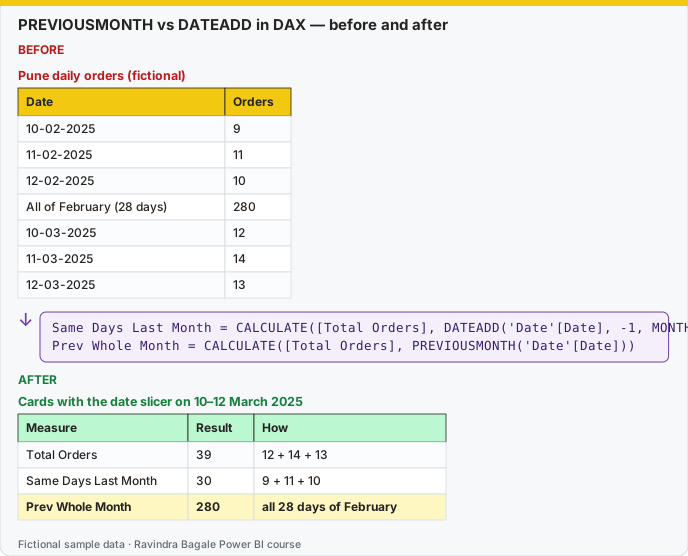
Same before / after tables as text
Before — Pune daily orders (fictional)
| Date | Orders |
|---|---|
| 10-02-2025 | 9 |
| 11-02-2025 | 11 |
| 12-02-2025 | 10 |
| All of February (28 days) | 280 |
| 10-03-2025 | 12 |
| 11-03-2025 | 14 |
| 12-03-2025 | 13 |
Formula / click path
Same Days Last Month = CALCULATE([Total Orders], DATEADD('Date'[Date], -1, MONTH))
Prev Whole Month     = CALCULATE([Total Orders], PREVIOUSMONTH('Date'[Date]))
After — Cards with the date slicer on 10–12 March 2025
| Measure | Result | How |
|---|---|---|
| Total Orders | 39 | 12 + 14 + 13 |
| Same Days Last Month | 30 | 9 + 11 + 10 |
| Prev Whole Month | 280 | all 28 days of February |
Do it step by step:
- Make sure the Date table is marked as a date table and related to Orders.
- Add a Date slicer (Between). Set 10-03-2025 to 12-03-2025.
- Click Home › New measure. Type the Same Days Last Month formula.
- Add the Prev Whole Month measure.
- Put three cards on the page. Check: 39, 30 and 280.
- Name the cards clearly: "same dates last month" or "whole previous month".
एक-एक step करून बघा:
- Date table marked आहे आणि Orders शी जोडलेला आहे ना ते तपासा.
- Date slicer (Between) टाका. 10-03-2025 ते 12-03-2025 set करा.
- Home › New measure वर click करा. Same Days Last Month formula type करा.
- Prev Whole Month measure जोडा.
- Page वर तीन cards टाका. तपासा: 39, 30 आणि 280.
- Cards ना स्पष्ट नावं द्या: "same dates last month" किंवा "whole previous month".
एक-एक step करके देखिए:
- Date table marked है और Orders से जुड़ी है या नहीं, जाँचिए.
- Date slicer (Between) लगाइए. 10-03-2025 से 12-03-2025 set कीजिए.
- Home › New measure पर click कीजिए. Same Days Last Month formula type कीजिए.
- Prev Whole Month measure जोड़िए.
- Page पर तीन cards लगाइए. जाँचिए: 39, 30 और 280.
- Cards को साफ़ नाम दीजिए: "same dates last month" या "whole previous month".
You learned DATEADD, but interviewers ask about the function names in short. Remember the difference.
DATEADD शिकलात, पण interview मध्ये functions ची नावं थोडक्यात विचारतात. फरक लक्षात ठेवा.
DATEADD सीख लिया, पर interview में functions के नाम थोड़े में पूछते हैं. फ़र्क याद रखिए.
DATEADD shifts the dates that are already in context. If the visual is 10–12 March, DATEADD(..., -1, MONTH) is 10–12 February. PREVIOUSMONTH and PREVIOUSYEAR return the whole previous month or year, not a shifted partial range.
Orders Prev Whole Month =
CALCULATE([Total Orders], PREVIOUSMONTH('Date'[Date]))

Sales Prev Whole Year =
CALCULATE([Total Sales], PREVIOUSYEAR('Date'[Date]))

Orders MTD (dates) =
CALCULATE([Total Orders], DATESMTD('Date'[Date]))
DATESMTD is the table of dates from the start of the month through the last visible date. TOTALMTD([Total Orders], 'Date'[Date]) is the short form of that CALCULATE pattern (section 13.16). Same idea for DATESQTD / TOTALQTD and DATESYTD / TOTALYTD.
EDATE is different again. It is not a time-intelligence table. It shifts one date by a number of months: EDATE(DATE(2025, 1, 31), 1) is 28 or 29 February, not 31 February. Use it on a customer anniversary column, not as a replacement for PREVIOUSMONTH.
DAY, next to YEAR and MONTH from section 13.15:
Order Day = DAY(Orders[Order Date])
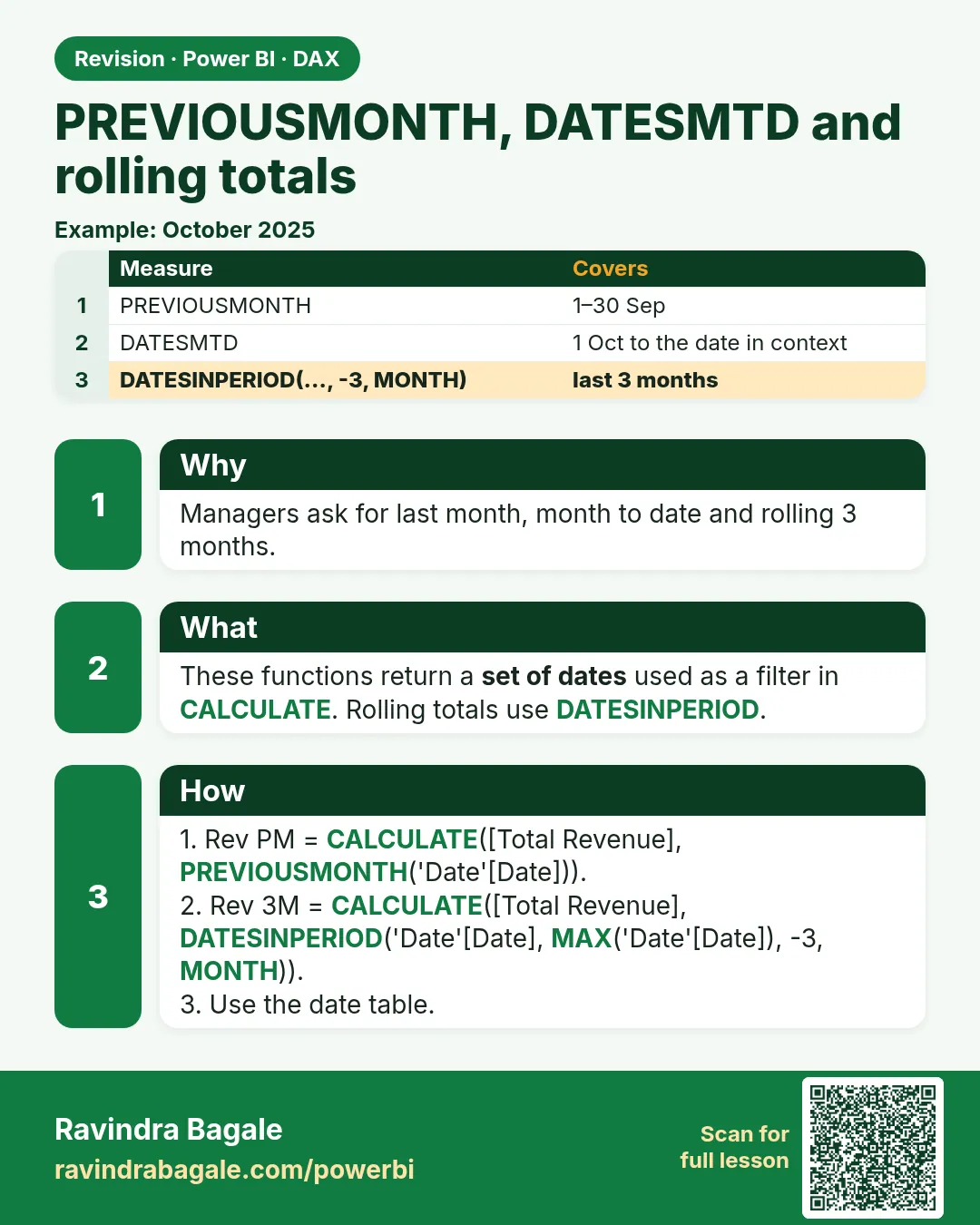
Rolling windows. Section 13.16 already has 7 days. Thirty and ninety are the same function with a different interval. Use them on a daily axis.
Orders 30D =
CALCULATE(
    [Total Orders],
    DATESINPERIOD('Date'[Date], MAX('Date'[Date]), -30, DAY)
)

Orders 90D =
CALCULATE(
    [Total Orders],
    DATESINPERIOD('Date'[Date], MAX('Date'[Date]), -90, DAY)
)
Worked example, fictional and IST. On 31 March the Pune visual shows that day only. PREVIOUSMONTH jumps to all of February, so the card is February's Pune orders, not "the same day last month". DATEADD('Date'[Date], -1, MONTH) on that same one-day filter is 28 or 29 February, one day, not the whole month. Orders 30D walks back 30 days from 31 March, which includes part of February and March. Label the card with the words "previous whole month" or "last 30 days" so a manager does not mix them up.
Ravindra Bagale's Tip
Many students write PREVIOUSMONTH and then say "my March selection should compare to the same dates in February". That is DATEADD, not PREVIOUSMONTH. PREVIOUSMONTH drops the day selection and takes the entire previous month. Check the date range on the visual first, then the formula. Pay attention!
Ravindra Bagale's Tip – मराठी
बरेच students PREVIOUSMONTH लिहितात आणि मग म्हणतात "माझ्या March selection ची तुलना February मधल्या त्याच dates शी व्हायला हवी". ते DATEADD आहे, PREVIOUSMONTH नाही. PREVIOUSMONTH दिवसांचं selection सोडून देतो आणि पूर्ण मागचा महिना घेतो. आधी visual वरची date range तपासा, मग formula. लक्षात ठेवा!
Ravindra Bagale's Tip – हिंदी
बहुत से students PREVIOUSMONTH लिखते हैं और फिर कहते हैं "मेरे March selection की तुलना February की उन्हीं dates से होनी चाहिए". वह DATEADD है, PREVIOUSMONTH नहीं. PREVIOUSMONTH दिनों का selection छोड़ देता है और पूरा पिछला महीना लेता है. पहले visual पर date range जाँचो, फिर formula. ध्यान रखो!
Loading DAX practice tasks...
- Previous month sales (Easy): Slicer: FY 2025-26. Shown per FYMonthNo. Measure: Sales PM = [Total Sales] in the previous month.
- Previous month orders (Easy): Slicer: FY 2024-25. Shown per FYMonthNo. Measure: Orders PM = [Total Orders] in the previous month.
- Month to date (Easy): Slicer: FY 2025-26. Shown per FYMonthNo. Measure: Sales MTD = [Total Sales] for DATESMTD of 'Date'[Date].
- Previous FY (Medium): Shown per FY. Measure: Sales PY = [Total Sales] for the previous year ending "3-31".
- Previous quarter (Medium): Slicer: FY 2024-25. Shown per FYQuarter. Measure: Sales PQ = [Total Sales] in the previous quarter.
- Month-on-month change (Medium): Slicer: FY 2025-26. Shown per FYMonthNo. Measure: MoM Change = [Total Sales] − previous month [Total Sales].
- Rolling 3 months (Medium): Slicer: FY 2025-26. Shown per FYMonthNo. Measure: Sales R3M = [Total Sales] for the 3 months ending on the last date in the row.
- Rolling 12 months units (Hard): Slicer: FY 2025-26. Shown per FYMonthNo. Measure: Qty R12M = [Total Qty] for the 12 months ending on the last date in the row.
- Last 30 days of the FY (Hard): Slicer: FY 2024-25. Measure: Sales L30D = [Total Sales] for the 30 days ending on the last date of the slicer.
- Festive season sales (Hard): Measure: Festive Sales = [Total Sales] from 1 Oct 2024 to 15 Nov 2024.
 Revision card