4. Connecting to Databases: SQL Server, MySQL, DirectQuery and Live Connection
4.12 SQL for Power BI: Views, Joins, CTEs and Where to Transform
Start with a problem
Amir's team argues: should cleaning and totals happen in SQL or in Power BI? Someone created a view that groups by city, and now nobody can split Pune by store.
Explain simply
Use SQL for shared, heavy, row-level rules close to the data (views). Use Power Query for file sources and report-specific steps. Use DAX for totals that must react to filters. Keep the grain you may need later.
Show the data
| order_id | order_date | store_id | platform | category | amount | delivery_mins | status |
|---|---|---|---|---|---|---|---|
| 301 | 2026-04-06 | S01 | Blinkit | Dairy | 400 | 8 | Delivered |
| 302 | 2026-04-06 | S02 | Amazon Now | Snacks | 200 | 12 | Delivered |
| 303 | 2026-04-07 | S03 | Blinkit | Dairy | 300 | 14 | Delivered |
| 304 | 2026-05-04 | S04 | Blinkit | Fruits | 150 | 9 | Delivered |
| 305 | 2026-05-04 | S05 | Amazon Now | Snacks | 450 | 7 | Delivered |
| 306 | 2026-05-05 | S01 | Blinkit | Fruits | 250 | 16 | Delivered |
| 307 | 2026-05-05 | S04 | Amazon Now | Dairy | 350 | 11 | Delivered |
| 308 | 2026-05-05 | S05 | Blinkit | Dairy | 0 | NULL | Cancelled |
Fictional sample data. Practice file: quickcommerce_practice.sql (source: src/practice/).
Demonstrate
-
Create a view at order grain:
CREATE VIEW dbo.vw_orders_clean AS SELECT order_id, order_date, store_id, amount, status FROM dbo.orders WHERE amount IS NOT NULL;Your result should look like this:
vw_orders_clean 8 rows (one per order) -
Compare a grouped view:
SELECT s.city, SUM(o.amount) AS sales FROM dbo.orders o JOIN dbo.dark_store s ON s.store_id = o.store_id GROUP BY s.city;Your result should look like this:
city sales Kolhapur 450 Nashik 800 Pune 850 -
Import vw_orders_clean and dark_store; measure
Total Sales = SUM(vw_orders_clean[amount]); matrix City › Store.Your result should look like this:
Pune Kothrud 650 · Baner 200 -
Running total in SQL (window function):
SUM(SUM(amount)) OVER (ORDER BY order_date)grouped by date.Your result should look like this:
order_date sales running 2026-04-06 600 600 2026-04-07 300 900 2026-05-04 600 1,500 2026-05-05 600 2,100
Show the result
Your result should look like this (fictional sample):
| Approach | Can split Pune by store? | Reacts to slicers? |
|---|---|---|
| Grouped view (city level) | No | Only by city |
| Order-grain view + DAX | Yes (Kothrud 650, Baner 200) | Yes |
| SQL running total column | — | No (fixed at load time) |
Explain what happened
The grouped view threw away order and store detail, so later questions could not be answered. The order-grain view keeps every option open, and DAX totals respond to filters. A SQL running total is fixed when loaded; a DAX running total respects slicers.
Explore further
- CTEs and stored procedures can be used through native SQL, but they usually stop folding; prefer views.
Detailed reference for this lesson:
SQL and Power Query can both prepare data. The real question is where each piece of work should happen.
SQL आणि Power Query दोन्ही data तयार करू शकतात. खरा प्रश्न हा आहे की कुठलं काम कुठे व्हायला पाहिजे.
SQL और Power Query दोनों data तैयार कर सकते हैं. असली सवाल यह है कि कौन-सा काम कहाँ होना चाहिए.
Use SQL when the database already knows the business rule, the table is large, or several reports must share one definition. Use Power Query when the source is a file, the rule is only for this report, or you cannot create objects in the database.
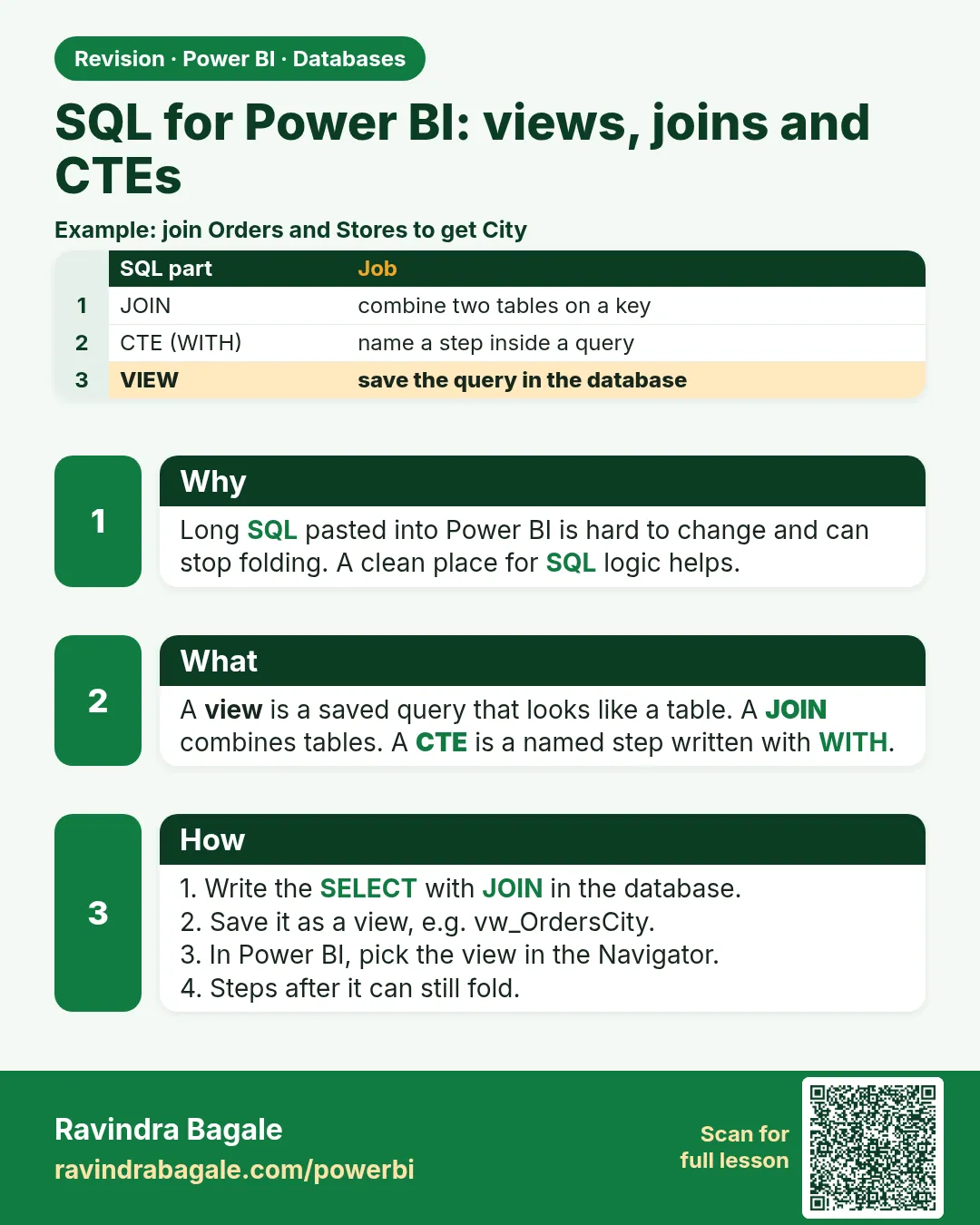
Joins. A star schema in SQL is the same shape as Module 11. orders joins to product on product_id and to store on store_id. In Power BI you usually do not join them into one flat query. Load the three tables and relate them in the model. A SQL join that flattens everything is how you get a wide, repeating table and a slow model.
Aggregations in SQL. GROUP BY city is useful for a small summary table. If you group away the order id, you cannot count distinct orders later in a new way. Prefer to import the grain you might still filter, and aggregate with DAX measures.
Views. A view is a saved SELECT. Power BI treats it like a table. Good uses: hide unwanted columns, fix a data type, apply a stable filter the business agreed (for example delivered rows only, if that is really the rule). The view stays under the database owner's control.
CTEs (WITH ... AS). A CTE is a named step inside one statement. Power BI does not "call" a CTE by name. You either put the whole statement in a native query (folding usually stops) or, better, save the logic as a view.
Window functions such as SUM(amount) OVER (PARTITION BY customer_id ORDER BY order_date) compute a running total inside the database. That is valid SQL. In Power BI, a running total is usually a measure (Module 13.16), so it still reacts to slicers. A window column is frozen at refresh. Use a window function in a view when the number must be stored per row (for example the previous order date on that row). Use a measure when the user will filter the page.
Stored procedures. Desktop can run some procedures through native SQL (EXEC ...), depending on the source. They often do not fold, they are awkward in DirectQuery, and the Service refresh account must be allowed to execute them. Prefer a view or a table-valued function the connector can read as a table. If a procedure is the only door the DBA gives you, load its result with Import and keep the procedure simple.
Worked example, fictional rows:
| order_id | city | amount |
|---|---|---|
| B-101 | Pune | 450 |
| B-102 | Pune | 800 |
| B-103 | Kolhapur | 300 |
-- View the model can import. Grain stays one row per order.
CREATE VIEW dbo.vw_orders_clean AS
SELECT order_id, city, amount, order_date
FROM dbo.orders
WHERE amount IS NOT NULL;
A second view vw_orders_by_city with GROUP BY city would show Pune 1250 and Kolhapur 300, and you could never split Pune by product later. Import vw_orders_clean. Write [Total Sales] = SUM(Orders[amount]) in DAX.
Ravindra Bagale's Tip
In interviews many students say "do everything in SQL, Power BI is only charts". The opposite is also wrong: doing everything in DAX and never using GROUP BY in the database. Heavy, shared, row-level cleaning goes in a view; filters the user clicks stay as measures. Remember the order.
Ravindra Bagale's Tip – मराठी
Interview मध्ये बरेच students म्हणतात "सगळं SQL मध्ये करायचं, Power BI फक्त chart आहे". उलटं पण चूक आहे: सगळं DAX मध्ये करून database वर कधीच GROUP BY न करणं. जड, shared, row-level cleaning view मध्ये जातं; user click करतो ते filters measures म्हणूनच राहतात. क्रम लक्षात ठेवा.
Ravindra Bagale's Tip – हिंदी
Interview में बहुत से students कहते हैं "सब SQL में करना है, Power BI सिर्फ़ chart है". उल्टा भी ग़लत है: सब DAX में करके database पर कभी GROUP BY न करना. भारी, shared, row-level cleaning view में जाती है; user जो filters click करता है वे measures ही रहते हैं. क्रम याद रखो.
Fix common mistakes
| Wrong result | Reason | Correction |
|---|---|---|
| "Do everything in SQL, Power BI is just charts" | Ignores filter-aware DAX | Rows and shared rules in SQL; filter-aware totals in DAX |
| Cannot drill Pune into stores | Imported a city-level aggregate | Import the order grain |
| Running total ignores the Platform slicer | Pre-computed in SQL | Write it as a DAX measure |
Practise independently
Practice task
Using the order-grain model, what is the running total by date for Blinkit only?
Hints
- Blinkit by date: 06-Apr 400, 07-Apr 300, 04-May 150, 05-May 250 + 0.
Solution
06-Apr ₹400; 07-Apr ₹700; 04-May ₹850; 05-May ₹1,100.
Think like a professional
Ask "which questions might come next?" before aggregating in SQL. Keep the finest grain that the business could ask about.
Thodkyaat sangaycha tar (quick recap)
Type the server and database names exactly, bring only the tables you need, check folding, and remember the difference between DirectQuery and Live connection. Do not forget: scheduled refresh does not work without a gateway for on-premises data. Now let us move on to web data.
Server आणि database चं नाव अगदी अचूक घ्या, गरज तेवढेच tables आणा, folding check करा, आणि DirectQuery vs Live connection मधला फरक लक्षात ठेवा. On-premises data साठी gateway शिवाय scheduled refresh चालत नाही, हे विसरू नका. आता पुढे जाऊया web data कडे.
Server और database का नाम बिल्कुल सही लीजिए, जितनी ज़रूरत उतने ही tables लाइए, folding check कीजिए, और DirectQuery vs Live connection का फ़र्क याद रखिए. On-premises data के लिए gateway के बिना scheduled refresh नहीं चलता, यह मत भूलिए. अब आगे बढ़ते हैं web data की ओर.
 Revision card