6.5 Data Types
Quick answer: the short, self-contained version of this lesson is the guide Power Query Data Types.
Start with a problem
Zoya changes Order Date to Date and sees 04-Jun-2026 for an order placed on 6 April. Amount is still text, so the sum fails.
Explain simply
A data type says what a column holds. Fix text first (remove ₹ and commas), then set types. For Indian dd-mm-yyyy dates use Change Type › Using Locale › English (India).
Show the data
Before (after 6.4 steps):
| Order Date (Text) | Amount (Text) |
|---|---|
| 06-04-2026 | ₹1,250 |
| 06-04-2026 | ₹980 |
| 07-04-2026 | ₹450 |
About this data: This table uses columns: Order Date (Text), Amount (Text). This table uses columns: Order Date, Amount. This table uses columns: Order Date (Date), Amount (Fixed decimal). Values shown are the lesson examples already on this page (not a new dataset).
Fictional sample data. Practice file: pq_raw_pune_export.csv (source: src/practice/).
Demonstrate
-
Select Amount › Transform › Replace Values › find
₹› replace with nothing. Repeat for,.Your result should look like this:
Amount (Text) 1250 980 450 -
Click the ABC icon on Amount › Fixed decimal number.
Your result should look like this:
Amount (Fixed decimal) 1,250.00 980.00 450.00 -
Right-click Order Date › Change Type › Using Locale… › Data type Date, Locale English (India) › OK.
Your result should look like this:
Order Date (Date) 06-Apr-2026 06-Apr-2026 07-Apr-2026 -
Check the header icons: calendar for Order Date, 1.2/₹ for Amount.
Show the result
Your result should look like this (fictional sample):
| Order Date | Amount |
|---|---|
| 06-Apr-2026 | 1,250.00 |
| 06-Apr-2026 | 980.00 |
| 07-Apr-2026 | 450.00 |
Explain what happened
With locale en-IN, Power Query reads 06-04 as day-month. Removing symbols first lets the text convert to numbers without errors.
Explore further
- Fixed decimal (Currency) avoids floating-point rounding surprises for money.
Detailed reference for this lesson:
Data types in Power Query with example — in 30 seconds
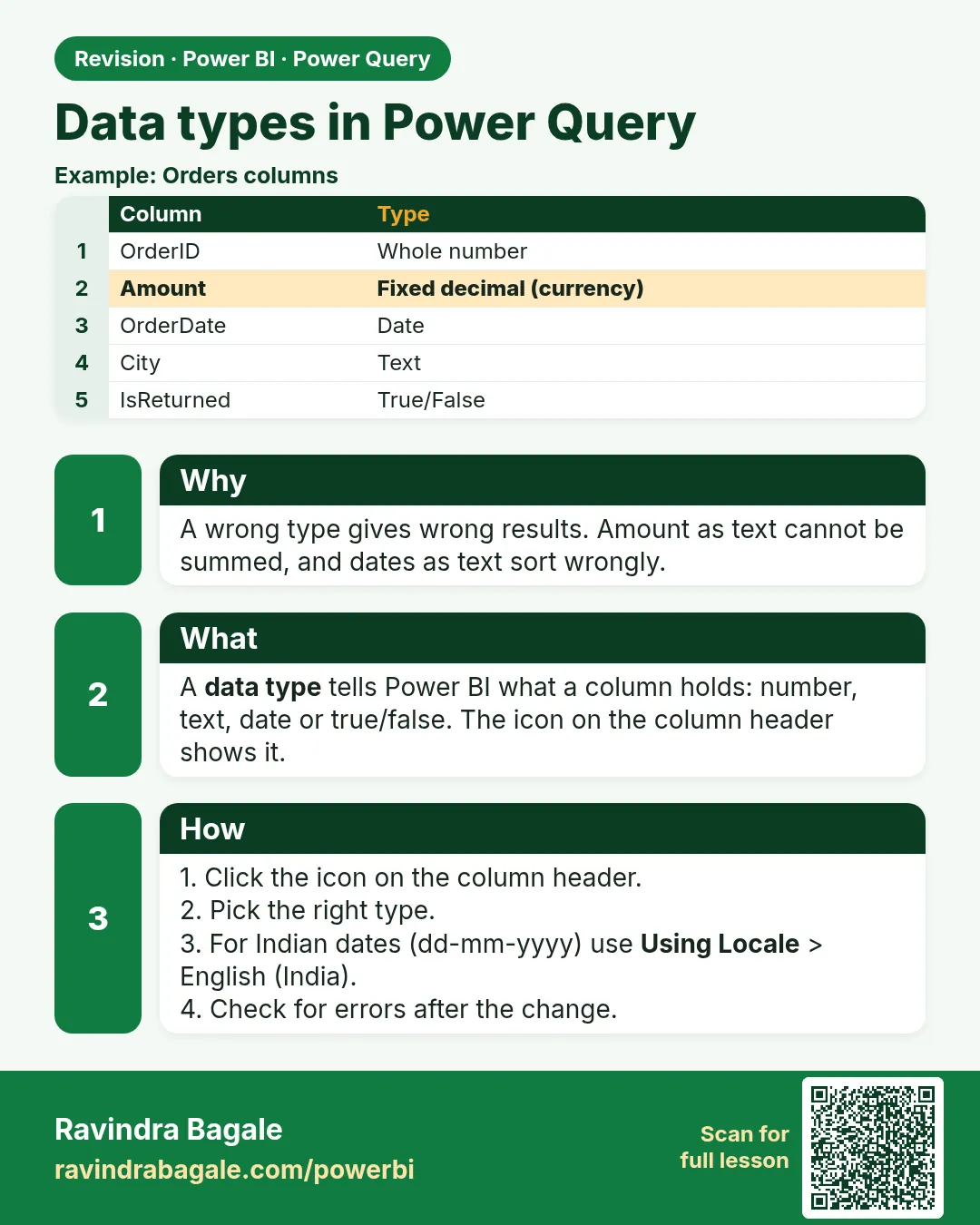
What: A data type tells Power BI what a column holds: text, whole number, decimal, date and so on.
Why: If Amount stays as text, Power BI cannot add it. If a date stays as text, YTD and month charts break.
Tiny example: "₹1,250" is text. After cleaning and a type change it becomes the number 1250.
Data types in Power Query with example — 30 सेकंदात
काय: Data type Power BI ला सांगतो की column मध्ये काय आहे: text, whole number, decimal, date वगैरे.
का: Amount text राहिला तर Power BI त्याची बेरीज करू शकत नाही. Date text राहिली तर YTD आणि महिन्याचे charts बिघडतात.
छोटं उदाहरण: "₹1,250" हा text आहे. साफ करून type बदलल्यावर तो 1250 हा number होतो.
Data types in Power Query with example — 30 सेकंड में
क्या: Data type Power BI को बताता है कि column में क्या है: text, whole number, decimal, date वग़ैरह.
क्यों: Amount text रहा तो Power BI उसका जोड़ नहीं कर सकता. Date text रही तो YTD और महीने वाले charts बिगड़ जाते हैं.
छोटा उदाहरण: "₹1,250" text है. साफ़ करके type बदलने पर वह 1250 number बन जाता है.
First look at the data (before → after):
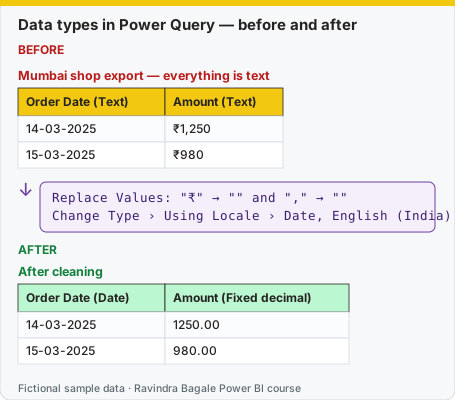
Same before / after tables as text
Before — Mumbai shop export — everything is text
| Order Date (Text) | Amount (Text) |
|---|---|
| 14-03-2025 | ₹1,250 |
| 15-03-2025 | ₹980 |
Formula / click path
Replace Values: "₹" → "" and "," → ""
Change Type › Using Locale › Date, English (India)
After — After cleaning
| Order Date (Date) | Amount (Fixed decimal) |
|---|---|
| 14-03-2025 | 1250.00 |
| 15-03-2025 | 980.00 |
Do it step by step:
- Select Amount. Click Transform › Replace Values. Replace
₹with nothing. - Do it again. Replace
,with nothing. - Click the type icon on Amount. Choose Fixed decimal number.
- Right-click Order Date › Change Type › Using Locale…
- Choose Date and locale English (India). Click OK.
- Check: the date column icon now shows a calendar.
एक-एक step करून बघा:
- Amount निवडा. Transform › Replace Values वर click करा.
₹च्या जागी काहीच नाही. - पुन्हा करा.
,च्या जागी काहीच नाही. - Amount वरच्या type icon वर click करा. Fixed decimal number निवडा.
- Order Date › Change Type › Using Locale… वर right-click करा.
- Date आणि locale English (India) निवडा. OK करा.
- तपासा: date column च्या icon वर आता calendar दिसतो.
एक-एक step करके देखिए:
- Amount चुनिए. Transform › Replace Values पर click कीजिए.
₹की जगह कुछ नहीं. - फिर से कीजिए.
,की जगह कुछ नहीं. - Amount के type icon पर click कीजिए. Fixed decimal number चुनिए.
- Order Date › Change Type › Using Locale… पर right-click कीजिए.
- Date और locale English (India) चुनिए. OK कीजिए.
- जाँचिए: date column के icon पर अब calendar दिखता है.
Setting correct data types is essential – DAX, sorting, relationships (संबंध) and performance depend on it. Click the icon on the column header or use Transform › Data Type.
| Type | Use for |
|---|---|
| Text | Names, codes, IDs with leading zeros, phone numbers |
| Whole number | Quantities, counts, integer IDs |
| Decimal number | Measurements, percentages |
| Fixed decimal number (Currency) | Money values – 4 fixed decimal places, avoids rounding issues |
| Date / Time / Date/Time / Date/Time/Timezone | Dates and timestamps |
| True/False | Flags such as Is Returned |
Simple bhashet sangaycha tar, fixing wrong types, Indian date formats (Using Locale) and numbers stored as text is covered step by step in Module 7.7–7.8.
Ravindra Bagale's Tip
The mistake seen most often with types is letting automatic type detection run and never checking it. It looks only at the first rows, so a Pincode or Order ID can become a number and lose its leading zeros. Set types deliberately after cleaning, especially for IDs, phone numbers and money. Never forget this.
Ravindra Bagale's Tip – मराठी
Type मध्ये सगळ्यात जास्त दिसणारी चूक म्हणजे automatic type detection चालू देणं आणि कधीच चेक न करणं. तो फक्त पहिल्या rows बघतो, त्यामुळे Pincode किंवा Order ID number होऊन सुरुवातीचे zeros जाऊ शकतात. Cleaning नंतर types विचारपूर्वक set करा, विशेषतः IDs, phone numbers आणि पैशांसाठी. हे अजिबात विसरू नका.
Ravindra Bagale's Tip – हिंदी
Types में सबसे ज़्यादा दिखने वाली गलती है automatic type detection को चलने देना और कभी check न करना. वह सिर्फ़ पहली rows देखता है, इसलिए Pincode या Order ID number बन सकता है और शुरुआत के zeros खो सकता है. Cleaning के बाद types सोच-समझकर set करो, ख़ासकर IDs, phone numbers और पैसों के लिए. यह बिल्कुल मत भूलना.
Fix common mistakes
| Wrong result | Reason | Correction |
|---|---|---|
| 06-04-2026 became 04-Jun-2026 | Default locale (English US) reads month first | Change Type › Using Locale › English (India) |
| Amount shows Error | Changed type before removing ₹ and commas | Delete the type step, clean text, then set type |
| PIN 411038 fine but codes like 0401 lose the zero | Typed as number | Keep codes as Text |
Practise independently
Practice task
What date does 07-04-2026 become with the default US locale?
Hints
- Month first.
Solution
04-Jul-2026 (wrong). With English (India) it is 07-Apr-2026.
Think like a professional
Dates silently wrong are worse than errors. Always check a few dates where day ≤ 12 after any type change.
 Revision card