27.8 Aggregation Tables
In short: The Orders table is huge in DirectQuery; most visuals only need sales by City and Month.
Start with a problem
The Orders table is huge in DirectQuery; most visuals only need sales by City and Month.
Explain simply
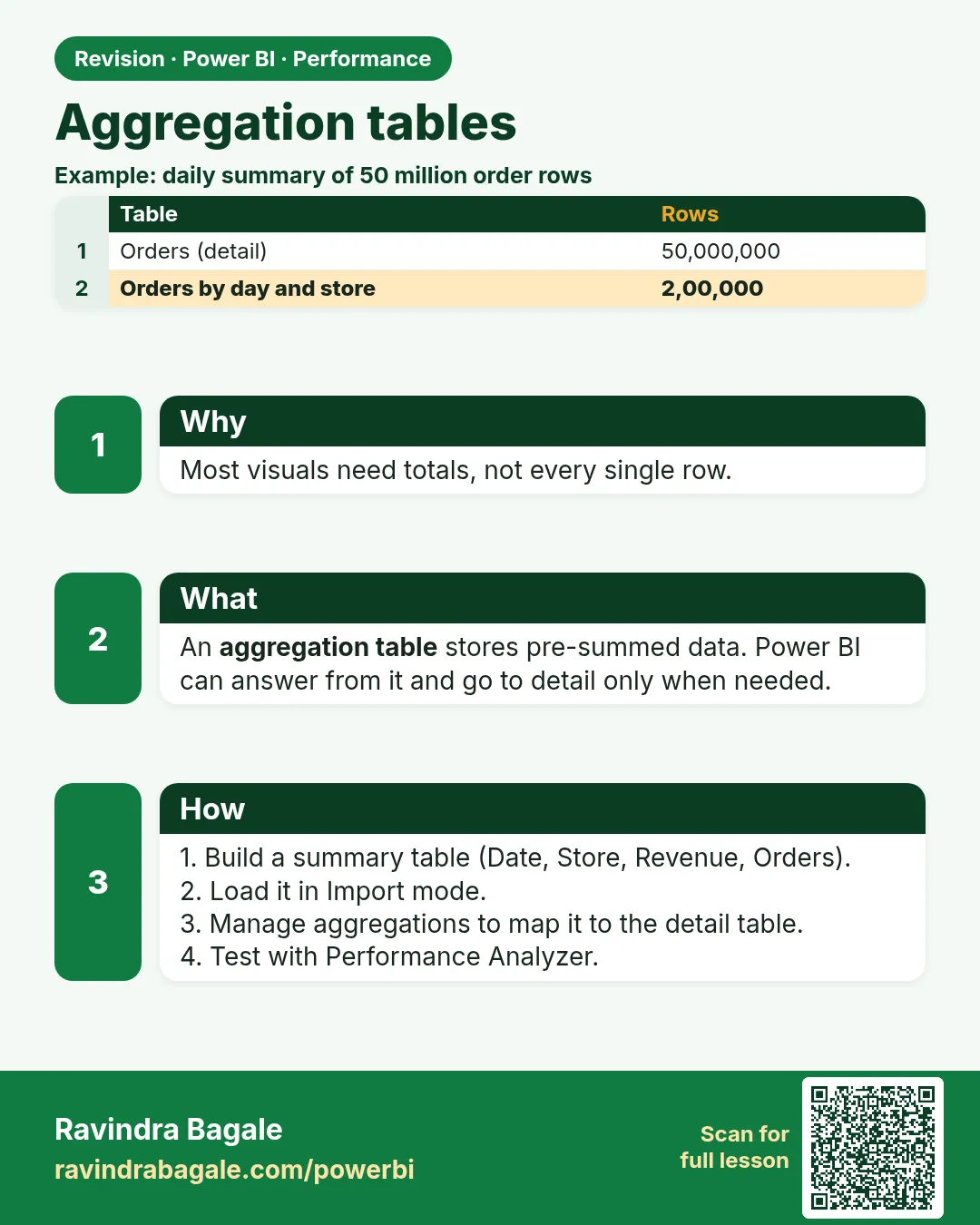
An aggregation table is a small pre-summed table (e.g., City × Month) that answers summary queries without scanning detail rows.
Show the data
| City | Month | Sales (₹) |
|---|---|---|
| Pune | Apr-2026 | 600 |
| Nashik | Apr-2026 | 300 |
| Pune | May-2026 | 250 |
| Nashik | May-2026 | 500 |
| Kolhapur | May-2026 | 450 |
Fictional sample data. Practice file: visuals_orders_apr_may_2026.csv (source: src/practice/).
Demonstrate
- Create the summary table (SQL view or Power Query Group By) at City × Month.
- Import it; set dimensions Dual.
- Manage aggregations on the summary: Sales → Sum of Orders[Amount], City → GroupBy, Month → GroupBy.
- Test: City chart uses aggregation; order list uses detail.
Show the result
Your result should look like this (fictional sample):
| Check | Value |
|---|---|
| Sum of aggregation | ₹2,100 |
| Sum of detail | ₹2,100 |
Explain what happened
Queries at City/Month grain hit the small table; finer grain falls back to detail.
Explore further
- 5 summary rows vs 8 detail rows here; in real data the gain is much larger.
Detailed reference for this lesson:
An aggregation table (a pre-summed copy of the detail) is a small summary that answers queries without going down to the detail rows.
Section 27.3 named aggregations in one line. Here is the shape. You keep a large fact, often DirectQuery, at order grain. You also import a small table already summed by day and city. You tell the model, Modeling › Manage aggregations (on the summary table), which summary column matches which detail column and which measure it can answer. A visual that only needs city and day can be answered from the imported summary. A visual that needs order id still hits the detail table.
The summary grain must be exact. If the aggregation is by city and day, a question by city and day can match. Add product category and it no longer matches, so the engine uses the detail table. That fallback is correct, and it is slower. Dual storage mode on the dimension (section 3.3) often sits beside this pattern so the city table can serve both the imported aggregation and the DirectQuery fact. Dual is not a magic speed button. It stores another copy and it is there so relationships work across the two modes.
Worked example, fictional and tiny. Detail rows: 31 March, Pune, order B-1, ₹400; 31 March, Pune, order B-2, ₹100; 31 March, Nashik, order B-3, ₹250. The aggregation table has two rows: 31 March Pune ₹500, 31 March Nashik ₹250. A card of sales by city can use the aggregation. A table of order ids cannot. If the aggregation says Pune ₹500 and the detail sums to ₹500, you are aligned. If someone later filters to Snacks, the aggregation cannot answer and must not be forced. Leave the aggregation precedence so the detail remains the source of truth.
Ravindra Bagale's Tip
A common mistake is a summary table with no Manage aggregations mapping, and two visuals that do not match. Without the mapping it is just another table. And do not put a distinct count in the summary when the detail needs the order ID. Map it with the grain in mind. Pay attention!
Ravindra Bagale's Tip – मराठी
एक common चूक म्हणजे Manage aggregations mapping नसलेला summary table, आणि न जुळणारे दोन visuals. Mapping शिवाय तो फक्त दुसरा table आहे. आणि detail ला order ID लागत असताना summary मध्ये distinct count ठेवू नका. Grain लक्षात ठेवून map करा. लक्षात ठेवा!
Ravindra Bagale's Tip – हिंदी
एक common गलती है Manage aggregations mapping के बिना summary table, और दो visuals जो मेल नहीं खाते. Mapping के बिना वह बस दूसरी table है. और जब detail को order ID चाहिए तब summary में distinct count मत रखो. Grain ध्यान में रखकर map करो. ध्यान रखो!
Fix common mistakes
| Wrong result | Reason | Correction |
|---|---|---|
| Aggregation never used | No mapping | Manage aggregations |
| Category visual slow | Grain not in aggregation | Expected fallback |
| Totals differ | Summary stale | Refresh both |
Practise independently
Practice task
Check: does the aggregation total match detail?
Hints
- 600+300+250+500+450.
Solution
Yes, ₹2,100.
Think like a professional
Always reconcile aggregation totals with detail.
 Revision card