26.1 Row-Level Security (RLS) in Power BI with Example
Quick answer: the short, self-contained version of this lesson is the guide Row-Level Security in Power BI.
Start with a problem
Ravindra (Pune) should see only Pune orders; Shraddha only Nashik; Rani all. Making three reports is wasteful.
Explain simply
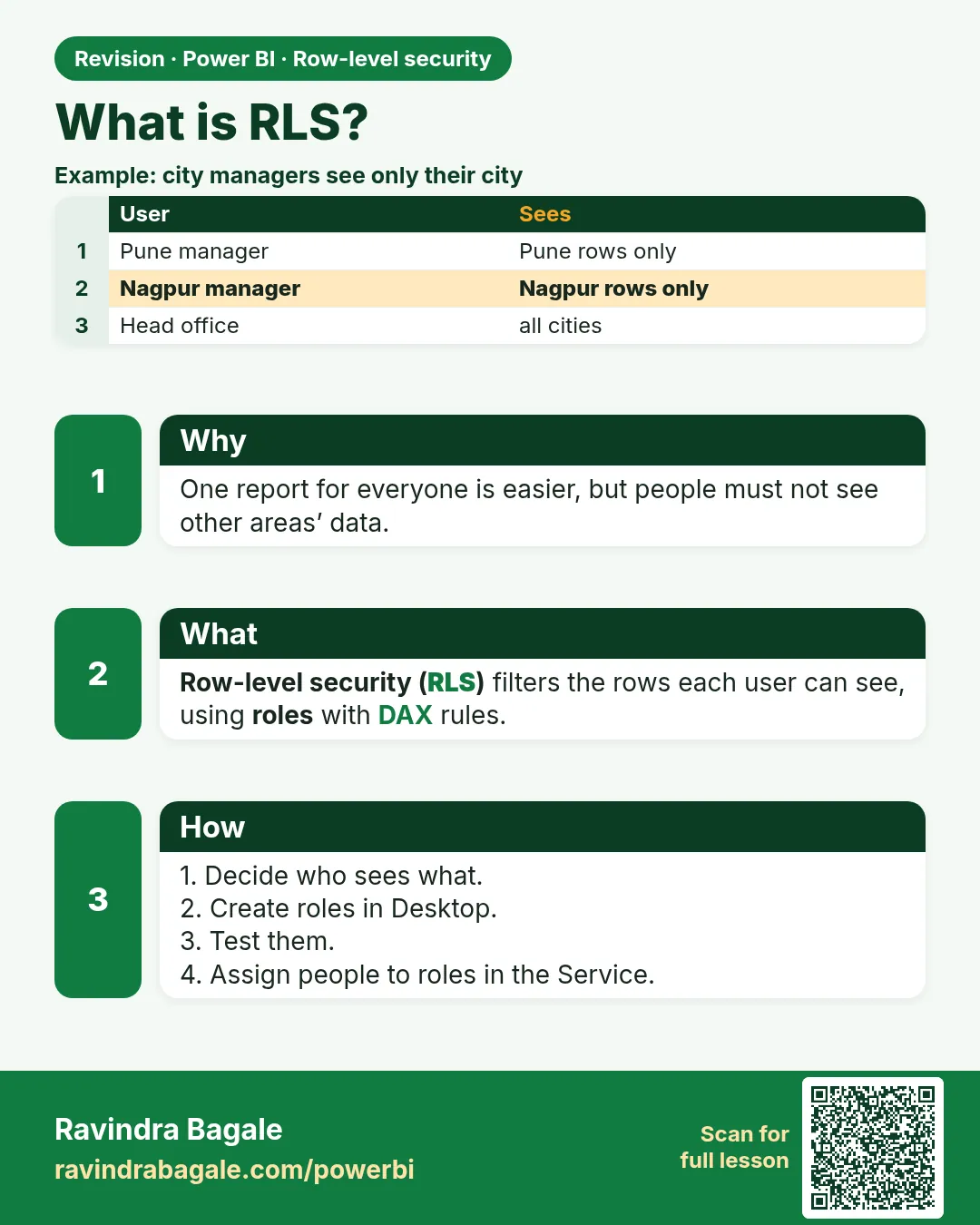
Row-level security (RLS) filters rows per user using roles. One report, different rows.
Show the data
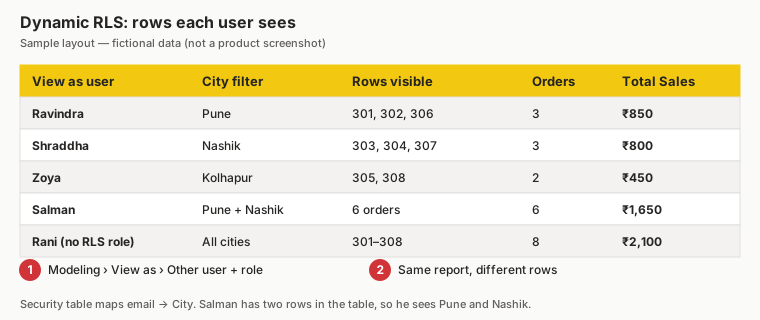
| User (email) | City in security table | Rows visible | Total Sales (₹) |
|---|---|---|---|
| ravindra@example.com | Pune | 301, 302, 306 | 850 |
| shraddha@example.com | Nashik | 303, 304, 307 | 800 |
| zoya@example.com | Kolhapur | 305, 308 | 450 |
| salman@example.com | Pune, Nashik | 6 orders | 1,650 |
| Rani (no role, workspace Viewer with all-cities role) | All | 301–308 | 2,100 |
About this data: This table uses columns: User (email), City in security table, Rows visible, Total Sales (₹). This table uses columns: View as, Rows, Total Sales. This table uses columns: Order ID, City, Amount (₹). This table uses columns: Signed-in user, Rows visible, Total Sales. Values shown are the lesson examples already on this page (not a new dataset).
Fictional sample data. Practice file: rls_user_security.csv, visuals_orders_apr_may_2026.csv (source: src/practice/).
Demonstrate
- Modeling › Manage roles › New role
Pune. - Table Orders › filter
[City] = "Pune"› Save. - View as › Pune.
- Read the card.
Show the result
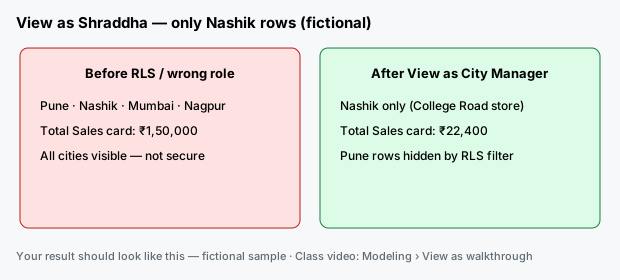
Your result should look like this (fictional sample):
| View as | Rows | Total Sales |
|---|---|---|
| None | 8 | ₹2,100 |
| Pune | 301, 302, 306 | ₹850 |
Explain what happened
The role adds a filter to every query from that user, before any visual filter.
Explore further
- Try the interactive demo: RLS role selector.
Detailed reference for this lesson:
Row-level security (RLS) in Power BI with example — in 30 seconds
What: RLS hides rows from users. Same report, but each person sees only their rows.
Why: The Nashik manager must not see Pune numbers. One report is easier than six copies.
Tiny example: Rani sees ₹1,500 (all). Shraddha sees ₹300 (Nashik only).
Row-level security (RLS) in Power BI with example — 30 सेकंदात
काय: RLS users पासून rows लपवतं. Report तोच, पण प्रत्येकाला फक्त त्याच्या rows दिसतात.
का: Nashik च्या manager ला Pune चे आकडे दिसता कामा नयेत. सहा copies पेक्षा एक report सोपा.
छोटं उदाहरण: Rani ला ₹1,500 (सगळं) दिसतं. Shraddha ला ₹300 (फक्त Nashik).
Row-level security (RLS) in Power BI with example — 30 सेकंड में
क्या: RLS users से rows छिपाता है. Report वही, पर हर किसी को सिर्फ़ अपनी rows दिखती हैं.
क्यों: Nashik के manager को Pune के आँकड़े नहीं दिखने चाहिए. छह copies से एक report आसान है.
छोटा उदाहरण: Rani को ₹1,500 (सब) दिखता है. Shraddha को ₹300 (सिर्फ़ Nashik).
First look at the data (before → after):
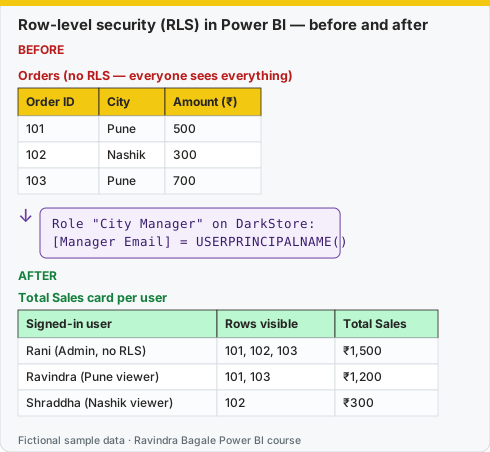
Same before / after tables as text
Before — Orders (no RLS — everyone sees everything)
| Order ID | City | Amount (₹) |
|---|---|---|
| 101 | Pune | 500 |
| 102 | Nashik | 300 |
| 103 | Pune | 700 |
Formula / click path
Role "City Manager" on DarkStore:
[Manager Email] = USERPRINCIPALNAME()
After — Total Sales card per user
| Signed-in user | Rows visible | Total Sales |
|---|---|---|
| Rani (Admin, no RLS) | 101, 102, 103 | ₹1,500 |
| Ravindra (Pune viewer) | 101, 103 | ₹1,200 |
| Shraddha (Nashik viewer) | 102 | ₹300 |
Do it step by step:
- Decide who sees what. Write it in a small table first.
- Build the role (26.2 or 26.3).
- Test in Desktop with Modeling › View as.
- Publish. Add members on the semantic model … › Security.
- Give users Viewer or app access, not Member.
एक-एक step करून बघा:
- कोणाला काय दिसायचं ते ठरवा. आधी एका छोट्या table मध्ये लिहा.
- Role बनवा (26.2 किंवा 26.3).
- Desktop मध्ये Modeling › View as ने test करा.
- Publish करा. Semantic model च्या … › Security वर members जोडा.
- Users ना Viewer किंवा app access द्या, Member नाही.
एक-एक step करके देखिए:
- किसे क्या दिखना है, तय कीजिए. पहले एक छोटी table में लिखिए.
- Role बनाइए (26.2 या 26.3).
- Desktop में Modeling › View as से test कीजिए.
- Publish कीजिए. Semantic model के … › Security पर members जोड़िए.
- Users को Viewer या app access दीजिए, Member नहीं.
Row-Level Security restricts which rows of data a user can see, using one report for everyone. In our quick-commerce model: the Pune city manager (Ravindra Bagale) should see only the Pune dark stores (Kothrud, Baner, Hadapsar, Hinjewadi, Wakad) and their orders; the Nashik manager (Shraddha Bagale) only Nashik; the Maharashtra state operations head (Rani) sees everything. Without RLS you would have to build and maintain separate reports per city.
RLS works through roles. Each role contains DAX filter expressions on tables. The filter propagates through relationships – so filtering DarkStore automatically filters Orders.
Ravindra Bagale's Tip
Friends, many students think hiding a page or visual is security. It isn't: anyone with build access can see the data. Use RLS to restrict rows, and OLS (Object-Level Security) when whole columns or tables must be hidden. Clear?
Ravindra Bagale's Tip – मराठी
मित्रांनो, बऱ्याच students ना वाटतं page किंवा visual hide करणं म्हणजे security. तसं नाही: build access असलेला कोणीही data बघू शकतो. Rows मर्यादित करण्यासाठी RLS वापरा, आणि संपूर्ण columns किंवा tables लपवायच्या असतील तर OLS (Object-Level Security). समजलं का?
Ravindra Bagale's Tip – हिंदी
दोस्तों, बहुत से students सोचते हैं कि page या visual hide करना security है. ऐसा नहीं है: build access वाला कोई भी data देख सकता है. Rows सीमित करने के लिए RLS इस्तेमाल करो, और पूरे columns या tables छिपाने हों तो OLS (Object-Level Security). समझ आया?
Fix common mistakes
| Wrong result | Reason | Correction |
|---|---|---|
| Rani sees nothing | Assigned to Pune role | Remove her or create All role |
| RLS not applied in Desktop | Desktop shows all unless View as | Use View as |
| Workspace Admin sees all | RLS does not apply to edit roles | Test with Viewer |
Practise independently
Practice task
What does Zoya (Kolhapur) see?
Hints
- 305, 308.
Solution
2 rows, ₹450.
Think like a professional
RLS is a top interview topic: roles defined in Desktop, members assigned in the Service.
 Revision card