3.4 Data Source Settings and Credentials
Start with a problem
Ruhi moved the orders CSV from her Desktop to a shared folder. Refresh now fails, and she starts rebuilding the query.
Explain simply
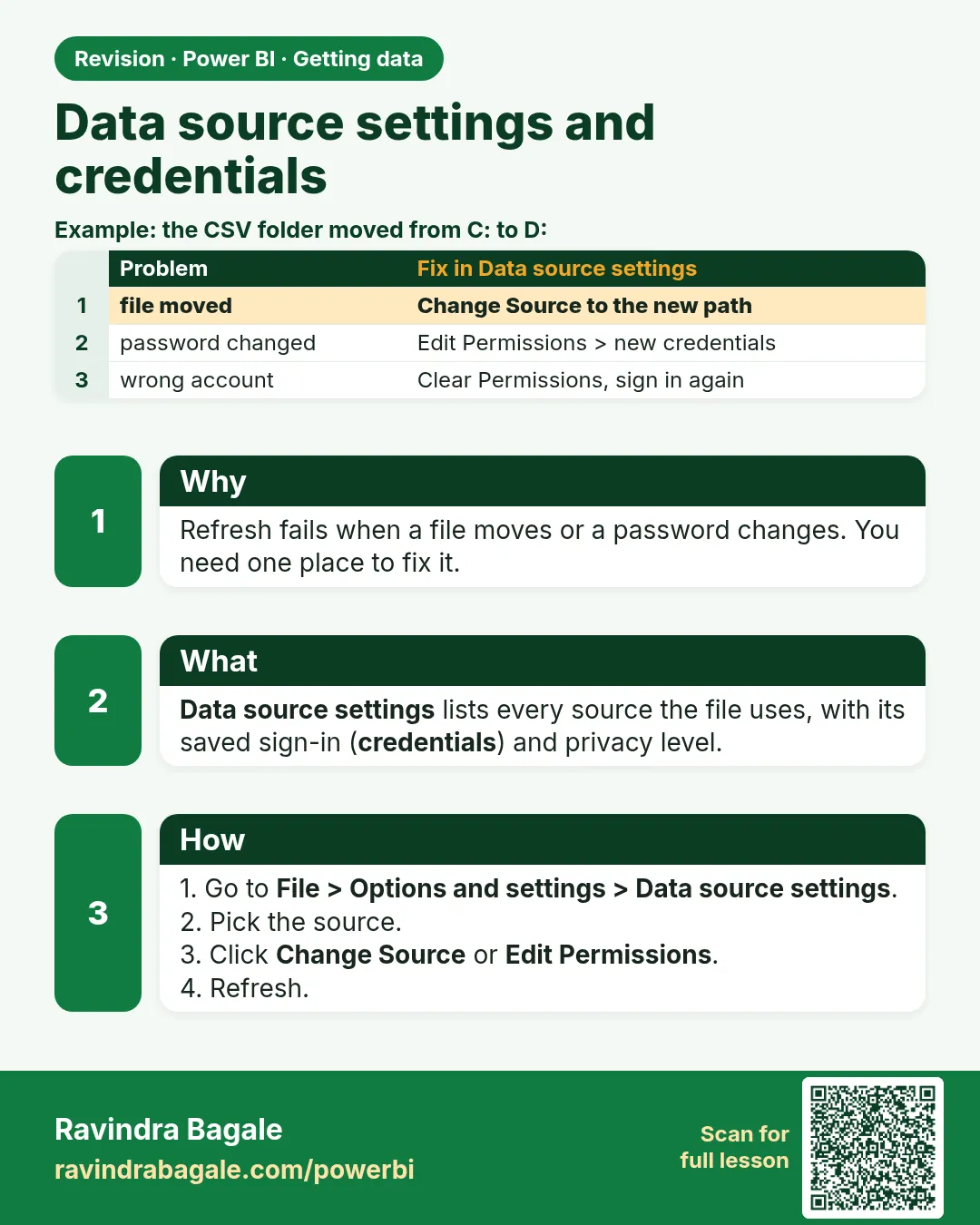
Data source settings lists every source in the file. Use Change Source when a file moves, Edit Permissions for credentials and privacy levels, and Clear Permissions to forget saved credentials.
Show the data
| Source in the file | Old path | New path |
|---|---|---|
| Orders CSV | C:\Users\Ruhi\Desktop\visuals_orders_apr_may_2026.csv | D:\Shared\QC\visuals_orders_apr_may_2026.csv |
About this data: This table uses columns: Source in the file, Old path, New path. This table uses columns: Error. This table uses columns: Data sources in current file. Values shown are the lesson examples already on this page (not a new dataset).
Fictional sample data. Practice file: visuals_orders_apr_may_2026.csv (source: src/practice/).
Demonstrate
-
Refresh › error.
Your result should look like this:
Error DataSource.Error: Could not find file 'C:\Users\Ruhi\Desktop\visuals_orders_apr_may_2026.csv' -
File › Options and settings › Data source settings › Data sources in current file.
-
Select the CSV › Change Source… › Browse to the new path › OK.
Your result should look like this:
Data sources in current file D:\Shared\QC\visuals_orders_apr_may_2026.csv -
Edit Permissions › Privacy level Organizational › OK.
-
Close › Refresh.
Your result should look like this:
Card ₹2,100 (8 rows)
Show the result
Your result should look like this (fictional sample):
| Check | Before | After |
|---|---|---|
| Source path | C:\Users\Ruhi\Desktop\… | D:\Shared\QC\… |
| Refresh | Error | Succeeds |
| Rows / Total | — | 8 / ₹2,100 |
Explain what happened
Change Source rewrote the path in every query that used it, so no query had to be rebuilt.
Explore further
- A FolderPath parameter (Module 10.3) makes the next move a one-value change.
Detailed reference for this lesson:
- File › Options and settings › Data source settings shows all sources used in the file. Here you can Change Source (e.g. when a file moves to a new folder), edit credentials, or clear permissions.
- Privacy levels (Public, Organizational, Private) control whether data from one source may be sent to another source when queries are combined. Setting them correctly avoids Formula.Firewall errors. Module 4.9 explains them with an example.
Practice task
Connect to Products.xlsx (a formatted Excel table) and Blinkit_Orders_2025_01.csv (UTF-8). Use Transform Data for both, check that the ₹ symbol and Marathi product names (if any) display correctly, and change the Excel file path using Data source settings › Change Source.
Ravindra Bagale's Tip
Look, friends: a common refresh failure comes from credentials saved against the wrong path or account. When a source moves or a password changes, open Data source settings and edit or clear permissions there, instead of rebuilding the query from scratch. This matters for both exams and interviews.
Ravindra Bagale's Tip – मराठी
हे बघा मित्रांनो: चुकीच्या path किंवा account साठी save झालेल्या credentials मुळे refresh fail होणं खूप common आहे. Source हलला किंवा password बदलला तर query शून्यापासून पुन्हा बनवण्याऐवजी Data source settings उघडा आणि तिथे permissions edit किंवा clear करा. हे exam आणि interview दोन्हीसाठी important आहे.
Ravindra Bagale's Tip – हिंदी
देखो दोस्तों: गलत path या account के लिए save हुई credentials की वजह से refresh fail होना बहुत आम है. Source हट जाए या password बदल जाए तो query शुरू से दोबारा बनाने की बजाय Data source settings खोलो और वहाँ permissions edit या clear करो. यह exam और interview दोनों के लिए ज़रूरी है.
Fix common mistakes
| Wrong result | Reason | Correction |
|---|---|---|
| Query rebuilt from scratch | Did not know Change Source | Data source settings › Change Source |
| Formula.Firewall error after combining sources | Privacy levels not set | Set levels in Edit Permissions |
| Old password keeps failing | Wrong saved credentials | Clear Permissions, then sign in again |
Practise independently
Practice task
Two queries use the same CSV path. How many times do you click Change Source?
Hints
- Data source settings lists each source once.
Solution
Once: the source appears once, and the change applies to both queries.
Think like a professional
Keep sources in shared, stable locations (or parameters) from day one; moving files later is a common refresh breaker.
 Revision card