21. Dynamic Charts: Field Parameters, What-if and Dynamic Top N
21.7 Calculation Groups and Time Intelligence Items
Start with a problem
Zoya needs Current, Previous Month and MoM % for both Total Sales and Total Orders. Writing six measures feels repetitive.
Explain simply
A calculation group holds calculation items such as Current, PM and MoM %. Each item modifies whatever measure is in the visual using SELECTEDMEASURE(). A marked Date table is needed for time intelligence.
Show the data
| Month | Total Sales (₹) | Total Orders |
|---|---|---|
| Apr-2026 | 900 | 3 |
| May-2026 | 1,200 | 5 |
Fictional sample data. Practice file: visuals_orders_apr_may_2026.csv (source: src/practice/).
Demonstrate
- Make sure a Date table is related and marked as a date table.
- Model view › Calculation group (Desktop) › name
Time Calc. - Items:
Current = SELECTEDMEASURE();PM = CALCULATE(SELECTEDMEASURE(), PREVIOUSMONTH('Date'[Date]));MoM % = VAR c = SELECTEDMEASURE() VAR p = CALCULATE(SELECTEDMEASURE(), PREVIOUSMONTH('Date'[Date])) RETURN DIVIDE(c - p, p). - Set a format string for MoM % as percentage (dynamic format string).
- Matrix: Rows Month, Columns
Time Calcitems, ValuesTotal SalesandTotal Orders.
Show the result
Your result should look like this (fictional sample):
| May-2026 | Current | PM | MoM % |
|---|---|---|---|
| Total Sales | ₹1,200 | ₹900 | +33.3% |
| Total Orders | 5 | 3 | +66.7% |
Explain what happened
For each cell the item wraps the measure in its expression; PREVIOUSMONTH shifts the date filter from May to April.
Explore further
- Creating a calculation group discourages implicit measures in the model – use explicit measures.
Detailed reference for this lesson:
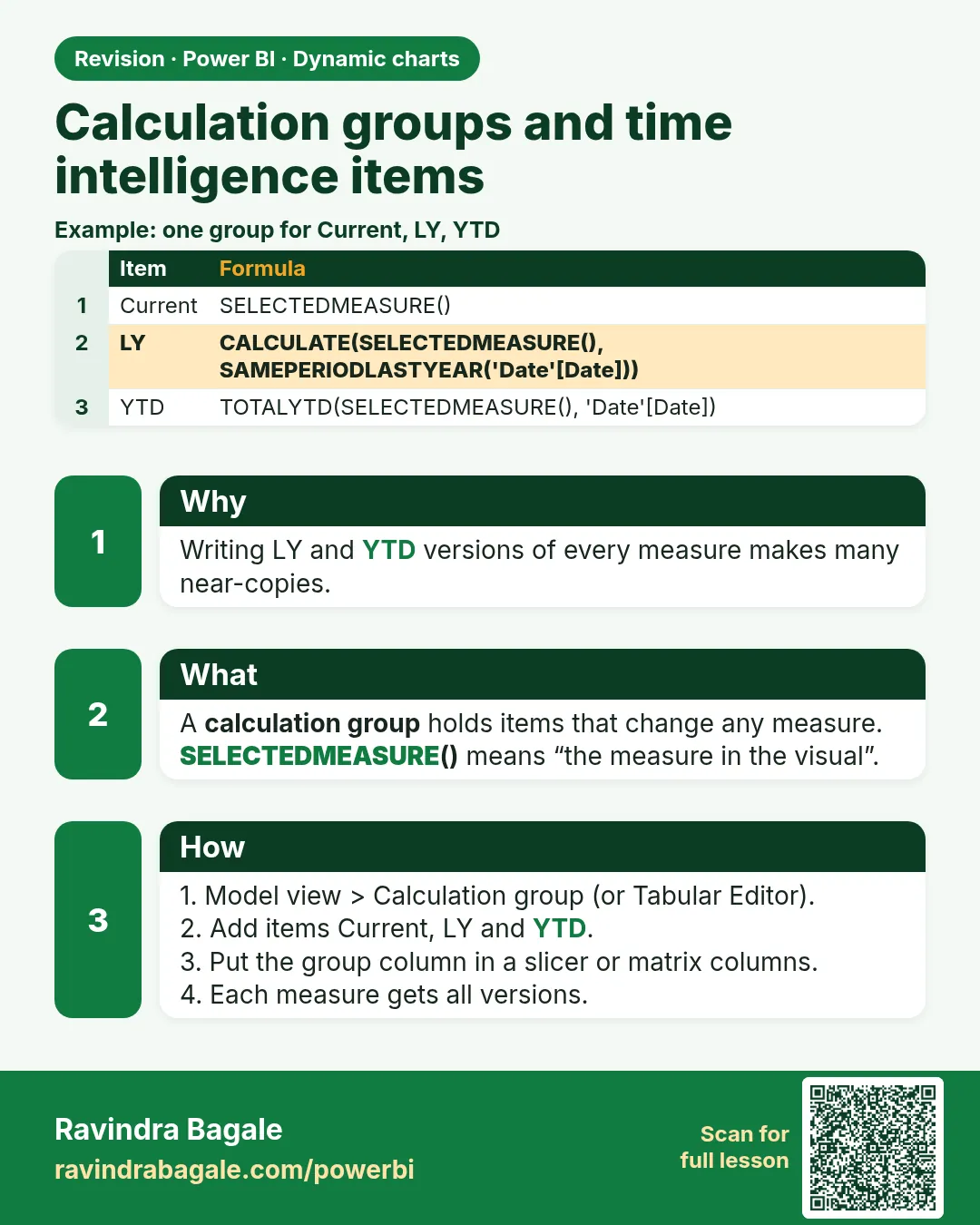
Writing separate YTD, LY and MTD versions of twenty measures is tiring. A calculation group applies one pattern to all measures.
A calculation group is a table of calculation items. Each item is a DAX pattern with SELECTEDMEASURE() standing in for whichever measure the visual is using. One group can turn [Total Sales], [Total Orders] and [Gross Profit] into year-to-date, last year and month-to-date without three copies of each formula.
You do not need Tabular Editor for this if your Desktop shows Model view › Calculation group on the ribbon. That button is the normal path now. Tabular Editor remains an optional advanced editor. If the ribbon button is missing, update Desktop rather than treating an external tool as mandatory.
Adding the first calculation group turns on discourage implicit measures (the model will want real measures, not "Sum of Amount"). Accept that. It matches the habit in section 8.13.
Steps
- Model view › Calculation group. Confirm the implicit-measure prompt.
- Rename the group
Time calcand the columnTime calc. Rename the first item toCurrentwith expressionSELECTEDMEASURE(). - Right-click the calculation items node › New calculation item. Name it
YTD:
CALCULATE(SELECTEDMEASURE(), DATESYTD('Date'[Date]))
- Add
LY:
CALCULATE(SELECTEDMEASURE(), SAMEPERIODLASTYEAR('Date'[Date]))
- Put
[Total Sales]in a matrix Values well,'Date'[Month Name]on rows, andTime calcon columns. You should see Current, YTD and LY. Repeat the same matrix with[Total Orders]. The items apply again. No new measures.
SELECTEDMEASURE() is blank-friendly in the same way as the original measure. A text measure in that visual will error or look wrong; keep the group on numeric measures. Item order is the ordinal on the items. Set it in the properties so YTD does not sort alphabetically into the wrong place.
Worked example. Fictional March sales for Sambhaji Nagar are ₹2,000 and the year before that, same dates, are ₹1,500. On the March row, Current is 2000, LY is 1500, YTD is January–March of the selected year. The same three items on [Total Orders] reuse the pattern. You did not write Orders YTD and Sales YTD as two measures. The date table must still be marked (Module 11), or both items fail quietly.
Ravindra Bagale's Tip
Many students create a calculation group and also leave Sum-of-column implicit measures on the page. A group cannot apply to implicit measures, so the card breaks. Build explicit measures first, then the group. And do not delete the Current item; without it the user cannot see the original number. Pay attention!
Ravindra Bagale's Tip – मराठी
बरेच students calculation group बनवतात आणि page वर Sum-of-column implicit measures पण तसेच ठेवतात. Group implicit measures वर लागू होऊ शकत नाही, म्हणून card बिघडतो. आधी explicit measures बनवा, मग group. आणि Current item काढून टाकू नका; त्याशिवाय user ला original number दिसत नाही. लक्षात ठेवा!
Ravindra Bagale's Tip – हिंदी
बहुत से students calculation group बनाते हैं और page पर Sum-of-column implicit measures भी वैसे ही छोड़ देते हैं. Group implicit measures पर लागू नहीं हो सकता, इसलिए card टूट जाता है. पहले explicit measures बनाओ, फिर group. और Current item मत हटाओ; उसके बिना user को original number नहीं दिखता. ध्यान रखो!
Fix common mistakes
| Wrong result | Reason | Correction |
|---|---|---|
| PM blank | No marked Date table / using Order Date column directly | Use a related Date table |
| MoM % shows 0.33 | No format string | Set format string for the item |
| Sum of Amount ignores the group | Implicit measure | Use explicit measures |
Practise independently
Practice task
What do Current, PM and MoM % show for April?
Hints
- There is no March data.
Solution
Current ₹900, PM blank, MoM % blank (DIVIDE by blank).
Think like a professional
Calculation groups reduce measure explosion. Explain SELECTEDMEASURE in one sentence in interviews.
 Revision card