Labs · Power BI
Lab: Explain Your CALCULATE Measure and Filter Context Aloud in 2 Minutes
Course: Power BI · Chapter 30: Interview Questions and Answers
Chapter 30 lists interview questions and answers; this lab trains you to say the most-asked DAX answer clearly.
Chala mitrano! "Explain CALCULATE" is asked in almost every Power BI interview. Many students know it but say it badly: too fast, too vague, no example. Today we practise saying it with your own measure, your own numbers, in 2 minutes. Record, listen, improve. Bolayla shika, nokri milva!
चला मित्रांनो! "CALCULATE explain करा" हा प्रश्न जवळपास प्रत्येक Power BI interview मध्ये विचारला जातो. बऱ्याच students ना ते माहीत असतं पण ते नीट सांगता येत नाही: खूप घाईत, खूप vague, उदाहरण नाही. आज तुमच्या स्वतःच्या measure ने, स्वतःच्या numbers ने, 2 मिनिटांत सांगायचा सराव करू. Record करा, ऐका, सुधारा. बोलायला शिका, नोकरी मिळवा!
चलो दोस्तों! "CALCULATE explain करो" लगभग हर Power BI interview में पूछा जाता है। बहुत से students जानते हैं पर ठीक से बोल नहीं पाते: बहुत जल्दी, बहुत vague, कोई उदाहरण नहीं। आज अपने measure, अपने numbers के साथ, 2 मिनट में बोलने का अभ्यास करेंगे। Record करो, सुनो, सुधारो। बोलना सीखो, नौकरी पाओ!
Suppose we are…
Suppose we are in a technical interview at TCS for a Power BI developer role. The interviewer says: "You wrote CALCULATE in your project. Explain what it does and what filter context means. Two minutes." We will answer using the Mumbai Sales measure from Lab D and the 12-row city_sales.csv. The numbers are sample data made up for practice.
Goal of this lab
By the end you will have:
- A 5-part answer written on one card (or one phone note).
- A 2-minute recording of yourself.
- A score out of 10 from the checklist, and one improved second recording.
What you need (all free)
- Power BI Desktop with
Lab-D-calculate-mumbai.pbixfrom Lab D open (the card shows 147K and the city table shows 147,000 on every row). No file? Download city_sales.csv (12 rows) and do Lab D first. - A phone voice recorder.
- 30 minutes.
The data: before and after
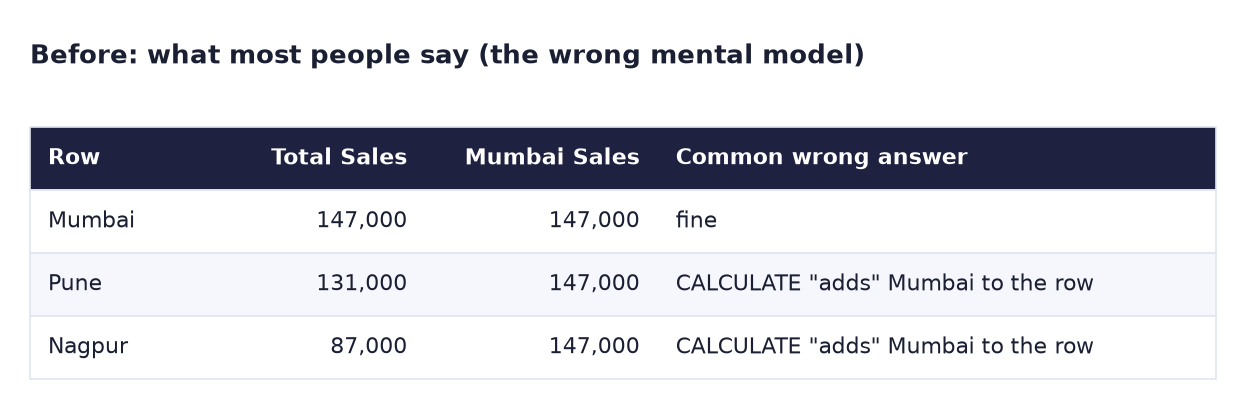
Before. The usual weak answer: "CALCULATE adds a filter", which cannot explain why the Pune row shows Mumbai's 147,000.
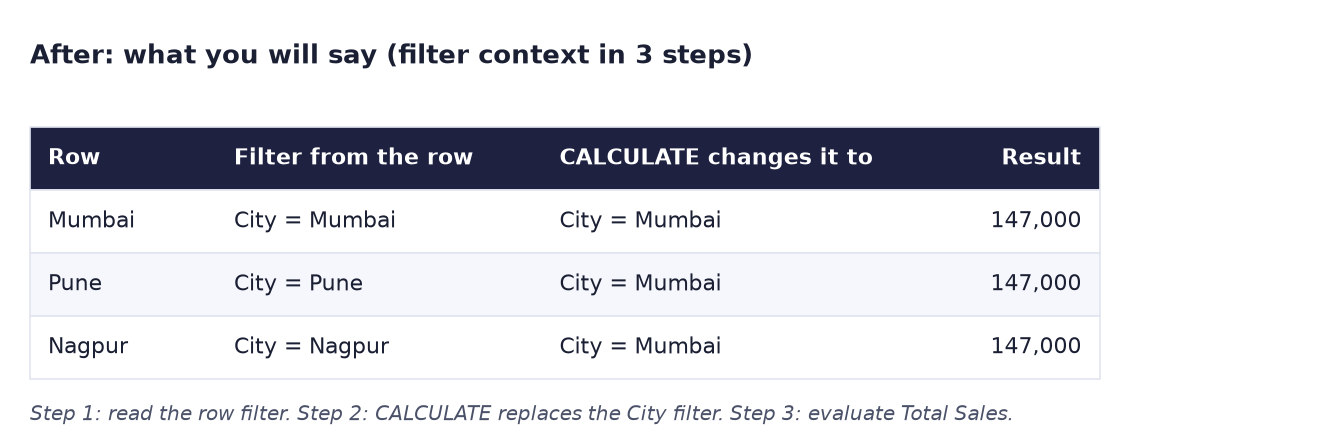
After. The strong answer, in 3 steps per row: read the row's filter, CALCULATE replaces the City filter, then evaluate.
The formula
Your two measures from Lab D:
Total Sales = SUM ( city_sales[Sales] )
Mumbai Sales = CALCULATE ( [Total Sales], city_sales[City] = "Mumbai" )
The 5-part answer (about 2 minutes):
- Definition (15 s): "CALCULATE evaluates an expression in a modified filter context."
- Filter context (20 s): "Filter context is the set of filters active when a measure is calculated: from the visual's row, slicers, the filter pane and relationships."
- My example (30 s): "I wrote Mumbai Sales = CALCULATE of Total Sales with City = Mumbai. In a card with no filters, it shows 147,000."
- The tricky row (30 s): "In a table by City, the Pune row has the filter City = Pune. CALCULATE replaces the filter on the City column with City = Mumbai, so the Pune row shows 147,000. In a table by Product, the row filter is on Product, so CALCULATE keeps it and adds City = Mumbai: Mobile in Mumbai = 78,000."
- When to use it (15 s): "Whenever a number needs a filter different from the visual's: a fixed city, last year (with time intelligence), or all cities for a percentage (with ALL)."
Steps
- Open your Lab D file. Look at the card (147K), the city table and the product table. Write down 147,000, 131,000, 87,000 and 78,000 on a card.
- Write the 5 parts above in your own words, one line each. Keep the numbers.
- Practise once aloud while pointing at the screen (the city table for part 4).
-
Open your phone's voice recorder. Record your answer, aiming for 1 minute 45 seconds to 2 minutes 15 seconds.
What you should see: a recording between about 1:45 and 2:15. Under 1:00 usually means something important was skipped.
-
Play it back and score it with the checklist below (1 point each).
-
Fix the weakest two points and record a second time.
What you should see: a higher score on the second recording. Keep the better one; listen to it again before a real interview.
Ravindra Bagale's Tip
The magic word is "replaces". Say it slowly: "CALCULATE replaces the filter on the same column". That one word explains the Pune row, and interviewers wait for it. Then say "and keeps filters on other columns": that explains the product table. Replace, keep: don shabda, poorna uttar!
Ravindra Bagale's Tip – मराठी
जादूचा शब्द आहे "replaces". हळू म्हणा: "CALCULATE त्याच column वरचा filter replace करतो". हा एक शब्द Pune row समजावतो, आणि interviewers त्याचीच वाट पाहतात. मग म्हणा "आणि इतर columns वरचे filters ठेवतो": त्याने product table समजते. Replace, keep: दोन शब्द, पूर्ण उत्तर!
Ravindra Bagale's Tip – हिंदी
जादुई शब्द है "replaces"। धीरे बोलो: "CALCULATE उसी column का filter replace करता है"। यह एक शब्द Pune row समझा देता है, और interviewers इसी का इंतज़ार करते हैं। फिर बोलो "और दूसरे columns के filters रखता है": इससे product table समझ आती है। Replace, keep: दो शब्द, पूरा जवाब!
Common mistakes
| Mistake | What happens | Fix |
|---|---|---|
| "CALCULATE adds a filter" only | Cannot explain the Pune row; sounds memorised | Say replaces (same column) and keeps (other columns) |
| No example | The answer sounds like a textbook | Use your own measure and the number 147,000 |
| Talking for 5 minutes | The interviewer interrupts | 5 parts, about 2 minutes |
| Mixing up row context and filter context | Follow-up questions go badly | Filter context = filters on the calculation; row context = "current row" in calculated columns and iterators |
| Reading from notes | Sounds unsure | Practise until you need only the 5 headings |
Self-check checklist
Score your recording, 1 point each:
0 of 10 done
Try-at-home challenge
Interviewers often follow up: "How would you make Mumbai Sales respect a City slicer instead of replacing it, so it shows Mumbai only when Mumbai is selected and blank otherwise?" Prepare a 30-second answer with the formula.
Check your answer
Mumbai Sales (respect) = CALCULATE ( [Total Sales], KEEPFILTERS ( city_sales[City] = "Mumbai" ) )"KEEPFILTERS makes CALCULATE intersect with the existing filter instead of replacing it. On the Mumbai row it is still 147,000; on the Pune row, Pune ∩ Mumbai is empty, so it is blank. With no city filter, it is 147,000." Say the word intersect.
Samjla ka? Define, explain filter context, show your measure, explain "replaces" and "keeps", give a use. Aata pudhe jaauya: solve 5 interview-style DAX tasks and check the answers.