Chapter 38: Capstone — One Small App, End to End
38.1 Why.
Welcome to Chapter 38.
I am Ravindra Bagale.
Raju had no engineering degree. He had thirty-seven chapters of notes and a fear that he could explain every control and still not ship one honest service. Guru-ji pushed a blank repository toward him. "One application. Synthetic data. A lab you own. You will model it, review it, scan it, containerize it, deploy it, and run an incident drill that uses a public advisory as a fire alarm, not as a recipe. If you need a stranger's network to feel real, you are not ready to finish."
The application is deliberately dull. It answers one question: given a fake order id, what is the fake status. Suppose the shape reminds you of Paytm or PayFast showing a payment state, or of Swiggy or Zomato showing an order state, or of Amazon showing a parcel state, or of Netflix showing whether a profile may play. The shape is only a teacher. The bytes stay on your machine. BHIM UPI and WhatsApp are not your backends. Infosys is not your client for this exercise. You do not connect to them. You do not scrape them. You do not "test" them.
One app, every control
The capstone joins the earlier chapters on one small app. You see how the controls fit together.
OWASP Juice Shop
OWASP Juice Shop is a deliberately vulnerable web app for practice in your own lab. It is a safe target to try scanners and fixes.
Log4Shell response
When Log4Shell appeared in December 2021, teams with an SBOM could answer "where do we use Log4j?" in hours. Others took weeks.
38.2 What.
The lab application. Call it lab-status. It has one route that returns a status for an order id that matches a boring pattern, and a health route for the process probe. It has no accounts, no saved cards, and no real personal data. The status values live in a small map inside the process, or in a file you create with fake rows. The point is the path around the code: threat model, review, scan, image, deploy, drill.
Here is a teaching sample you may type into a lab repository you own. It is a standard-library server so you are not forced to trust a large framework on day one. It refuses to treat the caller as authenticated for a debug switch, because there is no debug switch.
# lab_status.py — own lab only, synthetic statuses, no secrets
from http.server import BaseHTTPRequestHandler, ThreadingHTTPServer
import json
import re

ORDERS = {
    "1001": "placed",
    "1002": "paid",
    "1003": "packed",
}

class Handler(BaseHTTPRequestHandler):
    def do_GET(self):
        if self.path == "/health":
            self._send(200, {"ok": True})
            return
        match = re.fullmatch(r"/orders/([0-9]{4})", self.path)
        if not match:
            self._send(404, {"error": "not-found"})
            return
        status = ORDERS.get(match.group(1))
        if status is None:
            self._send(404, {"error": "not-found"})
            return
        self._send(200, {"order": match.group(1), "status": status})

    def _send(self, code, body):
        raw = json.dumps(body).encode()
        self.send_response(code)
        self.send_header("Content-Type", "application/json")
        self.send_header("Content-Length", str(len(raw)))
        self.end_headers()
        self.wfile.write(raw)

    def log_message(self, fmt, *args):
        # Log the code path, not a raw query that might someday carry a secret.
        print("lab-status", self.command, self.path.split("?", 1)[0])

if __name__ == "__main__":
    ThreadingHTTPServer(("127.0.0.1", 8080), Handler).serve_forever()
Bind to localhost in the exercise until you deliberately put it on a lab network you control. Do not point it at a public address to "see if the world can find it."
Threat model, on one page. Draw two boxes: the lab client and lab-status. Draw one arrow, a status read. Assets are small: integrity of the status word, availability of the health check, and any future secret you might be tempted to add. You have no real payment data, and you will not invent some for drama.
Walk a simple stride of questions without turning them into an attack guide. Could a caller ask for an order that is not theirs. In this toy, every order is fake and public by design, so the note says "no authorization, acceptable only because the data is synthetic and the port is local." If you later add a private field, that note becomes a defect and you add a check before you add the field. Could a caller send a path that is not an order id. The pattern match says no, and the review must prove there is no second route. Could logs swallow a secret. The sample logs the path without a query string. Could a dependency become dangerous later. You pin the base image and you keep a bill of materials, even if today the only dependency is the language runtime. Could the deploy identity do more than roll the process. It should not. Write those sentences. That is Chapter 3 applied to something you can hold.
Code review. Read the file as if a teammate wrote it. Confirm there is no hidden route, no shell call, no secret constant, no reflection of untrusted input into a log line beyond the constrained path. Confirm errors do not include a stack in the client response. Confirm the server does not listen on every interface by accident. A review comment you are allowed to practice fixing: "health and orders share a process; a future debug flag must not ship." You add a test that the source has no such flag, or you simply do not add the flag. You do not add a broken flag so you can exploit it. Review is a gate in the repository, even if the gate is a checklist file a second lab identity signs with a commit.
Scan. Run the shelves from Chapter 37 that fit a tiny program. Secret detection on the repository. A SAST pass if you have one, aimed at this file, with the understanding that a tiny safe file should be quiet. SCA against the lockfile or, if you truly have no third-party libraries, an explicit note that the bill of materials is the base image plus the interpreter, and that you scanned those. Image scanning comes after you build. A quiet scan is not a personality. Record the tool name, the day, and the digest you scanned. If you introduce a deliberate test fixture that looks like a fake token in a file named as a fixture, confirm the tool sees it and that your suppression is scoped to that file with an expiry. Then delete the fixture. The scan must be something you can rerun.
Container. Put the process in an image that runs as a non-root user, with a read-only root filesystem if you can do it without a heroic fight, and with no extra packages "because you might need them." The image has no cloud credentials baked in. The tag you deploy by is a digest, not a moving word like latest. A minimal Dockerfile belongs in the lab repo and in review. You do not mount the host's container socket into the lab app. You do not need it. Health checks call /health on localhost inside the lab network.
Deploy. Deploy means the lab machine, or a local cluster on that machine, running the digest you just built. One command you can repeat. A rollback command that returns the previous digest. A note of who the deploy identity is, even if that identity is you on a laptop, so the habit exists. Watch one log line and one health check. If health fails, Chapter 36's rule applies: one lever, the previous digest. You are done with deploy when a second terminal can request /orders/1001 and see placed, and when a nonsense path returns a small not-found without a traceback.
Incident drill. Pick a quiet afternoon. Announce, to yourself or to a lab partner, that an advisory has arrived for a component in your bill of materials. You may use the public Log4j advisory as the story's historical model, described in Part 4, but your lab service does not need to contain that library. The drill is the motion. Freeze new features. Identify whether the affected component is in the image. If it is, upgrade or rebuild from a patched base on a branch. Scan again. Deploy the new digest to the lab. Confirm health. Write a five-line note: what the advisory claimed in plain language, what you found in your bill of materials, what you changed, how you proved the lab recovered, what debt remains. If the component is absent, write that too. Absence is a result only when the bill of materials is real. Guessing "we probably do not use it" is how teams skip the drill.
Rotate one lab credential you created for the exercise, even if it was a dummy, so rotation is not theoretical. Time the drill. Chapter 35 would put that duration on the one-page review. You do not need a war room. You need a clock and a note.
What the capstone refuses. It refuses a deliberately vulnerable clone of a real company. It refuses exploit strings, stolen-looking production data, and a "red team finale." It refuses deploying this toy onto a cloud account you do not control. Educational means you can explain every file. Own lab means the process list is yours.
What "done" looks like in the folder. A stranger who was not in the room should open the repository and find, without asking you, the threat page, the review checklist with a date, the scan note with the digest, the container file, the command that deploys, and the drill note with a start and a stop. If any of those live only in your head, the capstone is a demo, and demos rot. Name the files in the readme in the order of the six stops. Keep secrets out. The fake order map is not a secret. A token you used for a registry on your laptop is a secret, and it does not belong in the commit even "just for the marker."
A review you can defend aloud. Read lab_status.py from the top and say what you checked. The listen address is loopback. The order id is four digits and nothing else. Unknown ids and unknown paths share a small not-found, so you are not teaching a caller which ids exist by a different error, beyond the fact that this toy's ids are not private. The log line drops the query string. There is no shell, no dynamic import, and no file read from the request. The next change you are tempted to make, "just print the raw path for debugging," is the change the checklist exists to stop. If a teammate wants a new status called cancelled, you add it to the map and to a test that requests /orders/1002 and expects paid. You do not add a route that runs a command. You do not add a library "because production services have frameworks" unless you are willing to put that library on the bill of materials and in the drill.
Deploy and roll back as muscle, not theater. Write the two commands in the readme before you need them. Forward applies a digest. Back applies the previous digest. Run back once while the service is healthy, confirm /health, then run forward again. That boring pair is what Chapter 36 will ask for when you are not calm. If your lab uses a local cluster, the same pair is a manifest change you revert in git, not a click you cannot remember. Time both. Put the minutes on the Chapter 35 page if you are keeping one. A capstone that cannot roll back has not deployed. It has only started.
Ravindra Bagale's Tip
Finish means a second person, or your future self, can run the health check, find the threat-model page, and replay the drill note. A demo from memory is not a capstone.
Practice task
Build lab-status or a program of the same size. Complete the six stops: model, review, scan, container, deploy, drill. Save the notes in the repository. Do not aim the service at a network you do not own.
38.3 How.
- Create a new repository on a machine you own and write "synthetic data only" in the readme.
- Add
lab-statusor an equally small service with one read route and one health route. - Draw the two-box picture and list assets. State that order rows are fake.
- Write four threat sentences: caller scope, unexpected paths, logs, and the deploy identity.
- Add a checklist for review and complete it on the first commit.
- Confirm the server binds to localhost until you choose a lab-only listen address on purpose.
- Run secret detection and record a clean result, or a finding you fixed.
- Record the dependency story, even if the story is "interpreter and base image only."
- Write a container build that runs as a non-root user and does not copy in secrets.
- Build the image and record the digest.
- Scan the image or the bill of materials with the tool you selected in Chapter 37.
- Deploy that digest to your lab runtime and request a known fake order.
- Request a bad path and confirm the response stays small.
- Save the pipeline or the command list so you can repeat the deploy.
- Roll back to a previous digest once, then roll forward again, as a drill not a crisis.
- Start the incident clock. Open a public advisory and search your bill of materials for the named component.
- If it is present, patch or rebuild in the lab. If it is absent, write the evidence of absence.
- Scan and deploy the resulting digest. Hit health again.
- Rotate any lab credential the exercise created.
- Write the five-line drill note with times labeled in your zone.
- Put the threat model, the scan note, the digest, and the drill note in one folder.
- Read the folder as if you were late to the team. Fill any hole you cannot understand.
- Stop the process when you are done. Do not leave a lab service listening because you forgot.
- State aloud the six stops without looking at a logo.
- Stop. Do not deploy or scan toward Swiggy, Paytm, Amazon, BHIM UPI, WhatsApp, Zomato, Netflix, Infosys, PayFast, or any host that is not your lab.
The pipeline for the capstone app
- Threat model the app on one page.
- Protect the repo: branch rules, secret scanning.
- CI: unit tests, SAST, SCA, IaC scan, image scan.
- Build an SBOM and sign the image.
- Deploy with least-privilege roles; private database.
- Turn on logs and two or three alerts.
- Write a short incident runbook.
Java / Spring Boot
Maven + OWASP Dependency-Check, Jib or distroless image, Actuator locked.
Node.js / Express
npm ci, npm audit, helmet, node:20-alpine as non-root.
Python / FastAPI
pip-audit, Bandit, python:3.12-slim, Uvicorn non-root.
.NET
dotnet list package --vulnerable, aspnet runtime image, non-root.
| Stage | Output |
|---|---|
| Plan | Threat model |
| Build | Scan reports, SBOM, signed image |
| Deploy | IaC plan, approval |
| Run | Logs, alerts, runbook |
38.4 A real public incident.
Name. Log4Shell, CVE-2021-44228, in Apache Log4j.
Date. The Apache Software Foundation published the CVE and a fixed release line on 10 December 2021. CISA and partner agencies published joint advisory AA21-356A on 22 December 2021, describing the issue as disclosed on 10 December 2021.
Source. The Apache Log4j security advisory for CVE-2021-44228 and CISA joint advisory AA21-356A. This capstone does not include input patterns, payloads, or steps that would abuse a logging library.
What happened. A logging library used inside a very large number of applications had a flaw severe enough that many organizations had to find it quickly, often inside software they had not written themselves. Public guidance told operators to inventory where the library was, to patch or otherwise mitigate on systems they ran, and to watch for signs of trouble. The hard part for most teams was not a speech about logging. It was the bill of materials. Services nobody remembered still ran the component. Scanners disagreed. Some fixes were incomplete and had to be followed by later releases. That is why your drill treats "are we affected" as a search of evidence, not as a feeling. A company the size of a payment network, a delivery network, or a studio would have had the same homework: know the digest, know the library list, rebuild, roll forward, and say so in writing. You practice the homework on lab-status, where a mistake restarts a toy and not a city.
How to stop.
- Freeze unrelated changes on the lab service until you know whether the named component is in the digest you run.
- Use the bill of materials and the image inventory. Do not rely on memory of what you "usually" install.
- Patch or replace the component on a branch you own, using the vendor's fixed version, and rebuild.
- Deploy the new digest in the lab and confirm the health route.
- Keep logs from the drill. Do not invent exploit traffic to "prove" anything.
How to prevent it again.
- Keep a bill of materials for every lab image you deploy, generated by the pipeline.
- Subscribe to advisories for the components you actually ship, and route them to a named owner.
- Make the incident drill a calendar item, using a real advisory and a fake customer base.
- Prefer images with fewer packages so the search is short.
- Put an aged, unpatched high finding on the Chapter 35 debt page rather than letting it live in a chat scroll.
- Never send crafted requests at a company to see whether they patched. Your lab is the only target in this course.
This is for learning only, and only inside a system you are allowed to test.
38.5 A simple picture.
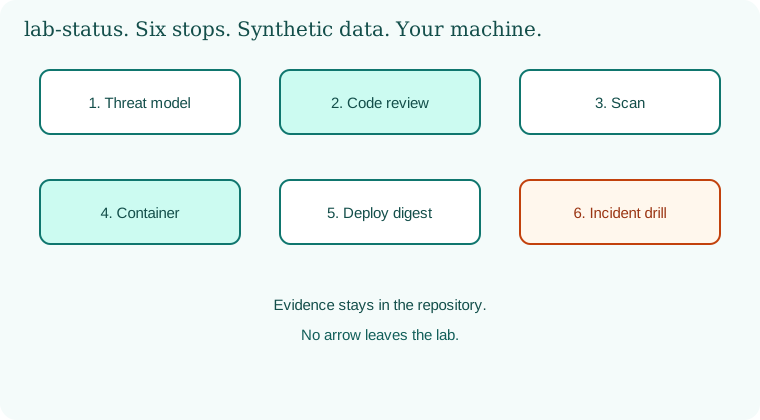
Six stops in a loop you can finish in a day: threat model, review, scan, container, deploy, and a drill. The repository holds the evidence. The arrow does not leave the lab.
38.6 A short animation.
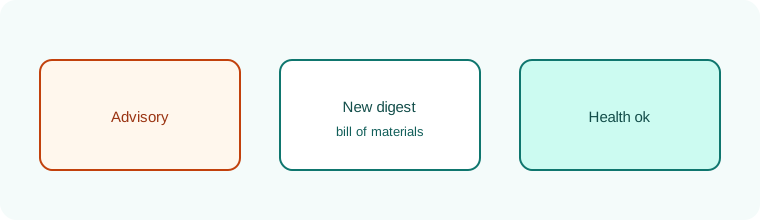
A small service pulses on localhost. An advisory bell rings. The digest label changes. Health returns. The bell rests.
38.7 Conclusion.
Raju's repository was small enough to read before tea. It still had a threat page, a digest, and a drill note with a start time and a stop time. Guru-ji did not ask for a bigger system. "You can walk the road. In Chapter 39 you will practice saying so aloud, in the kind of questions a hiring conversation actually uses, without pretending this course hands you a certificate."
- One toy service is enough if the six stops are real.
- Synthetic data and a localhost bind are features, not limits to sneak past.
- The drill is inventory, rebuild, and a written result. It is not an exploit demonstration.
- Log4Shell, disclosed 10 December 2021, is the public picture of why a bill of materials is part of shipping.
- Own lab only.
END OF CHAPTER 38 MASTER CLASS
| Control | Proof |
|---|---|
| SBOM | File stored with each release |
| Signed image | Signature verified at deploy |
| Alerts | Test event fired and was seen |