Chapter 36: Advanced Troubleshooting and Failure Analysis
36.1 Why.
Welcome to Chapter 36.
I am Ravindra Bagale.
Raju had no engineering degree. He had three terminals open and three theories. The pipeline was red. A cloud role was denying a call. The lab service was restarting. He wanted to fix all three at once so the afternoon would feel heroic.
Guru-ji closed two of the terminals. "A failure that crosses a pipeline, a cloud account, and a running process is still one story, or it is three stories glued together by panic. You earn the right to a second cause only after the first cause fails a test. Change one thing. Watch one signal. Write down what you believed before you looked."
Raju said the users would be angry. Guru-ji agreed, and still refused the scramble. "Suppose we are Netflix and a stream stutters after a config push. Suppose we are Swiggy or Zomato and a status page lies during dinner. Suppose we are Paytm, PayFast, or BHIM UPI and a checkout sits on a spinner. Suppose we are Amazon and a deploy in one account cannot read a bucket it read yesterday. Suppose we are WhatsApp and media uploads time out after a certificate change. Suppose we are Infosys and a client asks why the last change failed. In every case the first deliverable is a timeline, not a guess. Heroic typing creates a second incident on top of the first, and then nobody can tell them apart."
Chapter 23 taught response, evidence, and recovery. Chapter 27 taught error budgets and rollback as a habit. This chapter is the craft in the middle: how you think when the symptom is real and the cause is still a rumor. You will practice on a lab you own. You will not poke production that belongs to someone else in order to feel thorough.
Failures teach the most
Hard problems in security often look like normal outages first. Calm, step-by-step analysis finds the real cause.
CrowdStrike, July 2024
On 19 July 2024 a faulty CrowdStrike Falcon content update crashed about 8.5 million Windows machines, by Microsoft's estimate. Airlines, banks and hospitals were hit. The cause was a bad update, not an attack.
AWS us-east-1, 2017
On 28 February 2017 a mistyped command during S3 debugging removed more servers than intended, and S3 in us-east-1 was down for hours. AWS then added safeguards on how fast capacity can be removed.
36.2 What.
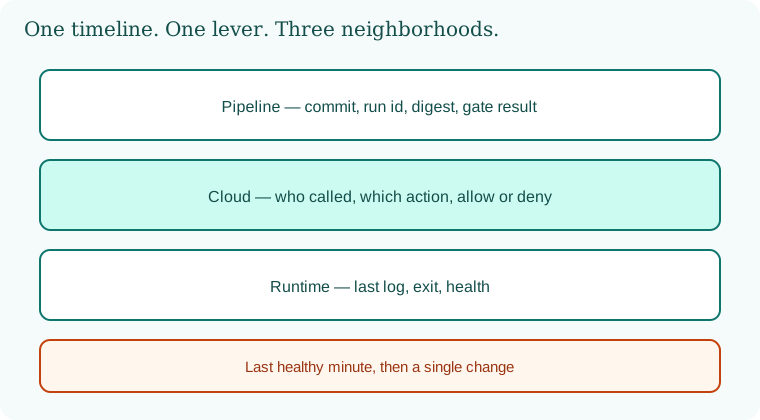
One timeline, three neighborhoods. Draw the path a change actually walks. A human merges. A pipeline builds, tests, scans, and signs. A cloud account receives a new task, function, or virtual machine. A runtime process serves a request and writes a log. A user sees a symptom. When something breaks, mark the last moment you can prove was healthy, and the first moment you can prove was not. Everything you "feel" happened in between is a hypothesis until a log, a deploy id, or a metric says otherwise. Pipeline, cloud, and runtime are neighborhoods on that timeline. They are not three unrelated wars. A bad artifact built at noon explains a crash at ten past. A cloud deny explains an empty response that the process logged as a timeout. A runtime limit explains a pipeline that is actually fine and a dashboard that is not.
Beliefs you write down. Before you change anything, write the symptom in one sentence a stranger could test. "Lab status returns an error for every request after deploy 18." Write what you believe is true, and what evidence would kill that belief. "I believe the new image is the cause. A rollback to image 17, with nothing else changed, should restore the old behavior if I am right." If you change the image, the database flag, and the feature toggle together, you have learned nothing even if the symptom leaves. You will meet it again on a Saturday and you will not know which lever worked. Advanced troubleshooting is not a larger pile of tools. It is the discipline of a single lever.
The pipeline neighborhood. Read the run from the top, not from the angry red line only. Note the commit, the workflow name, the runner identity, and whether the run used a pull-request identity or a protected deploy identity. A red scan gate is not the same failure as a green scan and a failed deploy. A failed unit test is not the same as a failed signature step. Preserve the log of the run before you rerun. Reruns can hide a flake, and they can also hide a secret that was present once and is now rotated. If a step is allowed to run with a broad cloud role, say so on the timeline. Chapter 11 and Chapter 13 already told you why that role should be narrow. Here you use that fact as a question: did this run have more power than the design, and did it use it.
Common pipeline shapes, described as symptoms, not as attacks. A dependency download fails because a lockfile and a registry disagree. A test fails only in the runner because a clock or a fixture differs from a laptop. A signing step fails because the key identity expired. A deploy step fails because the cloud call was denied. Do not "fix" a deny by granting a larger role in the heat of the page. Record the deny, decide the smallest permission the design already named, and apply that in the lab. A green pipeline that deployed the wrong commit is a failure too. Compare the digest that was signed with the digest the runtime pulled. If they differ, your story is substitution or drift, and Chapter 32's reconciliation idea belongs on the timeline.
The cloud neighborhood. When a call is denied, read the deny. The useful fields are who called, which action, which resource, and which statement matched. A missing log is itself a finding: you cannot troubleshoot an identity you do not record. Quotas and region mistakes look like application bugs if you only watch the process. A function in the wrong region timing out toward a database is not a code defect until you prove the network path. Drift belongs here. Someone changed a security group or a policy in a console, and the repository still tells yesterday's story. The troubleshooting move is to diff the live shape against the reviewed shape, in an account you own, and to treat the difference as the prime suspect until it is explained. Do not "click around production" that is not yours. In your lab, export the policy and the last change record, and attach both to the timeline.
Configuration scope is a frequent liar. A setting you thought applied to one bucket applied to the account. A variable you set on a laptop was not the variable the task received. Write the actual environment the cloud control plane reports, not the environment you intended in the pull request. Intent is a hypothesis. The control plane's description is evidence.
The runtime neighborhood. A process that restarts has a last log line and an exit reason. Read both before you add a new log line and redeploy. Saturation looks like slowness and then like errors. A limit on memory, file descriptors, or concurrent calls will produce a pile of different client symptoms from one cause. Latency budgets from Chapter 27 help: if the user-facing error starts exactly when a dependency's time exceeds the budget, suspect the dependency and the budget together, not a random function in the middle. Authentication failures are a timeline of their own. A certificate that expired at a known minute, a token audience that does not match the service, a clock skew. Check time. A surprising number of "security incidents" in lab notebooks are clocks.
Crash loops invite a bad habit: raising the limit until the loop stops, without reading why the process died. Sometimes the kind move is to raise a limit. Often the kind move is to notice a leak, a bad configuration value, or a probe that kills a slow-but-healthy process. Change one of those, not all.
Correlation without superstition. Put pipeline events, cloud audit events, and runtime logs on one clock. If your lab has no fancy trace product, a spreadsheet with three columns and synchronized timestamps is enough. Look for a change that precedes the symptom by a short gap and touches the same request path. Distrust changes that are nearby in time but touch a different service. Dinner-rush traffic at a Swiggy-shaped or Zomato-shaped lab fake can coincide with a bad deploy and still not be the cause. You test by repeating the deploy against quiet synthetic traffic, or by holding the deploy and replaying the traffic shape, whichever your lab can do safely. You do not generate load against a company.
Five questions, not a courtroom. Ask what changed, what you expected, what you observed, what would disprove your favorite cause, and what you will restore if the next lever is wrong. Stop at the first answer that predicts a new fact you then observe. A root-cause essay that names five contributing factors is fine after the service is stable. During the page it is a way to avoid choosing a lever. Blameless language from Chapter 2 still applies. You are looking for the missing control and the missing test, not for a person to scold. Afterward, one new test belongs in the pipeline or in a lab drill so this exact surprise has to work harder next time.
A teaching sample: a lab timeline. Invented, on a service you run yourself.
14:00 UTC+5:30  pipeline run 18 built image digest aaa on commit abc
14:04 UTC+5:30  cloud audit: lab role deployed digest aaa
14:05 UTC+5:30  runtime: process started, then exited, last line "config flag missing"
14:06 UTC+5:30  users of the lab client see errors
belief: commit abc dropped a required flag
test: roll back to digest bbb only; do not edit the role
result: errors stop; belief holds; add a pipeline check for the flag
The times are in the zone you live in when you write the page, labeled so a teammate does not mix them up. The test touched one variable. The follow-up is a guard, not a longer chat.
What you do not do while troubleshooting. You do not turn off audit logs to "reduce noise" on a system that may have been changed by someone you did not expect. You do not paste live tokens into a ticket. You do not open a broad role because a deny is embarrassing. You do not SSH, in this course's lab or anywhere else, into a host you do not own. You do not run a scanner at a company named in a status page because their outage inspired you. You may read their public postmortem. You may imitate the thinking on your own breakable toys.
Ravindra Bagale's Tip
The timeline is the tool. If you cannot point to the last healthy minute, you are still guessing, however many dashboards you have open.
Practice task
In a lab you own, break one thing on purpose: remove a config flag, or deploy a digest that fails its health check. Write a six-line timeline. Restore with one lever. Add one guard. Do not practice on Amazon, Netflix, Paytm, or any network that is not yours.
36.3 How.
- Create a lab application you can break and restore without affecting anyone else.
- Write the symptom you will cause, in one sentence, before you cause it.
- Note the last known healthy deploy id and the time, with the zone written beside the clock.
- Make one breaking change through the pipeline, not by hand on a running host.
- Capture the pipeline log, the cloud change record, and the runtime log before you fix anything.
- Put those three records on one timeline sorted by time.
- Write your belief and the single lever that would disprove it.
- Apply that lever alone. Do not "clean up" unrelated settings in the same minute.
- Record whether the symptom left, stayed, or changed shape.
- If it stayed, revert the lever so the lab is back to the broken baseline, and write a new belief.
- Repeat until one lever predicts the result you observe.
- Only then look for a second contributing factor, and mark it as secondary.
- Add one guard: a test, a policy check, or a health check that would have failed the bad change.
- Redact secrets from the notes. Keep actor, action, object, and result.
- Write five lines: what changed, what you expected, what you saw, what disproved the loser theories, what you restored.
- Practice a rollback that returns the previous digest without editing the live process by hand.
- Practice a cloud deny you caused with a too-small role, and fix it by granting the designed action only.
- Practice a restart loop caused by a missing flag, and fix the flag rather than raising memory until the loop hides.
- Schedule a second person to read the timeline and say where they would have pulled a different lever.
- File the timeline next to the Chapter 35 one-page review if this failure should change the plan.
- Turn the guard into something the pipeline runs without you remembering.
- Stop the lab and confirm you left no broad role behind "just for debugging."
- Read one public postmortem from a vendor and rewrite it as a timeline of beliefs and levers, without copying any dangerous detail.
- Say aloud, in one minute, the cause, the evidence, and the guard.
- Stop. Do not attach your troubleshooting to Swiggy, Paytm, Amazon, BHIM UPI, WhatsApp, Zomato, Netflix, Infosys, PayFast, or any system outside the lab.
A troubleshooting method
- Write down the symptom and the exact start time.
- Ask: what changed just before? (deploy, config, certificate, update).
- Check one layer at a time: DNS, network, TLS, app, data.
- Form one hypothesis, test it, record the result.
- Roll back first if users are hurt; investigate after.
- Write a blameless review with fixes.
| Symptom | Check first |
|---|---|
| Sudden 403s | WAF or auth rule change |
| TLS errors | Certificate expiry or chain |
| Mass crashes after update | Staged rollout, rollback |
| Slow everything | DNS and dependencies |
36.4 A real public incident.
Name. Cloudflare outage of 2 July 2019.
Date. On 2 July 2019, Cloudflare reported a global outage starting at 13:42 UTC. The company said a global halt of the component responsible restored traffic at 14:09 UTC. A detailed public account followed on 12 July 2019.
Source. Cloudflare's posts "Cloudflare outage caused by bad software deploy," 2 July 2019, and "Details of the Cloudflare outage on July 2, 2019," 12 July 2019. This chapter uses those public accounts. It does not repeat the rule text that caused the CPU spike.
What happened. Cloudflare said a routine deployment of a new managed firewall rule, intended to run in a mode that would log rather than block, contained a regular expression that drove CPU to exhaustion on machines serving traffic worldwide. Visitors saw gateway errors. The company said traffic dropped sharply at the worst point, that the rule had gone out globally rather than in stages, and that tests had not caught the CPU cost. The public write-up describes engineers correlating alerts, live process data, and logs until the firewall component was the agreed cause, then using a prepared kill switch for that component, then rolling back the specific rule and turning the component back on. The lesson for you is the shape of the work. One change. A global blast radius. A signal, CPU, that explained many user-facing errors. A single lever, stopping that component, that restored service before the story was fully polished. A later guard: staged rollout and a test that notices a rule is expensive before the world receives it. None of that requires you to build a harmful expression. Your lab version is a small config change you can stage to one instance first.
How to stop.
- Name the symptom and the clock. Separate "users see errors" from "CPU is saturated" and see which one you can prove.
- Stop the rollout if a rollout is still proceeding. Do not push a second change on top.
- Use the smallest prepared kill switch that removes the suspect component or rule, on systems you operate.
- Watch the one signal you blame. If it recovers when the lever moves, keep that story. If it does not, revert the lever and look again.
- Preserve the change record and the logs before debate erases them.
How to prevent it again.
- Stage security-rule and config changes the way you stage application changes: one slice, then more.
- Put a performance check beside a correctness check for any rule that runs on the request path.
- Keep a kill switch you have actually used in a lab, so the first use is not during a fright.
- Write the timeline the same day, while the clocks are still honest.
- Add the missing test to the pipeline so memory of the meeting is not the only control.
- Practice on a lab proxy or a lab filter you own. Do not aim load or experiments at a network that is not yours.
This is for learning only, and only inside a system you are allowed to test.
36.5 A simple picture.
A symptom arrives at the user. You walk backward through runtime, cloud, and pipeline until you find the last healthy proof and the first broken proof. One lever moves. The timeline records what happened.
36.6 A short animation.
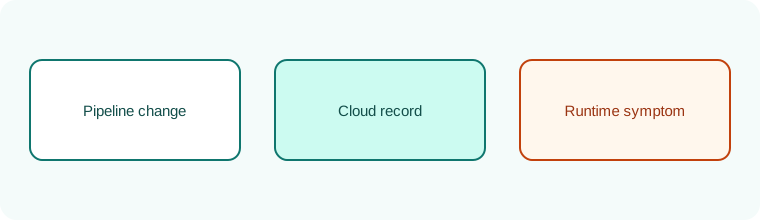
Three lanes sit still. A single change lights up in the pipeline lane, then the cloud lane, then the runtime lane. The other theories stay dim. One change, one path.
36.7 Conclusion.
Raju's two extra terminals stayed closed until the first lever worked. The missing flag was dull. The timeline was not. Guru-ji tapped the page. "Dull and true will do. In Chapter 37 we stop collecting tools the way tourists collect magnets. You will name the control you need, pick a category that serves it, and practice throwing a tool away without throwing the control away."
- Write the last healthy minute before you write a theory.
- Pipeline, cloud, and runtime are lanes on one timeline.
- Move one lever. If the symptom does not answer, put the lever back.
- A guard in the pipeline is the end of the analysis, not a longer argument.
- Cloudflare's 2 July 2019 outage shows a global rule change, a CPU signal, and a kill switch.
- Own lab only.
END OF CHAPTER 36 MASTER CLASS
| Lesson | Case |
|---|---|
| Stage every update | CrowdStrike 2024 |
| Guard dangerous commands | AWS S3 2017 |
| Kill switch for rules | Cloudflare 2019 |