Chapter 4: Web Application Security and OWASP Top 10:2025
4.1 Why.
Welcome to Chapter 4.
I am Ravindra Bagale.
Guru-ji led Raju down from the high table into a quieter room of the Magical Code Library. Ten cards stood in a row. They were not magic. They were the ten risks people keep shipping.
"In Chapter 3 we drew the castle," Guru-ji said. "A drawing does not stop a bad request. The handler does. Every line you write either checks the order or trusts the phone."
Raju touched the first card. "Are these the old ten names from the 2021 list?"
"Some names moved," Guru-ji said. "The Open Web Application Security Project published the Top 10:2025. Broken access control is still first. Misconfiguration rose. Supply chain has its own card. A new card says: when the program is surprised, it must fail closed. We will use the code from my earlier library chapter. We will hang that code on the 2025 names, not on the old order."
Raju had no engineering degree. He had ordered dinner on Swiggy, paid a bill on Paytm, and sent money with BHIM UPI. He knew what a wrong screen felt like. He did not yet know which risk had which name.
Suppose we are Netflix and a title page shows another household's watch history. That is access control. Suppose we are Amazon and a debug page is still on during a sale. That is misconfiguration. Suppose we are Infosys on a client project and a library in the build is years old. That is the supply chain. Suppose we are Zomato and a coupon field is pasted into a query. That is injection. Suppose we are WhatsApp and a web companion stores a session cookie that a script can read. That is a cookie flag, and it sits with misconfiguration and with authentication. Suppose we are PayFast and the phone picks the fee. That is insecure design, and Chapter 3 already forbade it.
The Top 10 is an awareness list. It is not a license to test a company you do not own. Scanners, PCI-DSS, SOC 2, and ISO 27001 use this family of risks as a shared language. You learn the language so a pipeline can say no.
Why the OWASP list keeps mattering
The OWASP Top 10 is built from real data about bugs found in real apps. The same classes return every edition because new code keeps making the same mistakes.
MOVEit Transfer 2023
A SQL injection flaw (CVE-2023-34362) in Progress MOVEit Transfer was used by the Cl0p group in mid-2023 to steal data from hundreds of organisations. Injection is an old OWASP item, and it still caused one of the biggest breaches of 2023.
British Airways 2018
Attackers changed a JavaScript file on the BA website to skim card details. This is the kind of risk OWASP groups under software and data integrity failures.
4.2 What.
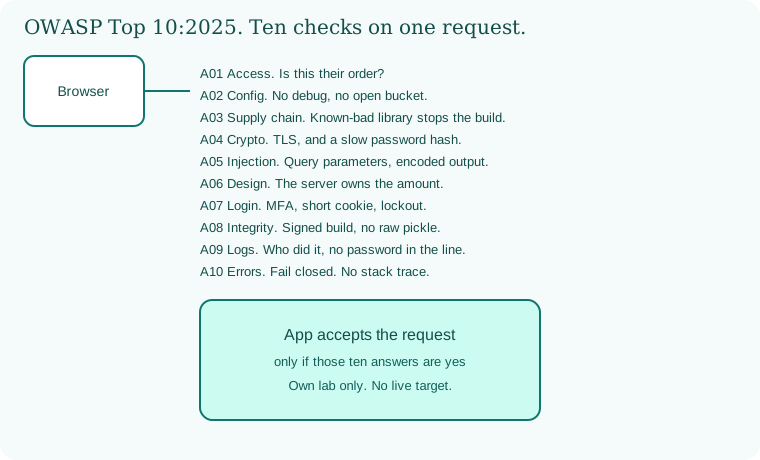
The Open Web Application Security Project, OWASP, is a non-profit. The Top 10 is a consensus list of the most serious web application risks. The 2025 list, in order, is the one this chapter teaches.
- A01 Broken Access Control.
- A02 Security Misconfiguration.
- A03 Software Supply Chain Failures.
- A04 Cryptographic Failures.
- A05 Injection.
- A06 Insecure Design.
- A07 Authentication Failures.
- A08 Software or Data Integrity Failures.
- A09 Security Logging and Alerting Failures.
- A10 Mishandling of Exceptional Conditions.
Three habits sit under all ten. Defense in depth: check at the edge, check in the handler, and constrain the database. Fail securely: an error closes the door. Never trust external input: body, query, header, cookie, webhook, and environment values are untrusted until checked.
A note on the older list. In 2021, cryptographic failures were A02, injection was A03, and server-side request forgery was its own A10. In 2025, SSRF is part of broken access control. Vulnerable components grew into software supply chain failures. The new A10 is mishandling of exceptional conditions. The code below is the same defensive code. The labels are the 2025 labels.
A01 Broken Access Control. The user must not act outside their rights. They must not read another person's order, call an admin function, or walk the server to a file or an address they chose. Common shapes have names: insecure direct object reference, missing function-level checks, path traversal, cross-site request forgery, open redirect, and server-side request forgery. You will learn the names and the stops. You will not learn a recipe.
Insecure direct object reference means the id in the URL is obeyed with no owner check. This is the vulnerable shape, then the fix, from the library chapter.
// BAD: the id in the URL is fetched with no owner check
app.get("/api/document/:id", async (req, res) => {
  const doc = await DB.findDoc(req.params.id);
  res.json(doc);
});
// GOOD: the document must belong to the authenticated user
app.get("/api/document/:id", async (req, res) => {
  const user = req.user; // set by auth middleware
  const doc = await DB.findDoc(req.params.id);
  if (!doc || doc.ownerId !== user.id) {
    return res.status(403).json({ error: "Forbidden" });
  }
  res.json(doc);
});
Read both. The bad handler believes the URL. The good handler believes the session, then compares ownerId. A missing document and a document you do not own look the same to the client. You do not tell a stranger "that id exists, but not for you" if you can avoid it. Forbidden is enough.
The same shape guards a Swiggy order, a Paytm bill, an Amazon return, and a Zomato address. The noun changes. The check does not.
Path traversal is a file name that tries to walk out of the folder you meant. The stop is: take the base name only, allow only the extensions you chose, and store uploads outside the public web root. Do not open a path the client assembled.
Open redirect is a "next" URL that sends the browser to a site you do not operate. The stop is an allowlist of your own paths. If the value is not on the list, send the user home.
Cross-site request forgery, CSRF, is another site tricking the browser into sending your cookie. The stops are SameSite on the cookie, and a token for state-changing requests that the other site cannot read. We do not walk through a forged form.
Server-side request forgery, SSRF, is the server fetching a URL the user supplied. In 2025 this sits under broken access control. The server has a network position the user does not. If it will fetch anything, the user can ask it to look at places only the server should see. The stop is an allowlist of hosts you meant, and a refusal of internal addresses. Here is the library function. Use it only in a lab you own. The allowlist is the real control. A blocklist of a few addresses is a spare lock, and it is not enough, because names can point at new addresses.
import socket
import urllib.parse

ALLOWED_DOMAINS = ["cdn.example.com", "images.example.com"]

def validate_url(url):
    parsed = urllib.parse.urlparse(url)
    # 1. Enforce a domain allowlist
    if parsed.hostname not in ALLOWED_DOMAINS:
        raise ValueError("Domain not allowed")
    # 2. Refuse a few internal shapes. This list is not complete.
    ip = socket.gethostbyname(parsed.hostname)
    if ip.startswith("127.") or ip.startswith("10.") or ip == "169.254.169.254":
        raise ValueError("Access to an internal address is forbidden")
    return True
Do not point this lesson at a cloud account, a bank, or a metadata service you do not own. The Capital One story in Chapter 3 is why the allowlist exists. This chapter does not repeat those steps.
A02 Security Misconfiguration. The program is insecure because a switch was left on the factory setting. Debug pages. Default passwords. A bucket that is public. A CORS header of * on an API that uses cookies. A framework banner that names the exact version. Verbose errors. XML parsers that still load outside entities. Cookies that are missing Secure or HttpOnly.
CORS is the browser rule for "may this other origin read the response?" If you reflect any origin and allow credentials, you have handed your API to other websites. Allow a list of origins you operate. Do not copy the request's origin into the allow header.
Clickjacking is a transparent frame over your button. The stop is a frame policy: X-Frame-Options or the CSP frame-ancestors directive. A user of your lab app should not be clickable from a stranger's page.
Security headers are cheap and specific. Content-Security-Policy limits where scripts may load. Strict-Transport-Security tells the browser to stay on HTTPS. X-Content-Type-Options stops a browser from guessing a file type. These are not decorations. They are the second lock when a bug slips through.
Here is the library's Express hardening. Helmet sets a family of those headers and hides the X-Powered-By banner.
const express = require("express");
const helmet = require("helmet"); // sets secure HTTP headers
const app = express();
// Hides the Express banner and sets CSP, HSTS,
// X-Frame-Options, and X-Content-Type-Options.
app.use(helmet());
XXE, an XML external entity, is a parser feature that can be turned into a file or network read. The stop is configuration: disable external entities and doctype loading in the parser you ship. Do not build a sample document that tries it. Know the name, close the feature, and move on.
A03 Software Supply Chain Failures. Your app is mostly other people's code. npm, PyPI, Maven, and NuGet are the warehouses. A known-bad version in that warehouse becomes your bug the day you build. This risk used to be "vulnerable and outdated components." In 2025 the name is wider. It includes the package, the build, and the path from source to artifact.
Software composition analysis, SCA, flags known vulnerabilities in dependencies during the build. A software bill of materials, an SBOM, is the inventory: names, versions, and licenses, in a format such as CycloneDX or SPDX. Dependabot or Renovate can open the update. You still review it. A scanner that nobody reads is a poster.
The library's pipeline step uses Trivy. It fails the job on critical or high findings that have a fix. The sample pins the idea, and you should pin the action's version in a real repo instead of tracking a moving branch.
# Example CI check: scan dependencies with Trivy
- name: Scan repository dependencies
  uses: aquasecurity/trivy-action@master
  with:
    scan-type: "fs"
    ignore-unfixed: true
    severity: "CRITICAL,HIGH"
    exit-code: "1" # fail the pipeline on critical or high findings that are fixed upstream
A private package feed, a lockfile, and a review of new maintainers belong here too. Chapter 6 covers the Git side of the same risk. Chapter 4's rule is: the build stops when the warehouse is on fire.
A04 Cryptographic Failures. This used to be called sensitive data exposure. The failure is the crypto, or the lack of it. Cleartext on the wire. Passwords stored with MD5 or a raw SHA-1. A hard-coded key in Git. An old cipher you would not wish on a friend. A card number in a log.
The rule from the library: TLS 1.2 or newer on the wire, and prefer TLS 1.3. AES-256-GCM, or the library default that means the same, for data at rest. Never invent a cipher. Use a library that has been reviewed.
Passwords are not encrypted so you can decrypt them later. They are hashed with a slow hash. The library uses Argon2id. The password in the sample is fake. Do not reuse it anywhere.
from argon2 import PasswordHasher

ph = PasswordHasher()
# Hash a password. This string is a classroom fake.
hashed_password = ph.hash("UserSuperSecretPassword123!")
try:
    ph.verify(hashed_password, "UserSuperSecretPassword123!")
    print("Authentication successful")
except Exception:
    print("Invalid credentials")
bcrypt is the other acceptable slow hash named in the library checklist. A bare SHA-256 of the password is not. A key that ships in the repo is not a key. It is a publish.
A05 Injection. Injection means untrusted text is glued into a command the interpreter will run. SQL, a shell, LDAP, a template, a NoSQL query, and HTML are all interpreters. The fix is the same shape. Keep data and command apart. Pass data as a parameter. Encode data on the way out to a browser.
The library's SQL pair is the one to memorize. The bad query builds a string. The good query uses placeholders. A real login does not compare the raw password in SQL. It fetches the hash and checks it with Argon2, as in A04. The point of this pair is the placeholder.
# BAD: string concatenation
query = (
    "SELECT * FROM users WHERE "
    "username = '" + user_input + "' AND "
    "password = '" + pass_input + "'"
)
cursor.execute(query)
# GOOD: a parameterized query
query = (
    "SELECT * FROM users WHERE "
    "username = %s AND password = %s"
)
cursor.execute(query, (user_input, pass_input))
Cross-site scripting, XSS, is injection into HTML or JavaScript. Reflected XSS comes back in the same response. Stored XSS waits in the database and hits the next reader. DOM XSS is the browser script copying untrusted text into a dangerous sink. The stop is encoding for the context. HTML text is not the same as an attribute, and neither is a URL. The library shows a template that escapes, beside one that does not.
<!-- BAD: raw HTML -->
<div>Welcome {{{ user_comment }}}</div>
<!-- GOOD: the engine encodes the comment as text -->
<div>Welcome {{ user_comment }}</div>
A Content-Security-Policy that blocks inline scripts is the second layer. Encoding is still the first.
OS command injection is user text inside a shell string. The stop is to call the program with an argument list, not a shell. LDAP and NoSQL follow the SQL lesson: use the driver's parameter API. Template injection is a template engine that evaluates user text as a template. The stop is to never pass user text as the template source. Pass it as data.
A06 Insecure Design. This risk exists before the code is pretty. A perfect implementation of a bad rule is still a bad rule. Unlimited password guesses. A reset link that never dies. A fee the browser chooses. A refund with no ceiling. Chapter 3 is the workshop for this card. Threat modeling, abuse cases, and a server-side amount are the design controls. No code review can save a rule that says "trust the phone."
Rate limits belong in the design, not as a patch you remember later. So does replay protection. So does the question "what is the worst honest customer, and what is the worst bot?"
A07 Authentication Failures. The 2021 name was longer: identification and authentication failures. The 2025 name is shorter. The work is the same. Prove who is calling. Keep the session. Do not let a stolen password database become a login festival.
Stops the library names: multi-factor authentication on important accounts. A password check against a breach list such as the Have I Been Pwned API, from the server, not from the browser. A slow hash, already shown. A lockout or a delay that does not tell an attacker which usernames exist. Session cookies with HttpOnly, Secure, and SameSite=Strict. A short life.
app.use(session({
  name: "__Host-sess", // name prefix that expects HTTPS and a root path
  secret: process.env.SESSION_SECRET,
  resave: false,
  saveUninitialized: false,
  cookie: {
    secure: true,       // send only over HTTPS
    httpOnly: true,     // browser JavaScript cannot read it
    sameSite: "strict", // not sent on a cross-site request
    maxAge: 1800000     // 30 minutes
  }
}));
The secret comes from the environment, which in a real deploy is a secrets store, not a committed file. __Host- is a cookie-name prefix with strict browser rules. Use it when the whole site is HTTPS.
WhatsApp, Paytm, BHIM UPI, Netflix, and Amazon all live or die on this card for their account screens. Your lab app is the only one you configure in this course.
A08 Software or Data Integrity Failures. The bytes you run must be the bytes you meant. That includes plugins, a CDN script, a container image, a CI job, and objects you deserialize.
Deserialization turns bytes back into objects. Some libraries will run code as part of that turn. Python's pickle is one of them. Do not point it at data you do not trust. JSON, parsed as data, does not turn into a function call by itself. Here is the library pair.
# BAD: pickle will run whatever is inside untrusted bytes
import pickle
user_data = pickle.loads(untrusted_network_input)

# GOOD: JSON is data, not a code loader
import json
user_data = json.loads(untrusted_network_input)
json.loads is not a magic shield against every bug. It will not check types for you. It will not make a bad design good. It will not execute a pickle payload. That is the point of the pair.
Integrity of the build is the other half. A pipeline that pulls an unsigned script from the internet at deploy time is hoping. Pin versions. Prefer a signed artifact. Check the checksum you recorded. Chapter 6 adds signed commits. This card is why.
A09 Security Logging and Alerting Failures. The 2025 name adds alerting. A log that nobody watches is a diary in a locked drawer during a fire. You need the line, and you need a person or a rule that acts.
Log the login failure, the access denial, the amount mismatch, and the admin action. Include the user id, the object id, and the time. Do not include the password, the card, the cookie, or the full token. A raw newline in user text can forge a second log line. The library strips those characters.
// BAD: raw user text can break the line
logger.info("Failed login attempt for user: " + username);

// GOOD: strip carriage returns and newlines, then use a placeholder
const sanitizedUser = username.replace(/[\r\n]/g, "_");
logger.info("Failed login attempt for user: %s", sanitizedUser);
Alert on the payment amount mismatch from Chapter 3. Alert on a burst of denied access. Send the alert to a channel a human owns. Dwell time, the gap between break-in and discovery, shrinks when the alert exists. The library mentions a SIEM, a security information and event management system, as the place logs go in a large company. A small lab can start with the log line and one alert.
A10 Mishandling of Exceptional Conditions. This card is new in 2025. It is what the program does when life is not the happy path. A missing field. An extra field. A null. A divide by zero. A library that throws. A timeout. A catch that swallows the error and continues as if the check passed.
Fail closed. If you cannot decide, deny. If the charge call throws, the order is not paid. If the owner lookup throws, the answer is not "show the document." A stack trace is sensitive. It belongs in the server log, not in the JSON the browser shows. The library's error handler is the pattern.
// Production: a short message, no stack in the response
app.use((err, req, res, next) => {
  console.error(err); // server log, not the client
  res.status(500).json({ error: "An internal server error occurred." });
});
Do not catch a broad exception and then return the object anyway. That is failing open. Do not use a missing check as a yes. A switch needs a default that denies. A parser that receives extra fields should ignore them or reject them, not copy them onto an admin flag. That last bug is sometimes called mass assignment. It is also an access-control bug. Two cards can be true.
Cookies, sessions, and the browser. A session id is a capability. Whoever holds it is the user, until it expires. HttpOnly keeps it out of page scripts. Secure keeps it off plain HTTP. SameSite cuts down CSRF. A short maxAge limits a stolen cookie. Regenerate the session id on login so a pre-login id cannot be fixed by an attacker. That last idea is called session fixation. The stop is to issue a new id after the password succeeds.
File upload. Allow a small set of types. Limit the size. Generate the stored name yourself. Do not use the client's path. Do not serve the upload from a place that executes scripts. Scan if your lab has a scanner. The business rule still applies: an upload is not a command.
Business logic. A01 through A10 can all be green while the coupon still applies twice. Put the rule in the server. Test the rule. The Top 10 is not a substitute for the product rule. It is the language around it.
OWASP ASVS. The Application Security Verification Standard is a catalog of checks, deeper than the Top 10. It has levels. Level 1 is a baseline. Higher levels ask for more evidence. You do not memorize every line tonight. You learn that "we follow OWASP" should name a level and a control, not a mood. A pull request can say "ASVS: the object check is on the server." That sentence is enough for this chapter.
DAST and header checks. Dynamic application security testing, DAST, talks to a running app from the outside. OWASP ZAP is the usual open tool. Interactive testing, IAST, watches from inside during tests. Static testing, SAST, reads source. You met SCA above. In this chapter the lab check is humble: in your own app, on your own machine, request the headers and fail the pipeline if the frame policy or the content security policy is missing. You may also run ZAP's baseline against 127.0.0.1 only. You may not aim it at Paytm, Swiggy, Amazon, Netflix, or any host you do not own.
The developer's ten-line checklist. Before you approve a pull request:
- Input is allowlisted before use.
- Output is encoded for the context, so XSS has no raw HTML.
- Every query is parameterized.
- Every object check is on the server.
- Passwords use Argon2id or bcrypt.
- No API key, database password, or private key is in Git.
- Cookies are
HttpOnly,Secure, andSameSite=Strictwhere the product allows it. - Dependencies are scanned, and open critical issues block the build.
- Logs are sanitized, and passwords and card values are masked.
- Remote fetches are allowlisted, and internal addresses are refused.
Ravindra Bagale's Tip
Students recite A01 to A10 and cannot say where the owner check lives. The name is not the control. Open the handler. Point at the line. If the line is missing, the card is red.
Practice task
In your own lab notes, map one feature of a shop you are allowed to build. Write the ten 2025 names down the page. Beside each, one sentence: either "not in this feature" or the control you will write. No request aimed at a real company.
4.3 How.
- Write "OWASP Top 10:2025" at the top of the page and list the ten names from Part 2 in that order.
- State the three habits: defense in depth, fail closed, and untrusted input.
- For the document or order route, add the owner check from the good JavaScript sample, and return 403 when the owner does not match.
- For a file feature, store the base name only, allow two extensions you chose, and keep the file outside the public root.
- For any redirect, allow only paths on your own site.
- For any server-side fetch, copy the allowlist function and replace the example hosts with hosts you operate in the lab.
- Add Helmet, or set the same headers yourself: Content-Security-Policy, HSTS, X-Frame-Options, and X-Content-Type-Options.
- Set CORS to a list of origins you own, and do not reflect a random origin with credentials.
- Turn off XML external entities in any parser you enabled.
- Add the Trivy step, or another SCA tool, and pin the action version when you leave the classroom sample.
- Generate an SBOM in CycloneDX or SPDX on the build you keep.
- Serve the lab only over TLS, and hash passwords with Argon2id or bcrypt.
- Replace every concatenated SQL string with a parameterized query.
- Encode untrusted text in the template, and do not pass user text as template source.
- Call programs with an argument list, not a shell string, if you must call a program at all.
- Put the amount, the fee, and the refund ceiling in server rules, as in Chapter 3.
- Configure the session cookie with
HttpOnly,Secure,SameSite, and a 30-minute life, and read the secret from the environment. - Turn on multi-factor authentication for the lab admin account.
- Replace
pickle.loadson untrusted data withjson.loads, then validate the fields you expect. - Log denials and amount mismatches with placeholders, and strip newlines from user text in log lines.
- Add one alert you can see when a denial repeats.
- Add the production error handler that returns a short message and writes the stack only to the server log.
- On any exception in an authorization check, deny.
- Add a pipeline step that requests your lab app on 127.0.0.1 and fails if Content-Security-Policy or X-Frame-Options is absent.
- If you run OWASP ZAP, point it only at that local lab address.
- Do not test Paytm, Swiggy, Amazon, Netflix, WhatsApp, Zomato, BHIM UPI, Infosys, or any other system you do not own.
Fixing the classes, stack by stack
Pick the safe default that your framework already gives you, and do not turn it off.
Java / Spring Boot
Use JPA or prepared statements. Thymeleaf escapes output by default. Spring Security gives CSRF protection.
ASP.NET Core
Use EF Core or parameters. Razor encodes output. Anti-forgery tokens protect forms.
Node.js / Express
Use parameterised queries (pg, mysql2). Add helmet for headers. Never build SQL with string joins.
Python / Django / Flask
Django ORM and templates escape by default. In Flask, use SQLAlchemy and keep Jinja autoescape on.
PHP / Laravel
Eloquent and PDO bind values. Blade {{ }} escapes output.
| OWASP class | First fix |
|---|---|
| Broken access control | Check permission on the server for every request |
| Injection | Parameterised queries |
| Security misconfiguration | Hardened defaults, no debug in production |
| Vulnerable components | Dependency scanning in CI |
4.4 A real public incident.
Name. The Equifax breach.
Date. Equifax announced it on 7 September 2017. The company said unauthorized access ran from mid-May 2017 through July 2017. A 15 September 2017 statement narrowed that to 13 May 2017 through 30 July 2017. Equifax said it learned of the incident on 29 July 2017.
Source. Equifax's statement of 7 September 2017, filed with the U.S. Securities and Exchange Commission, and Equifax's follow-up statement of 15 September 2017. The company named Apache Struts CVE-2017-5638. The U.S. CERT notice for that vulnerability was public in March 2017.
What happened. Attackers used a flaw in Apache Struts on Equifax's online dispute portal. The flaw was already public. The portal was not patched in time. Equifax first said the incident potentially affected about 143 million U.S. consumers. It later updated the figure to about 145.5 million. The data included names, Social Security numbers, birth dates, addresses, and in some cases driver's license numbers. Credit card numbers for about 209,000 U.S. consumers were also accessed, along with dispute documents for about 182,000. This is A05, injection, in a framework, and it is A03, the supply chain, because a known-bad component stayed in production. It is also A09: the activity ran for weeks.
How to stop.
- Take the vulnerable application offline or block the route.
- Patch the framework before it comes back, which Equifax said it did for the affected application.
- Rotate credentials that may have been exposed.
- Bring in an outside forensic team and law enforcement.
- Tell the people who were affected, with a clear list of what was taken.
How to prevent it again.
- Inventory every framework and library, which is an SBOM, not a guess.
- Fail the build, or fail the deploy, when a critical known vulnerability has a patch you have not taken.
- Watch the vendor advisory the week it is published, not the quarter after.
- Log and alert on unusual queries and unusual outbound traffic from the app.
- Practice the patch on a lab copy you own. Do not hunt for this flaw on a company portal.
This is for learning only, and only inside a system you are allowed to test. This chapter does not describe how the Struts flaw is triggered.
4.5 A simple picture.
One request. Ten names. The app answers only when the checks you actually coded say yes.
4.6 A short animation.
The ten seals light in order. A01 first. A10 last. A bright seal is a name you can explain. A dim seal is homework.
4.7 Conclusion.
Raju stepped back from the ten cards. "They are not a spell list," he said. "They are the ways a handler gets careless. The owner check. The placeholder. The slow hash. The header. The log line. The closed door."
Guru-ji nodded. "You kept the code and you used the 2025 names. In Chapter 5 we will sit in the review chair and read a diff the way a careful teammate reads it. Same risks. Sharper eyes. Still your own lab."
- The 2025 order is access, misconfiguration, supply chain, crypto, injection, design, authentication, integrity, logging and alerting, and exceptional conditions.
- SSRF now sits with broken access control. The allowlist is the control.
- Parameterized queries, encoded output, Argon2id, Helmet, safe cookies, JSON instead of pickle, and a quiet error page are the code.
- Equifax, announced 7 September 2017, is the patched-too-late lesson.
- Your lab only.
END OF CHAPTER 4 MASTER CLASS
| Bug class | Real case | Lesson |
|---|---|---|
| Injection | MOVEit 2023 | Parameterise every query |
| Unpatched component | Equifax 2017 (Struts) | Patch fast, track versions |
| Script tampering | British Airways 2018 | Control and monitor third-party JS |