Chapter 21: Runtime Security and Cloud Workload Protection
21.1 Why.
Welcome to Chapter 21.
I am Ravindra Bagale.
Raju had no engineering degree. He had a green pipeline and a belief that a scanned image stays scanned. Guru-ji pointed at the running pod. "The image is a promise made at build time. Runtime is what the process actually does after the promise. A shell that was not in your Dockerfile, a miner that eats the CPU, a file that changes under the binary, a connection to a place the service never needed. Those happen while Netflix-shaped traffic still looks healthy and while the scanner stays quiet because the package list did not change."
Raju folded his arms. "Chapter 14 dropped capabilities. Chapter 15 wrote network policy. Chapter 18 narrowed the role."
"Those are walls," Guru-ji said. "This chapter is the watchman who notices when something climbs anyway. Suppose we are Swiggy and a menu container starts a program the image does not contain. Suppose we are Paytm and a payment worker opens a raw socket it never needed in test. Suppose we are Amazon and a cloud workload's role is read by a process that is not the application. Suppose we are Zomato or WhatsApp-shaped infrastructure and a cryptominer hides beside a real service so the bill grows before the page does. Suppose we are BHIM UPI or PayFast and you cannot tell, after an alert, which binary ran. Suppose we are Infosys and the client asks for runtime evidence, not a slide that says the cluster is secure. Suppose we are Netflix and an agent you deployed to protect the host takes the host down because the policy was reckless. Detection without a containment plan is a siren. Containment without evidence is a rumor."
Attacks happen while workloads run
Scans before release find known issues. Runtime security watches what actually happens in production.
Cryptomining in containers
Security vendors such as Aqua and Sysdig keep reporting attacks where exposed Docker APIs are used to start cryptomining containers. The miners show up as odd CPU use and network calls.
TeamTNT
The TeamTNT group, reported widely from 2020, stole cloud credentials from compromised containers and spread miners. Runtime alerts on unusual processes caught many of these.
21.2 What.
The runtime threat model. Draw the workload after it starts. Who can execute? What should it execute? Which files may change? Which addresses may it call? Which syscalls does the job need? What cloud role is attached, from Chapter 18? What happens if the process is not your process? Pre-deployment controls fail closed on known bad packages and known bad configs. Runtime controls watch behavior. They catch a new binary dropped after start, a shell in a container that should be distroless, a sudden outbound flood, a change to a binary that file integrity thought was stable. They do not replace patching. They sit beside it.
Process, file, network, and syscall telemetry. A process tree says who started whom. A payment worker that starts a shell is a sentence. A file event says a binary appeared in /tmp or a config changed outside a deploy. A network event says the pod called an address that is not your database and not your identity provider. A syscall event says the process asked the kernel for something the profile does not allow: a ptrace, a module load, a raw socket. You do not need every event forever. You need the events that prove the four questions. Sample the rest for cost. Chapter 8's auditd is the host cousin of this telemetry. The container runtime adds the container id so you can name the pod, not only the node.
eBPF, as a concept. Extended Berkeley Packet Filter lets a small program run in a safe way inside the kernel and report what processes, files, and sockets do, without a kernel module you compiled in a hurry. Many modern runtime sensors use it. You are not asked to write kernel code in this course. You are asked to know why the sensor can see a short-lived process that a once-a-minute cron would miss, and why a sensor that needs high privileges on the node must itself be locked down. The watcher is a workload. Give it a name, a version, and a least-privilege install. Do not curl a sensor from the internet onto a production node because a blog said the one-liner was fine.
Falco-style rules. Falco is a common open tool that matches kernel events to rules. The idea travels even if you use another product. A rule names a condition, an output that includes the pod and the command, and a priority. You write rules for your lab, not copies of every rule on the internet. Start with one: a shell spawned inside a container. Then a binary written and executed from a temp path. Then an outbound connection that is not on the allow list. Tune the ones that fire on your own health checks before you send them to a human.
A lab sketch, not a production policy:
# own lab only — alert, do not ship this as a silent block
- rule: Shell in lab container
  desc: A shell started in a container
  condition: spawned_process and container and proc.name in (bash, sh, zsh)
  output: shell in container user=%user.name cmd=%proc.cmdline
  priority: WARNING
Run a shell in a lab pod you own and confirm the line. Do not start shells in clusters you do not own. The rule detects. It does not teach a break-in. If your engine's syntax differs, keep the condition in a sentence and translate.
Drift and unexpected binaries. Drift means the running filesystem is no longer the image you signed. A read-only root filesystem, which Chapter 14 asked for, makes drift harder. Runtime still watches for the hole you left: an emptyDir, a writable temp, a debug sidecar. Allowlisting says these binaries may run and nothing else. The list comes from a normal hour of the service, reviewed by a human, not from "whatever ran yesterday" forever. A new version of your app changes the list on purpose, through the pipeline, with the image digest. An unknown miner does not.
Cryptomining and unexpected long-running processes. Miners burn CPU, open pools you did not approve, and often arrive beside a more serious theft so the noisy coin hides the quiet data read. Detection signals: a process not in the image, sustained CPU on a pod that should be idle, egress to an address absent from the allow list, a binary in a temp directory. Say those signals in a rule. Do not download a miner to "see if it works" on a cloud account you pay for with someone else's money, and do not mine anywhere. In a lab, a harmless CPU loop you wrote yourself is enough to test the alert. Name it lab-load, not a real miner.
File integrity and host intrusion detection. File integrity monitoring hashes the binaries and configs that should be stable and alerts when the hash moves outside a deploy window. Host intrusion detection watches the node: new users, new keys in authorized files, kernel modules, suspicious cron. Chapter 8 introduced auditd and integrity on one host. Here the host is the node under many pods. An alert without the image digest and the deploy time will blame the wrong change. Feed the sensor the release id.
EDR and cloud workload protection. Endpoint detection and response on laptops watches human devices. Cloud workload protection platforms watch servers, containers, and functions: vulnerability plus runtime plus identity context. A good platform joins "this pod ran a shell" to "this pod's role can read the payment bucket." That join is the priority. A shell in a sandbox with no role is a lab mess. A shell in a workload that can read customer data is a page-one incident. Do not buy the join and then turn off the identity feed to save a license tier. The join is the product.
Kubernetes runtime alerts. Map alerts to namespace, deployment, and image digest. A rule that says only a node name will wake the wrong team. Send payment-namespace alerts to the payment on-call. Suppress what you have ticketed, with an expiry, not with a global mute. Admission control can refuse a pod that sets the host network or a privileged flag. Runtime then catches the pod that was allowed and behaved badly. Policy and detection are a pair. Chapter 15's admission rules remain in force.
Allowlists and baselines. A baseline is a description of normal: processes, domains, and files. Build it in a quiet lab window, then in a production-like soak you own. Review it. Freeze it in Git. Deviations page a human until you promote them. A baseline that updates itself every hour will learn the attacker's habits and call them normal. That is the failure mode to write on the wall.
Automated containment. Containment is a planned, reversible action: quarantine the pod's network with a policy you already tested, cordon the node, revoke the workload's cloud session, scale the deployment to a known digest. Automate the safe ones. Require a human for the ones that stop revenue. A script that deletes random pods because a CPU spike fired is not containment. It is a second incident. Netflix-shaped traffic and Swiggy-shaped meal peaks will trip clumsy rules. Test containment in the lab until the healthy pod survives and the misbehaving lab pod loses egress.
Evidence for response. Every alert should carry time, cluster, namespace, pod, image digest, command line, parent process, and the cloud role if you have it. Those fields are the start of Chapter 23's timeline. If the sensor keeps events for three hours, you will not investigate a Friday finding on Monday. Retention is a security requirement. So is integrity: an attacker who can delete the only copy of the alert has deleted your witness. Ship a copy off the node, which Chapter 22 will make a system.
Functions and short jobs. A function that lives for a second still has a runtime. The role attached to it is the prize. Alert on functions that change their role, on layers that were not in the deployed package, and on outbound calls the function never made in test. Short life is not invisibility. Log the invocation id so a one-second job is still a line on the timeline, with the role name beside it.
What you page, and what you ticket. A shell in a payment namespace pages a human. A shell in a build sandbox during a known compile tickets, or it is allowlisted for that job's digest only. High CPU during a Netflix-shaped encode or a Swiggy-shaped peak is a metric first and an incident only if the process is not the one you shipped. Write that distinction in the rule's note so the on-call does not learn it at dinner time. Severity is the data the process can reach, not the loudness of the CPU.
The watcher must be safe. Runtime agents run with power. Pin their version. Limit who may edit rules in production. Review rule changes like code. A bad rule can be noisy, or it can be dangerous if it is allowed to kill processes without a blast-radius test. Stage rules in the lab. Promote with the pipeline. Keep a kill switch that stops enforcement and leaves detection on, so a bad rule cannot become an outage you cannot turn off.
Ravindra Bagale's Tip
One rule you understand, tied to one image digest, beats a hundred rules you muted. If the alert does not name the pod and the command, it is not an alert. It is a mood.
Practice task
On a lab cluster you own, deploy a small container with a read-only root. Run a shell in it on purpose. Catch that shell with one runtime rule. Then run a CPU loop you wrote and see a second signal. Quarantine only the lab pod. Do not install miners, do not attach host shells to clusters you do not own, and do not point sensors at Swiggy, Paytm, Amazon, BHIM UPI, WhatsApp, Zomato, Netflix, Infosys, or PayFast.
21.3 How.
- Write "own lab only" and draw the runtime threat model for one lab service.
- List the processes that service should run. Anything else is suspicious.
- List the domains or addresses it should call.
- Make the root filesystem read-only if the lab runtime allows it.
- Install a runtime sensor the way its vendor documents, from a pinned version, on a lab node only.
- Confirm the sensor sees a normal start of your lab process.
- Add a rule that alerts when a shell starts in a container.
- Start a shell in the lab pod and capture the alert. Include pod name and command.
- Add a rule for a binary executed from a temp directory. Drop a harmless lab script there and confirm the alert.
- Do not download exploit kits or miners. Use your own script.
- Add an egress observation. Note any destination you did not expect.
- Hash one config file and change it outside a deploy. Confirm integrity or audit sees it.
- Attach a lab cloud role that can read one bucket, as in Chapter 18.
- Read the alert beside that role and write one sentence of impact.
- Build a baseline of processes for a quiet ten minutes. Save it in Git.
- Change the image digest on purpose and update the baseline through a reviewed edit, not an auto-learn.
- Write a quarantine manifest that removes egress from one labeled lab pod.
- Apply it only to the misbehaving lab pod. Prove the healthy pod still runs.
- Revoke or expire the lab role session and confirm the pod loses cloud access.
- Export the alert to a second system or a file off the node.
- Set retention long enough to reopen the alert the next day.
- Put rule changes behind a pull request.
- Document who is paged for this namespace.
- Practice the kill switch: detection on, destructive action off.
- Stop. No runtime attacks on other people's clusters, no coin miners, no host-level tools aimed at work you do not own.
Watch processes, files and network
- Deploy a runtime sensor (Falco, or a cloud CWPP).
- Alert on shells inside containers, new binaries, and writes to /etc.
- Alert on calls to the metadata service from unusual pods.
- Make container filesystems read-only where possible.
- Send alerts to the SIEM with the pod and image name.
| Tool | Type |
|---|---|
| Falco (CNCF) | Open-source runtime rules |
| Amazon GuardDuty Runtime Monitoring | Managed, AWS |
| Microsoft Defender for Containers | Managed, Azure |
| Tetragon (Cilium) | eBPF-based open source |
21.4 A real public incident.
Name. SCARLETEEL, a cloud intrusion reported by Sysdig.
Date. Sysdig's Threat Research Team published the account on 28 February 2023, describing an operation it discovered in a customer environment.
Source. Sysdig, "SCARLETEEL: Operation leveraging Terraform, Kubernetes, and AWS for data theft," 28 February 2023. This chapter uses that public research for defensive lessons. It does not repeat commands, endpoints, or credential-collection steps.
What happened. Sysdig described an operation that began with a compromised containerized workload on a self-managed Kubernetes cluster hosted in Amazon Web Services. The activity included cryptomining in the cloud environment and, more seriously, use of the cloud permissions available from that workload to reach data and credentials. Sysdig reported that the actor retrieved a large volume of data, on the order of a terabyte in this case, including Terraform-related material, and that Terraform state held further cloud keys in clear text. The actor tried to pivot toward another account with what that state exposed. Some paths were limited because permissions on a stolen identity were narrower than they might have been. The defensive picture is the one this chapter exists to teach. A running container was not the image you hoped it was. A miner was a visible runtime symptom. The quiet damage was identity and data. Pre-deployment scanning of the original image would not, by itself, have told the story of what the process did after it was no longer your process.
How to stop.
- Isolate the workload and the node. Cut egress. Revoke the cloud session attached to it.
- Rotate every credential that workload, or the state file it could read, might have exposed.
- Preserve runtime events, cloud audit logs, and the image digest before you rebuild.
- Rebuild from a trusted digest. Do not "clean" a drifted container and leave it.
- Notify data owners. The miner is not the whole incident if data moved.
How to prevent it again.
- Runtime rules for unexpected processes, shells, and drift, shipped off the node.
- Read-only roots and allowlisted binaries so a new executable is an event.
- Workload identity scoped so a pod cannot list the estate or read state files full of keys. Chapter 16 already said state is not a secret store.
- Egress allow lists. A pool or a strange address should fail closed.
- Alerts that join process behavior to the cloud role's power, so a miner in a powerful pod outranks a miner in a sandbox.
- Practice the shell alert and the quarantine on a lab cluster you own. Do not hunt for exposed clusters on the internet.
This is for learning only, and only inside a system you are allowed to test.
21.5 A simple picture.
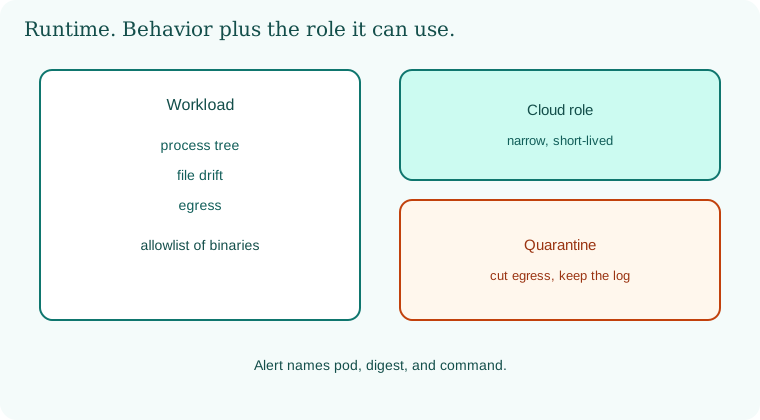
Build-time scanning sits upstream. At runtime the node watches process, file, and network. An allowlist decides what may run. A quarantine path waits for the alert that names the pod. The cloud role is drawn beside the pod because behavior plus privilege is the severity.
21.6 A short animation.
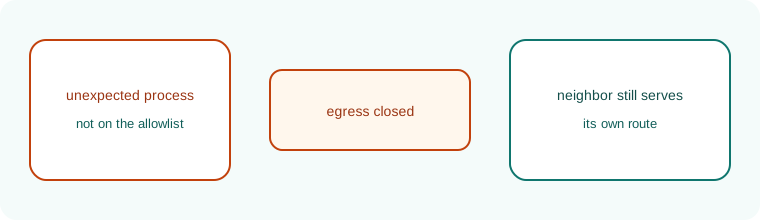
An unexpected process appears. The allowlist mark flashes deny. The pod's egress closes. The healthy neighbor keeps its route.
21.7 Conclusion.
Raju's lab shell had a name in the alert, and the healthy pod was still up. Guru-ji did not smile for long. "A watchman who whispers into a drawer is not a watchman. Chapter 22 carries this alert, and the cloud audit, and the pipeline log, into one place a human can correlate before the story is four years old."
- Runtime watches behavior after the image has shipped.
- Process, file, network, and syscall events need pod, digest, and command.
- Allowlists and quarantine are planned. Auto-learn baselines that never freeze will learn the attacker.
- Join the alert to the cloud role. That join is priority.
- SCARLETEEL, reported 28 February 2023, is the container that became a cloud data theft, with a miner in the picture.
- Own lab only.
END OF CHAPTER 21 MASTER CLASS
| Signal | Likely meaning |
|---|---|
| Shell in a web container | Possible break-in |
| High CPU, unknown process | Cryptominer |
| Metadata call from app pod | Credential theft attempt |