Chapter 6: Git, Source Control, and Repository Security
6.1 Why.
Welcome to Chapter 6.
I am Ravindra Bagale.
Raju pushed his lab project and felt proud. The refund check from Chapter 5 was in the commit. So was a file named notes.env, because the database password had to live somewhere while he tested. He had no engineering degree. He did have a green check mark on the screen.
Guru-ji did not look at the check mark. He looked at the file list. "A repository is not a notebook in your bag. It is a copy machine. The moment you push, every clone can become a copy. If a secret is in one copy, deleting the latest commit does not collect the other copies. Git remembers."
Raju's face changed. "I can delete the file in the next commit."
"You can," Guru-ji said. "The next commit will show the delete. The old commit will still show the password. History is the product. Treat the password as already public. Revoke it. Then we will talk about locks on main, signatures, and scanners. We will do this on a lab repo you own. Not on a company repo. Not on a stranger's fork."
Suppose we are Netflix and the player team merges to main fifty times a day. A lock that asks for one review does not make them slow in any way that matters. It stops a tired push at midnight. Suppose we are Infosys on a client project. The client will ask who can write to the repo and who approved the change. "Whoever has the link" is not an answer. Suppose we are Paytm, Amazon, Swiggy, or PayFast. A cloud key in a private repo is still a key. Private means fewer people, not nobody. Suppose we are WhatsApp or BHIM UPI in the sense of a product that must not leak a token. The token does not belong in Git at all. Zomato's menu service and Amazon's order service follow the same rule. The brand does not make Git forget.
Source control is a production asset. Lose it, and you lose the recipe for the city and, too often, the keys to the gates.
Repositories hold the keys
A Git repository often holds more than code: config, CI files and, by mistake, passwords.
Toyota, 2022
Toyota said in October 2022 that an access key for a customer data server had been visible in a public GitHub repository for nearly five years, after a contractor uploaded source code.
GitHub secret scanning
GitHub now scans public repositories for known token formats and alerts providers like AWS. That feature exists because leaked keys are so common.
6.2 What.
Git stores snapshots and the links between them. If you understand the links, the security rules stop sounding like superstition.
Commits, branches, tags, refs, hashes. A commit is a snapshot plus metadata: parent, author, message, and a hash. The hash names that exact snapshot. Change one byte, and the name changes. A branch is a movable label pointing at a commit. A tag is a label you promised not to move. A ref is the general word for those labels. main is a ref. refs/tags/v1.2 is a ref. When someone says "I deleted it," ask which ref moved, and whether the old commit is still reachable. If any clone, any fork, or any backup fetched it, the bytes are still out.
Branch protection. main is the line you deploy. Protect it.
- No direct pushes. Changes arrive as a pull request.
- At least one review from a person who is not the author.
- Required status checks: tests, and the scanners you actually trust.
- The branch cannot be deleted by a drive-by click.
- Force-push is off for
main. A force-push rewrites history people already fetched. - A linear history, if your team likes rebase, is a setting. It is not a substitute for review.
GitHub calls a richer version of these switches a ruleset. GitLab and Bitbucket have the same ideas under other labels. Learn the idea. Then click the label your host uses.
CODEOWNERS. A file named CODEOWNERS maps paths to people. The payment handler can require a review from the payments owners. A workflow file can require a review from the platform owners. This is least privilege for attention. It does not replace the owner check inside the code. It raises the chance the right human sees the diff.
/api/pay.js          @payments-owners
/.github/workflows/  @platform-owners
/sources/devsecops/  @course-owners
The example owners are names you invent for your lab. They are not invitations to tag real teams.
Signed commits and signed tags. A review proves a person clicked approve. A signature proves the commit was made by a key that person holds. Git can sign with an OpenPGP key or with an SSH key. The host can mark the commit as verified when the public key is on the account.
git config --global gpg.format ssh
git config --global user.signingkey ~/.ssh/id_ed25519.pub
git config --global commit.gpgsign true
git commit -S -m "Require the server-side amount"
git tag -s v0.1 -m "Lab tag"
Use a key you created for this lab. A signature is not a secret scanner. You can sign a commit that still contains a password. Do both. Sign the commit. Keep the secret out.
Repository permissions. Most people read. Some people write to a feature branch. Very few people administer the repo. Admins can turn protection off, so admin is not a courtesy title. Outside collaborators do not get admin. A bot gets the one permission its job needs. If the bot can rewrite main and read every secret, the bot is a second company.
Secrets in history. A secret in a commit is public to everyone who can read that commit. A private repo is still too many people: every developer, every CI job, every backup, every laptop that cloned it. The fix is not a new commit that deletes the file. The fix starts by revoking the secret so the old bytes stop working. Then you remove the file from history on a repo you own, and you tell every teammate to throw away old clones. Old clones are still copies.
Tools you will hear: git filter-repo, and the older BFG. They rewrite history. Rewriting history on a shared repo is a team decision, because every collaborator must re-clone. Rewriting history does not revoke a cloud key. The cloud console does that. Do the revoke first. If you revoke second, the minutes in between are enough.
Pre-commit hooks. A hook is a script Git runs on your machine before the commit is born. It is a seatbelt. It is not a lock on the server. Anyone can skip it with a flag. You still install it, because most mistakes are accidents. The server-side scanner is the lock. Here is a small hook for a lab repo. It looks for shapes, not for a real secret.
#!/bin/sh
# .git/hooks/pre-commit  — lab use on a repo you own
if git diff --cached | grep -E -n 'AKIA[0-9A-Z]{16}|BEGIN (RSA |OPENSSH )?PRIVATE KEY|password[[:space:]]*='; then
  echo "Blocked: a secret-shaped line is staged. Remove it."
  exit 1
fi
Make the hook executable in the way your operating system expects for a script you own. Do not open the permissions to the world. A hook that everyone can rewrite is not your hook.
Host settings. On GitHub, GitLab, or Bitbucket, turn on secret scanning and push protection if the host offers them. Turn on dependency review so a pull request shows new packages. Require the status checks. Read the audit log once, so you know what an admin event looks like. Turn off features you do not use. A wiki and a public pages site are more doors.
Dependabot and Renovate. These open pull requests when a dependency has a newer version. They are the friendly face of Chapter 4's supply-chain card. Review the diff. A major bump can break the build or change behavior. Auto-merge only the ones your tests cover, and only the ones your policy names. A green robot is not a human review of a payment library.
Protected environments. Deploying to production is not the same as merging to main. An environment protection rule can require a second person to approve the production deploy. The approver should not be the author of the change, when you have two people. A lab can simulate this with a production environment that only you can approve, so you feel the extra click before you script it away.
OIDC, not a long-lived cloud key. OpenID Connect, in this context, means the CI host asks the cloud for a short-lived token. The workflow proves which repo and which branch it is. The cloud role trusts that proof. You do not store a cloud access key in the repo and you do not store it in CI variables forever. A long-lived key in a variable is better than a key in Git, and still worse than a token that dies in minutes. Prefer the short token. If a long-lived key already leaked, revoke it. Do not "hide it better" and leave it valid.
Runners and fork pull requests. A runner is the machine that executes the workflow. A GitHub-hosted runner is still a machine with a network. A self-hosted runner is your machine. Do not let untrusted code run on a self-hosted runner that holds production credentials. A pull request from a fork is untrusted code. The safe default is: workflows that need secrets do not run on fork pull requests. A pull request from a branch inside your own repo is still code review, but it is a different trust than a stranger's fork.
Webhooks, apps, and tokens. A webhook tells another system that a push happened. Verify the signature. A personal access token, a PAT, is a password with a scope. Use a fine-grained token that can touch one repo, not every repo in the account. An installed app with a short permission list is better than a token taped to a laptop. Rotate tokens. When a person leaves the team, remove their access the same day. The repo does not forget them by magic.
Audit logs and organization policy. The organization can force rules the repo admin cannot quietly disable: required reviews, banned actions, and a list of allowed runners. The audit log answers "who turned the rule off?" Read it when something feels odd. Export it if your lab host allows a download, so you have seen the shape of the file.
Malicious pull requests, workflow injection, CI poisoning. These are names for one family of mistakes. The workflow file is code. Data from a pull request title, a branch name, or an issue body is not code. If the workflow file pastes that data into a shell step, the data becomes code. The impact is a job that runs with the repo's credentials. The stop is: do not interpolate untrusted text into a run step. Pass it as an environment variable to a program that treats it as a string, or do not use it. This chapter does not show a payload. If you see ${{ }} wrapping a pull request title inside run, send the workflow back.
CI poisoning also means a dependency or a build plugin that changed under you, or a pull request that edits the workflow and the code in one diff so the checks bless themselves. The stop is CODEOWNERS on the workflow directory, and required reviews, and a rule that workflow changes are obvious in the diff. A stranger's pull request must not be able to print your secrets to a log. If a check needs secrets, it should not run for that stranger.
The lab story of a leaked file. You will do this on a toy repo.
- Put a fake password in a file and commit it.
- Push it to a remote you own, if you have one, or keep it local and still treat it as leaked.
- Revoke the fake by deleting it from any real system. If it was truly fake, say so in your notes, and still practice the revoke sentence.
- Remove the file from history with a history rewrite.
- Confirm a fresh clone does not contain the string.
- Confirm an old clone still does. That last confirmation is the lesson.
# On a toy repo you just created. Not on a shared company repo.
git filter-repo --path notes.env --invert-paths
git filter-repo rewrites the repo and removes the remote, on purpose. Read its note before you add the remote back. If teammates exist, they re-clone. You do not force-push over a team without telling them. In a one-person lab, you are the team. Write that down.
What Git will not do. It will not check ownerId. It will not know the payment amount. It will not stop a bad design. Chapters 3, 4, and 5 still apply after the merge. Git's job is custody of the bytes and of the decision to accept them.
Ravindra Bagale's Tip
Students delete the file in a new commit and feel safe. Search history. If the secret is in the parent commit, the delete commit is a signpost. Revoke first. Then rewrite. Then re-clone.
Practice task
Create an empty lab repo. Commit a file that contains the text password = classroom-fake-not-real. Install the pre-commit hook and confirm a second commit is blocked. Revoke nothing real, because the value is fake. Then remove the file from history and clone the repo into a new folder. The new folder must not contain that line. Do not practice on a repo you do not own.
6.3 How.
- Create a lab repo that contains no real password, no real key, and no customer data.
- Draw the refs you use:
main, feature branches, and one tag. - Turn on branch protection or a ruleset: no direct push, one review, required checks, no force-push, no deletion.
- Add a
CODEOWNERSfile that names owners for the payment path and for the workflow path. - Create an SSH or OpenPGP key for the lab and turn on signed commits.
- Make one signed commit and confirm the host shows it as verified, if you are using a host.
- Set repository roles so a second lab user, if you have one, can write but cannot administer.
- Add the pre-commit hook from Part 2 and stage a line that matches the pattern, then watch the commit fail.
- Remove that line and commit a clean change.
- Turn on secret scanning and push protection in the host settings.
- Add Dependabot or Renovate, and review one update pull request without auto-merging it blind.
- Create a protected
productionenvironment that asks for approval before deploy. - Write down, in one sentence, that CI should ask the cloud for a short-lived OIDC token instead of storing a long-lived key.
- If a workflow exists, read every
runstep and reject untrusted pull request text inside the shell script. - Set fork pull requests so they do not receive secrets and do not run on a self-hosted runner.
- Create a fine-grained token for one repo, or note that you will, and do not paste it into the repo.
- Verify webhook signatures in any lab receiver you write, and refuse a body with a bad signature.
- Open the audit log and find today's settings change.
- On the toy repo only, commit
notes.envwith a fake password, then revoke the idea by treating it as public. - Run
git filter-repoas in Part 2 to drop that path, then clone into a new folder and search for the fake string. - Keep one old copy aside and see that the old copy still has the string, so you remember why revoke comes first.
- Tell a teammate, even if the teammate is future you, to re-clone after a rewrite.
- Do not force-push a shared company
main, and do not practice these steps on Uber, Amazon, Infosys, or any repo you do not own.
Lock down the repository
- Turn on branch protection for main: pull requests, reviews, passing checks.
- Require MFA for every member of the organisation.
- Turn on secret scanning and push protection.
- Add a pre-commit hook such as gitleaks so secrets never leave the laptop.
- Sign commits or tags for releases.
- Review who has admin rights every quarter.
| Platform | Built-in control |
|---|---|
| GitHub | Branch protection, secret scanning, Dependabot |
| GitLab | Protected branches, secret detection, push rules |
| Bitbucket | Branch permissions, merge checks |
| Azure Repos | Branch policies, required reviewers |
6.4 A real public incident.
Name. The Uber data breach of 2016, disclosed in 2017.
Date. The U.S. Federal Trade Commission later described intruder access between 13 October 2016 and 15 November 2016. Uber disclosed the breach to the public on 21 November 2017, more than a year later. Bloomberg reported it the same day.
Source. Uber's public disclosure on 21 November 2017, as reported by Bloomberg on 21 November 2017. The U.S. Federal Trade Commission's analysis of its revised proposed consent order describes the GitHub and cloud-key facts. This chapter does not link to a file download and does not repeat intrusion steps.
What happened. Intruders reached Uber's private GitHub organization. The FTC's account says they used passwords exposed in other breaches, and that Uber had not required multi-factor authentication on those GitHub accounts. In a private repository they found an AWS access key. With that key they downloaded unencrypted backup files from cloud storage. Uber told the public that about 57 million riders and drivers were affected: names, email addresses, and phone numbers, and for a large set of drivers, license numbers. The company also paid the attackers and delayed telling people. Paying to hide a breach is not a control. It is a second failure. A private repo did not save them. A key in Git is a key in the hands of anyone who can read Git.
How to stop.
- Revoke the cloud key. Do this before the blog post, before the history rewrite, and before the argument about whose fault it was.
- Remove the key from the repo and from history only after it is dead.
- Turn on multi-factor authentication for the source host.
- Lock down who can read the repository.
- Tell the people whose data was copied, and tell the regulators who expect to hear. Do not pay for silence.
How to prevent it again.
- Do not put long-lived cloud keys in Git, in a wiki, or in a ticket.
- Prefer a short-lived token from OIDC so there is no key to steal from a repo.
- Require multi-factor authentication on GitHub, GitLab, or Bitbucket.
- Turn on secret scanning and push protection.
- Require reviews and CODEOWNERS on workflow files so a single stolen password cannot quietly rewrite the checks.
- Encrypt backups, and give the app role the one bucket it needs, not the archive of everything.
- Practice the revoke-and-rewrite drill on a toy repo. Do not go looking for keys in a company's GitHub.
This is for learning only, and only inside a system you are allowed to test.
6.5 A simple picture.
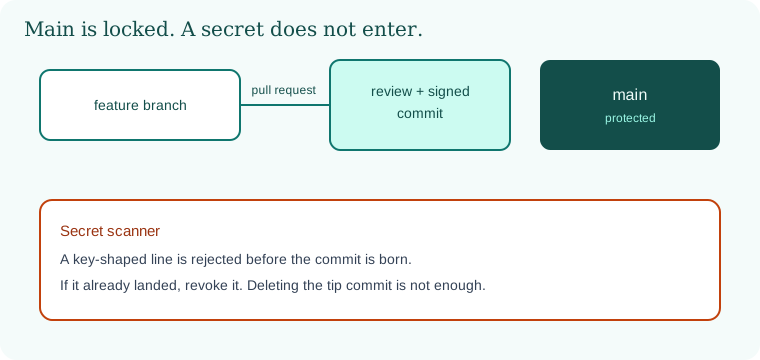
A feature branch becomes a pull request. A review and a signature stand in front of main. A secret-shaped line stops at a scanner and does not become a commit.
6.6 A short animation.
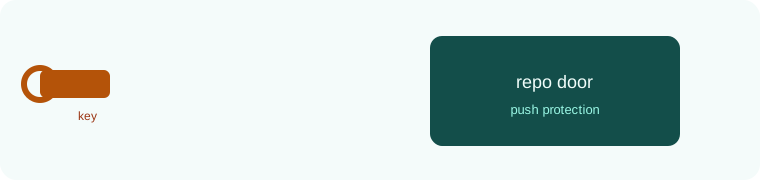
The key walks toward the door. Push protection sends it back. The door stays shut. That is the whole story.
6.7 Conclusion.
Raju deleted notes.env the wrong way once, found it still in the parent commit, and then did it the right way on a toy repo. Revoke. Rewrite. Re-clone. He turned on a review for main even though he was the only reviewer in the lab, so the click would be there when a second person arrived.
Guru-ji closed the ledger. "The handler can be perfect and the repo can still betray you. Custody of the bytes is part of DevSecOps. You now have the picture, the ten risks, the review habit, and the lock on main."
- A commit hash is the name of the bytes. A branch is a label. History is a copy machine.
- Protect
main. Require a review, checks, and a signature. Give people the smallest role. - A secret in history is public until you revoke it. Deleting the tip file is not revocation.
- Forks, workflows, and tokens are trust boundaries. Untrusted text is not shell code.
- Uber, access in October 2016, disclosure on 21 November 2017, is the private-repo lesson.
- Toy repo only.
END OF CHAPTER 6 MASTER CLASS
If a secret reaches Git, deleting the file is not enough. History keeps it. Rotate the secret first, then clean history.
| Mistake | Fix |
|---|---|
| Key committed to repo | Rotate key, then scan and clean history |
| Anyone can push to main | Branch protection |
| No MFA | Org-wide MFA requirement |