Chapter 17: Cloud Security — AWS, Azure and GCP Concepts
17.1 Why.
Welcome to Chapter 17.
I am Ravindra Bagale.
Raju had no engineering degree. He had three browser tabs open, one for each big cloud, and he thought they were three different professions. Guru-ji closed two tabs. "The logos change," he said. "The rooms do not. Someone owns the account. Someone owns the network. Someone owns the key. Someone owns the log. If you cannot point at those four owners, you do not have a cloud. You have a rented room with the window open."
Raju had just learned plans in Chapter 16. "The file can build the room."
"The file can also build the open window in every account that uses the module," Guru-ji said. "Suppose we are Paytm and card data sits in object storage that a partner can list. Suppose we are Swiggy and a security group allows the whole internet to an admin port because a demo asked for it. Suppose we are Amazon and the platform is the one you rent, while the guest still chooses the lock. Suppose we are Infosys explaining shared responsibility to a client who thinks the provider 'does security.' WhatsApp, Zomato, Netflix, BHIM UPI, and PayFast-shaped products run on these rooms. The names differ. The mistake of a public store is the same mistake."
This chapter is the map. Chapter 18 is the identity that walks it. Do not skip the map because identity sounds more advanced.
Most cloud breaches are settings
Cloud providers secure the hardware. You secure what you configure. This is the shared responsibility model, and AWS, Azure and Google Cloud all publish it.
Accenture, 2017
UpGuard found four Amazon S3 buckets belonging to Accenture left open to the public, holding keys and credentials for a cloud platform.
Microsoft Power Apps, 2021
UpGuard reported that portals built on Microsoft Power Apps exposed about 38 million records because a data feature was public by default. Microsoft later changed the default.
17.2 What.
Shared responsibility. The provider secures the cloud: the physical sites, the hypervisor, and the managed control planes they promise. You secure what you put in the cloud: data, identities, network rules, application code, and most configuration. A managed database still needs a private endpoint, a tight identity, and backups you have tested. A managed Kubernetes control plane still needs the Chapter 15 controls. Read the provider's shared-responsibility page once and write, in your own words, three items that remain yours. If you cannot list them, you will assume a guardrail that does not exist.
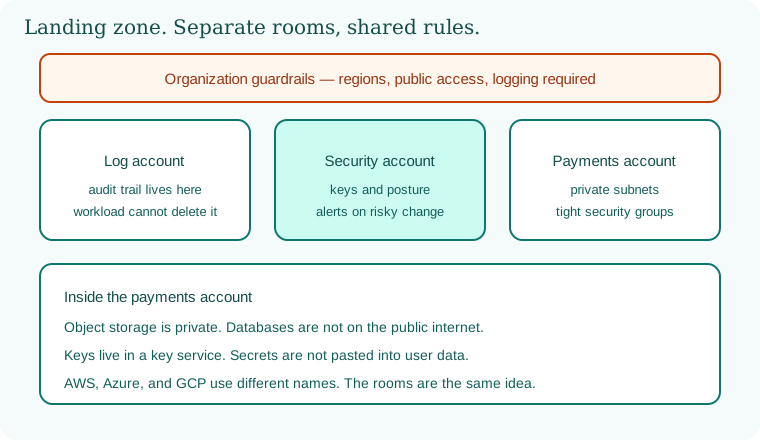
Organizations, accounts, subscriptions, and projects. Amazon Organizations group accounts. Azure uses management groups and subscriptions. Google Cloud uses organizations, folders, and projects. The useful idea is a boundary for blast radius and for bills. A lab project must not share an account with production payments. A log archive account should not be writable by the workload that it watches. Netflix-shaped estates and smaller PayFast-shaped stacks both benefit from more than one boundary. Start with three even in a lab story: logs, security tooling, and one workload. You may implement only the workload account this week. Draw the other two anyway.
Landing zones and guardrails. A landing zone is the paved pattern for new accounts: a network shape, mandatory logs, blocked regions you do not use, blocked public storage, and an identity baseline. Guardrails are organization policies. Amazon calls a strong version service control policies. Azure and Google Cloud have policy services with the same intent. A guardrail stops an account from turning off audit logs even if a local admin wants to. Chapter 16's module should deploy into this paved pattern, not into a blank account with the root user.
Networks. Amazon VPCs, Azure VNets, and Google VPCs are private networks you define. Public subnets have a route to an internet gateway. Private subnets do not, except through a controlled egress device you chose. Put databases and internal APIs in private subnets. Put a load balancer or an API edge in the public tier only when the product must face users. Segment the way Chapter 9 taught: payments are not the same subnet as experiments. Peering and shared networks are hallways. A hallway without a filter is how one account greets another account's database.
Security groups, firewalls, and routing. Security groups and cloud firewalls are allow lists on the path. Default should be no inbound from the world. Administration ports do not belong on 0.0.0.0/0, a phrase you should treat as a smell in review, not as a lab habit you paste into production modules. Egress deserves a thought too. A workload that can talk to any address can send data anywhere. Prefer known endpoints. Network rules are not a substitute for identity. They are the other half.
Encryption and key services. Amazon KMS, Azure Key Vault, and Google Cloud KMS hold keys so applications do not invent cryptography. Encrypt disks, databases, and object storage with a key you control or a managed key whose policy you have read. Separate who can administer a key from who can use it to decrypt. A key policy that lets every workload decrypt every secret has collapsed the design. Rotate on a documented clock. Chapter 10's certificate habits still apply at the edge. The key service is for data and for some secret wrapping, not a reason to stop TLS.
Secrets management. Amazon Secrets Manager and Systems Manager Parameter Store, Azure Key Vault secrets, and Google Secret Manager are the adult versions of a .env file. The workload identity reads the secret at runtime. Humans do not copy it into chat. Rotation can be automated for database passwords when the platform supports it. A secret in user-data or in a startup script printed to logs has already failed. Tie this to Chapter 16: the infrastructure file names the secret, it does not contain the secret.
Object storage. Buckets and blobs are the most common public accident. Block public access at the organization if you can. Turn on encryption. Turn on access logs for stores that hold real data. Use a bucket policy that names the workload identity, not "any authenticated user," a phrase that is wider than newcomers think. Versioning and object lock help when ransomware or a bad script deletes data. A store for receipts is not a store for marketing. Different buckets, different identities.
Managed databases. Private networking, encryption, automated backups, and a maintenance window for patches. Database users follow least privilege: the payment app does not own the database server. Disable public IP addresses on the database. Administrative tools jump through a bastion or a private endpoint, with MFA for the human. Test a restore. A backup you have never restored is a rumor, which Code Spaces already taught beside Chapter 16.
Containers and Kubernetes services. EKS, AKS, and GKE host the control plane pieces the provider manages. You still own node images or node pools, RBAC, network policy, and admission. Private API endpoints are preferable to a public Kubernetes API with a wide allow list. Cluster logs should land in the log account. Chapter 15 is the workload chapter. Here, remember that "managed" does not mean "policy-free."
Serverless. Functions and managed app platforms still have identities, environment variables, and triggers. A function with an administrator role is a small file with a large key. Event sources should be authenticated. Public function URLs need the same edge thinking as any API. Cold starts are an operations topic. Over-broad permissions are a security topic. Secrets belong in the secret service, not in the function's environment if you can avoid long-lived values there.
Logging, audit, and posture. Amazon CloudTrail, Azure Activity Logs, and Google Cloud Audit Logs record control-plane changes. Turn them on at the organization, write them to a place the workload cannot delete, and alert on risky events: public storage, trail disabled, new admin, security group opened to the world. Posture tools in each cloud score accounts against benchmarks. They are cousins of the IaC scanners. A red finding is a ticket with an owner, not a dashboard decoration. Application logs are separate and still required. A trail that records only the cloud API will not show the payment bug from Chapter 3.
WAF and DDoS controls. A web application firewall and the provider's DDoS service sit at the edge. They reduce noise and some classes of abuse. They do not fix a missing server-side authorization check. Configure them for the routes you actually serve. Log what they block so you can tune without going blind. This course will not hand you bypass tricks. It will tell you to put an edge in front of internet-facing Paytm-shaped or Zomato-shaped apps and to keep origin servers private so the edge is not optional theater.
Private endpoints. PrivateLink-style endpoints, Azure Private Endpoints, and Google Private Service Connect let a private subnet reach a cloud API without a public detour. Use them for storage, databases, and secret services when the data is sensitive. A private endpoint still needs an identity check. Network privacy plus a wildcard role is only half a control.
Vulnerability management. Patch images, functions' dependencies, and managed service versions. The cloud provider patches their side. Your AMIs, containers, and language packages are yours, which returns you to Chapters 8, 12, 13, and 14. Inventory belongs in the account, not in a spreadsheet that forgot the new region.
Backup and ransomware-minded design. Copies in a second region or a second account, encrypted, with a role that can restore and cannot be the same role a compromised app uses to delete objects. Test the restore quarterly in a lab. Immutable retention, where the provider offers it, stops an attacker who stole the app role from erasing history. Cost is real. An untested multi-region replica you cannot afford to restore is a costume. Choose a pattern you can rehearse.
Cost and security together. Public IP addresses, oversized compute, and chatty cross-region traffic show up on the bill and sometimes on the attack surface. A budget alert is a security signal when mining appears, which the Tesla story in Chapter 15 already hinted. Tag owners. Delete lab stacks with the same pipeline that created them. A forgotten open workstation in a cloud account is still a forgotten open workstation.
Names you can translate without a poster. A security group in Amazon is close to a network security group or firewall rule elsewhere. A bucket is a blob container or a cloud storage bucket. An IAM role is a managed identity or a service account, and Chapter 18 will refuse to let those words stay fuzzy. KMS has cousins in Key Vault and Cloud KMS. CloudTrail has cousins in activity logs and audit logs. When a tutorial uses only one logo, translate the noun before you copy the setting. Copying a world-open rule from a blog into a Swiggy-shaped or BHIM UPI-shaped design is how demos become incidents. Translation is a security step.
Regions, residency, and the quiet copy. Data may need to stay in a country or a region your customer named. A backup that silently replicates to another geography can break that promise even when the primary bucket looks correct. Write the allowed regions into the guardrail. Confirm replicas on purpose. Infosys-shaped client contracts often care about this line more than about your choice of container runtime. Security includes keeping the copy where you said it would live.
A lab landing-zone sketch you may build only in an account you own.
org guardrail: block public storage, require audit logs
log account: receives trails, workload cannot delete them
workload account: one private subnet, one public edge if you truly need it
storage: encrypted, block public access, policy names one role
database: no public address, backups on, restore tested once
alert: page you when a security group gains a world-open admin port
Implement that list with the IaC from Chapter 16. One account is enough for a student lab if money is tight. Draw the log boundary even if both buckets sit in the same account with different identities. Do not build this inside an employer organization unless you are assigned that work.
Ravindra Bagale's Tip
When the three clouds overwhelm you, ask four questions: Is it private? Is it encrypted? Who can change it? Who is alerted? Logos are optional. The four answers are not.
Practice task
In a lab account you own, enable the audit trail, create one private encrypted bucket, prove a public policy is rejected by your guardrail or scanner, and raise an alert on a risky change you then revert. Write the shared-responsibility line in your own words. Do not scan or configure clouds belonging to Swiggy, Paytm, Amazon customers, or any account you do not control.
17.3 How.
- Write "own lab only" and which provider you will touch.
- Read that provider's shared-responsibility description and list three duties that stay with you.
- Create or select a lab account, subscription, or project separated from anything production.
- Turn on organization or account audit logs and send them to storage the lab app cannot delete.
- Apply a guardrail or a policy that blocks public object storage.
- Create a network with a private subnet and, only if needed, a small public subnet.
- Put a security group or firewall on a lab instance that allows your admin address only, not the whole internet.
- Create an encrypted object store and confirm block-public-access or the equivalent is on.
- Attempt a public setting in a branch and watch policy or the IaC scan fail.
- Create a customer-managed key or accept a managed key only after you read who can use it.
- Store one lab secret in the secret service and read it with a workload identity, not with a pasted password.
- Place a lab database without a public address, or skip the database if cost is high and document the control you would have set.
- Turn on backups for whatever store you did create, and restore one object or one row.
- If you run a managed Kubernetes service, keep the API private or restricted and apply Chapter 15's namespace controls.
- If you run a function, give it one narrow action on one resource.
- Confirm the audit log shows the bucket creation.
- Create an alert for a world-open admin rule or for a trail being stopped, then trigger it safely and revert.
- Run the provider's posture check or an IaC scanner and ticket one finding.
- Draw private endpoints for storage if the lab budget allows, or write the design if it does not.
- Note the edge control you would place before a public app: TLS, a WAF profile, origin not public.
- Set a budget alert so a surprise bill is visible the same day.
- Tag the resources with the owner and the repository.
- Export the architecture sketch next to the code.
- Schedule a restore drill date.
- Stop. No probing of other tenants, no public buckets "just to see," no use of company production credentials.
Five cloud basics
- Turn on audit logs: CloudTrail, Azure Activity Log, GCP Cloud Audit Logs.
- Block public storage at account level.
- Use roles and short-lived credentials instead of long-lived keys.
- Turn on the provider threat detector.
- Run a posture check against CIS benchmarks every week.
| Need | AWS | Azure | GCP |
|---|---|---|---|
| Audit log | CloudTrail | Activity Log | Cloud Audit Logs |
| Block public storage | S3 Block Public Access | Disable blob public access | Public access prevention |
| Threat detection | GuardDuty | Defender for Cloud | Security Command Center |
| Posture check | Security Hub | Defender CSPM | SCC findings |
17.4 A real public incident.
Name. Verizon customer data exposed through a NICE Systems Amazon S3 bucket.
Date. UpGuard reported finding the exposed storage in June 2017 and notifying Verizon the same month. The exposure was widely reported on 12 July 2017, after the bucket had been secured.
Source. UpGuard's public report, "Cloud Leak: How A Verizon Partner Exposed Millions of Customer Accounts," and contemporaneous reporting in July 2017. This chapter uses those public accounts. It does not include bucket names to copy or any access technique.
What happened. A partner working with Verizon left an Amazon S3 bucket reachable more broadly than customer data allows. UpGuard said the data related to roughly fourteen million customers and included information such as names, phone numbers, and account PINs used in customer-service contexts. The bucket was secured after notification. The lesson is dull and therefore easy to skip: object storage defaults and partner accounts are part of your system. A provider did not "leak the cloud." A configuration allowed the wrong principal, or the public, to read. Logs, a block-public-access guardrail, and a partner review would have been the adult controls. PIN data in a wide-open store is not a paperwork bug.
How to stop.
- Block public access and tighten the bucket or blob policy on storage you own.
- Rotate or invalidate secrets that were in the exposed data, including PINs or passwords if those were present.
- Preserve access logs to see what was read, if logging was already on.
- Notify affected people and regulators when the data and the law require it.
- Review partner accounts that can write or read production stores.
How to prevent it again.
- Organization guardrails that deny public storage even if a team tries.
- Separate partner identities with least privilege and an expiry.
- Encryption plus a narrow identity, not encryption alone.
- IaC review and posture alerts from this chapter and Chapter 16.
- Inventory every bucket the way you inventory images.
- Practice the control in your lab. Do not go looking for other companies' open stores.
This is for learning only, and only inside a system you are allowed to test.
17.5 A simple picture.
An organization guardrail sits over a log account, a security account, and a payments account. Inside payments, the network is private, storage is encrypted, and the workload cannot delete the logs.
17.6 A short animation.
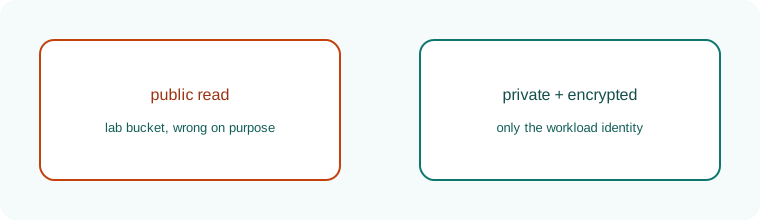
A lab bucket starts with a public door. The door closes. Only the workload identity remains.
17.7 Conclusion.
Raju could finally say which rooms were his. Guru-ji tapped the identity box he had not opened yet. "The map is drawn. Chapter 18 asks who is allowed to walk: humans with MFA, workloads with short-lived roles, and the evaluation rules that make a wide key worse than an open port."
- Shared responsibility means you still own data, identity, network rules, and configuration.
- Accounts, landing zones, and guardrails limit the blast of one mistake.
- Private networks, tight firewalls, encryption, and secret services are the default rooms.
- Logs must land where the workload cannot erase them. Posture findings need owners.
- The Verizon partner bucket, reported from June 2017 and covered on 12 July 2017, is the public-storage lesson.
- Own lab only.
END OF CHAPTER 17 MASTER CLASS
| Mistake | Real case | Guardrail |
|---|---|---|
| Public bucket | Verizon / NICE 2017 | Account-wide Block Public Access |
| Public-by-default feature | Power Apps 2021 | Review defaults of every new service |
| No logs | Many small incidents | Audit logs on in every account |