Chapter 11: CI/CD Architecture and Pipeline Security
11.1 Why.
Welcome to Chapter 11.
I am Ravindra Bagale.
Raju watched a green check mark bloom on his lab pull request. Tests passed. The image pushed. Production in the lab updated itself. He had no engineering degree. He had automation pride. Guru-ji asked a quiet question: "Who could change the workflow file? Which identity pushed the image? Could a fork pull request see the same secrets? If the build machine lied, would you notice?"
Raju's smile faded. "The pipeline is just glue."
"The pipeline is a privileged employee who never sleeps," Guru-ji said. "It holds cloud roles, signing keys, and the right to overwrite what customers run. Netflix-shaped delivery speed without pipeline trust is how a city installs poisoned packages at scale. SolarWinds taught that lesson to the world. Swiggy, Paytm, Amazon, BHIM UPI, WhatsApp, Zomato, Infosys, and PayFast all need pipelines that are least-privileged, reproducible, and hard to tamper with. Chapter 6 locked Git. Chapter 10 vaulted secrets. Today we secure the road between them."
Deeper notes for 11.1 Why. (examples, stacks, worksheet)
Why the pipeline is a target
A CI/CD pipeline builds your code, tests it and pushes it to production. To do that, it needs powerful access: cloud roles, registry passwords, signing keys. That makes it one of the most valuable things in your company to an attacker.
Example 1: an Indian company (sample data)
Suppose we are a junior DevOps engineer at a Paytm-style team. The deploy job uses one cloud key that can do everything in the account. A contractor's pull request adds a line to the workflow that prints environment variables. If pull-request jobs can see that key, it is now in the job log. The fixes:
- Pull-request jobs from forks get no secrets.
- Workflow files are protected by CODEOWNERS review.
- The deploy job uses short-lived OIDC credentials, limited to one environment.
Example 2: a global incident
In 2021 the Codecov Bash Uploader script was changed by an attacker. Many CI pipelines that downloaded and ran it could have leaked their environment variables, including credentials. Codecov publicly disclosed this in April 2021. The lesson: anything your pipeline downloads and runs is part of your pipeline.
Example 3: everyday life
A bank's cash van carries a lot of money. Nobody worries about the empty van. They worry about who can drive it and where it stops. Your pipeline is the cash van of your software.
What the pipeline holds, by stack
Different stacks need different credentials in CI. Know what yours holds.
Java / Spring Boot (Maven/Gradle)
Credentials for a Maven repository (Nexus, Artifactory, GitHub Packages), often in settings.xml. Keep them in CI secrets, not in the repo.
Node.js (npm)
An NPM_TOKEN to publish or install private packages. Use a read-only token in CI unless the job publishes.
Python (pip / PyPI)
A PyPI API token for publishing. PyPI supports "trusted publishing" via OIDC, so no stored token is needed.
.NET (NuGet)
A NuGet API key scoped to specific packages, with an expiry.
Go / PHP / Ruby
A private module proxy token (GOPRIVATE), Composer auth.json or RubyGems API keys. The same rules apply: scoped and short-lived.
Containers
Registry push credentials (ECR, ACR, GCR or Artifact Registry, Docker Hub). The build job pushes; the deploy job only pulls.
AWS / Azure / GCP
Cloud deploy rights. Prefer OIDC federation from GitHub Actions or GitLab to an AWS role, an Azure federated credential or GCP Workload Identity Federation.
Common mistakes
- One all-powerful key used by every job.
- Third-party actions referenced by a moving tag instead of a commit SHA.
- Self-hosted runners that are never cleaned between jobs.
11.2 What.
Pipeline stages and trust boundaries. Typical stages: fetch source, build, test, scan, sign, publish artifact, deploy to staging, deploy to production. Each arrow is a trust boundary. The build stage should not use the production deploy role. The publish stage should write to a registry, not mutate production directly unless that is a deliberate combined job with strong controls. Draw the stages. Label the identity at each stage. If one identity can do everything, you built a skeleton key.
Hosted versus self-hosted runners. Hosted runners are machines the CI vendor operates. Self-hosted runners are machines you operate. Self-hosted runners often hold more powerful network paths into private services. They must be patched like Chapter 8 hosts. They must not run untrusted fork code with production secrets. Ephemeral self-hosted runners that die after one job shrink leftover malware and leftover credentials. Persistent shared runners that many repos use are convenient and dangerous.
Ephemeral runners and isolation. One job, one clean virtual machine or container, then destroy. Cache carefully. A poisoned cache can infect later jobs. Separate caches by trust level. Do not share a cache between public fork builds and private mainline builds.
Secure pipeline credentials. Store secrets in the CI secret store, masked in logs, limited to environments that need them. Prefer OIDC to cloud roles over long-lived access keys. Scope each secret to one environment: staging versus production. A pull request job from an untrusted fork gets no production secrets. Chapter 6 said this. Here you enforce it in the workflow.
OIDC-based cloud authentication. The workflow presents an identity token that says which repo, which branch, which actor. The cloud identity provider trusts that issuer and maps to a role with a small policy. Tokens expire quickly. There is no static key in GitHub secrets to leak into a log. Configure the audience and subject checks tightly so another repo cannot assume your role.
Pinned actions and plugins. Third-party actions are code. Pin to a full commit SHA, not to a moving tag that can change under you. Review what the action can access. Prefer official or internally approved actions. A market of actions is a market of supply-chain risk. Dependency trust for pipelines mirrors SCA for apps, which Chapter 12 covers.
Pipeline-as-code review controls. Workflow files are code. Require reviews. Use CODEOWNERS on .github/workflows or the GitLab equivalent. A change that edits the workflow and the application in one pull request needs careful eyes. Branch protections from Chapter 6 apply.
Branch, tag, and environment protections. Only protected branches produce production artifacts. Tags that trigger release must be signed or otherwise controlled. Environments require approval for production. The approver should differ from the author when staffing allows.
Artifact handoff and immutability. Build once. Promote the same artifact digest from staging to production. Do not rebuild from source at production time with different dependency resolution. Sign the artifact. Verify the signature before deploy. Mutable tags like latest are convenience and confusion. Prefer digests.
Caching risks. Caches can be poisoned if an attacker can write a cache key that later trusted jobs read. Namespace cache keys by repo and trust. Document what you cache. When in doubt, disable cache for sensitive jobs.
Untrusted PR and fork execution. Treat external contributions as hostile code until merged. Run limited checks without secrets. Do not mount cloud credentials. Do not use self-hosted runners that can reach the data tier. After merge, trusted pipelines may run with more privilege.
Command injection through variables and commit metadata. Pull request titles, branch names, and commit messages are data. If a workflow pastes them into run: echo ${{ github.event.pull_request.title }} inside a shell, data becomes code. Pass untrusted strings as environment variables to programs that treat them as data, or do not use them in shells. This chapter will not show a payload. If you see unsafe interpolation in review, send it back.
Logging and sensitive-output masking. Mask tokens. Avoid set -x spam that prints secrets. Centralize pipeline logs with access control. Audit who downloaded artifacts.
Secure rollback and deployment verification. Every deploy needs a rollback path that uses a previous signed artifact. Verify health checks after deploy. Do not mark success on timeout. Record who approved.
Separation of build and deploy identities. The builder may push to a staging registry repository. The deployer may only pull that digest and apply it to production. The builder cannot edit production IAM. The deployer cannot push arbitrary images. That split contains a SolarWinds-shaped nightmare where the build system becomes the distribution channel for evil.
Jenkins, GitHub Actions, GitLab CI, Azure DevOps — same morals. Names differ. Trust boundaries do not. Jenkins needs controller hardening, agent isolation, and folded credentials. GitHub Actions needs OIDC, pinned actions, and environment gates. GitLab needs protected variables and merge request pipelines rules. Learn your tool deeply after you learn the morals.
Lab workflow sketch — safe shape.
# lab only — illustrative; pin real SHAs in a real repo you own
name: lab-ci
on:
  pull_request:
  push:
    branches: [main]
jobs:
  build:
    runs-on: ubuntu-latest
    permissions:
      contents: read
      id-token: write
    steps:
      - uses: actions/checkout@<pin-full-sha>
      - name: Build
        run: npm test && npm run build
      - name: Exchange OIDC
        if: github.ref == 'refs/heads/main' && github.event_name == 'push'
        run: echo "assume lab role here with cloud CLI on your account"
Notice permissions are minimal. Fork secrets stay off. Production steps gate on branch and event. Replace the echo with your cloud's documented OIDC login on an account you own.
Infosys-shaped and Paytm-shaped scale. More repos means more workflow duplication. Use reusable workflows that are themselves reviewed and pinned. A single weak template multiplies. Governance lists allowed actions. Break-glass jobs are monitored.
Approval theatre versus approval substance. Two people clicking Approve because a chat asked them to is theatre. An approver who sees the digest, the change ticket, and the scan summary is substance. Train approvers. Rotate who can approve so one compromised account cannot self-serve production forever.
Webhook security for CI callbacks. If your deploy system receives webhooks from the CI host, verify signatures. A forged "deploy success" webhook should not move traffic. Chapter 6 said the same for Git webhooks. Repeat it at the deploy boundary.
Hermetic builds, briefly. Hermetic means the build inputs are declared and network fetch during compile is controlled or banned. Full hermeticity is hard. Moving toward locked dependency files and private mirrors already removes a class of surprise. Combine with SCA in Chapter 12.
Multi-cloud Infosys projects. Different clients mean different CI projects, different OIDC trust, different secret stores. A shared "company runners" pool that can deploy to every client is a shared fate. Prefer segregated runner pools per sensitivity tier.
WhatsApp-shaped mobile pipelines and BHIM UPI-shaped release trains. Mobile signing keys and payment SDK keys often sit near CI. Protect them with hardware-backed storage and manual gates for store releases. A stolen Android signing key is a long emergency. Treat it like a CA key from Chapter 10.
Observability of the pipeline. Metrics: failed signature verifies, OIDC assume failures, jobs run from forks that requested secrets, changes to workflow files. Alert on workflow file changes to main. That alert is cheap and precious.
Ravindra Bagale's Tip
Students chase fancy deploy tools and leave workflow_dispatch open with secrets attached for anyone who can click. Map who can trigger what before you map which Kubernetes chart to render.
Practice task
On a repository you own, create a workflow with pinned actions, masked secrets, OIDC to a lab cloud role with read-only permissions, and a production environment requiring a manual approval. Open a fork-style untrusted PR simulation without secrets and confirm it cannot deploy. Do not test against a company CI you do not own.
Concurrency and cancellation. Cancel outdated runs on the same PR so an old insecure workflow result cannot overwrite a newer gate. Configure concurrency groups. Race conditions in deploy jobs can mark a bad revision live if two deploys interleave. Use locks or environment exclusivity for production.
Matrix builds and secret fan-out. A matrix that expands into many jobs multiplies secret exposure surface. Only pass secrets into the legs that need them. Do not echo matrix values that contain customer identifiers into public logs.
Protected variables versus ordinary variables. Ordinary variables can be printed. Protected or masked variables should be used for anything credential-shaped. Still assume a malicious workflow change can attempt to exfiltrate them if someone can edit the workflow and run on a privileged runner. That is why CODEOWNERS and reviews matter more than masking alone.
Artifact stores as production peers. A registry that accepts any push from any developer is a mutual free-for-all. Use project-scoped push roles, immutable tags where supported, and retention policies. Scan images on push. Block deploys of images that lack a signature. Paytm-shaped payment images and Amazon-shaped order images deserve stricter projects than a hobby container.
Infrastructure pipelines. Terraform and friends often run in CI with cloud admin-like roles. Split plan and apply. Require approval on apply to production. Store state with encryption and restricted access. A pipeline that can create IAM users is a crown jewel. Treat it with Chapter 8 host hardening on its runners and Chapter 10 secrets for backend credentials.
Story beat for Raju's lab. He once granted the build role AdministratorAccess "so it works." The deploy worked. So would an attacker who found a way to run code on that runner. He replaced it with a role that could push to one ECR repository and describe one cluster, nothing more. The next failure was a missing permission he added narrowly. That failure was a teacher.
Comparing speed myths. Teams fear security gates will slow Swiggy-shaped delivery. Unoutlined rebuilds, flaky tests, and manual SSH hotfixes already slow delivery. A signed digest promote is often faster than "build again on the server and hope." Measure. DORA metrics from Chapter 2 still apply: change failure rate falls when bad artifacts never reach production.
GitLab merge request pipelines versus GitHub pull request workflows. Different YAML, same questions: does this event provide secrets? Does this source trust the submitting user? Is the runner shared? Answer per event type, not once for the whole product.
Jenkins controller special note. The controller holds credentials and job definitions. Isolate it on the network. Keep agents off the controller. Update plugins with the same care as actions SHAs. An outdated plugin is an outdated action with a longer history of headlines.
Evidence pack for auditors. Export: workflow file revision, approver identity, artifact digest, scanner summaries, and OIDC role name used. Store them with the release ticket. Infosys-shaped clients ask for this pack. Building it on day one is cheaper than reconstructing from chat scrollback after an incident.
When to pause the factory. If secret scanning finds a live cloud key in the repo, pause deploy jobs that use related roles until rotation finishes. If a pinned action's upstream disappears or is disputed, pause and replace. Pausing is strength. Blind green checks during a known compromise are how SolarWinds-shaped pain spreads inside your own walls.
Zomato and Swiggy partner integrations in CI. Jobs that call partner APIs need partner tokens. Scope them to the job that syncs menus or prices, not to the universal build job. Token breach then affects one integration, not the entire kitchen.
11.3 How.
- Draw your lab pipeline stages and label identities for build versus deploy.
- Enable branch protection and CODEOWNERS on workflow paths.
- Pin every third-party action to a full commit SHA.
- Set job permissions to least privilege; disable default write-all where the platform allows.
- Store secrets in environment-scoped stores; production secrets only on protected environments.
- Configure OIDC between the CI host and your lab cloud; remove static access keys you no longer need.
- Block secrets on pull requests from forks.
- Use hosted runners or ephemeral self-hosted runners; patch any persistent self-hosted image.
- Sign artifacts and record digests in the pipeline log.
- Promote by digest, not by rebuilding.
- Require a human approval on the production environment.
- Review every
runstep for unsafe interpolation of PR data. - Turn on log masking and audit a job log for accidental secret leakage using a fake secret you rotate after.
- Separate registry push credentials from Kubernetes deploy credentials.
- Document rollback: redeploy previous digest.
- Add a cache policy that separates trusted and untrusted jobs.
- Inventory who can admin the CI org and cut the list.
- Run a tabletop: "build identity stolen" and write the revoke steps.
- Prefer reusable workflows under review instead of copy-paste YAML sprawl.
- Verify tags that trigger release are protected.
- Collect pipeline audit logs into the same place you keep host audits.
- Test failure: revoke OIDC role permission and confirm deploy fails closed.
-
Stop. Do not attempt to poison, scan, or exploit CI systems belonging to Amazon, Netflix, Infosys, or anyone else.
-
Create an alert or mail filter for changes to workflow files on main.
- Document the break-glass deploy path and test it once in the lab.
- Remove unused secrets from the CI project.
- Ensure production environment protection cannot be bypassed by a rewritten workflow without review.
- Practice promoting a known-good digest after a failed bad deploy in the lab.
- Write a one-page pipeline threat model with STRIDE on the runner and on the artifact store.
- Stop again. No experiments on foreign CI.
Deeper notes for 11.3 How. (examples, stacks, worksheet)
The steps grouped into five habits
- Protect the recipe. Branch protection and CODEOWNERS on workflow files.
- Pin what you run. Pin third-party actions to a commit SHA, and pin tool versions.
- Least privilege per job. Set read-only permissions by default and grant write only where needed.
- Short-lived identity. OIDC to the cloud, with no stored cloud keys.
- Promote, don't rebuild. Build once, sign, then deploy the same digest to each environment.
A minimal, safer GitHub Actions workflow
permissions:
  contents: read
  id-token: write      # for OIDC only
jobs:
  build:
    runs-on: ubuntu-latest
    steps:
      - uses: actions/checkout@<full-commit-sha>
      - run: make test
  deploy:
    needs: build
    environment: production   # requires approval
    steps:
      - uses: aws-actions/configure-aws-credentials@<full-commit-sha>
        with:
          role-to-assume: arn:aws:iam::123456789012:role/deploy-prod
What you see: the deploy job waits with "Waiting for review" until an approver clicks Approve.
The build step for each stack
Each stack has its own build command. All of them should run in a clean runner, with versions pinned.
Java / Spring Boot
Use the Maven wrapper so the Maven version is pinned.
./mvnw -B verifyWhat you see:
BUILD SUCCESSNode.js / React / Angular
npm ci installs exactly what is in the lockfile.
npm ci && npm run buildWhat you see:
added 812 packages ... build completePython / Django / FastAPI
Install pinned requirements, ideally with hashes.
pip install --require-hashes -r requirements.txtWhat you see:
Successfully installed ....NET
Locked restore uses packages.lock.json.
dotnet restore --locked-mode && dotnet publish -c ReleaseWhat you see:
Restore succeededGo
Check module hashes against go.sum.
go mod verify && go build ./...What you see:
all modules verifiedPHP / Laravel
Install from composer.lock without dev packages.
composer install --no-dev --prefer-distWhat you see:
Installing dependencies from lock fileRuby / Rails
Frozen bundle from Gemfile.lock.
bundle config set frozen true && bundle installWhat you see:
Bundle complete!Containers (nginx, mysql, app images)
Pin base images by digest in the Dockerfile.
FROM nginx:1.25@sha256:...Summary
| Stack | Locked install |
|---|---|
| Java | ./mvnw |
| Node.js | npm ci |
| Python | --require-hashes |
| .NET | --locked-mode |
| Go | go mod verify |
| PHP | composer install (lock) |
| Ruby | frozen bundle |
Examples
Indian company (sample): an Infosys client team moved from one shared AWS key to OIDC roles per environment, and deleted 9 old access keys in a week. Global: GitHub documents OIDC with AWS, Azure and GCP in its official guides. Everyday: a restaurant kitchen where only the head chef can change the recipe book, and every cook has only the knives they need.
Common mistakes
- Using
pull_request_targetwith a checkout of untrusted code. - Putting PR titles or branch names straight into shell commands.
- Rebuilding for production instead of promoting the tested artifact.
Recap
- Protect, pin, least privilege, OIDC, promote.
- Locked installs make builds repeatable.
- Production approval is a human safety catch.
11.4 A real public incident.
Name. SolarWinds Orion supply-chain compromise.
Date. Public disclosure began in December 2020. FireEye announced it had been breached via a SolarWinds Orion update on 13 December 2020, and SolarWinds and U.S. government statements followed in the same period. Later reporting described attacker presence in the build environment across 2020.
Source. FireEye's 13 December 2020 public disclosure, SolarWinds' public statements and SEC filings from December 2020, and advisories from CISA regarding affected Orion versions. This chapter summarizes the trust failure. It does not reconstruct malware or intrusion steps.
What happened. Attackers compromised the build system used to produce SolarWinds Orion software updates. Malicious code was distributed through signed updates to a large number of public- and private-sector customers. Because the pipeline and the signing trust were abused, customers installed the update as if it were routine vendor maintenance. The blast radius came from trust in the CI/CD and release channel. A pipeline identity that can change what the world runs is a nation-scale privilege. Detection lagged because the delivery path looked legitimate.
How to stop.
- Identify affected software versions and isolate impacted hosts under incident guidance from vendors and government advisories.
- Replace compromised builds with clean versions when available.
- Revoke and rotate credentials and certificates that may have been exposed in follow-on activity.
- Hunt using trusted indicators from official advisories, not from random forums.
- Treat the build system itself as a crime scene: preserve evidence, rebuild from known-good.
How to prevent it again.
- Isolate build environments; no general browsing or broad network paths from builders.
- Separate build and release signing; protect keys in HSM-backed systems with dual control.
- Require reproducible or at least reviewed build steps; monitor for unexpected changes to build scripts.
- Verify artifacts with signatures and provenance attestations where available.
- Least-privilege CI identities; ephemeral builders.
- Study SolarWinds as architecture. Do not attempt to probe vendor build systems.
This is for learning only, and only inside a system you are allowed to test.
SolarWinds explained simply
What Orion is
SolarWinds Orion is software that companies use to monitor their networks. It needs wide access inside a network to do its job. That made it a powerful place to hide.
Why signing did not help
A digital signature proves who released a file. It cannot prove the build was clean. If the build system itself is changed, the vendor signs the bad file honestly. That is why newer practices add provenance: signed records of how, where and from which source something was built.
One control per stack
Small, practical steps that make your build harder to tamper with.
Java / Spring Boot
Use Gradle dependency verification or the Maven Enforcer plugin to check dependency checksums.
./gradlew --write-verification-metadata sha256What you see:
verification-metadata.xml writtenNode.js
npm ci plus lockfile review. Watch new postinstall scripts in dependencies.
npm ci --ignore-scripts (where your build allows)Python
Use hash-pinned requirements.
pip-compile --generate-hashesWhat you see:
requests==2.32.3 --hash=sha256:....NET
Lock files, plus package source mapping so each package comes only from the expected feed.
Go
The checksum database (sum.golang.org) verifies modules by default.
go mod verifyWhat you see:
all modules verifiedContainers
Sign images with Cosign and verify before deploy.
cosign verify --key cosign.pub registry/app@sha256:...What you see:
Verification for registry/app@sha256:... -- The following checks were performed...AWS / Azure / GCP
Isolated build accounts or projects, with build logs sent to a separate account the build cannot change.
Two more examples
Indian company (sample): a TCS client team splits "who can merge" from "who can release". The release key is held in a cloud HSM-backed service and used only by the release pipeline. Everyday: a sealed medicine bottle. The seal (the signature) proves the factory packed it. You still trust the factory's own quality checks to keep the contents correct.
Recap
- SolarWinds updates were signed but built by a compromised system.
- Signatures prove origin. Provenance and isolation protect the build.
- Pin, verify and isolate your own builds.
11.5 A simple picture.
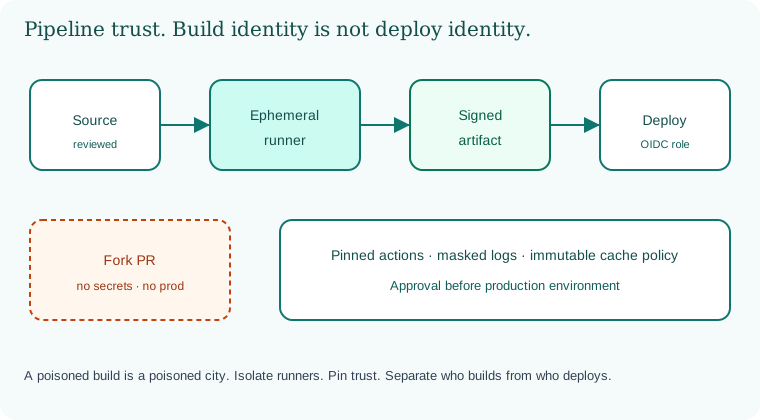
Source to ephemeral runner to signed artifact to deploy with a separate OIDC role. Fork PRs stay outside the secret line.
11.6 A short animation.
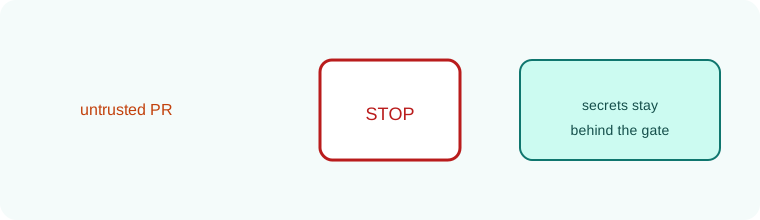
An untrusted pull request approaches. The gate stops it before secrets. Production stays quiet.
11.7 Conclusion.
Raju pinned his actions and split his roles. The green check still appeared, but it meant more. Guru-ji said, "Speed remains. Blind trust does not. In Chapter 12 we attach scanners to this pipeline: SAST, SCA, DAST, and IAST, with gates that developers can live with." Raju wrote one more line in his notebook: the pipeline is part of production, so it follows production rules for patching, identity, and audit.
- Pipelines are privileged employees; give them least privilege.
- Pin actions, isolate runners, separate build from deploy, prefer OIDC.
- Forks and PR metadata are untrusted; never turn them into shell code.
- Sign and promote immutable artifacts; approve production.
- SolarWinds, disclosed December 2020, is the poisoned build lesson.
- Ephemeral runners, pinned actions, digest promotion, and split identities are the everyday controls.
- Measure gates against DORA; fear of slowness is not an architecture.
- Own lab only. Green checks must mean trusted process, not only passing tests.
Treat every workflow change as a production change.
END OF CHAPTER 11 MASTER CLASS
Pipeline platforms
The same controls exist in every CI/CD platform under different names.
GitHub Actions
permissions: block, environments with required reviewers, OIDC, SHA-pinned actions, CODEOWNERS for .github/workflows.
GitLab CI
Protected branches and variables, protected environments, ID tokens (OIDC), include pinned to a ref.
Jenkins (common with Java and .NET)
Credentials plugin with folder scoping, ephemeral agents, Jenkinsfile reviewed in Git, script approval kept strict.
Azure DevOps
Service connections with workload identity federation, environment approvals, branch policies.
AWS CodePipeline / Google Cloud Build
IAM roles per stage, manual approval actions, build logs in a separate account or project.
Summary
| Control | Why |
|---|---|
| Pinned actions/tools | Stop surprise changes |
| Least-privilege jobs | Limit damage |
| OIDC | No stored cloud keys |
| Approval for prod | Human check |
| Promote by digest | Run what you tested |
Remember with three pictures
Global: SolarWinds (2020) and Codecov (2021). Indian company (sample): one shared key replaced by OIDC roles. Everyday: the cash van with a locked route.
Interview-ready answers: Pipelines
Q. Why pin GitHub Actions to a SHA?
A tag can be moved to new code. A full commit SHA cannot.
Q. What is OIDC in CI?
The CI job proves its identity to the cloud and gets short-lived credentials. No stored keys.
Q. Why promote by digest?
Production runs exactly the bytes that passed testing.
Q. Who should be able to change workflow files?
Only reviewed changes, protected by CODEOWNERS and branch protection.
Common questions about CI/CD pipeline security
Q. Are self-hosted runners bad?
Not bad, but they need patching and cleaning. Ephemeral runners are safer.
Chapter practice kit: worksheet, stacks, checklists
Key terms
- Runner: The machine that executes CI jobs.
- OIDC: A standard that lets CI get short-lived cloud credentials.
- CODEOWNERS: A file naming who must review changes to which paths.
- Environment protection: Approvals and rules before a deploy job runs.
- Artifact: A build output, such as a JAR, a DLL bundle or an image.
- Digest: The content hash of an artifact.
Recap
- The pipeline is a privileged employee.
- Give each job only what it needs, and prefer short-lived credentials.
- Protect workflow files like production code.