Chapter 8: Linux, OS and Systems Security
8.1 Why.
Welcome to Chapter 8.
I am Ravindra Bagale.
Raju had no engineering degree. He had a laptop and a lab virtual machine that said root@lab. He typed a password once, stayed root for an hour, and felt powerful. The Magical Code Library put a second chair beside him. Guru-ji sat down and asked for the list of who could become root, who could open SSH, and which service still listened on a port nobody used.
"I am the only user," Raju said.
"Today," Guru-ji answered. "Tomorrow a CI runner shares this image. Next week a teammate copies the AMI. The day after that, a forgotten package receives a patch and you postpone the reboot because Netflix-shaped traffic is busy. A host is not a school desk. It is a door into the city."
Raju closed the root shell. He opened a normal user. The prompt looked poorer. Guru-ji smiled. "That poorer prompt is the beginning of DevSecOps. Permissions are sentences. SSH is a door. sudo is a written permission slip. auditd is the diary. SELinux and AppArmor are the rules about which room a program may enter. A hardened host is the whole paragraph."
Suppose we are Paytm and a payment worker runs on Amazon Linux. The worker needs one secret and one database port. It does not need the ability to install packages as root at midnight. Suppose we are Swiggy and a build agent cooks images. That agent must not keep a long SSH key that also opens production. Suppose we are Infosys on a client project. The client will ask for evidence: who logged in, who ran sudo, which package versions are current. "Trust me" is not evidence. Suppose we are BHIM UPI, WhatsApp, Zomato, Amazon, or PayFast in the sense of a product that must stay up. An open SSH with password login is not a small mistake. It is an invitation.
Volume 1 taught design, OWASP names, review, and Git locks. Volume 2 begins under the floorboards. If the operating system is soft, the pipeline and the scanner stand on mud.
The server is still the base
Containers and cloud still run on a Linux kernel. If the host is weak, everything above it is weak.
Dirty COW, 2016
CVE-2016-5195 was a Linux kernel race condition that let a normal user write to read-only files and gain root. It had existed in the kernel for about nine years before the fix.
sudo Baron Samedit, 2021
Qualys found CVE-2021-3156, a heap overflow in sudo that let local users become root on many distributions. Patching sudo quickly was the fix.
8.2 What.
Linux is the common ground under most runners, most containers' hosts, and most cloud images you will harden. Learn the control objective first. The flag name changes between Ubuntu and Amazon Linux. The objective does not.
Filesystem, permissions, ownership, umask, ACLs, capabilities. Every file has an owner, a group, and a mode. Read, write, and execute mean different things for a file and for a directory. The mode is not decoration. A configuration file that holds a database password must not be readable by every account on the box. A script that only root should run should not be writable by a deploy user. umask sets the default mask for new files. An ACL adds named users beyond the simple owner-group-other model when you truly need that. Linux capabilities split "root powers" into smaller coins: bind a low port without owning the whole machine, for example. Prefer a capability and a dedicated user over a permanent root process. Do not open a directory to the world because a blog said a three-digit mode that looks like a lucky number. Name the owner. Name the group. Give the smallest mode that still lets the job run. Check with ls -l and with getfacl when ACLs are in play. Fix with chown, chmod, and setfacl on systems you own.
Users, groups, sudoers, PAM, SSH hardening, MFA concepts. People get named accounts. Shared "admin" logins are a fog. Groups collect people who share a job. sudoers says which user may run which command as which other user, often with a password or a ticket. Keep sudo lists short. Prefer a single allowed command over ALL. PAM is the plug-in stack that decides how login proves identity: password, key, and second factor ideas live there. SSH is the remote door.
Harden SSH on a lab host you own:
- Prefer public-key login and turn password login off once keys work.
- Do not allow root to log in directly over SSH.
- Change the listening surface only if your runbook can find the new door; a weird port alone is not security.
- Allow only the users who need the shell.
- Use a second factor when your environment supports it: a hardware key, an authenticator app tied to the identity provider, or a bastion that already enforced MFA.
- Keep
MaxAuthTriesmodest and watch the logs for repeated failures. - Disable unused authentication methods you do not understand.
A bastion is a single jump host. Production databases do not open SSH to the internet. Operators land on the bastion, then to the private host, with short-lived credentials when you can manage that. MFA at the identity provider beats MFA invented as a sticky note.
Processes, signals, namespaces, cgroups, systemd, services. A process is a running program with an id, a user, and open files. Signals ask it to stop, reload, or die. Namespaces give a process its own view of mounts, network, and process ids. cgroups limit CPU and memory so one noisy neighbor cannot starve the host. systemd starts services, restarts them under policy, and keeps unit files that say which user the service runs as. Read the unit. If User=root and the service only needs to serve HTTP, change the story. Disable services you do not need. Every listening socket is a door.
Kernel security basics, sysctl, ASLR, seccomp, AppArmor, SELinux. The kernel is the referee. sysctl tunes knobs: IP forwarding, and whether the box accepts source-routed packets, among many others. ASLR randomizes where libraries sit in memory so a guessed address is less useful. seccomp filters which system calls a process may make. AppArmor and SELinux are mandatory access control. They say, beyond the discretionary mode bits, whether this Apache-shaped process may write that directory. SELinux uses labels. AppArmor uses path profiles. Both feel strict the first week. Both stop an escaped process from reading every secret on the disk. Learn to read an audit denial. Do not learn by turning the system to "permissive forever" on a production image and forgetting it.
Package management and repository trust; GPG verification. Install software from repositories you trust. Verify signatures. Pin versions when your policy requires reproducibility. A random script from the open web that pipes into a shell is not a package manager. Prefer official images and mirrors your company approved. When a package updates, read the changelog for security fixes. Unattended upgrades can apply security patches on a schedule you choose. Reboots still need a plan: kernel updates often need one.
File integrity monitoring; auditd; journald; log rotation. auditd records security-relevant events: a sudo escalation, a change to /etc/passwd, an open of a watched file. journald holds systemd logs. Rotate logs so disks do not fill, and ship copies off the box so an intruder who clears local files does not clear your memory. File integrity monitoring watches critical binaries and configs for unexpected change. Ahash today versus yesterday is a sentence you can show an auditor.
Linux networking commands, sockets, ports, iptables/nftables. ss and ip show what listens and how routes look. A socket bound to 0.0.0.0 is visible on every interface. Bind to the interface you mean. iptables and nftables filter packets on the host. Cloud security groups filter before the packet arrives. Use both ideas: deny by default, allow the few ports the job needs, log the drops you care about. Chapter 9 goes deeper on network design. Here, know that a hardened host still needs a closed local firewall when the overlay is wrong.
Hardening benchmarks and baseline configuration. CIS-style benchmarks and cloud hardening guides list settings: password policy, unused modules, permissions on cron, and SSH flags. Pick a baseline. Apply it with configuration management or a golden image. Drift detection tells you when someone opened a door by hand. Immutable hosts take this further: you do not patch in place; you bake a new image and replace the box.
Patch management, unattended updates, reboot strategy. Equifax taught the industry a hard lesson about postponing a known fix. Track CVEs that apply to your packages. Test the patch in a lab image. Roll forward. Have a reboot window. A kernel that never reboots is a kernel that never finishes some updates. Document who owns the calendar.
Secure images, minimal OS, immutable hosts. A minimal image has fewer packages and therefore fewer surprises. Remove compilers from production images if builds belong elsewhere. Remove unused users. Bake SSH keys or cloud-init rules into the image carefully so secrets are not stamped into every AMI snapshot forever. Prefer instance roles and short-lived credentials over baking a long-lived key.
Windows and PowerShell in mixed estates. Many enterprises still run Windows beside Linux. The same ideas apply: least privilege, patching, audit logs, and no shared local admin password. PowerShell remoting and constrained endpoints are the cousins of sudo and SSH. Know enough to speak with the Windows team. Do not pretend Linux hardening finishes the company.
Endpoint protection and EDR concepts. Antivirus of old looked for known bad files. Endpoint detection and response watches behavior: a sudden script that dumps credentials, a strange child process from a browser. On servers, the agent must be tuned so it does not break the workload. Attack-surface reduction means turning off macros, unused remote services, and local admin where the job does not need them. EDR is a safety net. It is not permission to leave SSH open to the world.
A teaching sample: least privilege for a lab service. This unit file is for a lab on a machine you own. It is not a production Paytm unit.
# /etc/systemd/system/lab-pay.service  — own lab only
[Service]
User=labpay
Group=labpay
WorkingDirectory=/var/lib/labpay
ExecStart=/usr/local/bin/lab-pay
NoNewPrivileges=true
ProtectSystem=strict
ProtectHome=true
PrivateTmp=true
The binary runs as labpay. It cannot casually become root. Home directories are hidden. The system directories are read-only except where you punch a hole with ReadWritePaths. That punch should be tiny.
Capabilities versus containers, on paper. A container shares the host kernel. Dropping capabilities inside the container is not a substitute for hardening the host that runs the runtime. If the host allows a container to remount sensitive paths or to talk to the docker socket without thought, the "least privilege" story in the unit file was theatre. Draw the host and the container as two boxes. The kernel sits under both. seccomp profiles and read-only root filesystems help. They do not forgive an SSH door that still accepts passwords from the world.
Journal evidence you can show. When Infosys-shaped client audits ask "who became root last Tuesday?", you need a line, not a shrug. Practice on your lab: run one sudo command, then journalctl or the audit search your distro documents, and paste the redacted line into your notes. Redact user names if you will share the notes. Keep the shape: time, user, command, success or failure. That shape is what Chapter 29 will later call evidence. You are collecting it early on purpose.
Immutable host rhythm. Monday: bake. Tuesday: test. Wednesday: replace ten percent of the fleet. Thursday: watch error budgets the way Netflix-shaped teams watch streams. Friday: finish the roll or roll back the image, not a hand-edited file on a single box. Hand edits that never return to the image are drift. Drift is how Equifax-shaped inventories lie. Your lab can simulate this with two virtual machines and a shared cloud-init file even when you have no fleet.
Ravindra Bagale's Tip
Students collect kernel flags the way tourists collect fridge magnets. One correctly closed SSH door and one audited sudo rule beat fifty unread sysctl lines. Harden what you can explain.
Practice task
On a lab virtual machine you own, create a non-root user, disable root SSH login, allow only key authentication, add one sudo rule for a single command, and write one auditd rule that records that command. Confirm a journal or audit line appears. Do not practice on Amazon, Infosys, Swiggy, or any host you do not own.
8.3 How.
- Create or start a lab Linux virtual machine you own, and write "own lab only" at the top of your notes.
- Create a named user for daily work and stop using root for editing files.
- Generate an SSH key pair for that user and install only the public key on the lab host.
- In sshd config on the lab host, set password authentication off after key login works, and set root login to prohibit-password or no.
- Restart sshd carefully while you still have a working session, and open a second session to prove you can get back in.
- List listening sockets with
ss -tulpenand write down every port you did not expect. - Disable or remove services you do not need on that lab image.
- Set ownership and modes on a fake secrets file so only the service user can read it, and confirm with
ls -l. - Set a sensible umask for the service user and create a new file to see the default mode.
- Install sudo if needed and add a sudoers drop-in that allows one command, not ALL.
- Run that command with sudo and find the matching line in the auth log or journal.
- Enable and start auditd on the lab host.
- Add an audit rule that watches
/etc/sudoersand your sudoers drop-in for writes. - Make a harmless change and confirm auditd recorded it.
- Read one SELinux or AppArmor status line so you know whether enforcing is on.
- If a denial appears in your lab, read the audit message before you widen the profile.
- Apply a small CIS-style checklist: unused accounts locked, cron permissions tight, core dumps handled per your policy.
- Turn on unattended security updates in a way your lab distro documents, and note the reboot plan.
- Build a second minimal image with fewer packages and boot it as a candidate golden image.
- Configure a host firewall with nftables or iptables that allows SSH from your admin address and denies other inbound by default.
- Ship journal snippets to a second folder or host so you practice off-box logs.
- Document the baseline in a short markdown file next to your lab scripts.
- Re-read the unit of any service you run and ensure it uses a non-root User= when possible.
- Practice a patch: update one package, run your smoke test, and reboot if the kernel requires it.
- Stop. Do not scan, SSH into, or "test" Swiggy, Paytm, Amazon, BHIM UPI, WhatsApp, Zomato, Netflix, Infosys, PayFast, or any network that is not yours.
Hardening steps for a new server
- Patch the system and turn on automatic security updates.
- Create a named admin user; disable SSH password login and root login.
- Allow only needed ports in the host firewall and the cloud security group.
- Remove packages and services you do not use.
- Send auth and system logs to a central place.
- Check the host against a CIS Benchmark with a tool like Lynis or OpenSCAP.
Amazon Linux 2023 / RHEL
dnf upgrade --security; firewalld; SELinux in enforcing mode.
Ubuntu / Debian
unattended-upgrades; ufw; AppArmor profiles.
Windows Server
Windows Update policies; Defender; disable SMBv1.
| Control | Command or tool |
|---|---|
| Patching | dnf / apt, unattended-upgrades |
| SSH | PasswordAuthentication no, PermitRootLogin no |
| Firewall | firewalld / ufw + security group |
| Audit | Lynis, OpenSCAP, auditd |
8.4 A real public incident.
Name. Equifax data breach.
Date. The intrusion window Equifax later described ran from mid-May 2017 into July 2017. Equifax publicly announced the breach on 7 September 2017.
Source. Equifax's public statements beginning 7 September 2017, subsequent U.S. Government Accountability Office reporting, and the U.S. House Committee on Oversight and Government Reform's bipartisan staff report on the breach. This chapter uses those public accounts for what failed. It does not repeat intrusion steps.
What happened. Attackers reached Equifax systems through a public-facing web application that was missing a patch for a known Apache Struts vulnerability. From that foothold, public reporting describes lateral movement and access to large stores of personal data. Equifax said about 147 million people were affected in the United States, with additional impact in the United Kingdom and Canada. Names, Social Security numbers, birth dates, addresses, and in some cases driver's license numbers were among the data classes discussed in public materials. The technical failure sat beside process failures: a patch was available, scanners and inventories did not guarantee the vulnerable system was fixed, and detection lagged. An unpatched host is not a paperwork issue. It is an open door with a published key shape.
How to stop.
- Isolate the affected applications and revoke credentials that may have been touched.
- Patch or take offline every instance of the vulnerable component, not only the first box you found.
- Preserve logs for investigators and law enforcement.
- Reset secrets and certificates that sat on the same trust fabric.
- Tell the people whose data was taken, and work with regulators as required.
How to prevent it again.
- Keep a real inventory of internet-facing hosts and the packages they run.
- Apply security patches on a measured clock, with owners and reboot windows.
- Harden the host: least privilege, closed SSH, audited sudo, minimal services.
- Segment so one web tier does not become a free hallway into every data store.
- Monitor for unusual bulk reads of personal data.
- Practice patching and reboot drills on images you own. Do not go hunting for unpatched Struts on someone else's network.
This is for learning only, and only inside a system you are allowed to test.
8.5 A simple picture.
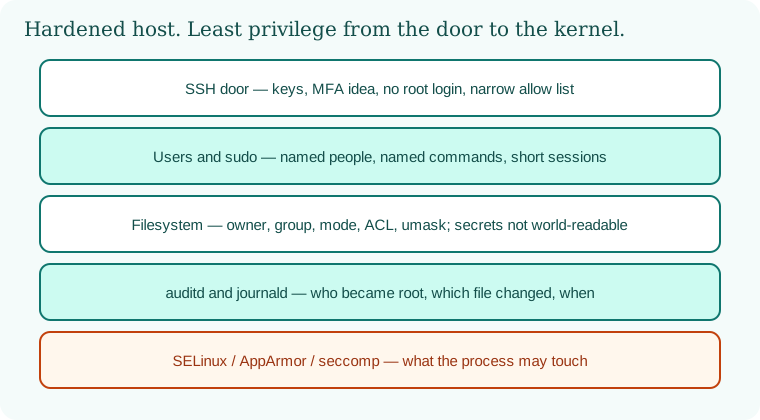
Identity at the SSH door. sudo with a short list. Files with owners. auditd with a diary. A kernel policy that limits what a process may touch. That stack is a hardened host.
8.6 A short animation.
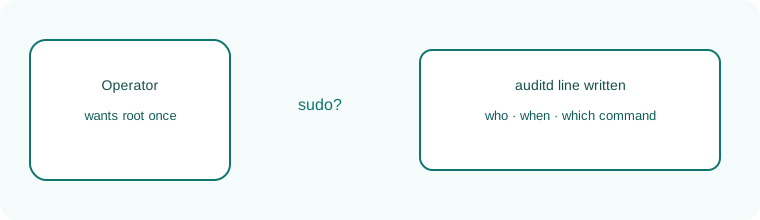
An operator asks for sudo. The stamp is the log line. Power without a diary is not DevSecOps.
8.7 Conclusion.
Raju's prompt was no longer root. He could still finish the lab. Guru-ji tapped the notebook. "The city sits on these hosts. If the host is soft, Chapter 3's picture and Chapter 6's Git locks stand on mud. In Chapter 9 we walk the wires between the hosts: TCP, TLS, firewalls, and segments that stop a vendor laptop from greeting a database."
- Permissions and ownership are the first sentences of OS security.
- SSH and sudo are doors with lists, not badges of honor.
- auditd and journals are evidence. SELinux and AppArmor are mandatory rules.
- Patches and minimal images close doors that scanners only name.
- Equifax, announced 7 September 2017, is the unpatched internet-facing host lesson.
- Own lab only.
END OF CHAPTER 8 MASTER CLASS
| Weakness | Real example | Control |
|---|---|---|
| Kernel bug | Dirty COW 2016 | Patch and reboot plan |
| Privilege bug | sudo CVE-2021-3156 | Fast package updates |
| Unpatched app on host | Equifax 2017 | Asset list plus patch deadlines |