Chapter 10: Secrets, Keys, Certificates and PKI
10.1 Why.
Welcome to Chapter 10.
I am Ravindra Bagale.
Raju needed a database password for the lab API. He had no engineering degree. He pasted the password into a WhatsApp chat with himself so he would not forget it. Then he pasted it into a ticket. Then he committed a .env file "just for today." Guru-ji held up a hand.
"A secret that travels by chat is a postcard," Guru-ji said. "A private key that sits in Git is a public key with a disguise. Paytm cannot keep wallet trust that way. Amazon cannot keep customer trust that way. BHIM UPI cannot move money on a certificate nobody can revoke cleanly. Swiggy, Zomato, Netflix, Infosys, and PayFast all drown if the signing key for production is a screenshot."
Raju deleted the chat message. The password was still in the ticket and in Git history. Chapter 6 had already taught revoke first. Today Guru-ji wanted the larger map: what kinds of secrets exist, where they live, how certificates chain to trust, and how rotation happens without an outage story that lights up the Magical Code Library in red.
Deeper notes for 10.1 Why. (examples, stacks, worksheet)
What a "secret" really is
A secret is any value that lets a program or person prove who they are, or unlock data. If a stranger gets it, they can act as you. These are the common kinds:
- Passwords: for a database (MySQL, PostgreSQL, MongoDB, Redis) or an admin panel.
- API keys and tokens: for payment gateways, SMS services, GitHub or the cloud.
- Private keys: the secret half of a TLS certificate or an SSH key.
- Signing keys: used to sign software releases or JWT login tokens.
- Encryption keys: used to lock data at rest, often managed by AWS KMS, Azure Key Vault or Google Cloud KMS.
Why it matters, with real examples
Example 1: an Indian company (sample data)
Suppose we are a junior developer at Razorpay-style payment software. A test API key for the payment gateway ends up in a public GitHub repo. Bots that watch GitHub for keys can find a leaked key within minutes. The safe response is the same every time:
- Revoke the key in the provider dashboard.
- Create a new key and store it only in a secrets manager.
- Check the provider logs for any use of the old key.
- Remove the key from the code, and accept that Git history still has it. That is why you revoke first.
Example 2: a global platform
GitHub secret scanning works with many providers, including AWS, Azure, Google Cloud, Slack and Stripe. When it finds one of their token formats in a public repository, the provider is notified and can revoke the token automatically. You might get an email titled "We found a secret in your repository".
Example 3: everyday life
A house key under the doormat is "hidden", but everyone knows where to look. A .env file committed to Git is the doormat key of software.
Where each stack usually keeps its secrets
Every framework has a normal place for configuration. The rule is the same in all of them: the code reads the secret from the environment or a secrets manager. The secret itself is never written in the code.
Java / Spring Boot
Spring reads ${DB_PASSWORD} from environment variables. Spring Cloud also offers AWS Secrets Manager and Vault integrations.
spring.datasource.password=${DB_PASSWORD}What you see:
App starts; no password visible in application.propertiesPython / Django, Flask, FastAPI
Read from the environment with os.environ. Never commit .env.
import os
DB_PASSWORD = os.environ['DB_PASSWORD']
What you see:
KeyError: DB_PASSWORD (if you forgot to set it, which is good: it fails loudly)Node.js / Express
process.env, with dotenv for local development only. Add .env to .gitignore.
const pass = process.env.DB_PASSWORD;What you see:
undefined (if not set)C# / ASP.NET Core
Use User Secrets in development and Azure Key Vault or environment variables in production.
dotnet user-secrets set "Db:Password" "..."What you see:
Successfully saved Db:Password = ... to the secret store.Go
os.Getenv. Fail at startup if the value is empty.
pass := os.Getenv("DB_PASSWORD")
if pass == "" { log.Fatal("DB_PASSWORD not set") }
What you see:
DB_PASSWORD not setPHP / Laravel
.env is read by env(). The file must stay outside the web root and out of Git.
DB_PASSWORD=${DB_PASSWORD}What you see:
php artisan config:cache Configuration cached successfully.Ruby / Rails
Rails encrypted credentials. The master key itself is kept out of Git.
bin/rails credentials:editWhat you see:
config/credentials.yml.enc is encrypted; config/master.key is git-ignoredAWS / Azure / GCP
AWS Secrets Manager, Azure Key Vault and Google Secret Manager store secrets. The app reads them using its role (an IAM role, a managed identity or a service account), not a pasted key.
aws secretsmanager get-secret-value --secret-id prod/dbWhat you see:
"SecretString": "{...}" (only for a role with permission)Summary
| Stack | Read secrets from | Never |
|---|---|---|
| Spring Boot | env / Secrets Manager | application.properties in Git |
| Python | os.environ | settings.py literal |
| Node.js | process.env | committed .env |
| ASP.NET Core | User Secrets / Key Vault | appsettings.json literal |
| Go | os.Getenv | const in code |
| Laravel | .env outside Git | .env in Git |
| Rails | encrypted credentials | master.key in Git |
Common mistakes
- Deleting a leaked secret from the file but not revoking it.
- Sharing one database password across dev, test and production.
- Passing secrets as Docker build arguments, which stay visible in the image history.
- Printing configuration at startup "for debugging", which puts secrets in the logs.
Recap
- A secret is anything that lets someone act as you.
- Read secrets from the environment or a manager. Never write them in code.
- If a secret leaks: revoke, replace, check the logs, then clean up.
10.2 What.
Secrets taxonomy. Passwords authenticate people and sometimes services. API tokens authorize programmatic calls. Symmetric keys encrypt or MAC data. Asymmetric key pairs sign and decrypt with separate halves. Certificates bind a public key to a name and an issuer. Session tokens and refresh tokens are short-lived cousins. One-time passwords are proof of possession for a moment. Treat each class with a lifetime and a storage rule. A password in a human password manager is fine. A password in a mobile screenshot shared to a group is not.
Secret managers. HashiCorp Vault and cloud-native secret services exist so apps fetch secrets at runtime instead of baking them into images. The app authenticates to the manager with an identity: an instance role, a Kubernetes service account, or a CI OIDC token. The manager returns a secret over TLS. Access is audited. Revocation is a policy change, not a scavenger hunt across laptops. In a lab, run a manager or use a cloud secrets service on an account you own. Do not load real production keys into a learning vault.
Dynamic secrets and short-lived credentials. Some managers can mint a database user that expires in an hour. Cloud roles assumed through OIDC last minutes. Short life shrinks the window when a leak matters. Long-lived static keys are easier to paste and harder to forget. Prefer short. When you must use static, rotate on a calendar and on every suspected leak.
Encryption at rest and in transit; envelope encryption. In transit means TLS on the wire, as Chapter 9 required. At rest means disks, object stores, and database files encrypt so a stolen disk is not a stolen clear archive. Envelope encryption means a data key encrypts the bytes, and a master key in a KMS wraps the data key. You rotate the master carefully. You rewrap data keys without always re-encrypting every byte on day one. Understand the hierarchy before you invent a homemade crypto protocol. Homemade crypto is a classic own-goal.
KMS and HSM concepts. A Key Management Service stores and uses master keys behind an API. A Hardware Security Module keeps key material in tamper-resistant hardware. Higher assurance costs more and slows some operations. Payment and certificate-authority private keys often demand HSM-backed protection. App data keys may live in cloud KMS with good IAM. Least privilege on who may encrypt, decrypt, and administer is the real control. A KMS key that every role can decrypt is a decorative lock.
PKI, certificate authorities, and trust chains. Public Key Infrastructure is how names and public keys earn trust. A certificate authority signs certificates. A root CA is trusted by browsers and systems, often via a trust store. Intermediate CAs sit under roots so roots can stay offline. A leaf certificate names your service. Clients verify the chain: leaf to intermediate to a trusted root, plus time validity, revocation status when checked, and the name matching the host they called. If any link lies, TLS becomes costume jewelry.
Issuance, renewal, revocation, rotation. Issue certificates with automation where you can: ACME for public names, or an internal CA for private mesh names. Renew before expiry. Monitor expiry; an expired certificate is an outage that looks like a security event. Revoke when a private key leaks or a name is retired. Rotation means replacing keys and certificates on a schedule even without a known leak. Practice rotation in the lab until it is boring.
mTLS and service identity. Mutual TLS means both sides present certificates. In a service mesh, identities map to certificates. A caller without the right identity fails. Combine with authorization: the inventory service may call read on catalog, not refund on payment. Certificate identity without object checks repeats Chapter 3's mistake in a tuxedo.
Secret scanning. Scan source, images, and logs for shapes of keys and tokens. Push protection blocks a commit that looks like a cloud key. Scanning is a seatbelt. It will miss novel formats. Design so secrets never enter the repo. Chapter 6 already banned .env in Git. Here you also ban keys in container layers, in CI logs, and in exception messages.
Kubernetes secrets limitations. A Kubernetes Secret object is base64-encoded by default, not encrypted with a personal puzzle. Anyone who can read secrets in the namespace can read the bytes. Enable encryption at rest for the API store. Prefer mounting secrets from an external manager through CSI or injecting at runtime. Restrict RBAC so a microservice account cannot list all secrets in the cluster. Do not paste production keys into a manifest in a ticket.
Injection patterns. Environment variables are simple and easy to leak into logs and child processes. Files mounted with tight modes are better when the runtime supports them. Sidecars and CSI drivers can refresh secrets. Templates that render secrets into config files at start must not leave world-readable copies. Prefer libraries that read from the manager directly.
Rotation without downtime. Overlap old and new. Accept both passwords during a window, or use dual certificates, then drop the old. For tokens, cut the old token only after every consumer fetched the new. Practice on a lab database user. Document the steps. The first production rotation should not be improvisation at 2 a.m.
Backup and disaster for key material. If you lose the only copy of a CA private key, you may have to re-issue a universe of certificates. If someone else gains that copy, you must revoke a universe. Back up CA material with dual control and encryption. Store recovery procedures offline enough to survive the same fire that takes the primary. Test restore on a lab CA, not by hoping.
Teaching sample: fetch a secret in a lab app. This is a sketch for a machine you own.
# lab only — fake names, no real cloud account required to read this lesson
import os

def db_password():
    # Prefer a manager SDK in real code. Here we show the rule:
    # the password is not a string literal in source.
    value = os.environ.get("LAB_DB_PASSWORD")
    if not value:
        raise RuntimeError("LAB_DB_PASSWORD missing; inject from your secret manager")
    return value
The point is the absence of a literal. Wire the environment from a manager in your lab compose file. Do not commit the compose override that holds the real value.
DigiNotar-shaped fear, in one sentence. If a public CA is compromised, browsers must distrust it, and every site that depended on it must replace certificates. That is why root keys live in HSMs and ceremonies, and why intermediates exist.
Paytm and BHIM UPI stakes. Payment intents and wallet balances are assets from Chapter 3. The keys that authorize a credit to a merchant account are higher still. A leaked merchant API token can drain trust even when the TLS certificate is perfect. Separate duties: the person who can mint a production token should not be the only person who can deploy, and the deploy role should not be able to export the CA key. Amazon-shaped retail and Netflix-shaped streaming use the same separation under different product names.
Infosys-shaped client boundaries. On a project serving two banks, secrets for bank A must not be readable by the namespace for bank B. That is multi-tenant secrets hygiene. Name the secret paths with tenant ids. Audit list and read operations. A shared "ops" vault folder for all clients is convenience and a breach waiting for a calendar date.
Logging discipline. Frameworks love to print configuration on startup. Configure them so secret-bearing fields redact. A single debug flag in production has published tokens into centralized logs that every engineer can query. Central logs need access control too. Treat log stores as secret-adjacent.
Human processes. Break-glass accounts exist for outages. They must be rare, monitored, and rotated after use. Dual control for CA ceremonies means two people. A ceremony checklist is not bureaucracy. It is how you avoid DigiNotar-shaped regret.
What this chapter refuses to teach. How to forge certificates, how to extract keys from HSMs, how to bypass TLS for third-party sites, and how to phish vault credentials. Those topics are outside the Magical Code Library on purpose.
Ravindra Bagale's Tip
Students encrypt disks and still paste the TLS private key into Slack. Encryption features do not cancel human routing. Ask "who can read this byte now?" for every secret.
Practice task
On infrastructure you own, create a lab CA or use a public ACME client for a name you control. Issue a leaf certificate, configure TLS on a local service, renew once, and revoke a deliberately discarded key. Store the private key outside Git. Scan the repo for key shapes and confirm a clean result.
Certificate transparency and public logs. Public CAs often log issued certificates to transparency logs so domain owners can notice surprise certificates for their names. Monitor names you own. A surprise certificate can mean mis-issuance or an attacker using a lookalike process. Internal CAs may not use public CT; then your own inventory of issued leaves must be strong.
Machine identity versus human identity. Humans use SSO and MFA. Machines use roles, instance identity documents, workload identity federation, and certificates. Do not share a human's refresh token to run a batch job. Mint a machine identity with the smallest scope. PayFast-shaped merchants integrating webhooks verify signatures with keys that are machine secrets, not a founder's laptop password.
Envelope encryption walk-through for a lab object. Generate a data key. Encrypt the file with the data key. Encrypt the data key with KMS. Store ciphertext plus wrapped key. To read, decrypt the data key with KMS, then decrypt the file. Delete clear data keys from memory when the library supports it. Never log the data key. This pattern appears in cloud object encryption and in many application-level designs.
SSH certificates as a cousin of PKI. Some estates issue short-lived SSH certificates instead of scattering permanent authorized_keys files. The same morals apply: protect the SSH CA key, keep lifetimes short, and revoke by stopping issuance and denying serials when your stack supports it. Chapter 8 hardened SSH; this chapter explains why a long-lived user key in a hundred images is a secret sprawl problem.
Secret sprawl metrics. Count how many places a production DB password still lives: vault, an old CI variable, a helm value in a private repo, a runbook screenshot, an engineer's password manager shared vault. The goal is one authoritative place plus audited checkout. Sprawl is the enemy. Swiggy-shaped growth and Zomato-shaped growth both tempt sprawl when teams move fast. Put a secrets review on the architecture checklist beside the threat model.
Disaster story you want to avoid. The only person who knew the CA passphrase left the company. The HSM backup was never tested. A leaf expired on a festival weekend. That is not bad luck. That is missing rotation, missing dual control, and missing restore drills. Write the drill date in the calendar when you create the CA.
10.3 How.
- Inventory secret types in your lab app: DB password, API token, TLS key, and signing key.
- Write a lifetime beside each: hours, days, or ninety days.
- Stand up a secret manager or cloud secrets service on an account you own.
- Authenticate the lab app with a role or service account, not with a long-lived personal key pasted into code.
- Remove any secret literals from source and from container build args.
- Turn on secret scanning and push protection on the lab repository.
- Configure TLS on the lab HTTPS endpoint with a certificate whose private key lives in the manager or in a restricted file mode.
- Document the chain: leaf, intermediate, root.
- Automate renewal reminders or ACME renew for names you control.
- Practice revocation: replace a lab key, reload the service, confirm the old key no longer works.
- Enable KMS-backed encryption for a lab disk or bucket and prove a role without decrypt permission cannot read clear data through the API path you test.
- Draw envelope encryption: data key wraps bytes; master key wraps data key.
- For a lab mesh or two services, enable mTLS and verify a third service without a cert cannot join.
- Restrict Kubernetes RBAC in a kind/minikube lab so only one service account reads its secret.
- Prefer file inject or SDK fetch over echoing secrets into build logs.
- Mask CI variables in the pipeline UI and confirm a debug echo does not print them.
- Write a dual-run rotation playbook for the DB password and rehearse it once.
- Back up lab CA material encrypted to a second location you control; test restore.
- Delete secrets from tickets and chat; if they appeared, rotate.
- Add CODEOWNERS for any path that could hold material templates.
- Educate the team in one page: how to request a secret, how never to paste one.
- Review IAM on the KMS key monthly in the lab until the habit sticks.
-
Stop. Do not attempt to obtain, crack, or misuse certificates or keys from Amazon, Paytm, or any foreign system.
-
Enable certificate-expiry monitoring for every lab name you serve.
- List all CI variables in the lab project and delete unused ones.
- Replace one static cloud access key with an OIDC role assumption if your lab cloud supports it.
- Confirm backup of vault or KMS recovery procedure is readable by a second person.
- Redact secrets in a sample exception message by coding a safe logger in the lab app.
- Review who can
getsecrets in the lab Kubernetes namespace and cut the list. - Stop. No key material from foreign companies enters your notes.
Deeper notes for 10.3 How. (examples, stacks, worksheet)
The same steps, made simple
The list above is long. Here it is grouped into five habits you can learn one at a time.
- Know your secrets. Write each one down with its owner and how long it lives.
- Give each a safe home. Use a secrets manager, not files or chat.
- Let apps use roles. An EC2 IAM role, an Azure managed identity or a GCP service account fetches the secret. There is no stored key.
- Rotate on a schedule. Short lifetimes mean a leak hurts for a shorter time.
- Watch for leaks. Secret scanning in Git, masked CI variables and alerts on unusual use.
Example 1: rotating a MySQL password with no downtime (sample setup)
Suppose we are at a Flipkart-style team with an order service on RDS MySQL. A "dual-run" rotation works like this:
- Create a second database user,
orders_app_v2, with the same privileges. - Store its password in the secrets manager under the same secret name.
- Restart or reload the app so it picks up the new user.
- Check the logs show successful connections as
orders_app_v2. - Drop the old user. Nothing breaks, because nothing uses it any more.
AWS Secrets Manager can automate this kind of rotation for RDS databases.
Rotation and retrieval, by stack and service
The pattern is always the same: fetch at startup or on a schedule, and never hard-code. Here is what it looks like in practice.
MySQL / PostgreSQL on RDS
Secrets Manager stores the credentials and can rotate them. The app fetches the current value.
aws secretsmanager rotate-secret --secret-id prod/orders-dbWhat you see:
{"ARN": "...", "Name": "prod/orders-db", "VersionId": "..."}MongoDB Atlas
Create database users with limited roles and set an expiry for temporary access. Prefer cloud-identity auth where it is supported.
What you see:
Database user "report-ro" expires in 6 hoursRedis (ElastiCache / Azure Cache)
Turn on AUTH or ACL users plus in-transit encryption. Rotate the auth token by adding the new one before removing the old one.
What you see:
Auth token update: ROTATE strategy appliedTLS certificates on nginx / Apache
Let's Encrypt with Certbot renews automatically. Test the renewal before you trust it.
sudo certbot renew --dry-runWhat you see:
Congratulations, all simulated renewals succeededTomcat (Java keystores)
Keep the keystore password out of server.xml where possible, restrict file permissions, and put certificate expiry in monitoring.
keytool -list -v -keystore app.p12 | grep UntilWhat you see:
Valid from: ... until: Sun Jan 10 2027Kubernetes (any app)
A Kubernetes Secret is only base64-encoded by default. Turn on encryption at rest, or use an external secrets operator that syncs from a cloud manager.
kubectl get secret db -o yamlWhat you see:
data: password: cGFzc3dvcmQ= (base64 is not encryption)CI: GitHub Actions / Jenkins / GitLab
Use masked, environment-scoped secrets, and OIDC to reach the cloud instead of storing keys.
echo "${{ secrets.DB_PASSWORD }}"What you see:
*** (masked in the log)Summary
| Item | Typical tool | Rotation |
|---|---|---|
| DB passwords | Secrets Manager / Key Vault / Secret Manager | Automatic or dual-run |
| TLS certs | Certbot / ACM / Key Vault certs | Auto-renew (~90 days for Let's Encrypt) |
| Cloud access | IAM roles / OIDC | Short-lived by design |
| K8s secrets | External Secrets / CSI driver | Synced from the manager |
Everyday example
A hotel key card stops working when you check out. Nobody has to collect it from you. Short-lived credentials work the same way: they simply expire.
Common mistakes
- Rotating the password but forgetting one server that still uses the old one. Use the dual-run method.
- Treating base64 as encryption.
- Certificates renewed on the server but the service never reloaded.
- Letting CI print environment variables.
Recap
- Inventory, safe home, roles, rotation, leak detection.
- Dual-run rotation avoids downtime.
- Test certificate renewal with a dry run.
10.4 A real public incident.
Name. DigiNotar certificate authority compromise.
Date. DigiNotar detected a compromise in July 2011. Public distrust and government disclosures unfolded through August and September 2011, including drastic browser and national responses that autumn.
Source. The public report prepared for the Dutch government by Fox-IT on the DigiNotar breach, contemporaneous advisories from browser vendors that distrust DigiNotar roots, and reporting by The Register and other outlets in September 2011. This chapter uses those public materials. It does not provide a method to compromise a CA.
What happened. Intruders breached DigiNotar's systems and caused fraudulent certificates to be issued for high-value names. Because DigiNotar was a trusted public CA, software that trusted its root could accept those certificates as valid. The failure was catastrophic for a PKI: the trust anchor itself was tainted. Browsers and platforms moved to distrust DigiNotar. The Netherlands faced emergency measures for certificates used in government-related services. A CA is not an ordinary web app. Its private keys are nation-scale secrets. Weak segregation, monitoring, and hardening around issuance turned into a global trust emergency.
How to stop.
- Distrust the compromised roots in clients and enterprises.
- Revoke known bad certificates and replace legitimate ones from a clean CA.
- Take the compromised issuance infrastructure offline for forensic work.
- Communicate clearly to relying parties what to distrust and what to install instead.
How to prevent it again.
- Protect CA private keys in HSMs with dual control and audited ceremonies.
- Separate issuance networks from general IT; monitor for unusual issuance.
- Prefer short-lived certificates so revocation windows hurt less.
- Maintain agility to distrust a CA and shift traffic.
- For your own services, minimize dependence on a single poorly governed CA.
- Study DigiNotar as history. Do not test CA defenses on systems you do not own.
This is for learning only, and only inside a system you are allowed to test.
Deeper notes for 10.4 A real public incident. (examples, stacks, worksheet)
The DigiNotar story in simple words
What a certificate authority does
When you open a bank website, your browser checks the site's certificate. A certificate authority (CA) is a company that browsers trust to say "yes, this certificate really belongs to this website". DigiNotar was one of these trusted companies, based in the Netherlands.
Why this break was so serious
Because attackers could make DigiNotar issue certificates for other companies' names, a fake site could look real to browsers. Fixing one website was not enough. The trust in DigiNotar itself had to be removed, and that is what browser makers did. DigiNotar went bankrupt later in 2011.
The same idea in your own systems
You probably do not run a public CA. But you do rely on certificates and keys in many places. The lesson is: protect the keys that create trust more strongly than anything else.
Where "trust keys" live in common stacks
Each of these is a small version of the DigiNotar lesson. If one leaks, an attacker can pretend to be you.
nginx / Apache
The private key file for your HTTPS certificate. Keep it readable only by root, and never copy it into Git or a Docker image.
ls -l /etc/letsencrypt/live/example.in/privkey.pemWhat you see:
lrwxrwxrwx ... -> ../../archive/.../privkey1.pem (target file mode 600)Tomcat
The keystore file and its password.
What you see:
server.xml: certificateKeystorePassword should come from a protected file, not GitJava / Spring Boot, Node.js, .NET, Python, Go
JWT signing keys. If one leaks, anyone can make valid login tokens. Store it in a secrets manager and rotate it, using a key ID (kid) so old and new keys can overlap.
What you see:
JWT header: {"alg":"RS256","kid":"2026-10"}Internal CAs (Kubernetes, service mesh)
Kubernetes and meshes such as Istio run their own internal CAs for mTLS. Their root keys deserve the same care.
AWS / Azure / GCP
Managed CAs (AWS Private CA, Azure Key Vault certificates, Google Certificate Authority Service) can keep CA keys in hardware security modules (HSMs).
Two more examples
Global example. Browsers and CAs now use Certificate Transparency: public logs of issued certificates. You can search the logs for your own domain, for example on crt.sh, to see whether any unexpected certificate has been issued for it.
Indian context. Indian government and banking sites rely on certificates from licensed CAs, under India's Controller of Certifying Authorities (CCA). The same principle applies: the trust is only as strong as the protection of the CA keys.
Try it yourself
- Open crt.sh in a browser and search for a domain you own.
- List the certificates issued for it. Do you recognise each one?
- On your own server, check the private key file permissions with
ls -l.
Recap
- A CA vouches for websites. If its keys are misused, trust breaks everywhere.
- Protect the keys that create trust: CA keys, TLS private keys, JWT signing keys.
- Certificate Transparency logs help you spot certificates you did not ask for.
10.5 A simple picture.
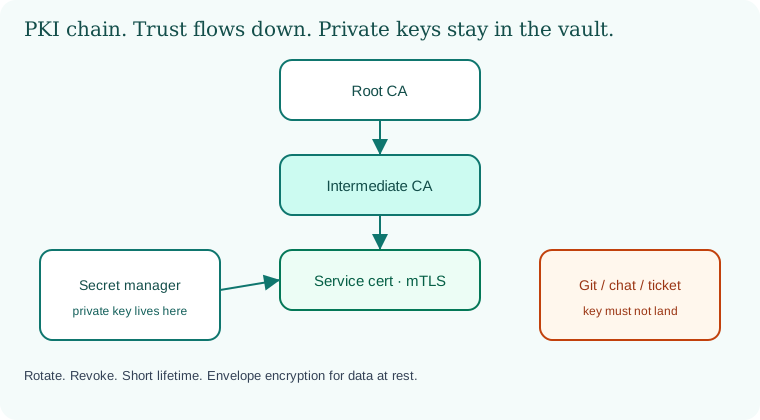
Root signs intermediate. Intermediate signs the service. The private key stays in the secret manager. Git and chat are marked as forbidden landing zones.
10.6 A short animation.
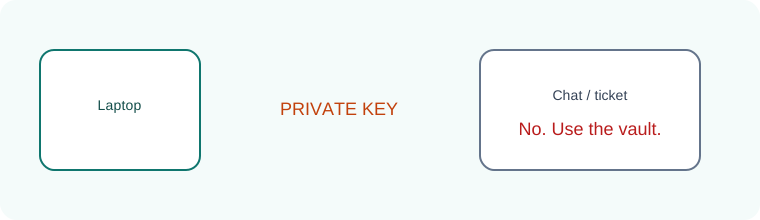
A private key tries to visit a chat. The stamp says no. The vault is the correct address.
10.7 Conclusion.
Raju rotated the lab password and put the new value only in the manager. Guru-ji checked Git one more time and found no literals. "Keys are oxygen," Guru-ji said. "Invisible when present, fatal when dirty. In Chapter 11 we put these secrets into CI/CD without letting the pipeline become a second company."
- Classify secrets and give each a lifetime and a home.
- Prefer secret managers and short-lived credentials over static pasted keys.
- PKI chains trust from root to leaf; protect CA keys like crown jewels.
- Rotate, revoke, scan, and never store private keys in Git or chat.
- DigiNotar, 2011, is the compromised public CA lesson.
- Short lifetimes and dual control beat heroic recovery after a leak.
- Own lab only. Practice revoke and renew until both are boring.
END OF CHAPTER 10 MASTER CLASS
Deeper notes for 10.7 Conclusion. (examples, stacks, worksheet)
Chapter 10 checklist
Your stack, your checklist
Tick these for the stack you use.
Java / Spring Boot
Passwords come from env or Secrets Manager. JWT keys are rotated with a kid. The keystore is not in Git.
Python / Django, Flask
SECRET_KEY comes from the environment, and .env is git-ignored.
Node.js
process.env only. .env is in .gitignore, and no secrets go into front-end bundles (React, Angular).
.NET
User Secrets for development, Key Vault for production, and managed identity to reach it.
Go / PHP / Ruby
Fail fast if a secret is missing. Laravel .env stays out of the web root. Rails master.key stays out of Git.
Databases
Separate users per app and environment, with automated rotation where possible.
Web servers
TLS keys with mode 600, auto-renew, and a reload after renewal.
Cloud
Roles instead of access keys, KMS for encryption, CloudTrail, Azure Monitor or Cloud Audit Logs to see who read secrets.
Remember with three pictures
Global: DigiNotar (2011), when the trust anchor itself broke. Indian company (sample): a leaked payment test key on GitHub, revoked within minutes. Everyday: a hotel key card that simply expires.
Interview-ready answers: Secrets and keys
Q. How do you store a database password for a Spring Boot app on AWS?
In AWS Secrets Manager, read at startup through the EC2 or EKS role. Rotated automatically. Never in application.properties in Git.
Q. What do you do first if a key appears in Git?
Revoke and replace it, then check the logs, then clean the history. The order matters.
Q. What is envelope encryption?
A data key encrypts the data. A master key in KMS encrypts the data key.
Q. Why short-lived credentials?
A leaked credential stops working soon, which limits the damage.
Common questions about secrets, keys and certificates
Q. Is a .env file safe?
Only on the server, with restricted permissions, and never in Git.
Key terms
- Secret: Any value that proves identity or unlocks data.
- KMS: Key Management Service: cloud-managed encryption keys.
- Rotation: Replacing a secret on a schedule.
- PKI: Public key infrastructure: CAs, certificates and trust chains.
- mTLS: Both sides present certificates.
- HSM: A hardware device that protects keys.
Recap
- Classify, store, use by role, rotate, revoke.
- Protect trust keys most of all.
- Next: Chapter 11 puts these secrets safely into CI/CD.