Chapter 14: Docker and Container Security
14.1 Why.
Welcome to Chapter 14.
I am Ravindra Bagale.
Raju had no engineering degree. He had a Dockerfile that started with a full operating system and ended with a root shell "so debugging is easy." Guru-ji set a cup on the Magical Code Library table. "A container is a room inside the host from Chapter 8," he said. "It has its own furniture. It does not have its own planet. The kernel underneath is still the host kernel. If you hand this room the Docker socket, you have handed it the keys to every other room."
Raju looked at the image he had pushed in Chapter 13. "The digest is pinned. Is that enough?"
"The digest proves which bytes," Guru-ji answered. "It does not prove the bytes are humble. Suppose we are Paytm and a payment worker runs as root in a container that can mount the host. Suppose we are Swiggy and a build container can talk to the daemon that builds every other image. Suppose we are Amazon and the registry is full of nicknames called latest. Suppose we are Infosys explaining the image to a client. They will ask which user runs inside, which capabilities remain, and whether the root filesystem is writable. WhatsApp, Zomato, Netflix, BHIM UPI, and PayFast-shaped systems answer those questions in the Dockerfile and in the run flags, not in a slide."
Chapter 13 gave the parcel a receipt. This chapter opens the parcel and locks the room it runs in.
Deeper notes for 14.1 Why. (examples, stacks, worksheet)
Containers in plain words
A container is a packaged app plus everything it needs to run, sharing the host's Linux kernel. It starts in seconds and looks the same on a laptop and in production. But because it shares the kernel, a badly configured container can put the whole host at risk.
One host, many kinds of containers
Real servers rarely run just one kind of container. Here is a typical mix and the main security point for each.
| Container | Image | Port | Security / config point |
|---|---|---|---|
| nginx (web server) | nginx:1.25-alpine | 80 → map to 8080 when non-root | Use nginxinc/nginx-unprivileged to run as non-root on 8080. Mount the config read-only. |
| MySQL (database) | mysql:8.0 | 3306 (internal only) | Never publish 3306 to 0.0.0.0. Pass the password via MYSQL_ROOT_PASSWORD_FILE with a secret file, not plain env in Git. Persist data in a volume. |
| PostgreSQL (database) | postgres:16 | 5432 (internal only) | POSTGRES_PASSWORD_FILE, a private network, a volume for data. |
| Redis (cache) | redis:7-alpine | 6379 (internal only) | Set requirepass or ACLs. Never expose it to the internet. |
| Java / Spring Boot app | eclipse-temurin:21-jre | 8080 | JRE-only runtime image, non-root user, -XX:MaxRAMPercentage to respect container memory limits. |
| .NET / ASP.NET Core app | mcr.microsoft.com/dotnet/aspnet:8.0 | 8080 (default since .NET 8) | .NET 8 images include a non-root app user. Set USER app. |
| Node.js / Express app | node:20-alpine | 3000 | npm ci --omit=dev, run as the built-in node user. |
| Python / Flask, Django, FastAPI app | python:3.12-slim | 8000 | Gunicorn or Uvicorn, non-root user, PYTHONDONTWRITEBYTECODE=1, no compilers in the final stage. |
| Go app | gcr.io/distroless/static | 8080 | Static binary on distroless: no shell, very few packages, nonroot variant available. |
| PHP / Laravel app | php:8.3-fpm-alpine | 9000 (FastCGI, behind nginx) | Run as www-data, and serve only public/ through nginx. |
Example 1: an Indian company (sample data)
Suppose we are a junior DevOps engineer at a Swiggy-style team. One host runs nginx, a Spring Boot orders API, a Node.js web app, a Python recommendation service, and Redis. A quick audit finds this:
$ docker ps --format "{{.Names}} {{.Ports}}"
nginx        0.0.0.0:443->8443/tcp
orders-api   8080/tcp
web          3000/tcp
reco         8000/tcp
redis        0.0.0.0:6379->6379/tcp   ← exposed to the internet!
The fix: remove the -p 6379:6379 mapping so only containers on the private network can reach Redis, and turn on authentication.
Example 2: a global incident
In 2018 Tesla's Kubernetes console was reported (by RedLock researchers) to be reachable without a password, and attackers used it to run cryptocurrency-mining containers. An open management interface gave away the power to run anything.
Example 3: everyday life
Flats in one building share the foundation and the water tank. If one flat has a leaking pipe that floods the shared tank, every flat suffers. Containers share the kernel the same way.
Common mistakes
- Running everything as root "because it works".
- Publishing database ports to the internet.
- Mounting
/var/run/docker.sockinto a container, which hands it control of the host. - Using
latesttags, so you never know which version is running.
Recap
- Containers share the host kernel.
- Each kind of container (web, database, app) has its own main risk.
- Least privilege applies to containers too.
14.2 What.
Namespaces, cgroups, and isolation. Linux namespaces give a process its own view of process ids, mounts, and network interfaces. cgroups limit CPU, memory, and sometimes devices so one container cannot starve the host. That is real isolation. It is not a virtual machine boundary. A container escape, when one happens, is serious because the kernel was shared all along. You will hear escape named in advisories. This course will not teach the steps. Your job is to make the room small: non-root, dropped capabilities, a read-only root, a seccomp filter, and no extra mounts.
Dockerfile hardening. The Dockerfile is a build policy written in public. Pin the base image by digest when you can, or by a specific version tag you then record as a digest in the lock of your deploy. Do not start from a mystery image a stranger built. Set a non-root USER. Do not copy secrets into a layer. Do not leave package manager caches if they bloat the image and widen the scan. Combine the habits you can explain. A Dockerfile you cannot read aloud is a Dockerfile you should shorten.
Minimal and distroless images. A smaller base has fewer packages and fewer advisories. Distroless-style images omit a shell. That makes casual debugging harder and makes an attacker's job less comfortable. Debug with a side image or an ephemeral tool in a lab, not by baking a shell and a compiler into production. Alpine and other small distributions are fine when you understand their package set. Minimal is a choice of attack surface, not a fashion.
Multi-stage builds. Compile in a builder stage that has the compiler. Copy only the finished binary or the application directory into a second stage that does not have the compiler, the source tree, or the test secrets. The final image is what you scan, sign, and promote. Intermediate stages should not be pushed to the production registry.
Non-root containers. Create a user in the image and switch to it. Also set the run configuration so the process cannot escalate. A USER line that a later compose file overrides back to root is theatre. Check the running process. If it is root, the Dockerfile's good intention lost.
Capabilities and dropping privileges. Chapter 8 split root into capabilities. Containers often start with a set they do not need. Drop all, then add back only a named capability if a real bind or network feature requires it. Most HTTP workers need none. Adding "just in case" capabilities is how a small bug becomes a large one.
Read-only filesystems. A read-only root filesystem stops a process from rewriting its own binary or dropping a tool into the image. Give a writable empty directory or a mounted volume only where the app must write, such as a temporary folder. If the app demands to write everywhere, fix the app in the lab before you loosen production.
seccomp, AppArmor, and SELinux. seccomp filters system calls. Default runtime profiles already block some dangerous calls. Do not disable the profile to silence an error you have not read. AppArmor and SELinux, from Chapter 8, still apply on the host. A container profile can confine the runtime further. Learn the denial log. Do not learn by turning the policy off forever.
Image scanning and base-image management. Scan the built image, not only the Dockerfile. The base image brings its own CVEs. Rebuild when the base is patched. Pin a fresh base on a schedule you own, the way you scheduled host patches. A critical finding in a package you do not execute still wants a plan: upgrade, replace the base, or record a time-boxed exception with an owner. Scanning once at build and never in the registry misses images that sat still while advisories moved.
Secrets during image build. A secret in a RUN layer can remain in history even if a later layer deletes the file. Build arguments that hold passwords are a common leak into image history and CI logs. Use a secret mount the builder provides for the duration of one instruction, and keep the secret out of the final stage. Better: the running container fetches a short-lived secret from a store at start, which Chapter 10 and Chapter 18 already pointed toward. Never commit a token so the image "can pull private modules." Use the CI identity.
BuildKit security concepts. Modern Docker builds use BuildKit. It supports secret mounts, cache controls, and more careful frontend features. Treat the builder as a privileged service. The cache can hold material from previous builds. Do not share a cache between untrusted pull requests and a release job that signs production. Chapter 11's split between untrusted pipelines and protected release pipelines applies here in paint.
Rootless containers. Rootless mode runs the daemon without host root. It reduces the blast if the daemon is fooled. It is a good lab and a good direction for build machines. It does not remove the need for non-root processes inside the container. Two different roots. Drop both habits.
Docker socket risks. Mounting the Docker socket into a container gives that container control of the daemon. From the daemon, a client can start other containers, mount host paths, and become as powerful as the user who owns the daemon, often root. CI systems that mount the socket for convenience have made the build job equal to the host admin. Prefer a remote builder, a rootless setup, or a dedicated build service with its own tight policy. If a lab exercise mounts the socket, label it dangerous and remove the mount before you call the image hardened.
Container escape awareness. Public advisories have described bugs in runtimes that allowed a process inside a container to affect the host. You patch the runtime and the host the way Chapter 8 patched kernels. You also avoid the configurations those bugs love: privileged mode, host network, host process namespace, and broad mounts. Naming the risk is enough. Practicing an escape on a cluster you do not own is not this course.
Runtime resource limits. Set CPU and memory limits so one noisy neighbor cannot take the node. Also set a process count where your orchestrator allows it, so a fork storm stops. Limits are reliability and security. An unlimited container is a bill and an outage waiting for a loop.
Image provenance and registry trust. Chapter 13's signature and digest meet the run command here. Pull by digest from a registry you authenticate to. Verify the signature in admission or in the deploy job. Do not configure the daemon to trust every registry on the internet for production pulls. Official base images still get pinned. Trust is a list, not a mood.
What the engine still owes the host. Install the container engine from a repository you trust, verify packages the way Chapter 8 verified them, and patch the engine when runtime advisories appear. A humble Dockerfile on an old, unpatched daemon is a polite letter on a broken door. Separate the machines that build images from the machines that run production. Builders need the daemon or a build service. Production nodes need a runtime, not a standing invitation for developers to run ad hoc containers. Log the daemon. If you cannot say who started a container, you cannot answer Infosys-shaped evidence questions.
Ignore files, health, and the trap of convenience flags. A .dockerignore file keeps local secrets, .git folders, and build caches out of the context you send the daemon. Without it, a forgotten environment file can become a layer. Health checks are operations, not authorization. A container that is "healthy" can still be root. Read compose and run flags with the same suspicion as the Dockerfile. privileged: true, a mounted socket, and network_mode: host undo the earlier paragraphs in one line. Review those lines in pull requests. CODEOWNERS on the compose file is reasonable when the service moves money for a Paytm-shaped or PayFast-shaped lab copy of a payment path.
Content trust and admission requirements. Older Docker content-trust features and newer Sigstore signatures answer the same human question: did the bytes come from the builder we named? Turn verification on in the deploy job even when the cluster admission in Chapter 15 will check again. Two checks catch a job that someone "temporarily" bypassed. Registry trust also means private base images mirrored into your registry, so a public outage or a surprise retag does not change your build at three in the morning. Netflix-shaped frequency makes that mirror a kindness. You still refresh the mirror on purpose when you are awake.
A teaching Dockerfile for a lab you own.
# own lab only — a small payment-shaped static binary
FROM golang:1.22 AS build
WORKDIR /src
COPY go.mod go.sum ./
RUN go mod download
COPY . .
RUN CGO_ENABLED=0 go build -o /out/lab-pay ./cmd/lab-pay

FROM gcr.io/distroless/static-debian12:nonroot
COPY --from=build /out/lab-pay /lab-pay
USER nonroot:nonroot
ENTRYPOINT ["/lab-pay"]
Run it with a read-only root and no extra capabilities. The exact run line depends on your lab engine. The intent is:
# own lab only
docker run --rm \
  --read-only \
  --cap-drop=ALL \
  --security-opt=no-new-privileges \
  --pids-limit=64 \
  --memory=128m \
  lab-pay:dev
Do not add the Docker socket to that command. Do not run it privileged. If the app fails because it must write, give one mounted temporary directory, not the whole host.
Write those two problems in the pull request so the next reviewer does not have to guess. A rootless builder and a non-root process solve two different problems. Say both out loud when you review a PayFast-shaped lab checkout or a Zomato-shaped lab menu image.
Evidence from a running lab container. When the process is up, record four lines in your notes: the image digest, the user id shown by the runtime, the capability list, and whether the root filesystem is read-only. Those four lines are what you would show an auditor before you show them a slogan. If a later compose change flips one line, the diff is the incident starter. Swiggy-shaped delivery and Zomato-shaped menus do not need the same image, but they need the same four lines filled in. Guessing "it should still be non-root" is how the socket mount returns.
Ravindra Bagale's Tip
A distroless slogan without a non-root user is a costume. Check the user, the capabilities, and the mounts on the running lab container. Three checks. Then scan.
Practice task
Rewrite a lab Dockerfile to a multi-stage build, run as non-root, scan the image with a tool you are licensed to use, and fix or record one finding. Start the container read-only. Confirm the process is not root. Do not pull or attack images belonging to Amazon, Swiggy, or anyone else.
14.3 How.
- Write "own lab only" on the lab notebook page for images.
- Pick one service you wrote and open its Dockerfile.
- Replace a floating base tag with a specific version, then record the digest you actually built from.
- Split the build into a builder stage and a runtime stage.
- Remove compilers and package managers from the runtime stage.
- Add a named non-root user and a
USERinstruction. - Delete any secret, token, or password from build arguments and copied files.
- If a private module must be fetched, use a short-lived CI credential or a BuildKit secret mount that does not land in the final image.
- Build the image on a builder you control.
- Scan the image and list findings by severity.
- Upgrade or rebuild the base until critical findings you accept are either gone or time-boxed with an owner.
- Push only to a registry namespace you own, by the habits of Chapter 13.
- Run the container with a read-only root filesystem.
- Drop all capabilities and set no-new-privileges.
- Set memory and process limits that match a small lab load.
- Confirm with a lab command that the process user is not root.
- Confirm the Docker socket is not mounted.
- Confirm privileged mode is off, and host network and host pid are off.
- Leave the default seccomp profile in place unless a written denial forces a narrower custom profile you understand.
- Try a rootless daemon in the lab if your engine supports it, and note what still runs as root inside the container.
- Sign or attest the image from CI and verify before a lab deploy.
- Write a base-image refresh note: who rebuilds, how often, and how the digest moves.
- Practice a rollback to the previous digest, not to a tag that moved.
- Document the run flags next to the Dockerfile so the next student does not "simplify" them away.
- Stop. No escape practice, no socket sharing with untrusted jobs, no scanning of registries you do not own.
Deeper notes for 14.3 How. (examples, stacks, worksheet)
Secure Dockerfiles, one stack at a time
The steps above apply to every image. Here is what they look like for common stacks: multi-stage builds, a small runtime image, a non-root user and no secrets.
Dockerfile per stack
Each example is minimal and meant for learning. Pin exact versions or digests in real projects.
Java / Spring Boot
Build with the JDK, run on a JRE image as a non-root user.
FROM eclipse-temurin:21-jdk AS build
WORKDIR /src
COPY . .
RUN ./mvnw -B package -DskipTests

FROM eclipse-temurin:21-jre
RUN useradd -r -u 10001 app
COPY --from=build /src/target/app.jar /app/app.jar
USER 10001
EXPOSE 8080
ENTRYPOINT ["java","-jar","/app/app.jar"]
What you see:
$ docker run --rm img id
uid=10001(app) gid=10001(app)
.NET / ASP.NET Core
Build with the SDK, run on the ASP.NET runtime image as app.
FROM mcr.microsoft.com/dotnet/sdk:8.0 AS build
WORKDIR /src
COPY . .
RUN dotnet publish -c Release -o /out

FROM mcr.microsoft.com/dotnet/aspnet:8.0
COPY --from=build /out /app
USER app
EXPOSE 8080
ENTRYPOINT ["dotnet","/app/Api.dll"]
What you see:
Now listening on: http://[::]:8080Node.js / Express
Production dependencies only, run as the node user.
FROM node:20-alpine
WORKDIR /app
COPY package*.json ./
RUN npm ci --omit=dev
COPY . .
USER node
EXPOSE 3000
CMD ["node","server.js"]
What you see:
Server listening on 3000Python / Flask, Django, FastAPI
A slim image, no build tools in the final stage, and Gunicorn.
FROM python:3.12-slim
ENV PYTHONDONTWRITEBYTECODE=1 PYTHONUNBUFFERED=1
RUN useradd -r -u 10001 app
WORKDIR /app
COPY requirements.txt .
RUN pip install --no-cache-dir -r requirements.txt
COPY . .
USER 10001
EXPOSE 8000
CMD ["gunicorn","-b","0.0.0.0:8000","app:app"]
What you see:
[INFO] Listening at: http://0.0.0.0:8000Go
A static binary on distroless, non-root.
FROM golang:1.22 AS build
WORKDIR /src
COPY . .
RUN CGO_ENABLED=0 go build -o /app

FROM gcr.io/distroless/static:nonroot
COPY --from=build /app /app
USER nonroot
ENTRYPOINT ["/app"]
What you see:
$ docker run --rm img sh
exec: "sh": executable file not found  (no shell, which is good)
PHP / Laravel (FPM)
The FPM image runs as www-data, with nginx in front.
FROM php:8.3-fpm-alpine
WORKDIR /var/www
COPY --chown=www-data:www-data . .
USER www-data
EXPOSE 9000
What you see:
NOTICE: ready to handle connectionsnginx (static site or reverse proxy)
The unprivileged image listens on 8080 as non-root.
FROM nginxinc/nginx-unprivileged:1.25-alpine
COPY site/ /usr/share/nginx/html/
EXPOSE 8080
What you see:
$ docker run --rm img id
uid=101(nginx)
MySQL / PostgreSQL / Redis
Use official images as they are. Do not build your own. Security comes from run settings: secrets via files, private networks and volumes.
docker run -d --name db --network backend \
  -e MYSQL_ROOT_PASSWORD_FILE=/run/secrets/db_root \
  -v dbdata:/var/lib/mysql mysql:8.0
What you see:
(no published port, so it is reachable only on the backend network)Summary
| Stack | Runtime image | User | Port |
|---|---|---|---|
| Spring Boot | eclipse-temurin:21-jre | 10001 | 8080 |
| ASP.NET Core | dotnet/aspnet:8.0 | app | 8080 |
| Node.js | node:20-alpine | node | 3000 |
| Python | python:3.12-slim | 10001 | 8000 |
| Go | distroless/static:nonroot | nonroot | 8080 |
| PHP-FPM | php:8.3-fpm-alpine | www-data | 9000 |
| nginx | nginx-unprivileged | nginx | 8080 |
Safe run flags (any image)
docker run --read-only --cap-drop ALL --security-opt no-new-privileges \
  --memory 512m --pids-limit 200 -p 127.0.0.1:8080:8080 myapp@sha256:...
What you see if the app tries to write outside a mounted temp folder: Read-only file system. Mount --tmpfs /tmp if it needs scratch space.
Examples
Indian company (sample): a Flipkart-style team cut its Spring Boot image from 480 MB (full JDK) to about 200 MB (JRE), and critical CVEs fell from 6 to 0 after moving to a fresh base image. Global: Google's distroless images are widely used to remove shells and package managers from production images. Everyday: you move into a flat with only the furniture you need, and leave the builders' tools behind.
Common mistakes
- A single-stage build that ships compilers and the whole source tree.
- Secrets in
ARGorENV, which stay visible indocker history. - Running as root because the port is below 1024. Use 8080 and map it.
Recap
- Multi-stage, small runtime image, non-root, no secrets.
- Each stack has a well-known minimal runtime image.
- Lock down the run flags as well as the Dockerfile.
14.4 A real public incident.
Name. Docker Hub unauthorized database access.
Date. Docker discovered unauthorized access on 25 April 2019 and notified affected users on 26 April 2019.
Source. Docker's user notification sent 26 April 2019, describing discovery the day before, and Docker's accompanying public FAQ for Hub users. This chapter uses that public notice. It does not guess unpublished intrusion steps.
What happened. Docker said a single Hub database holding a subset of non-financial user data was accessed without authorization. Sensitive data from approximately 190,000 accounts, less than five percent of Hub users, may have been exposed. Docker said the data included usernames and hashed passwords for a small percentage of those users, and GitHub and Bitbucket tokens used for Docker automated builds. Docker said it revoked affected GitHub tokens and access keys and asked people to check source-provider security logs and reconnect builds if needed. The lesson for this chapter is not a slogan about images. It is identity at the registry and in the build integration. Tokens that let a registry build from your source are production keys. A hashed password is not a reason to relax. A token that can still push or alter build settings is an open side door beside the digest you were proud of.
How to stop.
- If a registry you run, or a vendor you use, reports exposed tokens, revoke those tokens and rotate connected source-control credentials.
- Review security logs on the source host for unexpected repository changes during the window the vendor names.
- Force password resets where the vendor says hashes were exposed, and turn on MFA.
- Rebuild and redeploy from known-good source if you cannot prove an image was untouched.
- Preserve the notice and your actions for the audit file.
How to prevent it again.
- Prefer a private registry for images you ship, with authentication and authorization.
- Keep build tokens scoped to the repositories they need, and rotate them.
- Do not store long-lived source tokens where a database leak becomes a supply-chain leak.
- Sign and pin digests so a swapped tag is not silently run.
- Scan and promote through quarantine, as Chapter 13 described.
- Practice revocation on a lab token you created. Do not go hunting for other people's Hub accounts.
This is for learning only, and only inside a system you are allowed to test.
The Docker Hub notice in simple words
What was at stake
Docker Hub stores images, and it could also be connected to GitHub or Bitbucket to build images automatically. To do that, it held tokens that could read (and sometimes write) source code. Those tokens were among the exposed data. That is why Docker revoked them quickly.
Registry credentials, by platform
Every team uses some registry. Here is how to keep its credentials short-lived and scoped.
Docker Hub
Use personal access tokens with limited scopes (for example read-only for pulls) instead of your password, and turn on 2FA.
docker login -u myuser (paste the token)What you see:
Login SucceededAWS ECR
No stored password. Get a short-lived token from your IAM role.
aws ecr get-login-password | docker login --username AWS --password-stdin <acct>.dkr.ecr.ap-south-1.amazonaws.comWhat you see:
Login Succeeded (token valid for 12 hours)Azure ACR
Use Entra ID (managed identity) and turn off the admin user.
az acr login --name myregistryWhat you see:
Login SucceededGoogle Artifact Registry
Use gcloud credential helpers with a service account or workload identity.
gcloud auth configure-docker asia-south1-docker.pkg.devWhat you see:
Docker configuration file updated.GitHub Container Registry
Use GITHUB_TOKEN in Actions, with packages: write only on the publish job.
What you see:
pushed ghcr.io/org/app@sha256:...Kubernetes pulling images
Use imagePullSecrets scoped to a namespace, or node and workload identity on EKS, AKS or GKE.
What you see:
Successfully pulled imageTwo more examples
Indian company (sample): an Infosys team found a Docker Hub password saved in 14 CI jobs. They replaced it with ECR and OIDC roles, so there is no stored password at all. Everyday: a building's master key. If it is copied, every flat is at risk, so you change the locks (rotate) at once.
Recap
- Registry and build tokens are production keys.
- Prefer short-lived, scoped tokens, or none at all (roles).
- After any vendor notice: revoke, rotate, check logs, rebuild if unsure.
14.5 A simple picture.
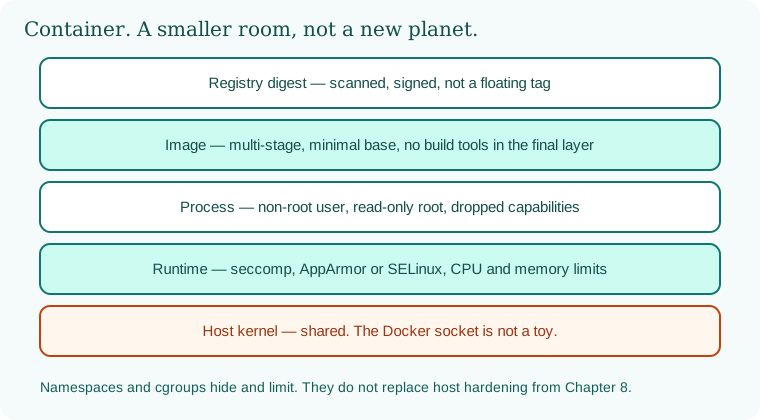
The digest sits on top. The image is minimal. The process is non-root. The runtime drops power. The host kernel is still shared, and the socket stays on the host.
14.6 A short animation.
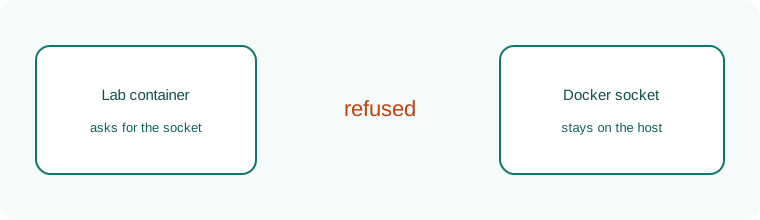
A lab container reaches for the Docker socket. The answer is no.
14.7 Conclusion.
Raju deleted the root user from the runtime stage. The container still served his lab page. Guru-ji nodded at the missing socket mount. "One room, humble furniture. In Chapter 15 we put many rooms on a cluster: the API server, RBAC, admission, and a network policy that defaults to silence."
- A container shares the host kernel. Namespaces and cgroups limit; they do not forgive a wide mount.
- Multi-stage, minimal, non-root, read-only, and dropped capabilities are the Dockerfile's real sentences.
- Secrets do not belong in layers. The socket does not belong in the job.
- Scan bases, pin digests, and verify signatures before you call an image trusted.
- Docker Hub's 25–26 April 2019 notice is the registry-token lesson.
- Own lab only.
END OF CHAPTER 14 MASTER CLASS
Deeper notes for 14.7 Conclusion. (examples, stacks, worksheet)
Chapter 14 checklist for every container you run
Remember with three pictures
Global: Docker Hub (2019) and the exposed Tesla Kubernetes console (2018). Indian company (sample): Redis accidentally published on 0.0.0.0:6379 and fixed by removing one port mapping. Everyday: flats sharing one foundation.
Interview-ready answers: Containers
Q. Why run containers as non-root?
If the app is compromised, the attacker has fewer rights inside and outside the container.
Q. Why never mount docker.sock?
It gives the container control of the Docker daemon, and so effectively of the host.
Q. Distroless vs alpine?
Distroless has no shell or package manager. Alpine is small but still has a shell and apk.
Q. Why multi-stage builds?
Build tools stay in the build stage. The final image is smaller and has fewer vulnerabilities.
Key terms
- Image: A read-only template for containers.
- Layer: One step of an image, which you can see with
docker history. - Capabilities: Fine-grained root powers that can be dropped.
- seccomp: A filter that limits system calls.
- Rootless: Running the engine itself without root.
- Distroless: An image with no shell or package manager.
Recap
- The same five checks apply to nginx, databases and apps in every language.
- Next: Chapter 15 runs many containers together on Kubernetes.