Chapter 12: SAST, SCA, DAST, IAST and Security Testing
12.1 Why.
Welcome to Chapter 12.
I am Ravindra Bagale.
Raju ran unit tests and felt finished. He had no engineering degree. He had a green bar. Guru-ji placed four lenses on the Magical Code Library table. "Your tests ask whether the feature works for a happy user," Guru-ji said. "These lenses ask whether a hostile story still breaks the city. SAST reads your code. SCA reads your packages. DAST talks to a running app you are allowed to test. IAST watches from inside while tests run. Without them, Log4Shell-shaped surprises hide in a transitive jar while Swiggy, Paytm, Amazon, BHIM UPI, WhatsApp, Zomato, Netflix, Infosys, and PayFast-shaped systems keep deploying on trust alone."
Raju picked up the SCA lens first. "Dependencies feel like someone else's problem."
"They become your production," Guru-ji answered. "Chapter 11 gave you a pipeline. Today we hang gates on it that developers can survive: tuned rules, severity with context, SARIF evidence, and no exploit recipes aimed at strangers."
Deeper notes for 12.1 Why. (examples, stacks, worksheet)
The four testing lenses in plain words
| Lens | Looks at | When | Finds things like |
|---|---|---|---|
| SAST | Your source code | On every pull request | SQL built by string concatenation |
| SCA | Your libraries | On every build | An old Log4j version |
| DAST | A running app (yours, in staging) | After deploying to staging | Missing security headers, reflected input |
| IAST | The app from inside while tests run | During integration tests | Which input reached which risky call |
Example 1: an Indian company (sample data)
Suppose we are a junior developer at a Zomato-style team. SAST flags this Python line in the restaurant search API:
cursor.execute("SELECT * FROM restaurants WHERE city = '" + city + "'")What you see in the pull request: B608: Possible SQL injection vector through string-based query construction. The fix is a parameterised query: cursor.execute("SELECT * FROM restaurants WHERE city = %s", (city,)).
Example 2: a global incident
The Equifax breach in 2017 was linked publicly to an unpatched Apache Struts vulnerability (CVE-2017-5638), for which a fix had been available for weeks. This is the classic SCA case: the bug was in a library, not in Equifax's own code.
Example 3: everyday life
A building inspector checks the plans (SAST), checks that the cement and steel come from good suppliers (SCA), walks through the finished building (DAST) and installs sensors while people move in (IAST). Each catches different problems.
The same SQL-injection lesson in each language
SAST tools look for the same mistake in every language: user input glued into a query. Here is the safe pattern in each.
Java / Spring Boot
JDBC PreparedStatement, or Spring Data with parameters.
PreparedStatement ps = conn.prepareStatement("SELECT * FROM users WHERE id = ?");
ps.setLong(1, id);
What you see:
SAST: no findingC# / ASP.NET Core
EF Core LINQ, or parameterised FromSqlInterpolated.
db.Users.Where(u => u.Id == id)What you see:
SAST: no findingNode.js / Express
Placeholders in mysql2 or pg.
await pool.query('SELECT * FROM users WHERE id = $1', [id]);What you see:
SAST: no findingPython / Django
The ORM, or %s placeholders.
User.objects.filter(id=user_id)What you see:
Bandit: no B608Go
database/sql placeholders.
db.QueryRow("SELECT name FROM users WHERE id = $1", id)What you see:
gosec: no G201/G202PHP / Laravel
PDO prepared statements, or Eloquent.
$stmt = $pdo->prepare('SELECT * FROM users WHERE id = ?');
$stmt->execute([$id]);
What you see:
Psalm/PHPStan: no taint findingRuby / Rails
ActiveRecord hash conditions.
User.where(id: params[:id])What you see:
Brakeman: no SQL injection warningMongoDB (NoSQL)
Injection is possible here too, when objects from the request are passed straight into a query. Validate types first.
User.findOne({ email: String(req.body.email) })Summary
| Language | Safe query | Typical SAST tool |
|---|---|---|
| Java | PreparedStatement | CodeQL / SpotBugs |
| C# | EF LINQ / params | CodeQL |
| Node.js | $1 / ? params | CodeQL / Semgrep |
| Python | ORM / %s | Bandit |
| Go | $1 params | gosec |
| PHP | PDO prepare | Psalm |
| Ruby | where(hash) | Brakeman |
Common mistakes
- Running DAST against a site you do not own. Only test your own staging.
- Turning off SAST because of noise instead of tuning it.
- Fixing your own code while ignoring old libraries.
Recap
- SAST: code. SCA: libraries. DAST: running app. IAST: inside view.
- Each catches different problems, so use them together.
- Parameterised queries fix SQL injection in every language.
12.2 What.
SAST — static application security testing. SAST analyzes source or bytecode without executing the full app the way a user would. Good SAST follows dataflow and taint: user input reaches a dangerous sink without sanitization. Rules flag injection-shaped patterns, hard-coded credentials, weak crypto use, and insecure deserialization patterns. Tune rules. A noisy rule that everyone suppresses blindly is worse than a smaller rule set people trust. Run SAST on the pull request diff for speed, and deeper scans on main nightly. Tools in the Semgrep, SonarQube, and CodeQL class belong here as categories. Pick what your lab can run. Teach developers to read the finding at the line, not to argue with the tool's marketing.
SCA — software composition analysis. SCA inventories dependencies, including transitive ones, and matches them to known vulnerabilities and sometimes licenses. Transitive means a library you did not choose arrived because a library you did choose needed it. Log4Shell lived in a logging library many apps pulled indirectly. SCA should fail builds on critical issues that have a reachable fix, with allowances for temporary suppressions that name an owner and an expiry. Generate an SBOM as a side benefit; Chapter 16 will deepen SBOM. For now, know that a lockfile is your friend and latest is not a version.
DAST — dynamic application security testing. DAST exercises a running application from the outside: crawl pages, submit forms, call APIs, check security headers. Authenticated DAST needs a lab account and a careful script so the scanner does not skip the logged-in surface. Point DAST only at apps you own or have written permission to test. This course will not give payloads for attacking Swiggy or anyone else. In your lab, expect findings like missing headers, open redirect shapes, or verbose errors. Fix on the server. Re-scan.
IAST — interactive application security testing. IAST instruments the app so that when functional tests or humans exercise paths, the agent notices unsafe dataflows with runtime context. It can reduce some false positives compared to pure SAST because it saw the path execute. It needs a test environment and an agent you trust. It is not a free pass to skip SAST and SCA.
Fuzzing and property-based testing. Fuzzers feed unexpected inputs and watch for crashes or assertion failures. Property tests state truths that should always hold: the charged amount equals the stored amount from Chapter 3. Start with unit-level fuzzing on parsers you own. Do not fuzz third-party production endpoints.
Unit and integration security tests. Write tests that prove the owner check and the amount check. Write a test that a second payment id replay does not double charge. These tests are precise and fast. Scanners find wide classes; your tests lock the business rules.
Secret scanning. Already in Chapters 6 and 10. Keep it in the same gate set: pre-commit, CI, and repository push protection.
Container and IaC scanning. Scan Dockerfiles and images for known CVEs and bad defaults like running as root. Scan Terraform or cloud templates for open security groups and public buckets. These scanners sit beside SAST in CI even though Chapter 18 and 21 go deeper.
License and compliance scanning. Some packages bring copyleft obligations your product cannot accept. SCA tools often flag licenses. Policy decides. Security and legal share this table.
Malware and package reputation. Typosquat packages and compromised maintainer accounts appear in public registries. Prefer pinned versions from internal mirrors when you can. Check reputation signals your SCA vendor offers. Sudden maintainer changes deserve a human look.
False positives, suppressions, baselines. A false positive wastes time. A false negative hides risk. Suppress with justification and expiry. Baselines acknowledge debt without letting new criticals enter. Review suppressions monthly. Developers should not be able to suppress without CODEOWNERS on the suppression file.
Security gates by severity, exploitability, and asset context. A critical in a payment service blocks. A low in an internal doc site may warn. Reachability matters: a vulnerable function you never call is lower priority than one on the auth path. Asset context means internet-facing beats a closed lab tool. Encode gates as code in the pipeline so arguments happen on policy pull requests, not in private chats after a fire.
Incremental and diff scanning. Full-repo SAST on every keystroke burns minutes and patience. Diff scans comment on the lines you touched. Nightly full scans catch what diffs miss. Balance both.
SARIF and normalized findings. SARIF is a common JSON shape for static analysis results. CI can upload SARIF to the host so findings appear on the pull request. Normalize severities across tools so one dashboard does not lie with five scales.
Scanner orchestration and evidence retention. A small orchestrator job calls SAST, SCA, secret scan, and IaC scan, then writes a summary artifact. Keep artifacts for the retention your audit needs. Without evidence, Infosys-shaped clients hear only stories.
Tool categories you will hear. SAST: Semgrep, SonarQube, CodeQL-class. SCA and SBOM: Trivy, Grype, Syft, Dependency-Track-class. DAST: OWASP ZAP, Burp-class in skilled hands on authorized targets. Secrets: Gitleaks, TruffleHog-class. Learn categories first. Logos change. Controls remain.
Lab gate sketch.
# lab only — conceptual job list
# 1) secret scan on the checkout
# 2) SAST on changed paths
# 3) SCA on the lockfile
# 4) build image and Trivy-class scan
# 5) for main branch, DAST against the lab staging URL you own
# fail on critical+high per policy file policy/security-gate.yml
Policy file names severities and exceptions with owners. The pipeline reads policy; humans review policy changes.
How scanners fail closed and open. Fail closed means the merge stops when the scanner cannot run. Fail open means a scanner outage silently skips the gate. Prefer fail closed for release branches, with a rare break-glass path that is audited.
Reachability and call graphs. Some SCA vendors claim reachability analysis: the vulnerable function is or is not on a path from your code. Treat reachability as a prioritization aid, not as permission to ignore patching forever. A library entry point you do not call today may be called after next week's feature.
Developer experience. Inline PR comments beat a PDF that arrives Friday evening. Auto-open upgrade pull requests with Renovate or Dependabot for SCA, then require tests and review. If the gate fails without a suggested fix, developers will hate the gate. Pair findings with links to safe upgrade paths.
IAST placement. Put IAST agents in QA, not first in production. Agents add overhead and a new trust surface. Protect the agent channel like a secret.
DAST authentication recipes for labs. Use a dedicated lab user, store its password in the CI secret manager, and teach the DAST tool to log in through the same form your users use. Crawl exclusions should skip logout and destructive admin actions. Snapshot the database before aggressive scans in shared labs.
Fuzzing ethics and scope. Fuzz your parser library locally. If a cloud provider offers a fuzzing service, point it at projects you own. Randomly fuzzing a public BHIM UPI or WhatsApp endpoint is both useless for learning and unauthorized.
Combining with threat models. Chapter 3 named spoofing and tampering. Map SAST rules to those names so reports speak the same language as design reviews. A finding titled only with a rule id helps machines. A finding titled "tampering: client-controlled amount" helps humans.
PayFast and Paytm payment paths. Raise the gate severity on packages that touch crypto, JWT, XML, or serialization on payment services. A medium elsewhere may be high on the charge path. Encode path-based policy if your tool allows.
Netflix-shaped mono-repos. Large repos need targeted scans per directory. Otherwise CI waits on unrelated trees. Path filters and CODEOWNERS for suppressions keep scale sane.
What "authorized testing" means. Written permission, defined scope, defined time window, and rules of engagement. Your own lab staging URL qualifies. A production URL belonging to a former employer does not. When in doubt, stop and ask.
Ravindra Bagale's Tip
Students collect scanner logos like cricket cards. One tuned Semgrep-class rule set plus a reliable SCA gate beats five dashboards nobody opens. Measure mean time to fix, not number of tools.
Practice task
On a repository you own, add secret scanning, SAST, and SCA to pull requests with a policy that blocks critical findings. Introduce a deliberate vulnerable dependency in a branch, watch the gate fail, upgrade the dependency, and watch it pass. Run OWASP ZAP baseline against a lab app you started locally. Do not run DAST against websites you do not own.
Baselines without surrender. A legacy service may open with two hundred SCA findings. Blocking all merges on day one freezes the team forever. A baseline freezes the old list and blocks only new findings, while a parallel project burns down the old list by severity. Publish the burn-down. Without a burn-down, baseline is denial.
IAST versus RASP, briefly. Runtime application self-protection tries to block attacks live in production. IAST is mainly a testing-time insight tool. Do not confuse the marketing labels. This chapter stays on testing. Production runtime protection appears again in later workload chapters.
API-first DAST. Modern apps expose more JSON than HTML forms. Your DAST configuration needs OpenAPI or a recorded traffic map for the lab API. Authenticate with tokens from Chapter 10's manager. Check authorization flaws with two lab users: user A must not read user B's order id. That test is a brother of Chapter 3's owner check, now from the outside.
SCA for containers versus SCA for language manifests. Image scans see OS packages and sometimes language deps. Manifest scans see package-lock.json and go.sum. Use both. An image that upgraded the OS but forgot the lockfile still ships a vulnerable jar.
Story from Raju's branch. He added an old logging package "because a blog used it." SCA failed the pull request. He felt attacked. Guru-ji showed the CVE summary and the fixed version. Raju upgraded, tests passed, and the gate turned into a friend. That emotional arc is part of DevSecOps training. Gates that only punish without teaching get bypassed.
Infosys client evidence. Export the gate policy, the scanner versions, a sample failing PR, and a sample fixing PR. Auditors understand stories with artifacts. Speeches without artifacts do not survive.
Coordination with Chapter 4 OWASP. Map SAST rules to OWASP Top 10:2025 names where possible so developers reuse vocabulary. Broken access control findings should sound like Chapter 3 and Chapter 4, not like a foreign dialect.
When scanners disagree. One tool says high, another says medium. Policy picks a primary tool per class, with a written tie-break. Endless tool debates are not risk reduction.
Scheduling wisdom. Heavy DAST belongs on staging at night if it is noisy. Fast SAST and SCA belong on every pull request. Nightly full SAST catches what diffs miss. Weekly container rescans catch newly published CVEs for images you did not rebuild. Put the schedule in the pipeline, not in someone's memory.
Swiggy and Zomato mobile companions. Mobile apps need their own SAST/SCA lanes and secret scanning for embedded API keys. Do not assume the server pipeline covers the Android project in a sibling folder. Add a path filter and a second gate.
Four worked examples: SAST, SCA, DAST and IAST
These four short examples sit on this page only. They are worked examples for reading, not a downloadable lab package and not a claim that a toy script is a real security scanner. Every output block below is an illustrative classroom sample. Use them to learn what each lens looks at, what a finding can mean, and what a careful defensive follow-up looks like. Do not point scanners at systems you do not own.
1. SAST — static application security testing
Input (source under review). A small Python handler builds SQL by joining a request value into the query string:
def find_user(name):
    # classroom sample — do not copy into production
    query = "SELECT id FROM users WHERE name = '" + name + "'"
    return cursor.execute(query)
Illustrative output (not a live scanner run). A Semgrep-class or Bandit-class SAST rule might report a finding like this on the concatenation line:
[illustrative SAST sample]
rule: sql-string-concat / Bandit B608-shaped
file: app.py
line: 3
message: Possible SQL injection vector through string-based query construction
confidence: medium
Interpretation. SAST reads source (or bytecode) without running the full app the way a user would. The finding means untrusted input appears to reach a SQL sink through string building. That is a strong teaching signal for parameterized queries.
Limitation. A SAST finding is not automatic proof that the bug is exploitable in production. Tools can raise false positives, miss complex flows, and miss configuration problems that are not visible in source. Review the line in context before you treat it as confirmed risk.
Defensive follow-up. Rewrite the query with placeholders or an ORM, then re-run the same SAST rule on the changed file. Placeholder style depends on the driver:
# psycopg / PostgreSQL: use %s
cursor.execute("SELECT id FROM users WHERE name = %s", (name,))

# sqlite3: use ?
# cursor.execute("SELECT id FROM users WHERE name = ?", (name,))
Primary reading: OWASP Developer Guide — Static Application Security Testing and OWASP Source Code Analysis Tools.
2. SCA — software composition analysis
Input (dependency inventory). A lockfile pin and a classroom advisory record (synthetic ID, not a real CVE):
# requirements.lock (classroom sample)
demo_logger==0.1.0

# advisory_db.json excerpt (synthetic classroom advisory)
{
  "id": "TOY-ADV-0001",
  "package": "demo_logger",
  "vulnerable_versions": ["0.1.0"],
  "fixed_version": "0.2.0",
  "summary": "Classroom sample: unsafe default used only for teaching SCA matching."
}
Illustrative output (not a live SCA product run).
[illustrative SCA sample]
finding: TOY-ADV-0001
package: demo_logger==0.1.0
status: matched synthetic advisory (not a real CVE)
suggested_fixed_version_from_advisory: 0.2.0
Interpretation. SCA inventories packages (including transitive ones when the tool supports that) and matches them to known advisories. Here the lockfile pin matches a classroom advisory that names a fixed version.
Limitation. A clean SCA report does not prove the application is safe. SCA does not replace SAST, DAST, IAST, or tests of your own business rules. An empty finding list can also mean the advisory database is incomplete or the inventory missed a dependency.
Defensive follow-up. Do not bump a version at random. In a real case, open the verified advisory, choose the fixed version it names (or a later release that still contains the fix), run your automated tests, then merge. In this classroom sample that means moving to the advisory’s fixed_version of 0.2.0 only because the advisory and your tests support that choice.
3. DAST — dynamic application security testing
Input (authorized running app). Imagine a baseline DAST check against a staging URL you own, requesting /health and reading response headers only. This course does not provide attack payloads for third-party sites.
Illustrative output (labeled classroom sample; no network probe from this page).
[illustrative DAST sample — authorized staging only]
target: https://staging.example.com/health
check: Content-Security-Policy response header
result: header not present
note: missing CSP is a hardening gap to review; it does not by itself prove the app is exploitable
Interpretation. DAST talks to a running app from the outside. Header and configuration checks are a common, beginner-friendly part of a baseline scan on systems you are allowed to test.
Limitation. A missing security header is useful evidence for hardening work. It is not proof that an attacker can already exploit the application. DAST coverage also depends on crawl depth, authentication, and which routes the scanner can reach.
Defensive follow-up. Add a Content-Security-Policy that matches how your pages and scripts actually load, deploy that change to staging you own, and re-check the same header. Keep DAST pointed only at lab or staging targets covered by written permission.
Primary reading: OWASP Web Security Testing Guide (latest) and OWASP WSTG — Web Security Testing Framework.
4. IAST — interactive application security testing
Input (instrumented app + tests). IAST needs an agent or sensor modules inside the application runtime (for example a JVM -javaagent, a .NET profiler, or language hooks). Ordinary unit tests alone are not IAST. In this classroom story the app starts with an IAST agent attached, then an existing integration test sends a request that reaches the SQL helper from example 1.
Illustrative output (classroom sample of an instrumented finding).
[illustrative IAST sample — requires runtime instrumentation]
agent: attached in QA runtime
trigger: integration test POST /users/search name=alice
observation: request parameter "name" marked tainted
sink: SQL string builder in find_user (app.py)
result: tainted data reached dangerous sink during live execution
Interpretation. IAST watches data flow from inside the running app while tests or QA exercise real paths. When instrumentation is present, it can confirm that untrusted input actually reached a risky operation, with stack and request context.
Limitation. Without an agent or sensors, calling a function from a unit test is still only a unit test. IAST also only sees paths your tests (or users) actually run, so weak test coverage means weak IAST coverage. Prefer IAST in QA or staging, not as a first production control.
Defensive follow-up. Keep the agent in the test environment, expand tests that exercise risky sinks, fix the parameterized-query issue from the SAST example, and re-run the suite under instrumentation. Keep SAST and SCA in the pipeline; IAST does not replace them.
Primary reading: OWASP DevSecOps Guideline — Interactive Application Security Testing. On this site: DevSecOps Security Pipeline (SAST, SCA, Secrets).
Ravindra Bagale's Tip
Run SAST on every pull request for the files you changed. Run SCA against the lockfile. Run DAST only against staging you own. Use IAST only when an agent is attached inside the app while your tests run. Give every open finding one named owner.
Ravindra Bagale's Tip – मराठी
प्रत्येक pull request वर तुम्ही बदललेल्या files वर SAST चालवा. Lockfile वर SCA चालवा. DAST फक्त तुमच्या स्वतःच्या staging वर चालवा. IAST तेव्हाच वापरा जेव्हा app च्या आत agent जोडलेला असतो आणि tests चालू असतात. प्रत्येक खुली finding एका नावाने ठरवलेल्या जबाबदार व्यक्तीकडे सोपवा.
Ravindra Bagale's Tip – हिंदी
हर pull request पर जो files बदली हैं उन पर SAST चलाओ. Lockfile पर SCA चलाओ. DAST सिर्फ़ अपनी staging पर चलाओ. IAST तभी इस्तेमाल करो जब app के अंदर agent लगा हो और तुम्हारे tests चल रहे हों. हर खुली finding एक नामित ज़िम्मेदार व्यक्ति को दो.
12.3 How.
- Write a one-page policy: which severities block merge for payment paths versus docs paths.
- Add secret scanning to CI and pre-commit on the lab repo.
- Add a SAST tool and run it once locally so you can read findings before CI shames you.
- Configure diff scanning on pull requests and full scanning on a schedule.
- Add SCA against the lockfile; commit the lockfile if it was missing.
- Fail the build on critical CVEs with available fixes; allow time-boxed exceptions with owners.
- Generate an SBOM artifact even if you only archive it for now.
- Scan the container image you build in Chapter 11's pipeline.
- Add a simple IaC scan if you have Terraform in the lab.
- Stand up the lab app and run a DAST baseline only against that lab URL.
- Store SARIF or JSON results as CI artifacts.
- Publish summaries on the pull request.
- Create a suppressions file protected by CODEOWNERS.
- Review all suppressions older than thirty days.
- Add unit tests for owner and amount checks so business rules do not rely on scanners alone.
- Wire gates into branch protection as required checks.
- Document break-glass: who can override, how it is logged, how long it lasts.
- Tune one noisy SAST rule with a targeted ignore or a better pattern instead of disabling the tool.
- Teach the team a thirty-minute reading of a sample finding.
- Track open criticals on a dashboard that someone owns.
- Re-run DAST after fixing headers and confirm the finding clears.
- Keep scanner versions pinned like actions SHAs.
-
Stop. Never point DAST, fuzzers, or exploit-shaped tests at Amazon, Paytm, Netflix, or any unauthorized host.
-
Pin scanner tool versions and review their changelogs monthly.
- Add a license policy check for packages that are not permitted.
- Create a sample SARIF upload so findings appear on the pull request UI.
- Run a tabletop: zero-day in a popular library; list the first five inventory commands you would run on assets you own.
- Ensure DAST runs only after deploy to lab staging, never as a side effect against production.
- Document how to reproduce a SAST finding locally so developers are not CI-hostages.
- Celebrate a week of zero overdue criticals; then keep the gate honest.
- Stop. Unauthorized scanning is outside this course.
Deeper notes for 12.3 How. (examples, stacks, worksheet)
The steps grouped into a simple rollout plan
- Week 1: secrets and SCA. Fast to add, with few false positives.
- Week 2: SAST on pull requests (diff only). Developers see only the new findings they caused.
- Week 3: image and IaC scans. Trivy for images, Checkov or tfsec for Terraform.
- Week 4: DAST baseline on staging. For example, an OWASP ZAP baseline scan against your own staging URL.
- Then: gates. Block merges only on critical or high findings that have a fix available.
Tool setup per stack (CI snippets)
One line each to get started. Pin the versions in real pipelines.
Java / Spring Boot
SCA with OWASP Dependency-Check, SAST with CodeQL.
mvn org.owasp:dependency-check-maven:check -DfailBuildOnCVSS=9What you see:
BUILD FAILURE ... CVSS score >= 9Node.js / React / Angular
SCA with npm audit.
npm audit --audit-level=criticalWhat you see:
found 0 vulnerabilitiesPython / Django / Flask / FastAPI
SAST with Bandit, SCA with pip-audit.
bandit -r src -ll && pip-auditWhat you see:
No issues identified..NET
SCA with the vulnerable-package list. SAST with built-in Roslyn analyzers (and CodeQL).
dotnet list package --vulnerable --include-transitiveWhat you see:
The given project has no vulnerable packagesGo
govulncheck plus gosec.
govulncheck ./... && gosec ./...What you see:
No vulnerabilities found.PHP / Laravel
composer audit plus PHPStan.
composer audit && vendor/bin/phpstan analyseWhat you see:
[OK] No errorsRuby / Rails
bundle-audit plus Brakeman.
bundle-audit check --update && brakeman -q -zWhat you see:
No warnings foundContainers (nginx, mysql, node, python, openjdk, dotnet)
Trivy image scan.
trivy image --exit-code 1 --severity CRITICAL myapp:1.4What you see:
Total: 0 (CRITICAL: 0)Terraform on AWS / Azure / GCP
Checkov IaC scan.
checkov -d infra/What you see:
Passed checks: 42, Failed checks: 1DAST (any web app, staging only)
OWASP ZAP baseline scan in Docker against your own staging URL.
docker run -t ghcr.io/zaproxy/zaproxy:stable zap-baseline.py -t https://staging.example.inWhat you see:
WARN-NEW: Content Security Policy (CSP) Header Not SetSummary
| Stack | SCA | SAST |
|---|---|---|
| Java | Dependency-Check | CodeQL |
| Node.js | npm audit | CodeQL / Semgrep |
| Python | pip-audit | Bandit |
| .NET | dotnet list --vulnerable | Roslyn / CodeQL |
| Go | govulncheck | gosec |
| PHP | composer audit | PHPStan / Psalm |
| Ruby | bundle-audit | Brakeman |
Examples
Indian company (sample): a Swiggy-style team began with 340 SCA findings. Instead of blocking every build, they gated only new criticals and burned down the old ones by 20 a week. Global: GitHub code scanning accepts SARIF results from many tools and shows them on the pull request. Everyday: airport security checks every bag, but only stops you for real dangers, not for every small item.
Common mistakes
- Gating everything on day one, so developers bypass the tools.
- Suppressions with no owner or expiry.
- DAST pointed at production or at someone else's site.
Recap
- Roll out in weeks, starting with the least noisy tools.
- Gate on serious, fixable findings.
- Every stack has free SCA and SAST options.
12.4 A real public incident.
Name. Log4Shell (CVE-2021-44228) in Apache Log4j.
Date. A public fix and widespread emergency response accelerated from 9 December 2021 through the following weeks, after the vulnerability became broadly known in early December 2021.
Source. The Apache Log4j security announcements for CVE-2021-44228, CISA's emergency directives and advisories in December 2021, and National Vulnerability Database entries for the CVE. This chapter explains the composition lesson. It does not provide exploitation steps.
What happened. A widely used Java logging library accepted crafted input that could lead to remote class loading and code execution in vulnerable configurations. Because Log4j appeared directly and transitively across enormous swaths of enterprise software, organizations scrambled to inventory where the library lived, to patch, and to apply mitigations. Many teams discovered they lacked a reliable software bill of materials. SCA would not have magically deleted the bug before disclosure, but inventory, rapid dependency upgrade pipelines, and gated deploys separated organizations that could respond in days from those that spent weeks asking which apps embedded the jar. The incident is the textbook argument for SCA, lockfiles, SBOMs, and pipeline upgrade muscle.
How to stop.
- Inventory applications and images for vulnerable Log4j versions using SCA and filesystem scans you are licensed to run on your assets.
- Upgrade to fixed versions or apply vendor-supported mitigations.
- Restrict outbound network egress from apps that still need temporary mitigations.
- Monitor official advisories for related CVEs that followed.
- Communicate status to customers and regulators when your role requires it.
How to prevent it again.
- Maintain dependency inventories and SBOMs before the emergency.
- Gate builds on critical CVEs with reachable upgrades.
- Keep upgrade PRs flowing with tests so emergency upgrades are not the first time you change the lockfile.
- Limit where user input meets powerful libraries; defense in depth remains.
- Practice a dependency emergency on a lab app: inject an old package, fail the gate, upgrade, redeploy.
- Do not scan the internet for Log4Shell victims. Scan only systems you own.
This is for learning only, and only inside a system you are allowed to test.
Log4Shell explained simply
What Log4j is
Log4j is a popular Java library that writes log messages. Many Java programs log things users type, such as a username or a browser name. In vulnerable versions, certain text inside a log message could make Log4j reach out over the network and load code. That is what made it so dangerous: just logging attacker-controlled text could be enough.
The hard part: hidden dependencies
Many teams did not add Log4j themselves. It came in as a dependency of a dependency (a transitive dependency). SCA tools and SBOMs show these hidden layers.
Finding a library everywhere, by stack
The Log4Shell question, "where do we use X?", applies to every ecosystem. Here is how to answer it in each.
Java (Maven)
Show the full dependency tree, filtered for one library.
mvn dependency:tree -Dincludes=org.apache.logging.log4jWhat you see:
[INFO] \- org.apache.logging.log4j:log4j-core:jar:2.14.1:compileJava (Gradle)
Ask why a library is there.
./gradlew dependencyInsight --dependency log4j-coreWhat you see:
org.apache.logging.log4j:log4j-core:2.14.1Tomcat servers
Search the deployed webapps for the JAR file.
find /opt/tomcat/webapps -name "log4j-core-*.jar"What you see:
/opt/tomcat/webapps/app/WEB-INF/lib/log4j-core-2.14.1.jarNode.js
Explain why a package is installed.
npm ls lodashWhat you see:
app@1.0.0 └─┬ some-lib@3.1.0 └── lodash@4.17.15Python
Show reverse dependencies with pipdeptree.
pipdeptree -r -p urllib3What you see:
urllib3==1.26.5 ├── requests==2.25.1 [requires: urllib3>=1.21.1].NET
List transitive packages.
dotnet list package --include-transitiveWhat you see:
> Newtonsoft.Json 12.0.1Go
Ask why a module is needed.
go mod why golang.org/x/netWhat you see:
# golang.org/x/net
example.com/app imports golang.org/x/net/http2
Containers (any image)
Generate an SBOM with Syft and search it.
syft myapp:1.4 | grep log4jWhat you see:
log4j-core 2.14.1 java-archiveSummary
| Ecosystem | "Where is it?" command |
|---|---|
| Maven | dependency:tree |
| Gradle | dependencyInsight |
| npm | npm ls |
| pip | pipdeptree -r |
| NuGet | --include-transitive |
| Go | go mod why |
| Images | syft |
Two more examples
Indian company (sample): an Infosys support team with 120 Java apps used a Syft-generated SBOM for each image and found 17 apps with vulnerable Log4j versions in one afternoon. Everyday: a food recall. Shops that know which batch numbers they stocked pull them off the shelves in an hour. Shops without records check every packet.
Recap
- Log4Shell was a library bug that hid inside many apps.
- SBOMs and SCA answer "where do we use X?" quickly.
- Practise the inventory command for your own stack before the next emergency.
12.5 A simple picture.
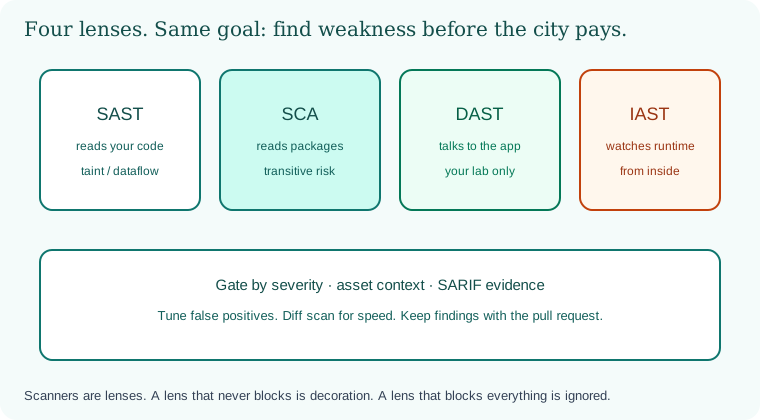
Four lenses along the SDLC: SAST on code, SCA on packages, DAST on the running lab app, IAST inside the test runtime. A gate policy sits beneath.
12.6 A short animation.
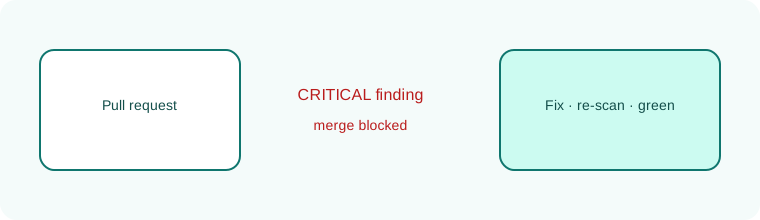
A pull request lights a critical finding. The merge blocks. A fix returns. The gate turns green.
12.7 Conclusion.
Raju's green bar grew up. It now meant tests, signatures, and scanners in conversation. Guru-ji shelved the four lenses. "Tools without policy are noise. Policy without tools is a speech. You need both. Volume 2 will continue into supply chain, containers, and cloud. You already know why the host, the network, the secrets, the pipeline, and the scanners belong in one story."
- SAST reads code; SCA reads dependencies; DAST probes running lab apps; IAST instruments runtime tests.
- Tune rules, manage suppressions, gate by severity and asset context.
- SARIF and archived results are evidence; diff scans keep developers fast.
- Unit security tests lock business rules scanners only approximate.
- Log4Shell, December 2021, is the transitive dependency emergency lesson.
- Baselines need burn-downs; suppressions need owners and expiry.
- Own lab only. No unauthorized DAST. Permission defines the lab.
END OF CHAPTER 12 MASTER CLASS
Deeper notes for 12.7 Conclusion. (examples, stacks, worksheet)
Your stack, your scanners
Pick your stack and confirm each line is in your pipeline.
Java / Spring Boot
CodeQL or SpotBugs (SAST), Dependency-Check (SCA), Trivy (image), ZAP (DAST on staging).
Python
Bandit, pip-audit, Trivy, ZAP.
Node.js / React / Angular
CodeQL or Semgrep, npm audit, Trivy, ZAP.
.NET
Roslyn analyzers or CodeQL, dotnet list package --vulnerable, Trivy, ZAP.
Go / PHP / Ruby
gosec plus govulncheck, PHPStan plus composer audit, Brakeman plus bundle-audit.
Infra on AWS / Azure / GCP
Checkov or tfsec for Terraform, plus the cloud's own posture tool.
Remember with three pictures
Global: Log4Shell (2021) and Equifax / Struts (2017). Indian company (sample): SQL injection caught in a pull request before merge. Everyday: the building inspector with four checks.
Interview-ready answers: Security testing
Q. SAST vs DAST?
SAST reads source code without running it. DAST tests a running app from outside.
Q. What is SCA?
Software composition analysis checks your libraries against known vulnerabilities.
Q. When should a scan block a merge?
For critical or high findings that have a fix available, with a time-boxed exception process.
Q. Where may you run DAST?
Only against systems you own or have written permission to test, such as your staging app.
Common questions about SAST, SCA and DAST
Q. Which tool should I add first?
Secret scanning and SCA. They are quick, with few false positives.
Q. Is IAST needed for small teams?
Usually not at first. SAST, SCA and a DAST baseline cover most needs.
Common questions about SAST, SCA and DAST
Q. How do I explain a finding to a developer?
Show the file and line, why it is risky in one sentence, the safe pattern for their language (for example PreparedStatement in Java or parameterised queries in Python), and how to check the fix in the next scan.
Q. What about mobile apps?
The same lenses apply. OWASP MASVS and mobile SAST tools cover Android (Kotlin/Java) and iOS (Swift) code.
Key terms
- SARIF: A standard JSON format for scanner results.
- False positive: A finding that is not a real problem.
- Suppression: A recorded decision to ignore one finding, with an owner and an expiry.
- Baseline: The findings that existed when scanning started.
- Transitive dependency: A dependency of your dependency.
- CVSS: A 0–10 severity score for vulnerabilities.
Recap
- Four lenses, one pipeline.
- Tune, gate fairly, give every suppression an owner and an expiry.
- Only ever test systems you own.