Chapter 16: Infrastructure as Code Security
16.1 Why.
Welcome to Chapter 16.
I am Ravindra Bagale.
Raju had no engineering degree. He had a cloud console and a habit of clicking. Guru-ji put a file on the Magical Code Library table. "Clicks do not review," he said. "A file does. Infrastructure as code means the rooms of the city — networks, buckets, databases, permissions — are written down, planned, and applied by a pipeline. The danger moves with the file. A public bucket in a module is a public bucket in every account that calls the module. A state file on a laptop is a map of the city with the keys drawn in the margin."
Raju remembered Chapter 13. "So the blueprint needs the same custody as the image?"
"Yes," Guru-ji said. "Suppose we are Paytm and a security group opens to the world because a variable defaulted that way. Suppose we are Swiggy and two people apply at once and the state file tears. Suppose we are Infosys and the client wants the plan in the pull request, not a screenshot after production changed. Amazon, Azure-shaped names, and Google-shaped projects will appear in Chapter 17. Tonight the tool can be Terraform, CloudFormation, Bicep, or Pulumi. BHIM UPI, WhatsApp, Zomato, Netflix, and PayFast-shaped systems still need a plan a second person can read before anything is destroyed."
Infrastructure as code repeats mistakes fast
Terraform, CloudFormation and Bicep make servers from text. A safe template makes a thousand safe servers. A bad one makes a thousand bad ones.
Public state files
Terraform state files can hold passwords in plain text. Teams have leaked them by storing state in public buckets or in Git. HashiCorp recommends remote state with encryption and access control.
Open security groups
Cloud security tools such as AWS Security Hub flag rules that open SSH (22) or RDP (3389) to 0.0.0.0/0. Many of those rules came from copied templates.
16.2 What.
Four tools, one habit. Terraform uses a declarative language and providers that talk to clouds and to Kubernetes. CloudFormation is Amazon's native stack language. Azure Resource Manager templates and Bicep describe Azure resources. Pulumi describes infrastructure in general-purpose languages. You will meet all four in real estates. Learn the security questions once. Where is the state? Who can apply? Are secrets in the file? Is the plan reviewed? Is the module pinned? Does policy block a public store before apply? The syntax changes. The questions should not.
State-file sensitivity. Terraform state is a snapshot of real resource ids and often of secret values the provider read back. It is not a harmless cache. Anyone who can read state can learn the shape of production and sometimes the credentials that were stored in it. Do not commit state to Git. Do not keep it only on one laptop. Use a remote backend you control.
Remote state, locking, and encryption. A remote backend stores state in a private bucket or a managed Terraform service, encrypted, with access limited to the pipeline identity and a small break-glass group. Locking stops two applies from corrupting the snapshot. Turn encryption on. Turn public access off. Version the state object so a bad apply can be understood. Log who read the state. A state bucket that any developer can download is a second production database with worse monitoring.
Module and provider trust. A module is a reusable room. A root module that copies an unpinned module from the open internet will change under you. Pin module versions. Prefer an internal registry of modules your platform team reviews. Providers are plugins. Pin them too. A lock file, such as Terraform's dependency lock, records checksums of providers so a mirror cannot silently swap the binary. Review a new provider the way you review a new payment library. It runs with the CI identity's power.
Version pinning. Pin the tool version in CI so a laptop with a newer binary does not write a state the pipeline cannot read. Pin provider versions. Pin module versions. Floating "latest" is the same shrug as a container tag, and Chapter 13 already retired that shrug.
Static scanning of IaC. Scanners in the class of Checkov, tfsec, Kics, or cloud-native template scanners read the file and flag public buckets, open security groups, unencrypted disks, and missing logs. Run them on the pull request. A finding in a module fails the module's own pipeline before fifty stacks inherit it. Tune false positives with a reviewed exception file, owner, and expiry, as you did for SAST in Chapter 12.
Policy-as-code. Open Policy Agent can judge a Terraform plan, not only a Kubernetes manifest. HashiCorp Sentinel is another policy language some Terraform Cloud estates use. The idea matches Chapter 15: audit, then enforce. Example rules you can explain: storage must be encrypted, storage must not be public, security groups must not allow the whole internet to administration ports, databases must sit in private subnets. The policy reads the plan JSON. Humans read the same plan in the pull request. Tools catch the pattern. Humans catch the surprise destroy.
Plan review. terraform plan is the diff. Require it as a comment or a check on the pull request. A human approves applies to production-like workspaces. The identity that applies should be the pipeline, not a developer laptop that also holds personal cloud keys. If the plan shows destroy and recreate of a database, stop. That is not a formatting change.
Drift. Drift is live infrastructure that no longer matches the code. Someone clicked a rule in the console. Someone hotfixed a security group during an incident and did not return the change to Git. Detect drift on a schedule. Investigate before you apply it away. Blind apply can delete the hotfix that is keeping Paytm-shaped checkout alive, or it can bless a click that opened a door. Either way, you want to know.
Secure defaults and reusable modules. A module's defaults are culture. Default encryption on. Default public access blocked. Default logs on. Make the insecure choice a variable the caller must set on purpose, and make policy reject that variable in production workspaces. One good network module beats twenty copied files that drift apart. Document the inputs the way you document a function: what they change, and what they must never change.
Least-privilege infrastructure. The resources you create should be small: a bucket for one app, a database user for one service, a security group with three rules you can name. The identity that creates them should also be small, which Chapter 18 will press harder. Do not build a module that attaches AdministratorAccess because the author was in a hurry. If a lab needs a wide role, name it lab-break-glass and keep it out of the production workspace.
Secrets in IaC. Passwords in a .tf file, in a variable default, or in a tfvars file that reaches Git are secrets in the supply chain. Reference a secret store. Mark sensitive outputs so the plan does not print them carelessly. Even then, state may still hold sensitive values. That is why state stays private. Rotate anything that already landed in Git, using the Chapter 6 and Chapter 10 habits. A variable file full of keys on a developer disk is not "local only" once the laptop is backed up to a consumer cloud.
CI identity for provisioning. The pipeline assumes a role or uses workload identity with permission to apply one stack. It should not use a long-lived access key checked into the CI variables forever if federation is available. Separate plan and apply permissions if you can: more people may read a plan than may apply it. Protect the branch that triggers apply. Chapter 11's rules for production pipelines are the door. This chapter is the freight.
Destructive-change controls. Destroy and replace need a second approver. Some teams require a typed confirmation or a separate pipeline for destroy. Backups of data must not be deletable by the same role that applies daily changes. Practice a restore. A stack that can delete its own only backup is one bad plan away from the end of the company.
Import and existing resources. Brownfield accounts already have clicks. Importing them into state is honest. Do it in a review, with a plan that shows no surprise changes, on a system you own. After import, the code is the source of truth. Console edits become drift. Say that out loud to the team so they stop "just fixing it" in the UI.
Testing and compliance tests. Lint the format. Scan the policy. Run a plan against a lab account. Where the tool allows, assert that a test deployment has encryption and private networking. Compliance is a test you can fail in CI, not a spreadsheet you fill after an audit. Keep the evidence: plan output, scanner report, policy decision, and the commit.
Workspaces and the blast line. A workspace or a separate state key per environment keeps a lab apply from touching production state. Name them so a tired engineer sees lab or prod in the prompt. The production workspace credentials must not be the ones loaded in a student shell. If one state file contains both the toy network and the payment database, you have already chosen the blast radius. Split it before the stack grows. Netflix-shaped fleets and Swiggy-shaped regions do this with accounts as well as files. Chapter 17 will draw the accounts. Your code should already assume the split.
Lifecycle guards you can explain. Many tools let a resource declare that it must not be destroyed casually. Use that on databases, key stores, and audit log buckets in the lab, and understand the override path so an incident does not become folklore. A guard that nobody can override will trap you. A guard that everyone overrides without a ticket will not save you. Pair it with the second approver. Also tag resources with the repository URL and the owner team. Untagged clicks are how drift hides. Tags are not security by themselves. They are how the next plan review knows which team to call.
What scanners will not think about. A scanner can see 0.0.0.0/0 and public ACLs. It cannot see that you granted a payment role to a marketing queue because both names looked internal. Read the plan for identity changes with the same care you used for sudo rules. When the plan adds iam or role assignment, stop and ask what new principal can do. That question is the bridge to Chapter 18. Policy-as-code can encode a few of those questions, such as "this stack may not attach administrator roles." It cannot replace the sentence. Write the sentence in the module README in plain words so Infosys-shaped reviewers and your future self share it.
Same controls in other syntaxes. If the estate is CloudFormation, stack policies can refuse updates that replace a database, and drift detection can show console edits. If the estate is Bicep, the deployment happens as an identity you chose, and a what-if operation is your plan. If the estate is Pulumi, the stack's secrets provider and the passphrase or key store must be treated like Terraform state: not in chat, not in the repository. Do not learn four tools by copying a tutorial that uses the root account. Learn one lab stack well, then map the nouns. The pull request is still the place the dangerous line should be seen by a second pair of eyes before the city changes shape.
A small backend shape for a lab account you own.
# own lab only — names must be buckets and tables you created
terraform {
  required_version = ">= 1.6.0"
  backend "s3" {
    bucket         = "your-lab-tfstate"
    key            = "lab-pay/terraform.tfstate"
    region         = "ap-south-1"
    encrypt        = true
    dynamodb_table = "your-lab-tflock"
  }
}
Pair it with a lock file you commit, a pipeline that runs plan on pull requests, and a policy check that fails if a bucket ACL becomes public. Do not point the backend at a bucket you do not own. Do not store this file with real access keys beside it.
Keep the lab account's bill small on purpose. A public IP and an oversized database are cost and attack surface together. Security and cost meet when you delete what the plan no longer needs, through the plan, after you have read it.
Put a monthly drift review on the team calendar so the check survives busy release weeks.
Ravindra Bagale's Tip
Read the plan's destroy lines first. Students skim creates and miss the one line that deletes the database. The frightening line is the lesson.
Practice task
In a lab cloud account you own, write one module that creates encrypted private storage, run a scanner, and add a policy that blocks a public setting. Apply through CI. Then change the resource in the console, detect the drift, and return the fix through Git. Do not import or scan accounts belonging to Amazon customers, Infosys clients, or anyone who has not authorized you.
Worked example: reading one illustrative IaC scan finding
This block is a worked example for reading. It uses one fictional, incomplete Terraform security-group excerpt and one illustrative scanner finding shaped like a Checkov text report. This page did not run Checkov, Terraform plan, Terraform apply, or any cloud change. No secret values appear. The goal is to practise triage: what the finding can establish, what it cannot establish, and what safe defensive action to take on a lab you own.
Shared classroom input (fictional incomplete HCL excerpt). This is not a runnable full Terraform configuration. The aws_vpc.classroom reference is incomplete on purpose, and required provider, backend, and variable blocks are omitted. Resource names and the 10.8.0.0/24 range are classroom fiction only. Do not apply this excerpt to any account you do not own, and do not use it as production configuration.
# Incomplete classroom excerpt — not a full runnable Terraform root module
resource "aws_security_group" "classroom_ssh" {
  name        = "classroom-ssh"
  description = "Classroom example security group"
  vpc_id      = aws_vpc.classroom.id

  ingress {
    description = "SSH from anywhere (unsafe classroom demo)"
    from_port   = 22
    to_port     = 22
    protocol    = "tcp"
    cidr_blocks = ["0.0.0.0/0"]
  }
}
Illustrative scan excerpt. Checkov’s published policy index and check implementation identify CKV_AWS_24 as the check that fails when a security group allows ingress to port 22 from the unrestricted IPv4 source 0.0.0.0/0. In networking terms, 0.0.0.0/0 means every IPv4 address. TCP port 22 is the conventional port for SSH. A matching finding is a policy signal about the declared template. It is not proof that the rule is reachable from the public internet right now, and it is not proof that an attacker is connected. The check implementation also treats unrestricted IPv6 sources such as ::/0 as a violation when those fields are present. This classroom sample shows only an IPv4 cidr_blocks rule, so it does not demonstrate IPv6 handling.
Passed checks: 0, Failed checks: 1, Skipped checks: 0

Check: CKV_AWS_24: "Ensure no security groups allow ingress from 0.0.0.0/0 to port 22"
 FAILED for resource: aws_security_group.classroom_ssh
 File: /classroom/sg_ssh.tf:1-18

[illustrative classroom excerpt — not a live Checkov run]
Vertical triage steps
- Read the check identity. Note the check id
CKV_AWS_24and the human title on the sameCheck:line. Confirm the finding is about unrestricted SSH ingress on port 22, not about a different port or protocol. - Open the named file and resource. Match
aws_security_group.classroom_sshto the HCL excerpt. Confirm theingressrule sets port 22 andcidr_blocks = ["0.0.0.0/0"]. - State what the finding can establish. On this template text, a matching Checkov-class check can establish that the declared IPv4 ingress allows SSH from every IPv4 address according to that policy’s rules.
- State what the finding cannot establish. A static finding is not proof that a live security group already exists in an account, that the port is reachable from outside, that an attacker is connected, that every other rule is safe, or that a pipeline apply would succeed. A scan of files is not the same as a cloud configuration audit of deployed resources. Narrowing only the IPv4 CIDR also does not prove there is no unrestricted IPv6 exposure elsewhere in the same resource.
- Choose a defensive change for a lab you own. Prefer narrowing the source to a known lab network that your authorized routes already reach, or remove public SSH and use a bastion or SSM-style path your lab already supports. Do not change production configuration from this classroom page.
- Handle exceptions with review, not silent skips. If your lab policy allows an exception, record owner, reason, expiry, and review approval in the tracking document your team requires. An expiry date is a review control. Do not assume the scanner itself parses or enforces expiry from a skip comment unless your installed tool and docs say that it does.
- Re-scan the same directory after the edit. Treat a later clean report for this check as evidence about the updated files only, not as a guarantee that live cloud resources still match the files.
Illustrative safer classroom edit (still an incomplete fictional excerpt; not a runnable full module; do not apply to accounts you do not own). The destination 10.8.0.0/24 is an illustrative private IPv4 range. It is only useful if your lab already has authorized network paths to that range. It is not automatically safe, and it may block legitimate access that previously relied on a wider rule.
# Incomplete classroom excerpt — not a full runnable Terraform root module
resource "aws_security_group" "classroom_ssh" {
  name        = "classroom-ssh"
  description = "Classroom example security group"
  vpc_id      = aws_vpc.classroom.id

  ingress {
    description = "SSH from classroom lab subnet only"
    from_port   = 22
    to_port     = 22
    protocol    = "tcp"
    cidr_blocks = ["10.8.0.0/24"]
  }
}
After this edit, the unrestricted IPv4 SSH condition that CKV_AWS_24 documents for 0.0.0.0/0 should no longer match this ingress block. That statement is an expected documented policy match for this sample. It is not a measured pass result from a scanner run on this page. This IPv4-only edit also does not, by itself, address an unrestricted IPv6 source if one were added later.
Limits to keep in mind
- Static IaC checks evaluate declared templates. They do not prove the live cloud matches the template.
- A failed check is a policy signal, not automatic proof of exploitability or current external reachability.
- Passing one check does not mean the module is safe overall.
- This sample omits egress rules on purpose. That omission is only to keep the example narrow. It is not guidance about egress policy.
Primary sources
- What is Checkov
- Checkov Quick Start (CLI output shape)
- Installing Checkov
- Checkov Policy Index (includes CKV_AWS_24)
- Checkov AbsSecurityGroupUnrestrictedIngress source (IPv4 0.0.0.0/0 and IPv6 ::/0 handling)
- Terraform AWS Provider — aws_security_group
- tfsec documentation (related IaC scanner class)
Ravindra Bagale's Tip
When a scanner reports a failed check, open the named file and confirm the resource and the exact rule. Fix the template on a lab you own, or record an approved exception with owner, reason, expiry, and review. A clean file scan is not proof that the live cloud still matches the file.
Ravindra Bagale's Tip – मराठी
Scanner check fail दाखवतो तेव्हा सांगितलेली file उघडा आणि resource व नेमका rule तपासा. स्वतःच्या lab मध्ये template दुरुस्त करा, किंवा owner, reason, expiry आणि reviewसह मंजूर exception नोंदवा. File scan स्वच्छ असणे म्हणजे live cloud अजूनही त्याच file प्रमाणे आहे असे सिद्ध होत नाही.
Ravindra Bagale's Tip – हिंदी
Scanner जब check fail दिखाए तो बताई गई file खोलो और resource व ठीक वही rule जाँचो. अपने lab में template ठीक करो, या owner, reason, expiry और review के साथ मंजूर exception लिखो. File scan साफ़ होना यह सबूत नहीं है कि live cloud अब भी उसी file जैसा है.
16.3 How.
- Write "own lab only" and the account id you are allowed to use at the top of the notes.
- Pick one tool: Terraform, CloudFormation, Bicep, or Pulumi, and install a pinned version.
- Create a remote state backend or stack store with encryption and blocked public access.
- Enable locking if the tool provides it.
- Restrict who can read and write that state to the pipeline and one break-glass group.
- Start a module for a private encrypted store or a private network, with secure defaults.
- Pin provider and module versions and commit the lock file.
- Keep secrets out of tfvars in Git. Point at a lab secret store.
- Run a static IaC scan locally and fix one real finding.
- Add the scan to the pull request pipeline.
- Publish the plan as a review comment or artifact.
- Ask a second person, even if that person is a future you on paper, to read destroy lines.
- Apply with the CI identity, not with a personal access key from a laptop shell.
- Confirm the created resource is private and encrypted in the console.
- Add a policy-as-code check that would fail the public variant.
- Try the public variant in a branch and watch the pipeline fail.
- Change one setting by hand in the lab console.
- Run a drift detection command or plan and write down the difference.
- Reconcile through code, not through another click.
- Import one harmless existing lab resource only if the plan is empty of destroys.
- Configure a separate backup that the daily apply role cannot delete.
- Practice a restore of state or of the data backup and record the time it took.
- Document who may approve an apply and who may approve a destroy.
- Archive the plan and the scanner report next to the commit id.
- Stop. No plans against employers' production, no state files in public buckets, no shared root keys.
Scan templates before apply
- Keep IaC in Git with pull requests.
- Run a scanner in CI: Checkov, tfsec/Trivy, or cfn-nag.
- Fail the build on high-severity findings.
- Run terraform plan in CI and have a human review it.
- Store state remotely with encryption and locking.
- Detect drift between code and the real cloud.
Terraform
Remote state in S3 + DynamoDB lock or Terraform Cloud; scan with Checkov or Trivy.
AWS CloudFormation
cfn-lint and cfn-nag; use stack policies to protect key resources.
Azure Bicep / ARM
Bicep linter and PSRule for Azure; Azure Policy at deploy time.
Pulumi
Policy as code with CrossGuard.
16.4 A real public incident.
Name. Code Spaces destruction.
Date. Code Spaces described the attack as beginning on Tuesday, 17 June 2014, and unfolding over about twelve hours. The company then said it would cease trading.
Source. Code Spaces' own public statement from June 2014, quoted by contemporary reports including Ars Technica and Help Net Security. This chapter uses that public account. It does not describe how the panel was entered.
What happened. Code Spaces was a code-hosting company running on Amazon Web Services. It said an unauthorized person reached the EC2 control panel during a denial-of-service extortion attempt. When staff changed passwords, the intruder had already created extra logins and deleted artifacts: EBS snapshots, S3 buckets, machine images, and instances. Code Spaces said most data, backups, machine configurations, and offsite backups were partly or completely deleted, and that it could not continue. The lesson is not a cloud brand. The lesson is destructive power and backups that lived under the same control plane as the attacker. Infrastructure as code does not magically stop a stolen admin. It gives you a reviewed plan, a smaller daily identity, and a place to see a destroy before it runs. Those controls were the missing furniture.
How to stop.
- Revoke unknown users and keys on an account you own, and check for new identities an intruder may have added.
- Stop further destructive changes by isolating the account and using the provider's support path.
- Restore from a backup that was not writable by the compromised admin role.
- Preserve logs for investigators.
- Tell customers the truth about what remains, as Code Spaces had to do.
How to prevent it again.
- MFA and federation for humans. No shared root password in a team inbox.
- Separate the backup account or vault so the application admin cannot delete recovery copies.
- Least privilege for daily automation. Destroy is a different, rarer right.
- IaC review so a plan that deletes buckets is obvious in a pull request.
- Alerts on new admin users and on mass delete events.
- Practice restore in a lab account. Do not poke at other companies' consoles to "see if they learned."
This is for learning only, and only inside a system you are allowed to test.
16.5 A simple picture.
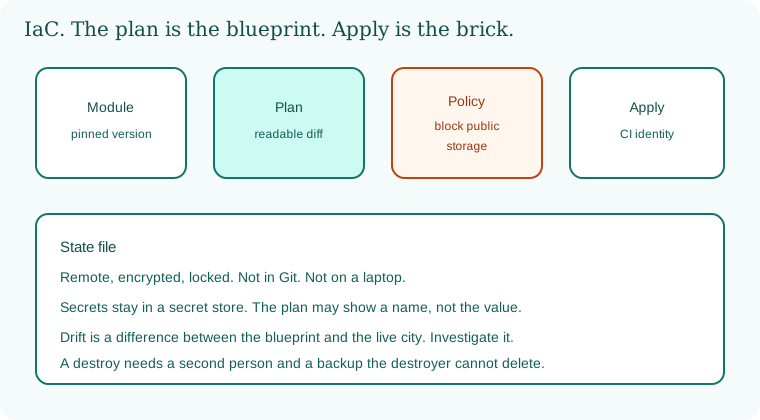
A pinned module becomes a plan. Policy blocks a public store. Apply uses a CI identity. State sits encrypted and locked. Drift is a disagreement you investigate.
16.6 A short animation.
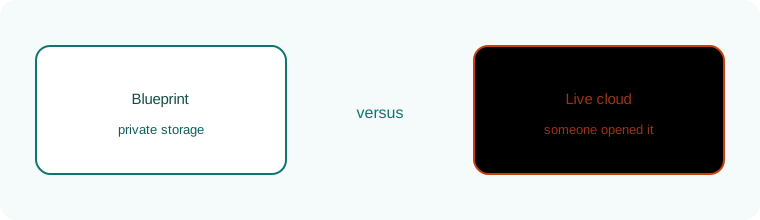
The blueprint says private. The live cloud blinks because someone opened it. That blink is drift.
16.7 Conclusion.
Raju stopped clicking and started reading plans. The lab bucket stayed private. Guru-ji folded the state-file warning into the notebook. "The file is only as safe as the account it lands in. Chapter 17 draws the cloud rooms: organizations, networks, keys, logs, and the shared responsibility line. Chapter 18 draws the identities that walk those rooms."
- Terraform, CloudFormation, Bicep, and Pulumi share one review habit.
- State is sensitive. Encrypt it, lock it, and keep it out of Git.
- Pin modules and providers. Scan plans. Enforce policy before apply.
- Drift is a clue. Destructive changes need a second person and a backup they cannot erase.
- Code Spaces, 17 June 2014, is the deleted-backup lesson.
- Own lab only.
END OF CHAPTER 16 MASTER CLASS
| Risk | Control |
|---|---|
| Secrets in state | Encrypted remote state, restricted access |
| Open ports in templates | CI scanner blocks the merge |
| Someone deletes everything | Least-privilege deploy role, backups in another account |