Chapter 30: Mobile Applications and DevSecOps
30.1 Why.
Welcome to Chapter 30.
I am Ravindra Bagale.
Raju had no engineering degree. He had an app on a phone and a feeling that the phone was "his," so the secret in the app was safe. Guru-ji borrowed the phone, turned it over, and gave it back.
"The phone is a client," Guru-ji said. "Clients lie. They are lost, borrowed, rooted, backed up to a laptop, and disassembled by anyone with patience. Your API is the trust boundary. The binary is public the moment it is installed. A key inside the binary is a key you published."
Raju had put a token in a source file because the tutorial did. "Suppose we are Swiggy or Zomato and the rider or restaurant app stores an order token in a world-readable file. Suppose we are Paytm or PayFast and a payment app keeps a long-lived secret that can move money without the server. Suppose we are WhatsApp-shaped messaging and local history is the product, so the local store must be protected and still assumed lost. Suppose we are BHIM UPI and a debug build with a test endpoint ships to a store by mistake. Suppose we are Netflix and a mobile client trusts its own decision about who may watch a title. Suppose we are Amazon and a release key lives on a laptop because the pipeline was annoying. Suppose we are Infosys and the client asks how you sign, who can sign, and how a tampered toolchain would be noticed. Answer with a pipeline, not with a promise."
Apps live on devices you do not control
A mobile app runs on phones that can be rooted, lost or copied. The server must assume the app can be changed.
Hardcoded keys in apps
Security firms such as CloudSEK (Bengaluru) and Symantec have reported thousands of Android and iOS apps shipping with hardcoded cloud keys. Anyone who unpacks the app can read them.
OWASP MASVS
OWASP publishes the Mobile Application Security Verification Standard (MASVS) and a testing guide. Banks and payment apps in India often use it for audits.
30.2 What.
Threat model for a phone. Draw the phone outside the trust boundary. The user may be honest and the device still hostile. Other apps may share a device. Backups may leave the device. A modified operating system may ignore your assumptions. The attacker goals are ordinary: steal a session, skip a payment check, read local data, or ship a lookalike build. The controls you own are the API, the account system, the release pipeline, and the way you store the little that must live on the device. You do not own the phone.
Local storage. Prefer platform stores meant for secrets: the operating system keystore or keychain patterns, with hardware backing when the device has it. Files in a shared folder are not a secret store. Databases on disk should be encrypted with a key that is not sitting beside them in the same file. Decide what happens if the user is not enrolled in a device passcode. High-risk actions can refuse to proceed. Do not store card numbers, full national identifiers, or long-lived refresh tokens in a preference file because it was easy. Store a short-lived session and be ready to revoke it from the server. WhatsApp-shaped local history and Netflix-shaped downloads are product data. Protect them, and design the server so a stolen phone does not become a stolen account forever.
Sessions and tokens. The server issues short sessions, bound to a device or a refresh flow you can revoke. The app sends the token over the protected channel from Chapter 9 and Chapter 20. The app does not decide authorization. The API does. A jailbroken or rooted device is a signal, not a proof, and not a puzzle for you to "defeat" in this course. You may refuse a high-risk action when the platform integrity check fails, and you should assume a determined person can hide that signal. The money check still lives on the server. Paytm-shaped and BHIM UPI-shaped actions are server decisions. The app is a window.
Pinning, as a trade. Certificate pinning means the app expects a specific key or certificate for your API and rejects others. It can limit some interception on untrusted networks. It can also brick the app when you rotate certificates badly, which is an reliability incident from Chapter 27. If you pin, pin a backup key, ship rotation in advance, and practice it. If you do not pin, say why, and still use the platform trust store correctly. Do not disable certificate checks in a debug flag that can ship. A review rule should fail the build if a bypass is present in release source.
Secrets in the client. Assume every string in the app can be read. API endpoints can be public. A secret that grants you, the company, a privileged backend action cannot live in the app. Per-user tokens are issued after login. They are not compiled in. Maps keys and similar identifiers should be restricted at the vendor so a copied key is not a blank check. Search the repo and the built artifact in CI. A secret scan that only reads the Git branch and never the binary will miss a secret injected by a build script.
Signing and release integrity. Android and iOS will only install what is signed. The private signing key is a production credential. It lives in a store the pipeline can use, not in a chat, not in a laptop backup, not in the repository. Two people should be needed to change signing access. The pipeline builds from a reviewed commit, on runners you administer, from a toolchain you mirrored or pinned. A developer machine build is not a store release. App store listing controls and internal distribution lists are part of integrity. A debug package with a wide entitlement does not ride the same track as production.
Mobile CI. The golden path from Chapter 26 grows a mobile lane: dependency review, secret scan, unit tests, a static analysis pass aligned to a mobile baseline, a signed artifact, and an attestation of which commit produced it. Third-party libraries are an SBOM problem. A tracker or a payment helper you do not understand is still code. Pin it. Review updates. The same ua-parser lesson from Chapter 29 applies to a mobile dependency that runs on the device and to one that runs in your build.
MASVS, as awareness. The OWASP Mobile Application Security Verification Standard is a menu of control objectives: storage, cryptography, authentication, network, platform interaction, code quality, and resilience to tampering. You are not memorizing every test id. You are mapping one control you implemented to one objective, the way Chapter 24 mapped duties. Pick a level that matches the data class. A menu app and a payment app do not need the same depth. They need an honest depth.
Binary analysis, as a concept. Binary analysis means inspecting a built app without pretending source review was enough. It looks for debug flags, exported components that should be private, weak storage, and embedded secrets. In this course you run a scanner on your own build. You do not use it against other people's store listings. You do not try to defeat integrity checks on someone else's app. The point of the scan is a ticket back to your pipeline.
Backend for mobile. Every bug you studied in APIs still applies. Object-level authorization, rate limits, replay protection on payments, and logging without tokens. The mobile client will be modified. Someone will call your API with a script. Design for that caller. Swiggy-shaped and Zomato-shaped order APIs must check the user on the server for every order id. A hidden button in the app is not an access control.
Root and jailbreak signals. Integrity signals can raise the cost of casual abuse and can protect some local secrets from casual extraction. They are not a boundary you testify about as absolute. Document them as defense in depth. Do not spend the chapter writing bypasses. Do not ask students to root a device they do not own. A lab emulator you own is enough to see what your app logs and where it writes files.
A teaching sample: release rules. Lab notes, not a store account.
release: lab-orders-mobile
build: CI runner, pinned toolchain, reviewed commit
sign: key in lab secret store, not in git
scan: secrets in source and in the built artifact
session: short, revocable, server checks every order id
local: no long-lived payment secret on disk
Ravindra Bagale's Tip
If a secret in the app would be a disaster when read aloud, it does not belong in the app. Move the decision to the API.
Practice task
In a lab app you own, find where a session is stored, move a fake secret out of source, sign a build from CI with a lab key, and show the API rejecting a call that asks for another user's synthetic order. Do not analyze or attack apps from Paytm, WhatsApp, Netflix, or any store listing you do not own.
Seminar notes. Raju asked how to stop a determined person from modifying the app. Guru-ji said you cannot promise that, and you should not spend the lab trying. You promise that a modified app cannot authorize itself. The server binds the session to a user, checks the object, and limits the rate. Root and jailbreak signals may refuse a high-risk local action. They are a speed bump. Document them as such so a future tester does not claim the bump is a wall. Do not research bypasses. Do not root a phone you do not own. An emulator you own is enough to see file paths and logs.
Pinning is a trade you write down. The benefit is resistance to some network interception on devices that trust a rogue certificate. The cost is an outage when you rotate and the old pin is the only pin. Backup pins, staged rotation, and a kill switch that you have rehearsed belong in the same note. A build flag that turns verification off is a defect if it can reach a release. Put a pipeline check on that flag. Netflix-shaped clients and Amazon-shaped clients will have opinions about pinning. Your lab only needs an honest decision and a test that release builds do not disable trust.
OWASP MASVS is a map, not a badge you print after one scanner run. Pick storage, network, and authentication for the lab. Map one implemented control to each. Binary analysis, for your own build, asks whether the artifact matches that map: no embedded long-lived secret, no debug endpoint, no extra permission. Run it in CI so a local "just this once" build is not the store build. The store, or your lab folder that pretends to be a store, receives only the pipeline's signed output. Signing keys are tiered. A lab key is not the key you would use for a real listing, and a real listing key never enters this notebook. Two-person control on who can use the key is the control. A key in a laptop backup is a failure even if the algorithm is modern.
Mobile CI is where SAST and SCA meet release integrity. Dependencies that run on the device and plugins that run during the build both matter. The XcodeGhost lesson is the build plugin and the toolchain mirror. Pin them. Verify checksums. A faster unofficial mirror is an untrusted source. Third-party trackers are data processors. If the lab app does not need one, do not add one. If a real product needs one, the catalog row should say what data leaves the phone. Infosys-shaped client reviews ask that question in plain language. Answer with the network log from a lab build, not with a marketing sentence.
Backend habits still decide the outcome. An order id in a query must be checked against the signed-in user on the server. A hidden screen in the app is not a control. Replay of a payment-shaped request must be idempotent. Logs from the app must not contain the session. When the phone is lost, revocation is a server button you have tested. WhatsApp-shaped local history and Swiggy-shaped offline queues are product features. Encrypt what you can, minimize what you store, and assume the device will be unlocked by someone else someday. Design the session so that day is recoverable.
One more pass. Release integrity is a story you can tell in four nouns. Commit. Toolchain. Signature. Store. If any noun is "someone's laptop," the story is not a release. Add the four nouns to the catalog row beside the data class. When a library update lands, the pipeline shows the diff and a human accepts it. Silent auto-updates of build plugins are how a trusted name starts compiling extra behavior. Keep humans on that acceptance. Keep machines on the checksum.
30.3 How.
- Draw the phone outside the trust boundary and the API inside it.
- List what the lab app stores locally and mark each item's data class.
- Remove synthetic secrets from source files and from checked-in config.
- Store a session token using the platform secret store in a lab build, not a world-readable file.
- Shorten the lab token lifetime and add a server-side revoke for that test user.
- Confirm a second lab user cannot fetch the first user's order by changing an id. Fix the API if they can.
- Search the built artifact for the fake secret you used to test the scanner, then remove it and rebuild.
- Add the secret scan and dependency scan to the mobile pipeline.
- Pin one library version and fail the build if the lockfile changes without review.
- Generate a lab signing key in a secret store. Do not export it into the repo.
- Build a release-shaped artifact only from the pipeline.
- Record the commit id next to the artifact hash.
- Check that a debug flag which disables certificate checks cannot be enabled in the release build.
- If you pin certificates, add a backup pin and rehearse rotation on the lab API.
- If you do not pin, write the reason and the review rule that forbids a trust bypass.
- Run a mobile static scanner on your own build and turn one finding into a ticket.
- Map that fix to one MASVS-style objective in a single line.
- Review entitlements or permissions and delete those the lab app does not need.
- Log a failed login without logging the token or the password.
- Add the mobile service to the catalog with owner, data class, and signing owner.
- Write who may approve a store-shaped release in your lab, even if the "store" is a folder.
- Stop. Do not instrument, unpack, or send traffic to apps or APIs of Swiggy, Paytm, Amazon, BHIM UPI, WhatsApp, Zomato, Netflix, Infosys, PayFast, or any product you do not own.
Mobile security basics
- Keep secrets on the server; the app gets short-lived tokens.
- Use HTTPS everywhere; consider certificate pinning for high-risk apps.
- Store local secrets in Android Keystore or iOS Keychain.
- Turn off debug flags and logging in release builds.
- Sign builds in CI, with keys in a protected store.
- Check app integrity with Play Integrity or App Attest for sensitive actions.
Android (Kotlin / Java)
Keystore, EncryptedSharedPreferences, network security config, R8 shrinking.
iOS (Swift)
Keychain, App Transport Security, App Attest, data protection classes.
Flutter / React Native
Use platform secure storage plugins; never ship API secrets in the JS bundle or Dart code.
30.4 A real public incident.
Name. XcodeGhost, a tampered Apple development toolchain used to build iOS apps.
Date. Public reporting began in mid-September 2015. Palo Alto Networks Unit 42 published an analysis on 17 September 2015. Apple acknowledged that apps built with the counterfeit tools had reached the App Store and began removing them.
Source. Palo Alto Networks Unit 42, "Novel Malware XcodeGhost Modifies Xcode, Infects Apple iOS Apps and Hits App Store," 17 September 2015, and Apple's public statements the same week. This chapter does not describe how the toolchain altered apps, and it does not provide the implant.
What happened. Developers who wanted Apple's development tools sometimes downloaded them from unofficial mirrors because the official download was large and slow. Some of those mirrors served a modified toolchain. Apps compiled with it were signed and distributed, including through the official store, because the signature said the developer had built the app. The signature was true and incomplete. It did not say the compiler was honest. Users installed apps that had passed a store process and still carried unwanted behavior added before signing. The lesson is a DevSecOps lesson. Release integrity includes the toolchain, the CI image, and the source of every download in the build. A laptop that fetched a faster mirror is a side path around the golden mobile pipeline. Secrets and API trust still matter, and they would not have answered this incident alone. The build itself was the poisoned ingredient.
How to stop.
- Stop shipping builds from the untrusted toolchain.
- Rebuild affected versions from a known toolchain and a reviewed commit.
- Revoke or expire sessions that the affected builds could have handled, according to your design.
- Remove the bad builds from distribution channels you control.
- Tell users and partners in plain language. Preserve evidence for the people who must have it.
How to prevent it again.
- Pin the toolchain and verify it before CI will build a release.
- Keep signing keys in a controlled store, available to the pipeline, not to random laptops.
- Forbid store releases from developer machines.
- Scan your own artifacts and review dependency and toolchain changes.
- Treat a "faster mirror" as untrusted until it matches an official checksum.
- Practice on a lab pipeline you own. Do not distribute tampered tools, and do not analyze apps you do not own.
This is for learning only, and only inside a system you are allowed to test.
What defenders took from XcodeGhost
- Download build tools only from the official source.
- Check signatures or hashes of tools in CI.
- Build release apps on controlled machines, not personal laptops.
30.5 A simple picture.
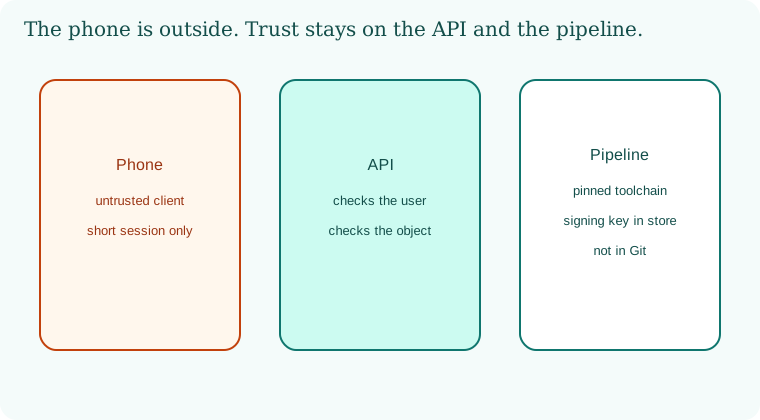
The phone is outside. The API authorizes. The pipeline signs with a key that never lived in the repo. The toolchain is pinned.
30.6 A short animation.
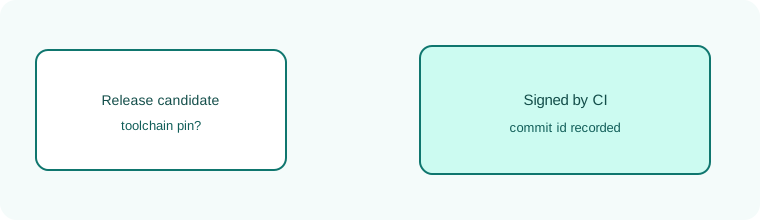
A release candidate waits. The pipeline checks the toolchain pin and the signer. Then the stamp appears.
30.7 Conclusion.
Raju took the token out of the source file and put a short session in the platform store. The second lab user could not read the first order. Guru-ji nodded at the signing note. "The phone will never be a safe deposit box. In Chapter 31 the new coworker is a model. It writes fluent text. It does not become the owner of your tools or your data."
- The device is hostile ground. Authorization stays on the server.
- Signing keys and toolchains are production credentials.
- Scanners must see the built artifact, not only the Git diff.
- XcodeGhost, reported 17 September 2015, is the poisoned-toolchain lesson.
- Own lab only.
END OF CHAPTER 30 MASTER CLASS
| Risk | Control | Standard |
|---|---|---|
| Secrets in app | Server-side secrets, short tokens | MASVS-STORAGE |
| Traffic interception | TLS, optional pinning | MASVS-NETWORK |
| Tampered build tools | Official tools, controlled CI | Supply chain controls |