Chapter 15: Kubernetes Security
15.1 Why.
Welcome to Chapter 15.
I am Ravindra Bagale.
Raju had no engineering degree. He had a cluster on his laptop and a smile. He applied a manifest that said the pod was privileged "because the sample said so." Guru-ji closed the sample. "Kubernetes is a city of rooms with one front desk," he said. "The API server is the desk. If the desk believes you, the rooms obey. A dashboard with no lock, a service account that can do everything, and a network that allows every pod to greet every other pod are three ways to lose the city before lunch."
Raju touched the digest from Chapter 14. "The image is humble."
"Good," Guru-ji said. "The cluster can still run it as root, on the host network, with a token that can read every secret. Suppose we are Paytm and payments share a cluster with marketing experiments. Suppose we are Swiggy and a staging namespace can call the production database because nobody wrote a NetworkPolicy. Suppose we are Netflix and a platform team upgrades the control plane on a calendar, not during an outage. Suppose we are Infosys and the client asks who can exec into a pod. Amazon, BHIM UPI, WhatsApp, Zomato, and PayFast-shaped estates ask the same question with different logos. The answer is RBAC, admission, and a default of no."
Kubernetes gives big power to small settings
One wrong setting in Kubernetes can expose a whole cluster. Most real problems are misconfiguration, not clever exploits.
Exposed dashboards
Researchers have repeatedly found Kubernetes dashboards and API servers reachable from the internet without login. Tesla in 2018 is the best-known case.
CVE-2018-1002105
In December 2018 a flaw in the Kubernetes API server let a crafted request escalate to cluster-admin in some setups. Fixed versions were released and managed services patched quickly.
15.2 What.
Architecture and control-plane trust. You need a mental picture, not a vendor diagram collection. The API server is the front door. etcd stores cluster state, including Secrets unless you encrypt them. The scheduler places pods. Controllers reconcile desired state. Kubelets on nodes pull that state and run containers. Trust the control plane the way you trust a domain controller. Private endpoints, tight admin access, and patched versions. A kubeconfig on a laptop is a key. It does not live in a chat.
Authentication and authorization. Authentication says who is calling. Users come from an identity provider. Workloads come from service accounts. Authorization says what that identity may do. Enable RBAC. Do not run a cluster that treats every caller as admin because it was a tutorial flag. Anonymous access to the API, if you leave it open, is a door without a name.
RBAC and least privilege. A Role names verbs on resources inside one namespace. A RoleBinding attaches that Role to a user or a service account. A ClusterRole is cluster-wide and easy to overuse. Application pods rarely need ClusterRole. They often need nothing but the ability to run. Humans who deploy may need a short list: get, list, and watch on their namespace, plus a separate break-glass role that is logged. cluster-admin is not a teaching convenience you leave in place. Review bindings the way you review sudo from Chapter 8.
Service accounts and token handling. Every pod can mount a service account token. Disable automount when the pod does not call the API. Use a dedicated service account per app, not the default account. Prefer short-lived projected tokens over a long-lived secret token you copy into an image. The token is a credential. Logs and crash dumps should not print it. Chapter 18 will let that identity become a cloud role. If the Kubernetes side is already cluster-admin, the cloud side will inherit your mistake in spirit even when the syntax differs.
Namespaces and multi-tenancy. Namespaces are boundaries for names, quotas, and policy. They are not a strong security boundary against a determined cluster admin, and they are not a full tenant wall if pods can still talk freely or mount host paths. For a lab, one namespace per environment is enough: lab-dev, lab-pay. For a company, separate clusters when the trust levels differ. Do not put a public experiment in the same control plane as BHIM UPI-shaped settlement if you can avoid it. If you must share, admission and network policy are mandatory, not optional.
Pod Security Standards. Kubernetes Pod Security Standards describe three profiles: privileged, baseline, and restricted. Restricted is the one you want for application namespaces. It expects non-root, dropped escalations, and a seccomp profile, among other rules. Enforce restricted on the payments namespace. Use audit mode first if you need to see what would break, then enforce. A namespace left on privileged is the sample manifest winning forever.
securityContext. On the pod and the container, set runAsNonRoot, a numeric user, allowPrivilegeEscalation: false, readOnlyRootFilesystem: true, capabilities.drop: ["ALL"], and a runtime-default seccomp profile. Add a capability only with a sentence that says why. These fields are the Chapter 14 run flags, now in the manifest so a later deploy cannot forget them.
NetworkPolicy and default deny. Without a policy plugin and a default-deny policy, pods may talk to any pod the network allows. Start with a policy that denies all ingress and egress in the namespace, then allow the few paths you drew in the threat model: the app port from the ingress controller, and the database port to the database namespace or endpoint. Egress to the whole internet is how a small foothold becomes data leaving the building. Test the allow rules with a lab client. A policy you never tested is a picture.
Secrets and encryption at rest. Kubernetes Secrets are not magic encryption by default. They are objects in etcd, often only base64 in the API. Enable encryption at rest for Secret resources. Limit who can get secrets. Prefer an external secret store when the platform provides one, with the pod receiving a short-lived value. Do not put the production database password in a manifest in Git. Chapter 16 will say the same about Terraform.
etcd, API audit, and the kubelet. etcd should not be reachable from the office wifi. Back it up as cluster state, and protect the backup as if it held every secret, because it might. API server audit logs record who created a privileged pod or who bound cluster-admin. Ship those logs off the node. The kubelet is an admin on its node. Lock its ports, use certificates, and do not leave read-only anonymous kubelet endpoints open because a dashboard wanted them. Ingress is the front door for users: TLS from Chapter 9 and Chapter 10, a narrow set of hostnames, and no debug paths. Egress is the back door. Both need policy.
Image policy and trusted registries. Admission should allow images only from registries you name, and only by digest, and only when a signature verifies. A pod that pulls :latest from a public registry is a supply-chain shrug. Tie this to Chapter 13. The cluster is where provenance becomes a yes or a no.
Quotas, limits, and node hygiene. ResourceQuota and LimitRange stop one namespace from eating the cluster and force every container to declare requests and limits. Nodes need the Chapter 8 patch habit. A node image is part of the cluster's trust. Drain, replace, and do not SSH in to hand-fix one node and forget. Kubernetes upgrades are a security lifecycle: control plane, then nodes, on a tested minor version, with a rollback plan. Skipping four versions because the app is busy is how known API and kubelet bugs stay in production.
Admission control and policy-as-code. Admission runs after authentication and authorization, before the object is stored. Validating admission can reject a pod. Mutating admission can add defaults, such as a seccomp profile. Kubernetes ValidatingAdmissionPolicy is a built-in style of validation you can learn on a current cluster. Open Policy Agent with Gatekeeper, and Kyverno, are common policy engines. The engine matters less than the rules you enforce: no privileged pods, no hostPath, no hostNetwork, no host process namespace, must drop capabilities, must set resources, images only from the trusted registry, signatures required. Run new rules in audit mode, show developers the failures, then enforce. An exception needs a name, an owner, an expiry, and a record. A waiver with no expiry is a second privileged namespace. Policy lives in Git, is reviewed, and is versioned. If someone can delete the policy with the same rights they use to ship an app, the policy is optional. Metrics that show deny counts help the platform team. A silent deny with a useless error message teaches people to route around you.
Runtime detection. Falco and similar eBPF-based tools watch syscalls and cluster events for surprises: a shell started in a distroless pod, a sensitive file read, an unexpected outbound connection. They are detection, not a substitute for Pod Security. Tune them on the lab so the first week is not a flood. Chapter 12's false-positive habit applies.
Backup and recovery. Back up etcd or use the managed control plane's backup, and practice a restore. Also export manifests from Git so the desired state is not only inside the cluster. A backup the same admin can delete, with no second copy, failed Code Spaces in spirit even though that story waits for Chapter 16. Ransomware-minded design means the backup identity is not the workload identity.
Policy testing and bypass. A policy you cannot unit-test will rot. Kyverno and Gatekeeper communities both expect you to try a bad manifest and a good manifest in CI before you install the rule. Put those fixtures in the same repository as the policy. Bypass happens when a team ships to a namespace you forgot to label, when a mutating webhook is down and your failure policy is "ignore," or when an admin uses a higher-privilege path during an incident and leaves it. Decide the failure mode while you are calm. For security admission, fail closed in production-like namespaces. Document the break-glass role, require two people, and expire the binding the same day. Metrics should show allows, denies, and waivers. If developers only hear "no" from a cryptic API error, they will ask for cluster-admin. Give them a sentence they can fix.
Workloads that are not pods in disguise. CronJobs, Jobs, and operators create pods with the same securityContext rules. An operator running as cluster-admin "because it installs things" is a second control plane. Prefer a namespace-scoped operator with a short verb list. Custom resources are still API calls. Audit them. GitOps controllers should apply the digest your supply chain promoted, not build from a branch on the cluster. The controller's identity is powerful. Protect it like a CI release identity from Chapter 11.
A lab manifest you may apply on a cluster you own.
# own lab only — payments namespace, humble pod
apiVersion: v1
kind: Namespace
metadata:
  name: lab-pay
  labels:
    pod-security.kubernetes.io/enforce: restricted
---
apiVersion: v1
kind: ServiceAccount
metadata:
  name: lab-pay
  namespace: lab-pay
automountServiceAccountToken: false
---
apiVersion: networking.k8s.io/v1
kind: NetworkPolicy
metadata:
  name: default-deny
  namespace: lab-pay
spec:
  podSelector: {}
  policyTypes: ["Ingress", "Egress"]
Add a container securityContext that sets runAsNonRoot: true, allowPrivilegeEscalation: false, readOnlyRootFilesystem: true, drops all capabilities, and sets seccompProfile.type to RuntimeDefault. Bind a Role that cannot list secrets unless the app truly must. Apply this on kind, minikube, or k3d on your machine. Do not point kubectl at a cluster whose kubeconfig you were not given for this purpose.
A word on managed control planes. Amazon EKS, Azure AKS, and Google GKE still leave you the workload, the RBAC, the network policy, and the admission rules. The provider patches part of the control plane on a contract. You still choose Pod Security, you still rotate who has cluster-admin, and you still upgrade node images. Chapter 17 names the cloud rooms. This chapter's controls do not disappear because the API server is someone else's binary. Read the shared-responsibility page for the service you use, then write down the lines that remain yours.
Ravindra Bagale's Tip
If you remember one command habit, remember to ask which subject can do which verb. A restricted pod with cluster-admin on its service account is a locked door with the key taped to it.
Practice task
On a local cluster you own, create a namespace, enforce restricted Pod Security, add default-deny, and deploy a non-root pod that meets admission. Then try to apply a privileged pod and confirm it is rejected. Audit who can get secrets. Do not run this against an employer cluster unless you are authorized in writing.
Worked example: what one NetworkPolicy can establish
This block is a worked example for reading. It uses one fictional, incomplete Kubernetes NetworkPolicy excerpt for a classroom namespace. This page did not apply manifests to a cluster and did not probe any live API server. The goal is to state what this policy shape can establish, what it cannot establish, and what safe defensive follow-up belongs in a lab you own.
Shared classroom input (fictional incomplete YAML excerpt). This is not a complete runnable cluster configuration. Namespace creation, namespace labels, CNI install, Service, and Deployment objects are omitted. Names such as classroom-api and classroom-web are reserved classroom fiction only. Do not apply this excerpt to a cluster you do not own, and do not use it as production configuration.
# Incomplete classroom excerpt — not a full cluster setup
apiVersion: networking.k8s.io/v1
kind: NetworkPolicy
metadata:
  name: classroom-api-default-deny-ingress
  namespace: classroom-api
spec:
  podSelector: {}
  policyTypes:
    - Ingress
---
apiVersion: networking.k8s.io/v1
kind: NetworkPolicy
metadata:
  name: classroom-api-allow-from-web
  namespace: classroom-api
spec:
  podSelector:
    matchLabels:
      app: classroom-api
  policyTypes:
    - Ingress
  ingress:
    - from:
        - namespaceSelector:
            matchLabels:
              name: classroom-web
          podSelector:
            matchLabels:
              app: classroom-web
      ports:
        - protocol: TCP
          port: 8080
Namespace label caveat (read this before the meaning). Kubernetes does not automatically label a namespace with name=<namespace>. The namespaceSelector matchLabels entry name: classroom-web matches only if that label was applied to the namespace explicitly. The namespace object’s metadata name alone is not enough for this selector.
Illustrative meaning. According to the Kubernetes NetworkPolicy documentation, pods are not ingress-isolated by default. Isolation for a direction begins only when at least one NetworkPolicy selects the pod for that direction. When one or more NetworkPolicies select the same pod for ingress, their allow rules combine as a union (additive). There is no “first object wins” rule between the two objects in this sample.
In this classroom pair, the first object selects all pods in classroom-api (podSelector: {}) and declares ingress policy without allow rules, which is a common default-deny ingress shape for selected pods. The second object selects only pods labeled app: classroom-api. For those selected pods, the allow rules from both objects are united, so the explicit allow for TCP port 8080 from pods labeled app: classroom-web in namespaces that carry the label name: classroom-web is part of that union. Other pods in classroom-api that are selected only by the empty podSelector of the first object remain ingress-denied under that default-deny shape; they do not receive the web allow exception.
The port value 8080 in a NetworkPolicy refers to the pod or container port, not automatically to a Service port. Matching a Service’s port or targetPort is a separate concern and is not established by this excerpt alone.
What it can establish. On a cluster whose network plugin implements NetworkPolicy as documented by that distribution, and after both objects exist as intended with the required labels present, this shape can establish ingress isolation for pods selected in classroom-api, with the web allow applying only to pods that the second object selects. Peers outside the united allow rules for a selected pod should not be treated as permitted ingress sources for that pod’s listed container port under that policy model.
What it does not establish. A NetworkPolicy does not encrypt traffic. It does not replace RBAC, authentication, or admission controls. It does not prove that the network plugin on your cluster actually enforces NetworkPolicy. Official docs require a networking solution that supports NetworkPolicy; this page does not invent CNI-specific guarantees. It does not cover traffic that never hits the pod network path the plugin mediates. It does not, by itself, lock down egress, DNS, the Kubernetes API, node ports, or hostNetwork pods unless you write and verify those controls separately. An allow that depends on a namespace label fails for your intent if that label was never applied, and it fails open for your intent if workloads can set matching labels without admission controls. YAML that sits in Git is not proof that the live API objects match that YAML.
Vertical reading steps
- Read the namespace and selectors. Confirm both objects target
classroom-api. Note thatpodSelector: {}on the first object means all pods in that namespace for that object, while the second object selects onlyapp: classroom-api. - Read policyTypes. This sample declares
Ingressonly. It does not establish an egress default deny. - Read how policies combine. Treat the two objects as an additive union of allow rules for pods both select. Do not assume the first object overrides the second.
- Read the allow scope. Confirm the web allow applies only to pods selected by the second object. Confirm the namespaceSelector needs an explicit
name: classroom-weblabel on the peer namespace. - Read the port. Treat
8080as the pod or container port in this policy. Do not assume it equals a Service port. - State the plugin dependency. Before you trust the policy in a lab, confirm your distribution’s networking solution documents NetworkPolicy support. A policy object can exist while enforcement does not.
- State what else you still need. Keep RBAC least privilege, Pod Security or equivalent admission, and secret access controls as separate checks. NetworkPolicy is one layer, not a complete cluster verdict.
- Defensive follow-up in a lab you own. On a local cluster you control and are authorized to change, apply only after you understand the selectors and labels, then verify both an allowed path and a denied path with tools you already use in that lab. Record owner and purpose for any exception policy. Do not test by opening an employer cluster or any system you are not authorized to change.
Limits to keep in mind
- Default-deny ingress without matching egress rules leaves egress unconstrained by this sample.
- Label-based allows are only as strong as your control over who can set those labels, and namespaceSelectors require the labels you wrote.
- Passing a quick connectivity check once is not continuous proof against later label or networking-plugin changes.
Primary sources
- Kubernetes — Network Policies
- Kubernetes — Declare a Network Policy
- Kubernetes — Using RBAC Authorization
- Kubernetes — Pod Security Standards
Ravindra Bagale's Tip
Before you trust a NetworkPolicy, read which pods each object selects, how allow rules combine as a union, and whether any namespaceSelector labels were applied explicitly. Confirm your networking solution enforces NetworkPolicy. Treat the policy as one network layer beside RBAC and admission, not as proof that the cluster is safe.
Ravindra Bagale's Tip – मराठी
NetworkPolicy वर विश्वास ठेवण्यापूर्वी प्रत्येक object कोणते pods select करतो, allow rules कशा union होतात, आणि namespaceSelector साठी label खरोखर apply केले आहे का ते वाचा. तुमचे networking solution NetworkPolicy enforce करते का ते तपासा. ही फक्त एक network layer आहे; RBAC आणि admission सोबत पाहा. Cluster पूर्णपणे सुरक्षित आहे असे समजू नका.
Ravindra Bagale's Tip – हिंदी
NetworkPolicy पर भरोसा करने से पहले देखो कि हर object किन pods को select करता है, allow rules कैसे union होती हैं, और namespaceSelector के लिए label सच में apply हुआ है या नहीं. पुष्टि करो कि तुम्हारा networking solution NetworkPolicy enforce करता है. इसे RBAC और admission के साथ एक network layer मानो, पूरे cluster की सुरक्षा का सबूत नहीं.
15.3 How.
- Start a local Kubernetes cluster on a machine you own, and write "own lab only" in the notes.
- Confirm RBAC is enabled and anonymous API discovery is not your admin path.
- Create a namespace for the lab payment app.
- Label that namespace to enforce the restricted Pod Security Standard.
- Create a dedicated service account and turn off token automount.
- Write a Role with the smallest verbs you can justify, and bind it only in that namespace.
- Remove any binding to
cluster-adminyou added while learning. - Add a default-deny NetworkPolicy for ingress and egress.
- Add one ingress allow and one egress allow that match your lab design, and test them.
- Set ResourceQuota and LimitRange so containers must declare cpu and memory.
- Deploy the Chapter 14 image by digest from a registry you trust.
- Set the container securityContext: non-root, no privilege escalation, read-only root, drop all capabilities, runtime seccomp.
- Confirm the pod is running and the process is not root.
- Attempt a privileged pod and confirm admission or Pod Security rejects it.
- Store a lab secret with encryption at rest enabled if your distribution supports the lab steps, and restrict
geton secrets. - Turn on API audit logging to a file or sink you control, create one object, and find the audit line.
- Check that the kubelet is not wide open on the node network.
- Install or enable one policy tool you can explain, even if the first rule only blocks
hostPath. - Run that rule in audit, read the report, then enforce it.
- Write an exception template with owner and expiry, and refuse to use it for this lab pod.
- Scan RBAC with a local tool in the kube-bench or kubescape class and triage one finding.
- Plan a version upgrade on the local cluster and read the upgrade notes before you click.
- Take a backup of cluster state or export manifests, then delete and restore the namespace from Git.
- Add a runtime detection rule in audit mode for a shell in a container, trigger it safely in the lab, and see the alert.
- Stop. No dashboard on the public internet, no testing of clusters you do not own, no mining experiments, no exploit kits.
Baseline controls for a cluster
- Keep the API server private or behind strict IP allow lists.
- Use RBAC with small roles; avoid cluster-admin for apps.
- Apply Pod Security Admission at the "restricted" level where possible.
- Set NetworkPolicies so pods talk only to what they need.
- Store secrets in an external manager (Vault, AWS Secrets Manager) or encrypt etcd.
- Scan images and block unsigned ones with an admission controller.
| Platform | Managed help |
|---|---|
| Amazon EKS | IAM roles for service accounts, GuardDuty EKS protection |
| Azure AKS | Entra ID integration, Defender for Containers |
| Google GKE | Workload Identity, GKE Autopilot hardened defaults |
15.4 A real public incident.
Name. Tesla Kubernetes cryptojacking exposure, reported by RedLock.
Date. RedLock published its report on 20 February 2018. Tesla said it secured the environment after notification. Contemporary reporting placed the researchers' disclosure shortly before that publication.
Source. RedLock's February 2018 cloud security report, Tesla's public comments to reporters that the impact appeared limited to internally used engineering test cars and that initial investigation found no indication customer privacy or vehicle safety was compromised, and later practitioner write-ups such as Joe Beda's 28 February 2018 note on dashboard exposure. This chapter does not repeat access steps.
What happened. RedLock said Tesla's Kubernetes administrative console was reachable and not password protected. From that console, cloud credentials were visible in a pod environment, and those credentials reached a broader Amazon Web Services environment, including storage that held telemetry. Attackers ran cryptocurrency mining and tried to make it quiet. The technical details that matter here are the defensive ones: an admin UI exposed beyond the cluster, missing authentication, and permissions wide enough that a console became a cloud incident. A dashboard is not "just a view" when it can act with a powerful identity. Mining was the noisy symptom. The design mistake was the unlocked desk.
How to stop.
- Remove public exposure of dashboards and admin APIs on systems you own.
- Rotate cloud credentials that were reachable from the cluster.
- Delete unexpected workloads and review audit logs for who created them.
- Preserve evidence for your own investigation.
- Confirm data exposure with the owners of the storage, and notify people if policy or law requires it.
How to prevent it again.
- Require authentication and MFA for any cluster UI, and keep it off the public internet.
- Enforce RBAC so a dashboard identity is not a cluster administrator.
- Enforce Pod Security and admission against privileged pods.
- Default-deny the network. Do not let every pod read the cloud metadata of the node by accident of design.
- Use workload identity with a narrow role, which Chapter 18 will detail, instead of long-lived keys in pod environment variables.
- Alert on unexpected CPU and on new pods in sensitive namespaces.
- Practice on a local cluster. Do not search the internet for open Kubernetes dashboards.
This is for learning only, and only inside a system you are allowed to test.
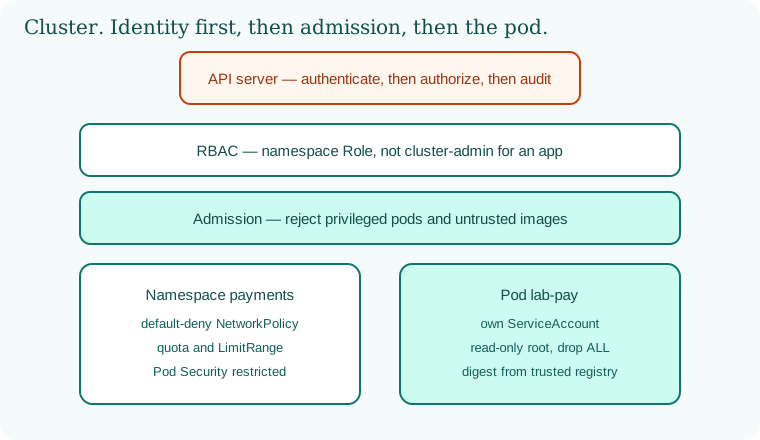
15.5 A simple picture.
The API server authenticates and authorizes. RBAC narrows the verb. Admission rejects a privileged pod. The namespace denies the network by default. The pod runs as itself, from a trusted digest.
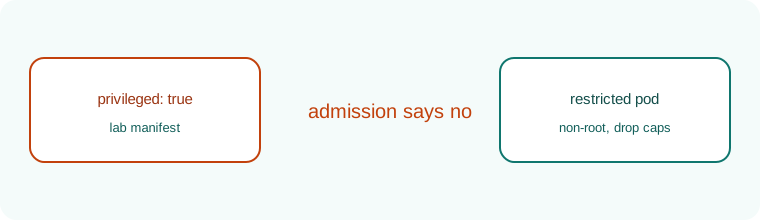
15.6 A short animation.
A privileged manifest walks up. Admission sends it back. The restricted pod remains.
15.7 Conclusion.
Raju's privileged pod never landed. The humble one did. Guru-ji pointed at the manifest in Git. "The cluster obeyed a file. In Chapter 16 the cloud itself obeys a file: Terraform and its cousins, the state that must stay secret, and the plan you read before you apply."
- The API server is the desk. Authentication, RBAC, and audit stand there.
- Namespaces, Pod Security, securityContext, and default-deny NetworkPolicy make the room small.
- Secrets, etcd, and kubelets are trust stores. Treat them that way.
- Admission turns policy into a yes or a no, with exceptions that expire.
- Tesla's February 2018 exposure is the unlocked console lesson.
- Own lab only.
END OF CHAPTER 15 MASTER CLASS
| Setting | Safe value |
|---|---|
| API server access | Private or allow-listed |
| App permissions | Namespace roles, no cluster-admin |
| Pod security | restricted profile |
| Pod traffic | Default-deny NetworkPolicy |