Chapter 13: Software Supply Chain, SBOM and Provenance
13.1 Why.
Welcome to Chapter 13.
I am Ravindra Bagale.
Raju had no engineering degree. He had a lockfile he had never opened. He typed a package install, watched a green line, and said the city was built. Guru-ji turned the laptop so the Magical Code Library could see the tree of names underneath one direct dependency. "You cooked one dish," Guru-ji said. "Twenty kitchens you have never visited sent ingredients. One of those kitchens can change the taste after you have already served Paytm-shaped payments, Swiggy-shaped orders, or a BHIM UPI-shaped confirmation."
Raju frowned. "The scanner in Chapter 12 already reads packages."
"It reads known bruises," Guru-ji answered. "Tonight we ask a harder question. Can you prove which bytes you built, from which commit, on which builder, with which ingredients, and that nobody swapped the parcel between the registry and production? Netflix-shaped teams ship often. Speed without a bill of materials is how a transitive jar becomes a week of guessing. Infosys-shaped client work will ask for that bill. Amazon-shaped registries will store the parcel. WhatsApp, Zomato, and PayFast-shaped products do not get to shrug when a signed update was signed by a builder that an attacker already owned."
Volume 2 has walked the host, the wires, the keys, the pipeline, and the scanners. The supply chain is the road those pieces share. If the road is unsigned, the gates in Chapter 12 inspect a box that may not be the box you reviewed.
What "software supply chain" means
Your app is mostly other people's code. A small web app can pull in hundreds of packages. The supply chain is everything that touches your code on its way to production: packages, build tools, CI, registries and base images.
Example 1: a global incident
In 2018 the popular npm package event-stream got a new maintainer, who added a dependency containing hidden code aimed at a specific cryptocurrency wallet app. It was found and removed by the community. The lesson: a change of maintainer can change your risk overnight.
Example 2: typosquatting
Attackers publish packages with names close to popular ones (for example a missing or swapped letter), hoping someone types the wrong name. Package registries such as PyPI and npm regularly remove such packages.
Example 3: an Indian company (sample data)
Suppose we are a junior engineer at a PhonePe-style team. A Node.js service has 11 direct dependencies but 640 packages in the lockfile. Nobody had looked at the other 629. Generating an SBOM is the first step toward knowing what you ship.
Everyday analogy
A biryani is only as safe as its rice, spices and meat suppliers. A good restaurant knows its suppliers and checks deliveries.
How big is your tree? One command per stack
Run the one for your stack and count the lines. Most people are surprised.
Node.js
Count all installed packages.
npm ls --all | wc -lWhat you see:
642Java / Spring Boot (Maven)
Show the full tree.
mvn dependency:treeWhat you see:
[INFO] +- org.springframework.boot:spring-boot-starter-web:jar:3.3.x ...Python
List installed packages.
pip freeze | wc -lWhat you see:
57.NET
List transitive packages.
dotnet list package --include-transitiveWhat you see:
Transitive Package ... (count shown)Go
List all modules.
go list -m all | wc -lWhat you see:
38PHP / Laravel
Show the tree.
composer show --treeWhat you see:
laravel/framework v11.x ...Ruby / Rails
List the bundle.
bundle list | wc -lWhat you see:
92Container images (nginx, mysql, python, node...)
Even base images contain hundreds of OS packages.
syft nginx:1.25 | wc -lWhat you see:
~150 (varies by version)13.2 What.
Software supply-chain threat model. Draw four rooms: source, build, publish, deploy. Threats sit in each room. Source can accept a dependency you did not mean, a typo-squatted name, or a maintainer account that changed hands. Build can be a shared runner with a wide token, a script fetched at build time from the open internet, or a compiler flag nobody reviewed. Publish can move a tag to new bytes, or store an image in a registry the production cluster should not trust. Deploy can run a digest nobody signed, or skip admission because the cluster is "only a lab" that later became production. Write one sentence per room before you pick tools. The sentence is the control. The tool is how you enforce it on systems you own.
Dependency confusion, typosquatting, and malicious maintainers. Typosquatting is a public package whose name is almost your real dependency. A hurried install binds the wrong one. Dependency confusion is different. A build that should resolve an internal name sometimes asks a public registry first. If an attacker publishes that same name publicly with a higher version, a careless resolver may pick the public one. Alex Birsan described this class of problem in public research in February 2021. The lesson is configuration, not a dare. Point internal namespaces at an internal proxy. Do not publish lookalike packages to test a company you do not own. Malicious maintainers are the third shape. A trusted project gains a new owner, or a long-trusted tarball changes. In March 2024 the public disclosure of CVE-2024-3094 around XZ Utils showed how patient trust in a build can become a distribution problem. This chapter names that lesson. It does not describe how to plant a payload.
Direct versus transitive dependencies. A direct dependency is one you declared. A transitive dependency is one your dependency declared. Log4Shell, from Chapter 12, lived in that second list for many teams. Your review habit must open both lists. A lockfile records exact versions and checksums so Tuesday's build matches Monday's unless you choose a change. Floating ranges feel friendly and make provenance a rumor.
SBOM concepts and formats. An SBOM is a software bill of materials. It lists components, versions, and relationships for an application, a package, or an image. Two formats you should recognize are SPDX and CycloneDX. SPDX grew up in license and component exchange. CycloneDX grew up beside security tooling and is common in pipeline gates. You do not need to memorize every field. You need to generate one in CI for artifacts you ship, store it next to the digest, and be able to answer "where is this component?" when a new advisory arrives. An SBOM that never leaves a laptop is a diary nobody can find during an incident. An SBOM you cannot tie to a digest is a menu for a meal you might not have served.
Provenance and build attestations. Provenance is the story of how an artifact was produced: source location, commit, builder identity, build recipe, and the materials used. An attestation is that story signed so a later gate can check it. A human README that says "we built it carefully" is not provenance. Provenance should come from the builder, not from the author of the code under build, because the author is who a supply-chain attacker may already be pretending to be.
SLSA concepts. SLSA is a public framework for describing how trustworthy a build's provenance is. Think in levels of habit, not in a badge you print. Low maturity means you produced an SBOM yourself and hoped. Higher maturity means an isolated builder generated the provenance, the builder is separate from the person who can change the source, and consumers verify the attestation before deploy. Hermetic builds help: the build does not phone the internet for a surprise script in the middle of compile. Reproducible builds help when two clean builds of the same source yield the same bits, which makes a quiet swap easier to notice. You will not reach the top level on day one in a lab. You can still stop using unsigned :latest today.
in-toto concepts. in-toto is a way to describe the steps that must happen before a release is trusted, and to record that each step actually happened. A layout says the order. Link metadata says a step ran, with inputs and outputs. The idea fits a payment pipeline: test, scan, SBOM, sign, then publish. If a step is missing, the final product is not "mostly fine." It is incomplete. You can learn the vocabulary without installing every reference implementation on the first afternoon.
Artifact signing, Sigstore, and keyless signing. A signature says someone attests to these bytes. A long-lived signing key on a developer laptop is a single point of loss. Sigstore's idea, used by Cosign and related tools, is keyless signing for many CI cases: the build job proves its identity through the same kind of short-lived OIDC token Chapter 18 will treat as workload identity, a certificate is issued for that moment, and the signature is recorded. Verification later checks the identity of the builder you expected, not merely that some key you once copied still exists. Transparency logs, such as the Rekor-style logs in this ecosystem, append signing events so a signature cannot be quietly denied or invented without a record. You still protect any key you do choose to keep. Keyless is a better default for pipelines. It is not an excuse to let every identity in the organization sign production.
Source-to-artifact traceability. From a running digest you should walk backward to the commit, the build number, the SBOM, and the scan result. From a commit you should walk forward to the digest that production runs. If those walks break, incident response becomes archaeology. Put the digest in the deployment manifest. Put the commit in the attestation. Keep both.
OpenSSF Scorecard and OWASP SCVS. Scorecard is a public project-health signal: branch protection, maintained status, and similar checks for open source you consume. It is a hint, not a verdict. A high score does not mean the code is safe for BHIM UPI-shaped money movement. A low score means you should look harder or vendor a copy you review. OWASP Software Component Verification Standard, SCVS, groups controls for how you inventory, analyze, and govern components. Use it as a checklist of families when Infosys-shaped auditors ask how you choose libraries. Do not pretend a single scanner implements the whole standard.
Third-party and vendor risk. Purchased software and SaaS are supply chain too. Ask the vendor for an SBOM or an equivalent inventory, for how they sign releases, and for how they will notify you. Record the answer. A contract that says "industry standard security" is not an inventory. When you cannot get an SBOM, isolate the product on the network the way Chapter 9 taught, and watch its egress.
Registries, tags, and digests. Private package repositories and container registries are the warehouses. Authenticate pushes and pulls. Authorize who may push to a production repository. Immutable tags, once your registry supports them, stop a name from moving to new bytes. Even then, deploy by digest. A digest is a hash of the artifact. Pin it in the manifest you apply. Vulnerability scanning belongs at push and again before promotion. Quarantine means a new image lands in a dev repository, fails or waits, and only a passed digest is copied to the prod repository. Do not rebuild from source in prod and hope it matches. Promote the same bytes. Lockfiles and checksum verification do the same job for language packages. A proxy repository in front of public registries lets you allowlist names and cache what you already approved. Retention and garbage collection need a policy so you can still roll back to last week's digest. Back up the metadata your audits need. Malicious package controls are the proxy rules, the delay before you accept a brand-new public version, and a human look when a maintainer changes suddenly.
Release integrity and chain of custody. Custody means you can name who held the artifact at each hop. Source owner, CI identity, registry permission, deploy identity. Break the chain where a laptop can push straight to production. Chapter 11 already wanted protected branches and separate runners. This chapter adds the parcel's paperwork.
Promotion across environments. Dev, test, and prod should not each build their own copy of "the same" release. Build once. Scan once. Sign once. Promote the digest. A promotion workflow is a pipeline identity that can copy, not a human who retags :latest on a laptop. If test finds a defect, you fix source and build a new digest. You do not quietly overwrite the bytes behind a name that prod already cached. Metadata storage matters here. Keep the SBOM, the scan report, the signer identity, and the commit on the digest for as long as you might need to investigate. Garbage collection that deletes a digest still referenced by a running manifest is an outage you caused yourself. Back up registry metadata on a clock, and test a restore in the lab before you trust the brochure.
Checksums are the small signature. Language ecosystems give you checksum files next to lockfiles. Turn verification on. A proxy that rewrites tarballs without updating checksums is a broken proxy. If verification fails, the build stops. That stop is success. A developer who disables checksums to "get green" has opened the warehouse door. Review that change the way you review a payment rule.
A teaching sample you may run on a lab you own. Generate a CycloneDX SBOM for a small project directory, and record the image digest after a local build. Exact flags change; read the tool's current help. The shape is:
# own lab only — inventory, do not attack anyone
syft dir:. -o cyclonedx-json=sbom.cdx.json
docker build -t lab-pay:dev .
docker image inspect --format '{{index .RepoDigests 0}}' lab-pay:dev
If the inspect line is empty, you have not pushed yet. Push only to a registry you control, then deploy the digest you just printed. Verification of a signature belongs in the same lab, against that registry, with the builder identity you configured. Do not point verification experiments at Swiggy, Paytm, Amazon, WhatsApp, Zomato, Netflix, Infosys, PayFast, or BHIM UPI.
Ravindra Bagale's Tip
Students collect supply-chain acronyms the way tourists collect stamps. One generated SBOM tied to one digest, checked by the pipeline before deploy, teaches more than a poster of every logo.
Practice task
In a repository you own, add a lockfile if it is missing, generate an SBOM in CI, push an image to a local or private registry you control, and change the deploy manifest from a floating tag to the digest. Write down the commit id next to the digest in your notes.
Worked example: what an SBOM, digest, provenance and signature can establish
This block is a worked example for reading. It uses one fictional classroom artifact and four kinds of accompanying material that teams often keep for a release. Every sample below is illustrative. It is not a live Cosign, Syft, or SLSA tool run, and it does not ask you to download a draft package. The goal is to state, for each kind of material, what a careful verifier can establish and what remains unproven.
Shared classroom artifact (fictional). Treat this as one downloaded file, not an OCI image, so the digest example stays a single-file checksum. Filename: classroom-order-api-1.4.2.tar.gz. Expected SHA-256 (fictional classroom value): aaaaaaaaaaaaaaaaaaaaaaaaaaaaaaaaaaaaaaaaaaaaaaaaaaaaaaaaaaaaaaaa. Repository and CI names below use reserved example domains only.
Note on container images. An OCI image digest commonly identifies a manifest or index. Verifying that digest does not, by itself, prove you checked every referenced blob or that you selected the intended platform. This classroom example therefore uses a single file so “recompute the hash of these bytes” is unambiguous.
1. SBOM (software bill of materials)
Input. An abbreviated CycloneDX-shaped classroom excerpt. Required fields are omitted on purpose. This is not a complete, schema-valid CycloneDX document and must not be treated as a runnable SBOM artifact. CycloneDX 1.6 documentation is linked in the sources below; SPDX is another common exchange format.
{
  "bomFormat": "CycloneDX",
  "specVersion": "1.6",
  "metadata": {
    "component": {
      "type": "application",
      "name": "classroom-order-api",
      "version": "1.4.2"
    }
  },
  "components": [
    {
      "type": "library",
      "name": "demo_logger",
      "version": "0.2.0",
      "purl": "pkg:pypi/demo_logger@0.2.0"
    },
    {
      "type": "library",
      "name": "demo_http",
      "version": "3.1.0",
      "purl": "pkg:pypi/demo_http@3.1.0"
    }
  ]
}
Illustrative meaning. An SBOM is a provided inventory claim: names, versions, and related fields that a producer or scanner asserted for some subject. Formats such as CycloneDX and SPDX exist so tools can exchange that inventory.
What it can establish. When you accept the inventory as the claim under review, you can search it for a package name and version when a new advisory arrives, and you can feed that inventory into SCA tooling that matches advisories against listed components.
What it does not establish. An SBOM does not prove that the running or downloaded bytes actually contain exactly those components. It does not prove completeness or coverage of every transitive dependency, embedded binary, or build-time tool. Putting an SBOM file next to a digest in a folder is not authenticated association (here, authenticated means the link was verified through a trusted signer or another trusted source, not merely placed nearby). Without a verified link from this inventory to the subject digest you deploy, you only have a claim about some artifact, not proof of composition of the bytes you run.
Defensive follow-up. Require an authenticated association between the SBOM and the subject digest you will deploy. Record known coverage limits of the generator. Run SCA against the inventory you trust for triage, then confirm fixes on the rebuilt subject digest. On advisory day, query the associated inventory before you guess which services are affected.
2. Artifact digest (hash of the file bytes)
Input. A trusted expected digest for the fictional single file, written with an explicit algorithm:
algorithm: SHA-256
filename: classroom-order-api-1.4.2.tar.gz
expected_digest: aaaaaaaaaaaaaaaaaaaaaaaaaaaaaaaaaaaaaaaaaaaaaaaaaaaaaaaaaaaaaaaa
Illustrative meaning. A cryptographic digest is a fixed-length value computed by a named algorithm over exact input bytes. For practical verification you need three things together: the algorithm name, a trusted expected digest obtained from a channel you already trust, and a fresh computation over the bytes you actually downloaded. SHA-256 is treated here as a collision-resistant hash for ordinary classroom and production integrity checks. That is a practical engineering assumption, not a claim that collisions are mathematically impossible.
What it can establish. If you recompute SHA-256 over the downloaded file and the result equals the trusted expected digest, you have strong evidence that those downloaded bytes match the bytes that expected digest was meant to identify. Pinning that digest in a deploy record stops a moving tag or filename from quietly pointing at different content under the same label.
What it does not establish. A digest string shown on a web page, in a chat message, or beside a tag is not verification by itself. Matching two untrusted strings to each other also is not verification. A digest does not tell you who built the file, which immutable source commit was used, whether the intended dependencies were honest, or whether the code is safe. A malicious build can still produce a stable digest for harmful bytes. For OCI images, remember that a manifest digest and a single-file checksum answer different questions.
Defensive follow-up. Store the algorithm and expected digest in a trusted release record. After download, recompute and compare before you promote. Deploy and promote by that verified digest, not by :latest or another floating label. Keep the same verified digest from staging to production.
3. Provenance / build attestation
Input. An abbreviated SLSA provenance-shaped classroom excerpt. Required fields are omitted on purpose. This JSON is unsigned metadata in this lesson. Displaying it cannot, by itself, establish that a real builder or source was authentic. This example cites the SLSA Provenance guideline at spec v1.1 and the stable predicate type https://slsa.dev/provenance/v1. That citation is for this lesson only. An HTTP 200 response is not proof that a page is the newest revision.
{
  "_type": "https://in-toto.io/Statement/v1",
  "subject": [{
    "name": "classroom-order-api-1.4.2.tar.gz",
    "digest": {
      "sha256": "aaaaaaaaaaaaaaaaaaaaaaaaaaaaaaaaaaaaaaaaaaaaaaaaaaaaaaaaaaaaaaaa"
    }
  }],
  "predicateType": "https://slsa.dev/provenance/v1",
  "predicate": {
    "buildDefinition": {
      "buildType": "https://example.com/classroom-buildtype/v1",
      "externalParameters": {
        "repository": "https://git.example.com/classroom-order-api",
        "ref": "refs/tags/v1.4.2"
      },
      "resolvedDependencies": [{
        "uri": "git+https://git.example.com/classroom-order-api",
        "digest": {
          "gitCommit": "bbbbbbbbbbbbbbbbbbbbbbbbbbbbbbbbbbbbbbbb"
        }
      }]
    },
    "runDetails": {
      "builder": {
        "id": "https://ci.example.com/builders/classroom-isolated"
      }
    }
  }
}
Illustrative meaning. Provenance is a structured claim about how a subject digest was produced: source materials, parameters, builder identity, and related build details. A human README that says “we built it carefully” is not provenance. An unsigned JSON excerpt is still only a claim. A useful gate consumes a trusted, authenticated attestation (for example a signed in-toto statement or an equivalent verified envelope) and then evaluates that claim against policy.
What it can establish. After authentication succeeds against keys or identities your trust policy accepts, a verifier can check whether the attested subject digest, immutable source commit (the exact commit ID, not a moving tag), builder.id, buildType, and declared parameters match what your release policy allows. A mutable git tag or branch ref alone is not enough, because that ref can move later.
What it does not establish. Provenance does not prove that application logic is free of bugs, that every dependency is safe, or that production configuration is correct. The builder.id string inside the predicate is not automatically the same as the cryptographic signing identity that authenticated the attestation. Policy may require both, and they can differ. Weak builder isolation makes even a well-formed claim less useful.
Defensive follow-up. Verify the attestation envelope first. Then enforce policy on the immutable commit digest, allowed builder identifiers, allowed buildType values, and required parameters. Reject missing attestations and subjects whose attested source commit is not the commit you approved. Do not treat a tag name as the source of truth.
4. Signature (authentication of a signed payload)
Input. An illustrative verification summary for a signed subject (classroom fiction, not a live Cosign transcript):
[illustrative signature check]
subject_file: classroom-order-api-1.4.2.tar.gz
subject_sha256: aaaaaaaaaaaaaaaaaaaaaaaaaaaaaaaaaaaaaaaaaaaaaaaaaaaaaaaaaaaaaaaa
expected_identity: https://ci.example.com/builders/classroom-isolated/jobs/release
expected_oidc_issuer: https://issuer.example.com
trust_policy: classroom-allowlist-v1
result: signature and certificate identity checks pass under the stated policy
note: classroom sample only — fictional identity and issuer under reserved example domains; not a valid actual-provider config and not a live Sigstore or Cosign transcript
Illustrative meaning. A digital signature shows that a private key corresponding to a verified public key or short-lived certificate produced a valid signature over a defined payload. In keyless flows such as Sigstore, verification normally includes the certificate identity and the issuer (and related trust material) under a policy you configure. The identity and issuer strings in the sample above are fictional classroom values, not a copy of a real provider configuration. The signed payload may be the artifact bytes, or it may be metadata such as an attestation that names the artifact digest. Signature verification is not the same as proving a human intended the release, and it is not the same as proving the build was clean.
What it can establish. Under a successful verify step against your approved trust policy, you gain evidence that the signed payload was produced by a key or workload identity that matches the expected identity and issuer constraints you checked. You are no longer relying on an unsigned floating tag alone.
What it does not establish. A valid signature does not prove tests passed, that the SBOM is complete, that the build was hermetic, or that the signer acted with informed human approval. “Signed” is not the same as “safe.” Keyless signing is useful for many CI builders when the identity and issuer are constrained, but it is not automatically better than every other carefully managed key setup. Blanket trust for any keyless identity in the organization is still a policy failure.
Defensive follow-up. Verify against explicit expected identity and issuer values from an approved trust policy. Decide separately whether you require a signature over the artifact, over the attestation, or both. Limit which repository workflows or builder identities may sign production subjects. Do not assume the predicate builder.id and the signing identity must be identical strings; require each according to policy.
Classroom summary
- An SBOM can establish only the inventory claim you were given, and only after you know how that claim is associated with the subject digest.
- A digest can support integrity checks when you recompute a named algorithm over downloaded bytes and compare the result to a trusted expected digest.
- Provenance can support build-origin checks only after the attestation is authenticated and the attested commit, builder, build type, and parameters pass policy.
- A signature can support authenticity of a signed payload under an expected identity, issuer, and trust policy, and it does not prove a clean or approved build by itself.
Primary sources (read these next)
- CycloneDX specification overview
- CycloneDX 1.6 JSON reference
- SPDX specifications
- SLSA Provenance (spec v1.1)
- Sigstore overview
- Cosign verifying artifacts
- NIST — Software security in supply chains (SBOM)
- On this site: SBOM, Dependency Risk and Secret Leaks
Ravindra Bagale's Tip
Before you promote a build, check four separate gates. Is the SBOM authentically tied to this subject digest, with known coverage limits? Did you recompute the named hash over the downloaded bytes and match a trusted expected digest? Did an authenticated provenance attestation pass your policy for immutable commit, builder, build type, and parameters? Did the signature verify under the expected identity, issuer, and trust policy for the payload you actually require? Treat builder metadata and signing identity as separate checks. If any gate fails, stop and fix that gap first.
Ravindra Bagale's Tip – मराठी
Build promote करण्यापूर्वी चार वेगवेगळ्या गोष्टी तपासा. SBOM या subject digest शी खरोखर जुळवून सांगितले आहे का, आणि coverage कुठे संपते हे माहीत आहे का? Download केलेल्या bytes वर दिलेला hash algorithm वापरून पुन्हा काढून, विश्वासू expected digest शी जुळते का? Authenticated provenance attestation मध्ये immutable commit, builder, build type आणि parameters तुमच्या policy प्रमाणे आहेत का? Signature expected identity, issuer आणि trust policy नुसार, तुम्ही मागत असलेल्या payload साठी verify होते का? Builder metadata आणि signing identity वेगवेगळ्या तपासण्या आहेत. एकही गोष्ट check fail झाली तर आधी ती दुरुस्त करा.
Ravindra Bagale's Tip – हिंदी
Build promote करने से पहले चार अलग जाँच करो. क्या SBOM सच में इस subject digest से जुड़ा है, और coverage की सीमा पता है? क्या download की गई bytes पर दिए गए hash algorithm से दोबारा निकालकर trusted expected digest से मिलान हुआ? क्या authenticated provenance attestation में immutable commit, builder, build type और parameters तुम्हारी policy के अनुसार पास हुए? क्या signature expected identity, issuer और trust policy के तहत, जिस payload की ज़रूरत है उसके लिए verify हुआ? Builder metadata और signing identity अलग-अलग जाँच हैं. कोई भी जाँच फेल हो तो पहले वही गैप ठीक करो.
13.3 How.
- Write "own lab only" at the top of your supply-chain notes.
- Draw the four rooms: source, build, publish, deploy, and one threat sentence for each.
- List every direct dependency in a small lab service.
- Generate the transitive list from the lockfile or an SCA tool you are allowed to run.
- Commit a lockfile and stop using floating version ranges for production builds.
- Configure a package proxy or cache you control, and point the lab build at it.
- Block a deliberate typo package name in that proxy so you see the control work.
- Add an SBOM generation step that writes CycloneDX or SPDX as a build artifact.
- Store the SBOM beside the job number and the git commit.
- Build a container image in CI, not on a laptop that also holds production tokens.
- Print the image digest and fail the job if the digest is missing.
- Push the image only to a registry namespace you own.
- Turn on registry authentication and remove anonymous push.
- Scan the image in the registry and fail promotion on a critical finding you have not excepted with an owner and an expiry.
- Copy the approved digest to a prod-like namespace without rebuilding.
- Change the lab manifest to deploy that digest.
- Add a signature or keyless attestation from the CI identity, using a tool such as Cosign against your lab registry.
- Verify the attestation in a later pipeline stage before the lab deploy job runs.
- Record builder identity, commit, and digest in one line of evidence you could show an auditor.
- Protect the CI identity so it cannot also approve its own source change.
- Document a quarantine rule: dev registry first, prod registry only after scans and verification.
- Set a retention note so last week's digest is still pullable during a rollback drill.
- Read one OpenSSF Scorecard or similar public health page for a library you already use, and write what you still need to verify yourself.
- Tabletop a new critical advisory: find the component in the SBOM, map it to digests, and patch the lab service.
- Stop. Do not publish confusing package names, scan strangers, or tamper with registries you do not own.
The steps in five habits
- Lock versions. Commit lockfiles and avoid floating ranges for production.
- Use a proxy. Pull packages through a cache you control (Nexus, Artifactory, AWS CodeArtifact, Azure Artifacts, Google Artifact Registry).
- Make an SBOM per build. Use CycloneDX or SPDX format.
- Sign and attest. Cosign signatures and build provenance.
- Promote by digest. Move the same image from dev to prod. Never rebuild.
SBOM generation per stack
Each ecosystem has a CycloneDX tool. Syft works on any container image.
Java / Spring Boot
CycloneDX Maven plugin.
mvn org.cyclonedx:cyclonedx-maven-plugin:makeAggregateBomWhat you see:
target/bom.json writtenNode.js
CycloneDX npm tool.
npx @cyclonedx/cyclonedx-npm --output-file sbom.jsonWhat you see:
sbom.json writtenPython
cyclonedx-py.
cyclonedx-py environment -o sbom.jsonWhat you see:
sbom.json written.NET
CycloneDX .NET tool.
dotnet CycloneDX app.csproj -o outWhat you see:
out/bom.xmlGo
cyclonedx-gomod.
cyclonedx-gomod mod -json -output sbom.jsonPHP / Ruby
CycloneDX Composer plugin and cyclonedx-ruby.
composer CycloneDX:make-sbomAny container image
Syft writes SBOMs, and Grype scans them.
syft myapp:1.4 -o cyclonedx-json > sbom.json && grype sbom:sbom.jsonWhat you see:
No vulnerabilities foundAWS / Azure / GCP registries
Amazon Inspector, Microsoft Defender for Containers and Artifact Analysis can scan registry images and produce or consume SBOMs.
Summary
| Stack | SBOM tool |
|---|---|
| Java | cyclonedx-maven-plugin |
| Node.js | @cyclonedx/cyclonedx-npm |
| Python | cyclonedx-py |
| .NET | CycloneDX dotnet tool |
| Go | cyclonedx-gomod |
| Images | syft |
Examples
Indian company (sample): a government-facing vendor is asked by a client for SBOMs for every release, and adds one CI step per service. Global: US federal guidance after Executive Order 14028 (2021) pushed SBOMs into mainstream procurement. Everyday: a packed-food label lists every ingredient, so people with allergies can check it.
Common mistakes
- SBOMs generated but never stored next to the release.
- Rebuilding for production, so the SBOM no longer matches.
- Using latest tags instead of digests.
Recap
- Lock, proxy, SBOM, sign, promote.
- Free tools exist for every stack.
- Store the SBOM with the build number and digest.
13.4 A real public incident.
Name. SolarWinds Orion supply-chain compromise (SUNBURST).
Date. Public disclosure accelerated on 13 December 2020, when SolarWinds confirmed malicious code in Orion updates and CISA issued Emergency Directive 21-01. FireEye had publicly described a sophisticated intrusion on 8 December 2020 and notified SolarWinds on 12 December 2020. SolarWinds and public reporting placed the trojanized, signed updates in a window from about March 2020 through June 2020.
Source. SolarWinds' December 2020 public filings and advisories, FireEye's 13 December 2020 SUNBURST write-up, and CISA Emergency Directive 21-01 issued 13 December 2020. This chapter uses those public accounts. It does not describe how the build was altered.
What happened. Customers trusted a signed update channel for widely used network-management software. Attackers had reached the vendor's software build process. Malicious code rode inside Orion software updates that were digitally signed and posted for customers to download. SolarWinds later said it believed fewer than 18,000 customers had installed an Orion build that contained the malicious code. The signature was real. The builder's integrity was not. Many defenders learned that "it was signed" answers only half of the custody question. The other half is whether the pipeline that produced the signed bytes was isolated, reviewed, and attested in a way a customer could verify.
How to stop.
- Follow the vendor's and CISA's guidance for affected products: disconnect or patch the specific builds they name, on systems you own.
- Rotate credentials and tokens that the affected software could reach.
- Preserve logs and hunt for the published indicators on your own estate.
- Tell customers and regulators when your role requires it.
- Do not download random "cleanup" scripts from unofficial pages.
How to prevent it again.
- Treat the build system as production: small admin set, MFA, logged access, no shared long-lived tokens.
- Generate provenance in an isolated builder and verify it before promotion.
- Keep SBOMs so you know which products and versions you actually run.
- Separate the identity that can change source from the identity that signs releases.
- Prefer digest pins and staged promotion over a single update pipe you cannot pause.
- Practice the paperwork on a lab image you own. Do not probe SolarWinds, a government network, or any supplier you were not hired to test.
This is for learning only, and only inside a system you are allowed to test.
The supply-chain view of SolarWinds
Chapter 11 looked at SolarWinds as a pipeline story. Here we look at it from the customer's side: how would you know whether the software you received was built honestly?
What changed in the industry afterwards
Frameworks like SLSA (Supply-chain Levels for Software Artifacts) and tools from the Sigstore project became widely discussed, to make build provenance verifiable. Many buyers began asking vendors for SBOMs.
Verifying what you receive, by type
Practical checks you can run on things you download or pull.
Container images (nginx, mysql, node, python, openjdk, dotnet)
Pull by digest and verify signatures where the publisher signs them.
docker pull nginx@sha256:...
cosign verify ...
What you see:
Status: Downloaded newer image for nginx@sha256:...npm packages
npm can verify registry signatures and provenance attestations.
npm audit signaturesWhat you see:
audited 642 packages ... verified registry signaturesPython packages
Use hash-pinned installs so a changed file fails the install.
pip install --require-hashes -r requirements.txtWhat you see:
ERROR: THESE PACKAGES DO NOT MATCH THE HASHES (if tampered)Java (Maven Central)
Gradle dependency verification checks checksums and signatures.
./gradlew buildWhat you see:
Dependency verification failed (if tampered)Go modules
The checksum database is checked automatically.
go mod downloadWhat you see:
verifying module: checksum mismatch (if tampered)Vendor software (agents, appliances)
Check vendor checksums from the official site, keep an inventory of versions, and follow official advisories only.
sha256sum installer.binWhat you see:
compare with the vendor's published valueTwo more examples
Indian company (sample): a bank's IT team keeps a list of every monitoring agent and version on its servers, so a vendor advisory can be matched in minutes. Everyday: a medicine strip has a batch number and expiry date. If there is a recall, the batch number tells you whether yours is affected.
Recap
- A signature proves who released something, not that the build was clean.
- Provenance, SBOMs and digests help customers verify.
- Keep an inventory of the vendor software you run.
13.5 A simple picture.
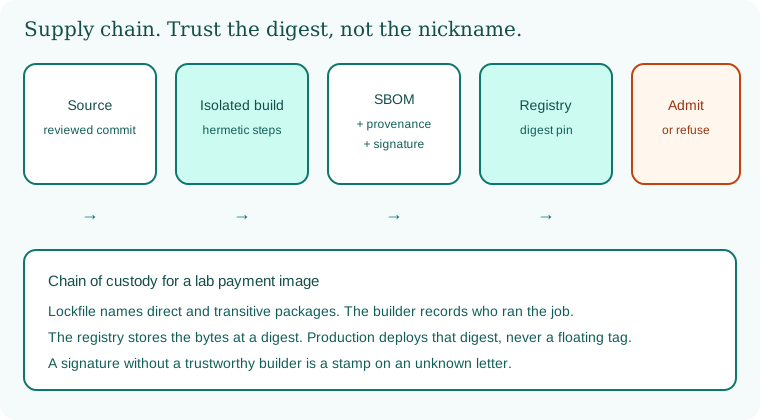
Source becomes an isolated build. The build emits an SBOM, provenance, and a signature. The registry keeps a digest. Admission later refuses anything that is not that digest.
13.6 A short animation.
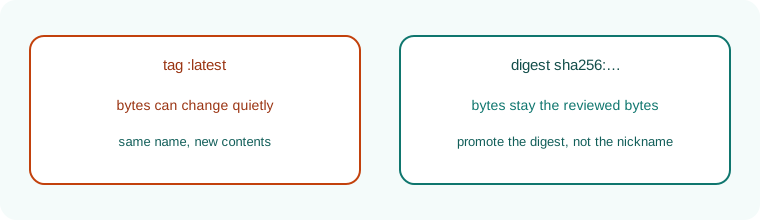
A floating tag slides. A digest stays. Production should follow the digest.
13.7 Conclusion.
Raju printed a digest and felt poorer again, the way he felt when he left the root prompt in Chapter 8. Guru-ji tapped the SBOM. "Poorer and provable. That is the trade. In Chapter 14 we open the parcel itself: the image, the Dockerfile, the user inside the container, and the socket you must not hand to a build."
- The supply chain is source, build, publish, and deploy. Each room needs a sentence and a control.
- Lockfiles, proxies, and maintainer awareness cut confusion, typos, and quiet ownership changes.
- An SBOM in SPDX or CycloneDX is inventory. Provenance is the builder's signed story.
- SLSA, in-toto, Sigstore, and transparency logs are the vocabulary of verification.
- Registries promote digests. Tags are nicknames.
- SolarWinds, confirmed in public on 13 December 2020, is the signed-update lesson.
- Own lab only.
END OF CHAPTER 13 MASTER CLASS
Lock, SBOM, verify
The three most useful habits for each stack.
Java
Maven or Gradle lock with verification metadata, CycloneDX plugin, Gradle dependency verification.
Node.js
package-lock.json committed, npm ci, npm audit signatures.
Python
Hash-pinned requirements, cyclonedx-py, pip-audit.
.NET
packages.lock.json, locked restore, package source mapping.
Go
go.sum, go mod verify, govulncheck.
PHP / Ruby
composer.lock and Gemfile.lock committed, audits in CI.
Containers
Digests not tags, Syft SBOM, Cosign verify.
Remember with three pictures
Global: SolarWinds (2020) and event-stream (2018). Indian company (sample): 11 direct dependencies but 640 total. Everyday: the ingredient label.
Interview-ready answers: Supply chain
Q. What is an SBOM?
A list of every component and version in your software, in a format like CycloneDX or SPDX.
Q. What is provenance?
A signed record of how, where and from which source an artifact was built.
Q. Tag vs digest?
A tag is a movable nickname. A digest is the exact content hash.
Q. What is typosquatting?
Publishing packages with names close to popular ones, hoping for a typing mistake.
Common questions about supply chain and SBOMs
Q. Do I need SLSA level 3 on day one?
No. Start with lockfiles, SBOMs and signed images, then improve step by step.
Q. Who reads SBOMs?
Your own security team during incidents, customers and auditors.
Q. Does signing slow down builds?
Only by seconds. Cosign signing is quick compared with a typical build.
Common questions about supply chain and SBOMs
Q. What should I do when a new advisory lands?
Search your stored SBOMs for the component, list the affected services and digests, upgrade, rebuild, scan and promote. Practise this once in your lab so it is routine.
Q. Are private registries enough?
They help, but you still need lockfiles, scanning and verification. A private copy of a bad package is still bad.
Chapter practice kit: worksheet, stacks, checklists
Key terms
- SBOM: The ingredient list of your software.
- CycloneDX / SPDX: The two common SBOM formats.
- Provenance: A signed record of how something was built.
- SLSA: A framework of levels for build integrity.
- Sigstore / Cosign: Tools for signing and verifying artifacts.
- Lockfile: A file pinning exact dependency versions.
Recap
- Most of your app is other people's code.
- Know your tree, watch maintainers, beware lookalike names.
- An SBOM is the ingredient list.