Chapter 18: Kubernetes Workloads
18.9 StatefulSet — stable name and disk
Why: the problem
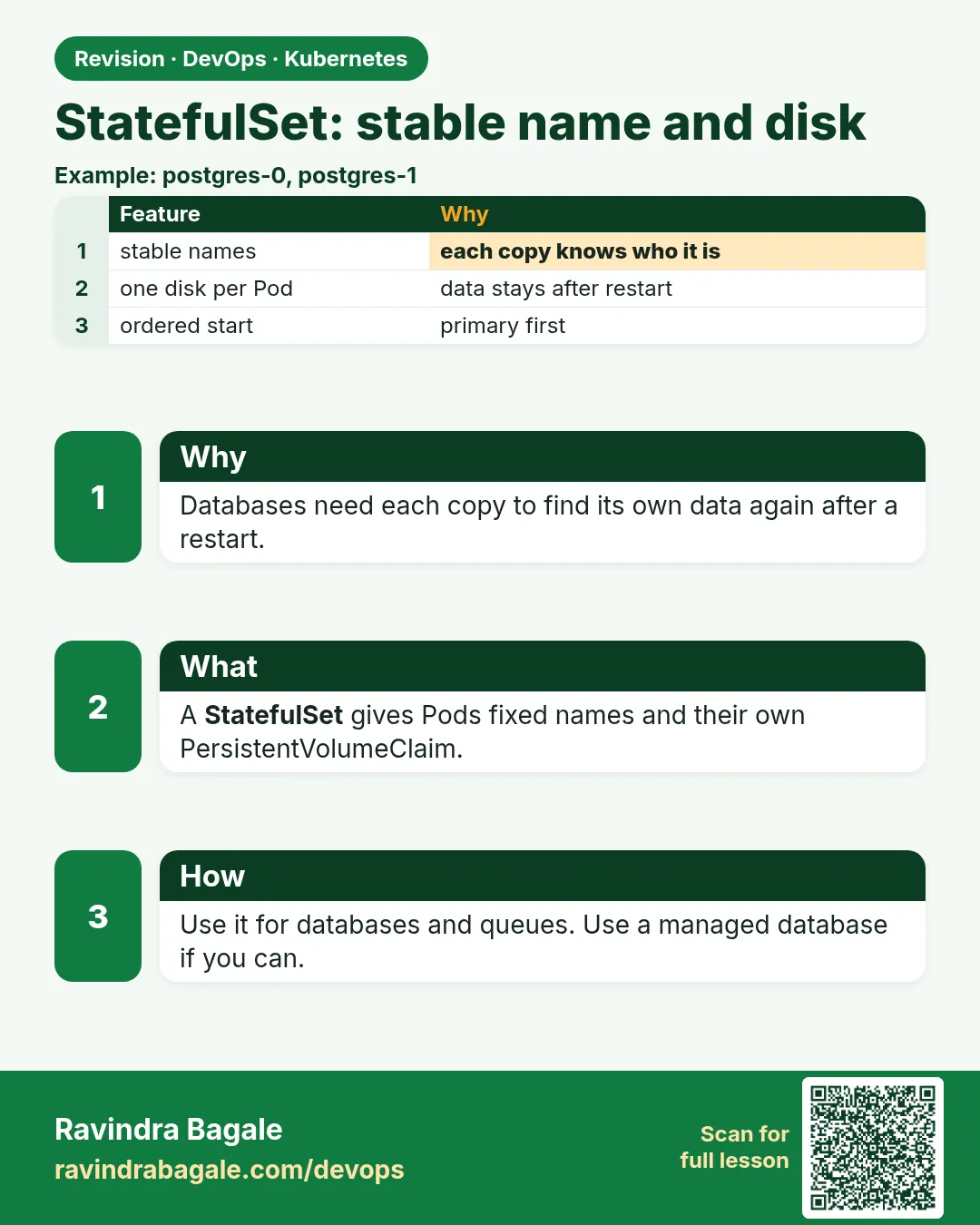
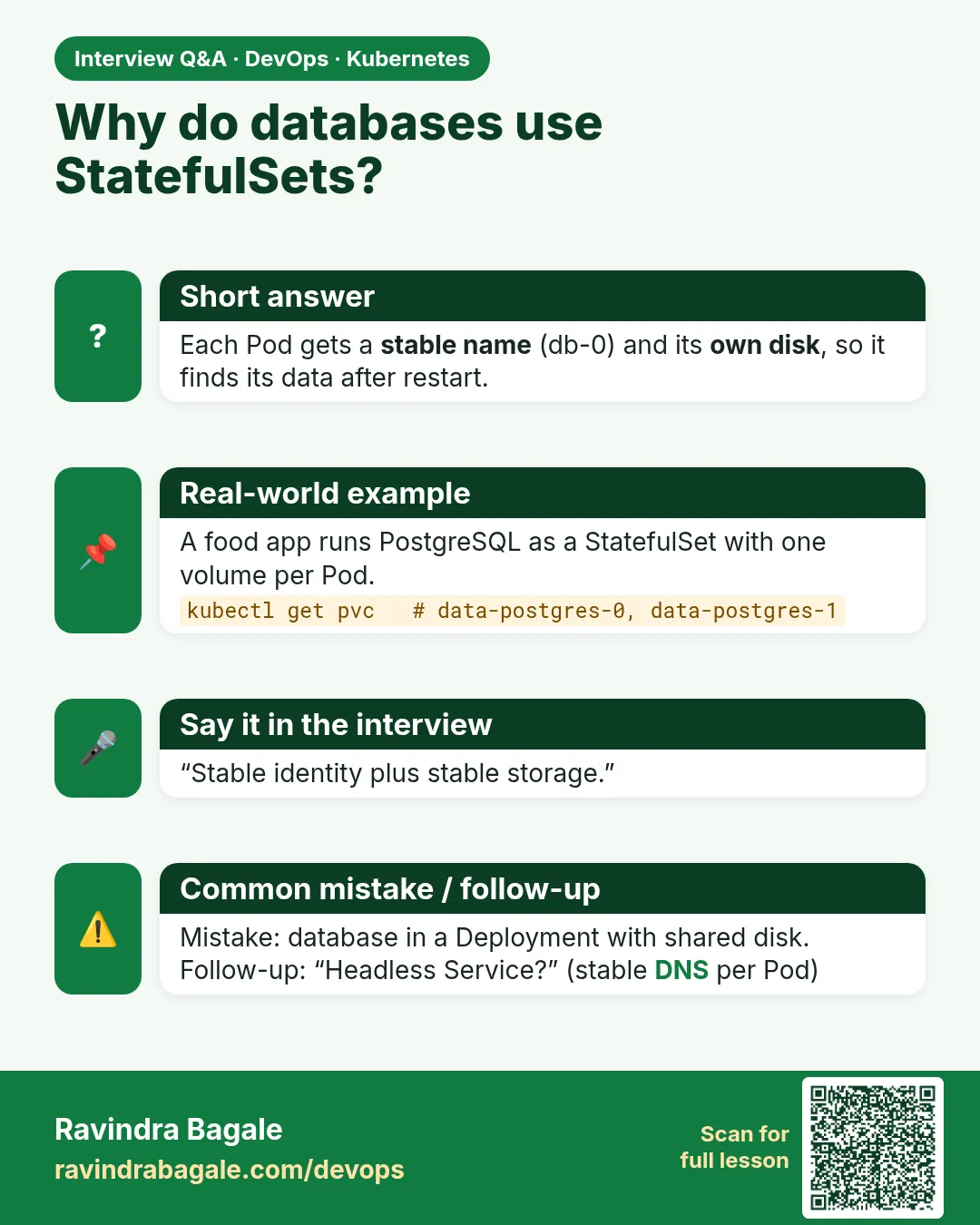
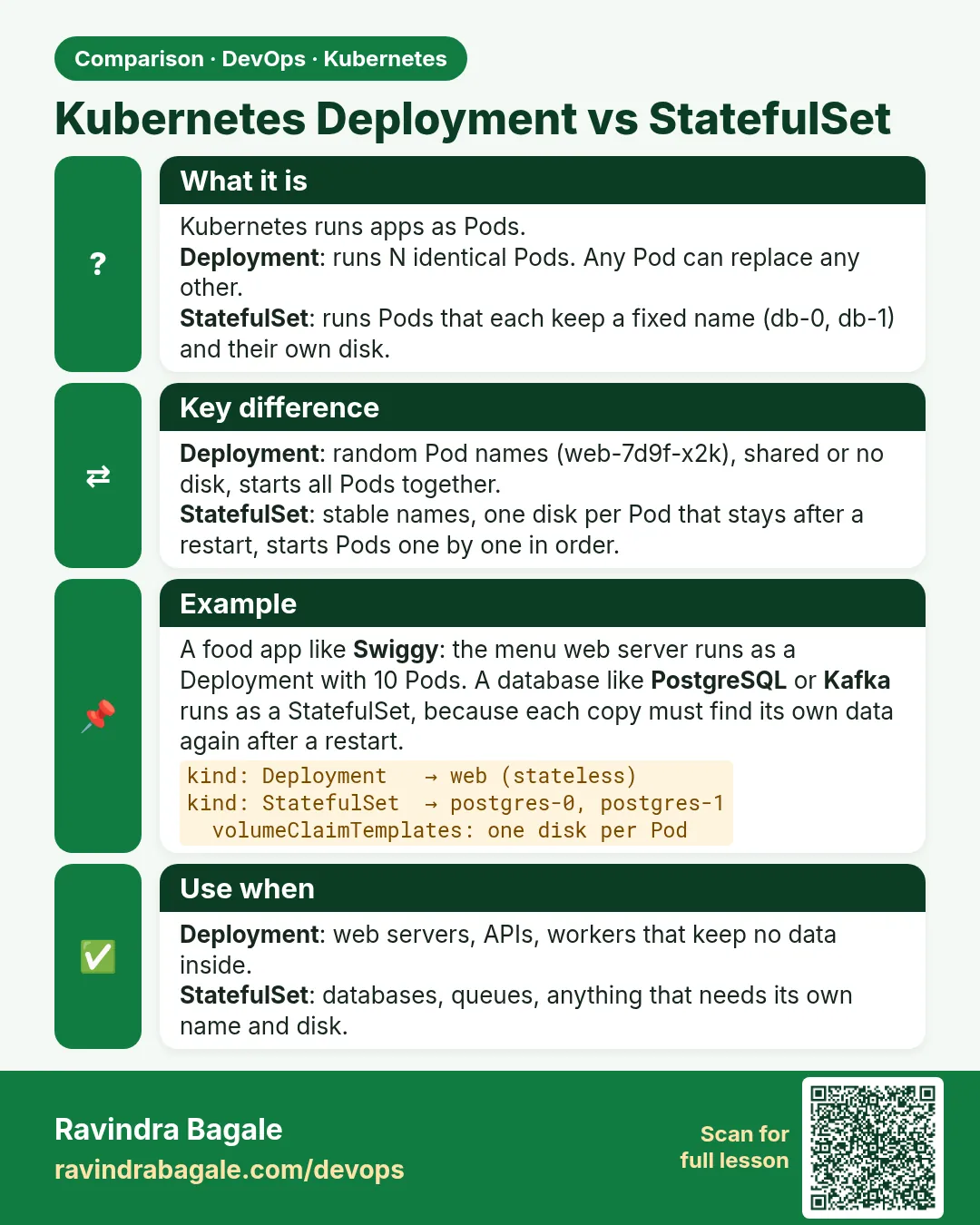
A database is not like a web server. If you run MySQL or Kafka with a Deployment, each new Pod gets a random name and, worse, all copies can share one disk or get a fresh empty one. At PhonePe a Kafka broker that comes back with an empty disk and a new name is a disaster. A StatefulSet gives each Pod three things a Deployment does not. First, a stable name with a number: db-0, db-1, db-2. Second, its own disk through volumeClaimTemplates, which follows that name forever. Third, order: db-0 starts first, and db-2 is stopped first. A headless Service gives each Pod a stable DNS name like db-0.db. In this lesson you will run a three-replica StatefulSet, write data into db-1, delete db-1, and see it come back with the same name and the same data.
What we will build
You will create a headless Service and a StatefulSet of 3 Pods, each with its own PersistentVolumeClaim from kind's default local-path storage. You will write a file into each Pod, delete a Pod, scale down and up, and prove the name, DNS and disk stay the same.
What: every term in plain English
- StatefulSet — A controller for Pods that need stable names, stable disks and ordered start and stop.
- Ordinal — The number at the end of the Pod name: db-0, db-1.
- Headless Service — A Service with clusterIP: None. It gives each Pod its own DNS name.
- volumeClaimTemplates — A PVC recipe. Each Pod gets its own claim, named data-db-0 and so on.
- PersistentVolumeClaim (PVC) — A request for a disk.
- StorageClass — Tells Kubernetes how to make disks. kind has standard (local-path).
- podManagementPolicy — OrderedReady (default, one by one) or Parallel.
How: step by step
-
Start a lab cluster
kind create cluster --name lab
kubectl get nodes
What it does: Creates a one-node Kubernetes cluster inside Docker. On minikube use: minikube start.
Output
Creating cluster "lab" ... ✓ Ensuring node image (kindest/node:v1.30.0) ✓ Preparing nodes Set kubectl context to "kind-lab" NAME STATUS ROLES AGE VERSION lab-control-plane Ready control-plane 40s v1.30.0 -
Make a practice namespace
kubectl create namespace practice
kubectl config set-context --current --namespace=practice
What it does: Keeps all lab objects in one folder that is easy to delete.
Output
namespace/practice created Context "kind-lab" modified. -
Check the storage class
kubectl get storageclassWhat it does: kind comes with a default class.
Output
NAME PROVISIONER RECLAIMPOLICY VOLUMEBINDINGMODE standard (default) rancher.io/local-path Delete WaitForFirstConsumer -
Apply the Service and StatefulSet
kubectl apply -f db.yamlWhat it does: The file is in Example 1.
Output
service/db created statefulset.apps/db created -
Watch ordered start
kubectl get pods -l app=db -wWhat it does: db-0 is ready before db-1 is created.
Output
db-0 0/1 Pending db-0 1/1 Running db-1 0/1 Pending db-1 1/1 Running db-2 0/1 Pending db-2 1/1 Running -
See one disk per Pod
kubectl get pvcWhat it does: Each claim is tied to one ordinal.
Output
NAME STATUS VOLUME CAPACITY STORAGECLASS data-db-0 Bound pvc-1a2b... 1Gi standard data-db-1 Bound pvc-3c4d... 1Gi standard data-db-2 Bound pvc-5e6f... 1Gi standard -
Resolve Pod DNS
kubectl run dns --rm -it --image=busybox:1.36 --restart=Never -- nslookup db-1.dbWhat it does: Each Pod has its own name.
Output
Name:      db-1.db.practice.svc.cluster.local
Address 1: 10.244.0.9
Example 1: Headless Service plus StatefulSet with its own disks
Stack. kind local-path storage
Goal. Headless Service plus StatefulSet with its own disks.
db.yaml
apiVersion: v1
kind: Service
metadata:
  name: db
spec:
  clusterIP: None
  selector: {app: db}
  ports: [{port: 80, name: web}]
---
apiVersion: apps/v1
kind: StatefulSet
metadata:
  name: db
spec:
  serviceName: db
  replicas: 3
  selector:
    matchLabels: {app: db}
  template:
    metadata:
      labels: {app: db}
    spec:
      containers:
      - name: web
        image: nginx:1.27
        ports: [{containerPort: 80, name: web}]
        volumeMounts:
        - {name: data, mountPath: /usr/share/nginx/html}
  volumeClaimTemplates:
  - metadata:
      name: data
    spec:
      accessModes: [ReadWriteOnce]
      resources:
        requests: {storage: 1Gi}
What each line does
clusterIP: None— Makes the Service headless.serviceName: db— Links the StatefulSet to that Service for DNS.replicas: 3— Pods db-0, db-1, db-2.volumeClaimTemplates— Makes data-db-0, data-db-1, data-db-2.ReadWriteOnce— One node can mount the disk at a time.mountPath— Where the disk appears inside the container.
Green output
service/db created
statefulset.apps/db created
NAME   READY   AGE
db     3/3     45s
Expected result. nginx stands in for a database so the lab is light. The same shape is used for MySQL, Postgres, Kafka and Elasticsearch.
Example 2: Delete a Pod: same name, same data
Stack. kind, Kubernetes 1.30
Goal. Delete a Pod: same name, same data.
terminal
for i in 0 1 2; do kubectl exec db-$i -- sh -c "echo I am db-$i > /usr/share/nginx/html/index.html"; done
kubectl exec db-1 -- cat /usr/share/nginx/html/index.html
kubectl delete pod db-1
kubectl wait --for=condition=Ready pod/db-1 --timeout=60s
kubectl exec db-1 -- cat /usr/share/nginx/html/index.html
kubectl run c --rm -it --image=busybox:1.36 --restart=Never -- wget -qO- db-1.db
What each line does
echo I am db-$i— Writes a different file on each disk.delete pod db-1— Kills the Pod.wait --for=condition=Ready— Waits for the new db-1.cat again— The file is still there because data-db-1 was mounted again.wget db-1.db— The DNS name works again with the new IP.
Green output
I am db-1
pod "db-1" deleted
pod/db-1 condition met
I am db-1
I am db-1
Expected result. A Deployment Pod would have come back with a random name and no link to the old disk.
Example 3: Scale down and up: disks are kept
Stack. kubectl scale sts
Goal. Scale down and up: disks are kept.
terminal
kubectl scale sts db --replicas=1
kubectl get pods -l app=db
kubectl get pvc
kubectl scale sts db --replicas=3
kubectl wait --for=condition=Ready pod/db-2 --timeout=90s
kubectl exec db-2 -- cat /usr/share/nginx/html/index.html
What each line does
scale to 1— Stops db-2 first, then db-1. Reverse order.get pvc— All three claims are still Bound. Kubernetes does not delete data on scale down.scale to 3— db-1 then db-2 come back and mount their old disks.cat on db-2— The old file is still there.
Green output
statefulset.apps/db scaled
NAME   READY   STATUS
db-0   1/1     Running
NAME        STATUS   CAPACITY
data-db-0   Bound    1Gi
data-db-1   Bound    1Gi
data-db-2   Bound    1Gi
statefulset.apps/db scaled
pod/db-2 condition met
I am db-2
Expected result. Data safety first: PVCs live on after scale down and even after you delete the StatefulSet. You delete them yourself.
Verify: did it work?
-
Check ready count
kubectl get sts dbWhat it does: READY must be 3/3.
Output
NAME READY AGE db 3/3 5m -
Check one Pod per claim
kubectl get pods -l app=db -o custom-columns=POD:.metadata.name,PVC:.spec.volumes[0].persistentVolumeClaim.claimNameWhat it does: Each Pod uses its own claim.
Output
POD    PVC
db-0   data-db-0
db-1   data-db-1
db-2   data-db-2
When it is red 1
pod has unbound immediate PersistentVolumeClaims
Cause. No StorageClass can make the disk, or the class name is wrong.
Fix, step by step
- Run kubectl get sc.
- Set storageClassName to an existing class or mark one as default.
When it is red 2
db-1 stays Pending and db-2 is never created
Cause. OrderedReady waits for each Pod. db-1 has a problem.
Fix, step by step
- Run kubectl describe pod db-1.
- Fix it; db-2 will follow.
- Use podManagementPolicy: Parallel only if the app allows it.
When it is red 3
Forbidden: updates to statefulset spec for fields other than 'replicas', 'template', 'updateStrategy' ... are forbidden
Cause. You changed volumeClaimTemplates or serviceName.
Fix, step by step
- Delete the StatefulSet with --cascade=orphan, then apply the new one; the Pods and PVCs are adopted.
Cleanup
-
Delete the StatefulSet and Service
kubectl delete sts db
kubectl delete svc db
What it does: Pods go away. PVCs stay.
Output
statefulset.apps "db" deleted service "db" deleted -
Delete the disks yourself
kubectl delete pvc -l app=db
kubectl delete pvc data-db-0 data-db-1 data-db-2 --ignore-not-found
What it does: Data is only removed when you ask.
Output
persistentvolumeclaim "data-db-0" deleted persistentvolumeclaim "data-db-1" deleted persistentvolumeclaim "data-db-2" deleted -
Delete the practice namespace
kubectl delete namespace practiceWhat it does: Deletes every object you made in this lesson in one go.
Output
namespace "practice" deleted
Ravindra Bagale's Tip
StatefulSet madhe naav ani disk kayam rahtat: db-0, db-1. Pod gela tari data tasach. Lakshat theva!
Practice tasks
Easy Read the DNS names
Why: Clients connect by name.
What to do: nslookup each Pod name.
- nslookup db-0.db
- nslookup db-2.db
Check: Each resolves to one IP.
Medium Parallel start
Why: Some apps do not need order.
What to do: Set podManagementPolicy: Parallel and recreate.
- Delete with --cascade=orphan is not needed; it is a new set.
- Watch Pods.
Check: All Pods start at once.
Hard Partitioned update
Why: Safe database upgrades.
What to do: Use updateStrategy.rollingUpdate.partition: 2 and change the image.
- Patch partition.
- Set image.
Check: Only db-2 gets the new image.
Easy Say a StatefulSet with stable names and disks in two lines
Why: If you can say it simply, you understand it. Interviewers want the short version first.
What to do: Write two short lines about a StatefulSet with stable names and disks for a fresher who knows only Docker basics.
- Write what problem it solves.
- Write the one kubectl command you use for it.
- Read it aloud to a friend.
Check: A fresher understands it without asking a question.
Easy Start a fresh lab cluster
Why: Practice needs a throwaway cluster. If you break it, you delete it and start again.
What to do: Create a kind cluster, or a minikube cluster, and check the node is Ready.
- kind create cluster --name lab
- kubectl get nodes
- kubectl get pods -A
Check: One node shows STATUS Ready and the kube-system Pods are Running.
Medium Break it on purpose
Why: You must know the red message by face. During an outage there is no time to read slowly.
What to do: Cause one error from the "When it is red" part of this lesson and fix it.
- Follow the error section.
- Copy the exact message and the kubectl describe Events into your notes.
- Write the fix in one line.
Check: You fixed it using only the steps, without searching the web.
Medium Write a one-page runbook
Why: At 2 a.m. nobody remembers the right command. A short page saves the on-call person.
What to do: Write a runbook page for this lesson.
- Title, when to use, exact kubectl command, how to check, how to undo.
Check: A teammate can follow it alone.
Medium Repeat it on a cloud cluster
Why: kind is a laptop toy. Real clusters run on EKS, GKE, AKS or k3s on a VM.
What to do: Do the main steps of this lesson again on a small k3s VM or a free-tier managed cluster.
- Install k3s on one Ubuntu 22.04 VM: curl -sfL https://get.k3s.io | sh -
- Copy the kubeconfig.
- Apply the same YAML and compare the output.
Check: Same output on the cloud cluster as on kind.
Hard Explain it like an interview
Why: Interviewers want real stories, not definitions.
What to do: Record a 60 second answer about this lesson.
- Say the problem, the YAML field you used, the kubectl command you ran, and one error you hit.
Check: Your answer has a real command and a real error message.
Hard Draw the flow top to bottom
Why: A drawing shows who talks to whom and in what order.
What to do: Draw this lesson as boxes from top to bottom.
- Start at kubectl apply, go through the API server, controller and scheduler, end at the running container.
Check: Each box matches a real thing you saw in kubectl output.
Homework: try at home
Try at home
At home, run Postgres as a StatefulSet with 1 replica and a 1Gi claim. Create a table, delete the Pod, and prove the table is still there. Write every command in your notes.
Recap
- A StatefulSet gives stable names, stable disks and order.
- A headless Service gives each Pod a DNS name.
- volumeClaimTemplates make one PVC per Pod.
- PVCs survive scale down and delete.
- Use it for databases, queues and clusters like Kafka.
FAQ
Should I run my production database on Kubernetes?
Many teams use managed RDS or Cloud SQL instead. If you run it in Kubernetes, use a well-tested operator.
Does a StatefulSet replicate data?
No. It gives stable identity and disks. The app (like MySQL replication) copies data.
Why ReadWriteOnce?
Each Pod has its own disk, so only one node needs it.
Can I resize the disks?
If the StorageClass allows expansion, edit each PVC size.
What is an operator?
A controller that knows how to run one app, like CloudNativePG for Postgres.
Interview questions
-
StatefulSet versus Deployment?
StatefulSet gives stable ordinal names, per-Pod storage and ordered rollout; Deployment Pods are interchangeable with random names.
-
What is a headless Service for?
To give each StatefulSet Pod a stable DNS record, like db-0.db.ns.svc.cluster.local.
-
What happens to PVCs when you delete a StatefulSet?
By default they are kept; you delete them manually or set persistentVolumeClaimRetentionPolicy.
-
How are StatefulSets updated?
RollingUpdate from the highest ordinal down, with optional partition, or OnDelete.
-
Name apps that need StatefulSets.
MySQL, Postgres, MongoDB, Kafka, ZooKeeper, Elasticsearch, Redis cluster.
Quick quiz
Q1. What are the Pod names in a 3-replica StatefulSet called db?
db-0, db-1, db-2.
Q2. Which Service type gives each Pod a DNS name?
Headless, clusterIP: None.
Q3. Which field makes one disk per Pod?
volumeClaimTemplates.
Q4. Are PVCs deleted when you scale down?
No.
Q5. Which Pod stops first when scaling down?
The highest number.
Samajla ka?
 Revision card
 Interview card
 Comparison card