Customer Lifetime Value (LTV) in Excel: Formula, Example and LTV to CAC
Raja runs Raja Coffee Roasters, a fictional coffee shop in Kolhapur that also delivers. He spends ₹64,000 a year on Google Ads and gets 22 customers: ₹2,909 per customer. Each of those customers brings about ₹1,691 of gross profit over their lifetime. He loses money on every Google Ads customer. Referral customers cost him only ₹562 each and are worth ₹3,877. One Excel sheet just told him where his next marketing rupee should go.
Customer lifetime value (LTV) is the gross profit you expect from one customer over the whole time they stay with you. The simple formula is average order value × orders per month × gross margin ÷ monthly churn rate. Dividing by churn is the same as multiplying by the expected lifetime in months. Compare LTV with CAC (customer acquisition cost = marketing spend ÷ new customers): an LTV to CAC ratio of 3 or more is a common rule of thumb for healthy marketing.
Download Customer_LTV_Template.xlsx
Excel file, 35 KB. Built for Microsoft 365 Excel on Windows; it also opens in Excel 2021 and 2024. All numbers in this workbook are fictional teaching data, not real company figures.
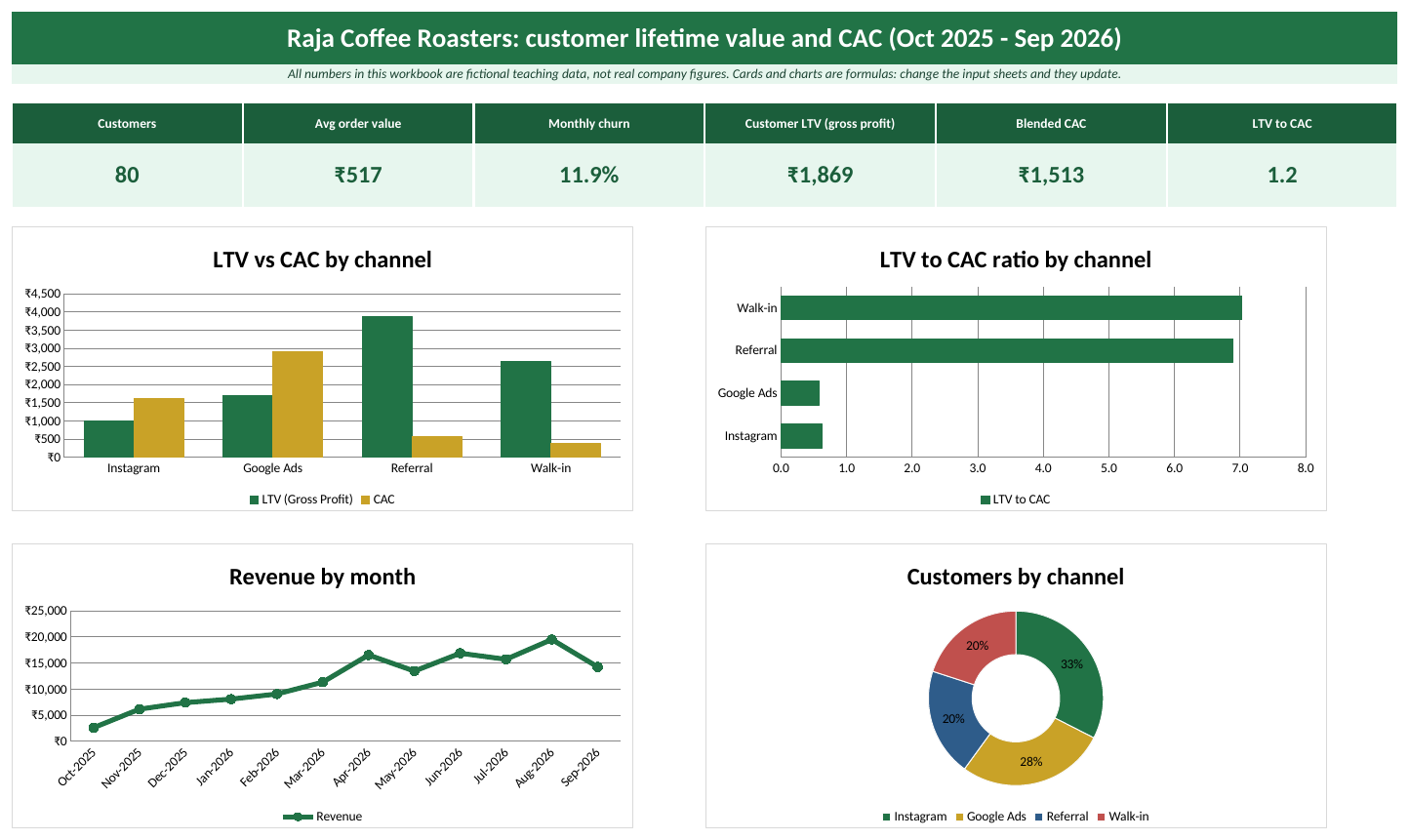
The Dashboard sheet with the sample data (Raja Coffee Roasters is a fictional business).
Quick answer
- Keep orders (Order ID, Date, Customer ID, Amount) and customers (Customer ID, Channel) in two tables.
- Per customer: first and last order (MINIFS, MAXIFS), orders (COUNTIFS), revenue (SUMIFS) and status (churned if no order for 90 days).
- Per customer: Active Months from the first order to the last order (churned) or to today (active).
- Average order value = revenue ÷ orders. Orders per month = orders ÷ customer-months. Monthly churn = churned customers ÷ customer-months.
- LTV = AOV × orders per month × gross margin ÷ monthly churn.
- CAC = marketing spend ÷ new customers. Compare LTV ÷ CAC for each channel.
LTV = AOV × Orders per month × Gross margin ÷ Monthly churn
The formula with real numbers
Take all customers of the sample together:
| Piece | How it is calculated | Value |
|---|---|---|
| Average order value (AOV) | ₹1,41,230 revenue ÷ 273 orders | ₹517.33 |
| Orders per customer per month | 273 orders ÷ 285 customer-months | 0.958 |
| Gross margin | Setting on the Lists sheet | 45% |
| Monthly churn | 34 churned ÷ 285 customer-months | 11.93% |
| Expected lifetime | 1 ÷ monthly churn | 8.4 months |
| LTV (gross profit) | ₹517.33 × 0.958 × 45% ÷ 11.93% | ₹1,869 |
Why gross profit and not revenue? Because CAC is paid out of profit. A customer worth ₹4,000 of revenue at 45% margin is worth ₹1,800 to you, and that is the number to compare with what you paid to get them.
Step 1: The data you need
- Orders: Order ID, Order Date, Customer ID, Amount. One row per order.
- Customers: Customer ID and the channel that brought them (Instagram, Google Ads, Referral, Walk-in). Ask new customers "How did you hear about us?" and keep the answer.
- Channels: marketing spend per channel for the same period as the orders.
- Three settings: the analysis date (
AsOfDate), your gross margin % (GrossMargin) and after how many days without an order a customer counts as gone (ChurnDays, 90 in the sample).
Step 2: Per-customer formulas
| Column | Formula |
|---|---|
| First Order | =MINIFS(Orders[Order Date],Orders[Customer ID],[@[Customer ID]]) |
| Last Order | =MAXIFS(Orders[Order Date],Orders[Customer ID],[@[Customer ID]]) |
| Orders | =COUNTIFS(Orders[Customer ID],[@[Customer ID]]) |
| Revenue | =SUMIFS(Orders[Amount],Orders[Customer ID],[@[Customer ID]]) |
| Status | =IF(AsOfDate-[@[Last Order]]>ChurnDays,"Churned","Active") |
| End Date | =IF([@Status]="Churned",[@[Last Order]],AsOfDate) |
| Active Months | =MAX(1,(YEAR([@[End Date]])-YEAR([@[First Order]]))*12+MONTH([@[End Date]])-MONTH([@[First Order]])) |
Customer-months is the sum of Active Months. It is the fair base for both frequency and churn: a customer who joined last month has had one month to buy and one month to leave, not twelve.
Step 3: LTV by channel
The Calculations sheet has one row per channel. Each row uses SUMIFS and COUNTIFS on the Customers table, then the same LTV formula:
Monthly Churn  =IFERROR(F6/E6,0)          churned ÷ customer-months
LTV            =IFERROR(((G6*H6)*GrossMargin)/I6,0)
LTV to CAC     =IFERROR(J6/K6,0)
| Channel | Customers | AOV | Orders / month | Monthly churn | LTV | CAC | LTV to CAC |
|---|---|---|---|---|---|---|---|
| 26 | ₹482 | 0.93 | 20.0% | ₹1,006 | ₹1,615 | 0.6 | |
| Google Ads | 22 | ₹544 | 0.86 | 12.5% | ₹1,691 | ₹2,909 | 0.6 |
| Referral | 16 | ₹643 | 1.14 | 8.5% | ₹3,877 | ₹562 | 6.9 |
| Walk-in | 16 | ₹407 | 0.95 | 6.6% | ₹2,634 | ₹375 | 7.0 |
| All customers | 80 | ₹517 | 0.96 | 11.9% | ₹1,869 | ₹1,512 | 1.2 |
What the numbers say
- Instagram and Google Ads lose money. Their LTV to CAC is 0.6 and 0.6: every customer costs more than they will ever bring back.
- Referral and Walk-in customers are gold. They churn less (8.5% and 6.6% a month against 20.0% for Instagram) and cost little to get.
- Overall LTV to CAC is only 1.2, because most of the budget goes to the weakest channels.
- A sensible test: move part of the Google Ads budget into a referral reward (for example a free coffee for both people) for three months, then run the sheet again.
Small numbers
Each channel here has only 16 to 26 customers. A few customers can swing the result. Treat the ranking as a strong hint and test it, not as a final verdict.
Historical value vs predicted LTV
Historical value is what customers have already brought: ₹1,41,230 revenue from 80 customers is ₹1,765 revenue, or ₹794 gross profit, per customer so far. Predicted LTV (₹1,869) is higher because the 46 active customers will keep buying. Show both; the historical number is a fact, the predicted one is an estimate.
What if churn changes?
LTV is very sensitive to churn. Keeping AOV, frequency and margin as they are:
| Monthly churn | Expected lifetime | LTV |
|---|---|---|
| 8% | 12.5 months | ₹2,787 |
| 10% | 10.0 months | ₹2,230 |
| 12% | 8.3 months | ₹1,858 |
| 14% | 7.1 months | ₹1,593 |
To build this in Excel, put churn values in a column and use Data > What-If Analysis > Data Table with the churn cell as the column input. Cutting churn from 12% to 10% adds about 20% to the value of every customer, often for less money than new ads.
Common mistakes
- Using revenue instead of gross profit and then comparing it with CAC.
- Taking spend from one period and customers from another.
- Counting a customer as churned after 30 days when your customers normally buy every 45 days. Set ChurnDays to roughly two to three times the usual gap between orders.
- Dividing by a churn rate of almost zero (very new business): LTV shoots up. Cap the lifetime, for example at 36 months, until you have a year of data.
- Forgetting returns, discounts and delivery costs in the margin.
Ravindra Bagale's Tip
Show LTV to CAC per channel, never just one overall number. The overall average hides the fact that one channel is paying for another. In the sample, the average of 1.2 looks merely weak; the channel view shows two channels losing money and two doing very well.
Ravindra Bagale's Tip – मराठी
LTV to CAC नेहमी प्रत्येक channel साठी वेगळा दाखवा, फक्त एक एकूण आकडा नाही. एकूण average मध्ये एक channel दुसऱ्याचा खर्च भरतोय हे लपून जातं. Sample मध्ये 1.2 हा average फक्त कमकुवत वाटतो; channel प्रमाणे बघितलं की दोन channels तोट्यात आणि दोन जोरात आहेत हे दिसतं.
Ravindra Bagale's Tip – हिंदी
LTV to CAC हमेशा हर channel के लिए अलग दिखाइए, सिर्फ एक कुल आंकड़ा नहीं। कुल average में यह छिप जाता है कि एक channel दूसरे का खर्च उठा रहा है। Sample में 1.2 का average बस कमज़ोर लगता है; channel के हिसाब से देखें तो दो channels घाटे में और दो बढ़िया चल रहे हैं।
Practice task
- Download the template and open Calculations. Check that the Referral row shows an LTV of about ₹3,877.
- On Lists, change GrossMargin from 45% to 55%. Which channels now pass an LTV to CAC of 1?
- On Channels, cut Google Ads spend from ₹64,000 to ₹40,000. What happens to its CAC and LTV to CAC?
- Change ChurnDays from 90 to 60. Why do more customers become Churned, and why does LTV fall?
- Build a What-If Data Table for monthly churn from 6% to 16% and chart LTV against churn.
Learn it properly
Course lessons:
- 3.4 AVERAGE, AVERAGEIF(S), MINIFS and MAXIFS
- 22.14 Marketing and Digital Ads
- 22.3 E-commerce
- 4.6 XLOOKUP Basics and if_not_found
Related guides: RFM Analysis in Excel: Segment Customers by Recency, Frequency and Monetary Value · Cohort Retention Analysis in Excel: Build a Customer Retention Table · SUMIF and SUMIFS · XLOOKUP for Beginners
Frequently asked questions
What is a good LTV to CAC ratio?
3 or more is a common rule of thumb. Below 1 you lose money on each customer. Far above 5 can mean you are spending too little on marketing and growing slower than you could.
Should LTV use revenue or profit?
Use gross profit (revenue × gross margin) when you compare it with CAC. Revenue LTV is fine for a quick size check, but it makes every channel look better than it is.
How do I get monthly churn from yearly churn?
Monthly churn = 1 - (1 - yearly churn)^(1/12). For example, 50% yearly churn is about 5.6% a month: =1-(1-50%)^(1/12).
Is the simple formula good enough?
For a small business, yes. It assumes customers keep buying the same way. Bigger companies add a discount rate and model each cohort separately, but the simple version already shows which channels pay back.
Is the data in the template real?
No. Raja Coffee Roasters and its customers are fictional teaching data.