Case Study: Find the Best Customers of a Real Online Retailer with RFM in Excel
A UK online shop that sells gift items, mostly to wholesalers, is planning December. The owner asks: "Who are our best customers, and who is slipping away?" We cleaned 473,903 invoice lines from January to November 2011 down to 14,587 invoices from 3,769 UK customers. RFM scoring shows that 820 Champions (21.8% of customers) brought 63.0% of revenue, and 318 customers who used to buy often have gone quiet. They spent £513,167 earlier in the year.
Download Online Retail II from the UCI repository, keep one country and one period, remove lines with no Customer ID, cancellations, non-product codes and zero or negative quantities, then add up the lines into one row per invoice. On a Customers sheet use MAXIFS for the last purchase date, COUNTIFS for the number of invoices and SUMIFS for spend. Score each with PERCENTILE.INC cut-offs and COUNTIF, combine the R and F scores into segments with a nested IF, and summarise with COUNTIF and SUMIFS.
Real data on this page
This case study uses real public data (the Online Retail II dataset from the UCI Machine Learning Repository), not fictional teaching data. It is the one exception to the fictional-data rule on this site. Every number on this page was calculated from the downloaded file, and the practice workbook contains the cleaned data and formulas so you can check each one.
Download the practice file (case-study-online-retail-rfm.xlsx)
Excel file, 1198 KB. It holds the trimmed real data and every formula used below. It has a raw sample (three days of original lines, with a Keep? formula), the cleaning log, every cleaned invoice, the Customers sheet with RFM formulas, the analysis and the dashboard.
Quick answer
- Download online_retail_II.xlsx from the UCI page and open the Year 2010-2011 sheet.
- Filter to United Kingdom and to dates from 1 January to 30 November 2011.
- Remove lines with no Customer ID, cancellations (Invoice starts with C), postage and fee codes, zero or negative quantity or price, and exact duplicates.
- Add Value = Quantity x Price, then make one row per invoice with a PivotTable or SUMIFS.
- On a Customers sheet, calculate Recency (MAXIFS), Frequency (COUNTIFS) and Monetary (SUMIFS) for each customer.
- Score each from 1 to 5 with PERCENTILE.INC cut-offs and COUNTIF, combine R and F into segments, then chart customers and revenue by segment.
The business question
December is the busiest month for a gift seller, and the marketing budget is small. Sending the same email to everyone wastes it. The owner needs three answers:
- Which customers bring most of the money?
- Which good customers have stopped buying and are worth a phone call?
- Which customers are not worth an expensive campaign?
RFM answers all three with three numbers per customer: Recency (days since the last purchase), Frequency (how many invoices) and Monetary value (how much they spent). If RFM is new to you, read the RFM segmentation guide first; this page applies the same method to real data.
The data: source and licence
Source and licence
Dataset: *Online Retail II*, donated to the UCI Machine Learning Repository on 20 September 2019. Creator: Daqing Chen. The UCI page describes it as all transactions of a UK-based, registered, non-store online retailer between 1 December 2009 and 9 December 2011, which mainly sells all-occasion gift-ware, and many of whose customers are wholesalers.
Where: archive.ics.uci.edu/dataset/502/online+retail+ii (file online_retail_II.xlsx, two sheets). Downloaded 6 October 2026.
Citation: Chen, D. (2012). Online Retail II [Dataset]. UCI Machine Learning Repository. https://doi.org/10.24432/C5CG6D.
Licence: Creative Commons Attribution 4.0 International (CC BY 4.0). You may share and adapt the data, also commercially, as long as you give credit, link the licence and say what you changed.
Our changes: we used only the Year 2010-2011 sheet, kept UK customers and dates from 1 January to 30 November 2011, removed rows as described in Step 1, and added up lines into invoices. The practice workbook holds the 14,587 cleaned invoices plus a raw sample of 4,759 original lines (4 to 6 January 2011). It does not hold the full 541,910-line sheet; download that from UCI.
| Column | Meaning |
|---|---|
| Invoice | Invoice number. If it starts with C, it is a cancellation. |
| StockCode | Product code (a 5-digit number, sometimes with a letter). Codes like POST and M are not products. |
| Description | Product name |
| Quantity | Units on this line |
| InvoiceDate | Date and time of the invoice |
| Price | Unit price in pounds sterling (GBP) |
| Customer ID | Customer number; blank on many lines |
| Country | Where the customer lives |
Step 1: Clean the lines
The sheet has one row per product line, not per order, and it has real-world mess. Open the Raw sample sheet of the practice file to see it: cancellations, blank Customer IDs, postage lines and customers from other countries, all mixed together.
- Filter InvoiceDate to 1 January to 30 November 2011. December 2011 stops on the 9th, so leaving it out keeps eleven full months.
- Filter Country to United Kingdom. UK customers are most of the lines, and mixing countries mixes very different buying patterns.
- Remove lines where Customer ID is blank. You cannot score a customer you cannot identify.
- Remove cancellations: filter Invoice with Text Filters > Begins With > C and delete those rows.
- Remove codes that are not products: POST, DOT, M, m, C2, D, S, BANK CHARGES, AMAZONFEE, CRUK, PADS, B and gift vouchers (codes starting gift_).
- Remove lines with zero or negative Quantity or Price.
- Remove exact duplicate lines with Data > Remove Duplicates (tick all columns).
- Add Value =
=D2*F2(Quantity x Price).
| Cleaning step | Lines left | Removed |
|---|---|---|
| Lines dated 1 Jan to 30 Nov 2011 | 473,903 | |
| Keep United Kingdom customers only | 431,427 | 42,476 |
| Remove lines with no Customer ID | 321,265 | 110,162 |
| Remove cancellations (Invoice starts with C) | 314,601 | 6,664 |
| Remove postage, fees, manual and gift-voucher codes | 314,301 | 300 |
| Remove zero or negative quantity or price | 314,282 | 19 |
| Remove exact duplicate lines | 309,931 | 4,351 |
In the practice file the Keep? column does the same test in one formula, so you can see which rule removes each line:
=IF(OR(G2="",LEFT(A2,1)="C",D2<=0,F2<=0,ISNUMBER(MATCH(B2,NonProduct,0)),LEFT(B2,5)="gift_",H2<>"United Kingdom"),"Drop","Keep")
In the 4,759-line sample, 2,872 lines are kept. NonProduct is a named range with the code list on the Lists sheet.
Why the Customer ID step is so large
More than a quarter of UK lines (110,162) have no Customer ID. They are real sales, so total revenue in this case study is lower than the shop's true revenue. RFM is about known customers, so we remove them, but say so when you report revenue.
Step 2: One row per invoice
RFM counts orders, not lines. Turn the cleaned lines into invoices:
- Select the cleaned lines and choose Insert > PivotTable > New Worksheet.
- Put Invoice in Rows, then add InvoiceDate and Customer ID to Rows as well, and set Report Layout > Show in Tabular Form and Do Not Show Subtotals.
- Put Value and Quantity in Values (Sum).
- Copy the PivotTable and Paste Values onto a new sheet, then press Ctrl+T and name the table Invoices.
The result is 14,587 invoices worth £6,277,357 in total, an average of £430.34 per invoice. The practice file keeps only the date part of each invoice time, because RFM works in days.
Step 3: Recency, Frequency and Monetary for each customer
Make a list of unique Customer IDs (Data > Remove Duplicates on a copy of the column, or =UNIQUE(Invoices[Customer ID])), turn it into a table called Customers, and add these formulas. The analysis date AsOfDate is 1 December 2011, the day after the last invoice.
Last Purchase  =MAXIFS(Invoices[Date],Invoices[Customer ID],A2)
Recency Days   =AsOfDate-C2
Frequency      =COUNTIFS(Invoices[Customer ID],A2)
Monetary       =SUMIFS(Invoices[Value],Invoices[Customer ID],A2)
Look at the spread before you score: 1,410 of the 3,769 customers bought only once in these eleven months, while the top 20% of customers (753) brought 71.9% of revenue.
Step 4: Score 1 to 5 and name the segments
Cut each measure into five groups of roughly equal size with PERCENTILE.INC, then count how many cut-offs a customer beats:
Cut-off (20%, 40%, 60%, 80%)  =PERCENTILE.INC(Customers[Recency Days],A6)
R Score  =5-COUNTIF(RCuts,"<"&D2)       (fewer days = higher score)
F Score  =1+COUNTIF(FCuts,"<"&E2)
M Score  =1+COUNTIF(MCuts,"<"&F2)
RFM Code =G2&H2&I2
| Percentile | Recency (days) | Frequency (invoices) | Monetary (GBP) |
|---|---|---|---|
| 20% | 13 | 1 | £226.65 |
| 40% | 31 | 2 | £429.97 |
| 60% | 65 | 3 | £850.62 |
| 80% | 164 | 5 | £1,784.43 |
The segment uses R and F (M follows F closely in this data):
=IF(AND(G2>=4,H2>=4),"Champions",IF(AND(G2>=3,H2>=3),"Loyal",IF(G2>=4,"New / promising",
  IF(H2>=3,"At risk",IF(G2<=2,"Lost / hibernating","Needs attention")))))
| Segment | Customers | Share | Revenue | Share of revenue | Avg recency (days) | Avg invoices | Avg spend |
|---|---|---|---|---|---|---|---|
| Champions | 820 | 21.8% | £3,956,548 | 63.0% | 12 | 10.0 | £4,825 |
| Loyal | 532 | 14.1% | £828,567 | 13.2% | 35 | 4.3 | £1,557 |
| New / promising | 513 | 13.6% | £232,133 | 3.7% | 16 | 1.5 | £453 |
| Needs attention | 413 | 11.0% | £202,811 | 3.2% | 48 | 1.4 | £491 |
| At risk | 318 | 8.4% | £513,167 | 8.2% | 123 | 4.2 | £1,614 |
| Lost / hibernating | 1,173 | 31.1% | £544,131 | 8.7% | 186 | 1.3 | £464 |
Segment rules are a choice
These six names and rules are a common teaching version of RFM, not a standard. Change them to fit the business. Because frequency here has many ties (one, two or three invoices), the five F groups are not equal in size.
Step 5: Build the dashboard
- On an Analysis sheet, list the six segments and use
=COUNTIF(Customers[Segment],A13)and=SUMIFS(Customers[Monetary],Customers[Segment],A13). - Add a monthly table with
=SUMIFS(Invoices[Value],Invoices[Date],">="&A24,Invoices[Date],"<"&EDATE(A24,1)). - On a Dashboard sheet make six KPI cards: customers, revenue, average invoice value, Champions' share of revenue, at-risk customers and their past spend.
- Insert four charts: revenue by month (column), customers by segment (bar), share of revenue by segment (bar) and invoices per month (line).
- Turn off gridlines and set the page to landscape, fit to one page.
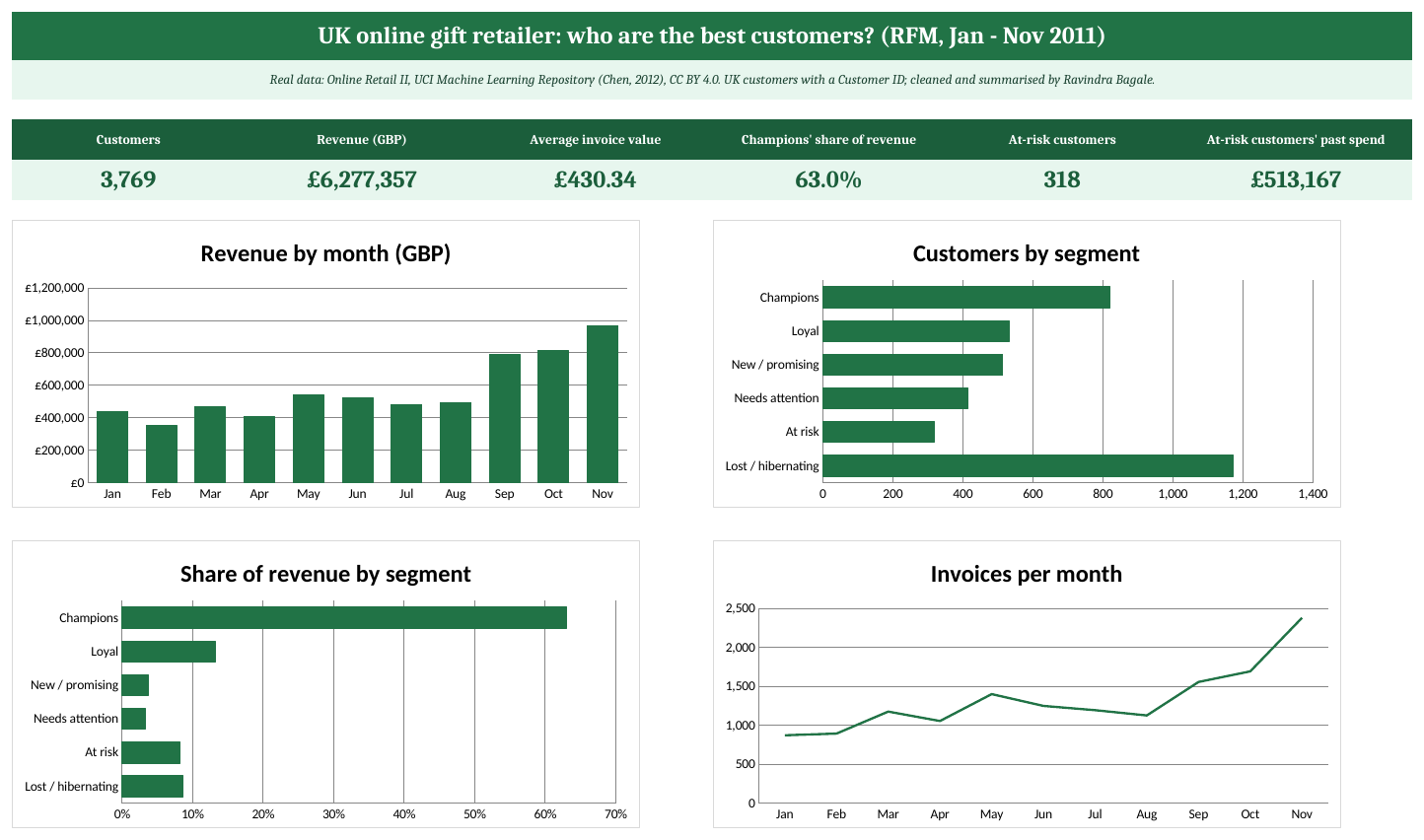
The Dashboard sheet of the practice workbook (real data: Online Retail II, UCI, CC BY 4.0).
Sales build towards the holidays: September to November brought 40.9% of the eleven months' revenue, and November alone was £967,883 from 2,379 invoices.
Step 6: The recommendation
- Look after the 820 Champions first. They are 21.8% of customers but 63.0% of revenue, and they bought on average 10.0 times in eleven months. Give them early access to the Christmas range and a named contact, not discounts.
- Call the 318 At-risk customers this week. They bought 4.2 times on average but not for about 123 days, and together they spent £513,167. A personal reminder before the December rush is the cheapest revenue in this list.
- Ask New / promising customers for a second order. 513 customers bought recently but only 1.5 times on average. A simple 'reorder' email with their last products can turn them into Loyal customers.
- Keep Lost / hibernating customers on the cheap list. 1,173 customers (31.1%) brought 8.7% of revenue. A newsletter is enough; do not spend sales time here.
What this data cannot tell you
- Customers who bought before January 2011 look newer and less frequent than they are, because we only counted eleven months.
- Lines without a Customer ID (110,162 UK lines) are left out, so revenue here is not the shop's full revenue.
- The data is from 2011 and about one shop. Use it to learn the method, then run it on your own orders.
Ravindra Bagale's Tip
Always write down how many rows each cleaning step removed. When your total looks smaller than someone expects, the cleaning log answers the question in one line, and it is also how you meet the 'say what you changed' part of an open licence.
Ravindra Bagale's Tip – मराठी
प्रत्येक cleaning step ने किती rows काढल्या ते नेहमी लिहून ठेवा. तुमचा total कोणाला कमी वाटला तर cleaning log एका ओळीत उत्तर देतो, आणि open licence मधली 'काय बदलले ते सांगा' ही अट सुद्धा त्यानेच पूर्ण होते.
Ravindra Bagale's Tip – हिंदी
हर cleaning step ने कितनी rows हटाईं, यह हमेशा लिखकर रखिए। आपका total किसी को कम लगे तो cleaning log एक लाइन में जवाब देता है, और open licence की 'क्या बदला यह बताइए' वाली शर्त भी इसी से पूरी होती है।
Practice task
- On Raw sample, filter Keep? to Drop and find one line removed for each reason (no Customer ID, cancellation, postage, other country).
- On Customers, sort by Monetary from largest to smallest. What share of revenue do the top 10 customers bring?
- Change AsOfDate on the Analysis sheet to 1 November 2011. Which formulas change, and why is this not a fair test?
- Change the Champions rule to R>=5 and F>=4. How many Champions are left, and what share of revenue do they bring?
- Make a PivotTable from Customers with Segment in Rows and Average of Monetary in Values, and check it against the Analysis sheet.
Learn it properly
Course lessons:
- 5.1 Duplicates
- 5.2 Blank Cells
- 3.4 AVERAGE, AVERAGEIF(S), MINIFS and MAXIFS
- 3.13 IF, Nested IF and IFS
- 13.4 KPI Cards
Related guides: RFM Analysis in Excel: Segment Customers by Recency, Frequency and Monetary Value · Customer Lifetime Value (LTV) in Excel: Formula, Example and LTV to CAC · Cohort Retention Analysis in Excel: Build a Customer Retention Table · COUNTIF and COUNTIFS
Frequently asked questions
Can I use the Online Retail II data in my own work?
Yes. It is published under CC BY 4.0, which allows sharing and adapting, including commercial use. Credit the creator (Chen, 2012, UCI Machine Learning Repository), link the licence and say what you changed.
Why are there so many lines without a Customer ID?
The dataset does not explain it. They are probably guest or unregistered sales. We remove them for RFM because we cannot tell who bought, and we say so when reporting revenue.
Why use PERCENTILE.INC instead of fixed cut-offs?
Percentile cut-offs adapt to the data, so each score holds roughly a fifth of customers. Fixed cut-offs (for example 'more than 10 orders') are easier to explain to managers; both are fine if you state the rule.
What currency is the data in?
Pounds sterling (GBP). The Price column is the unit price in pounds.