Case Study: How Big Is US E-commerce? Excel Analysis of Census Retail Data
A planning manager at a US retailer asks a simple question before next year's budget: "Online keeps growing. How fast, and how much bigger is the holiday quarter?" The answer is in a free government spreadsheet. In the second quarter of 2026, e-commerce was 17.1% of all US retail sales (seasonally adjusted). From 2015 to 2025 online sales grew 14.0% a year, almost three times as fast as total retail (4.9%). And the fourth quarter alone brings about 30.4% of a year's e-commerce sales. This page shows how to get those numbers in Excel, step by step.
Download the Census Bureau's quarterly e-commerce time series, clean the label column into Year and Quarter with TRIM, MID, FIND and LEFT, sort it oldest first, then use SUMIFS for yearly totals, a growth formula for year-on-year change, a CAGR formula for long-term growth, and a PivotTable with Show Values As to see the share of each quarter. Four charts on one sheet make the dashboard.
Real data on this page
This case study uses real public data from the U.S. Census Bureau, not fictional teaching data. It is the one exception to the fictional-data rule on this site. Every number on this page was calculated from the downloaded file, and the practice workbook contains the same data and formulas so you can check each one.
Download the practice file (case-study-us-ecommerce-census.xlsx)
Excel file, 36 KB. It holds the trimmed real data and every formula used below. It has the two published sheets exactly as downloaded (Raw NSA, Raw SA), the cleaned table, the yearly analysis and the dashboard.
Quick answer
- Download tsnotadjustedsales.xlsx (not adjusted) and tsadjustedsales.xlsx (seasonally adjusted) from the Census e-commerce page.
- Keep only the 107 quarter rows; split each label such as
2nd quarter 2026(p)into Year, Quarter and Status with formulas. - Sort oldest first and divide e-commerce by total retail to get the online share.
- Make yearly totals with SUMIFS for the 26 complete years (2000 to 2025) and calculate growth and CAGR.
- Insert a PivotTable (Rows: Year, Columns: Quarter, Values: E-commerce) and show values as % of row total to see the Q4 peak.
- Put four charts and six KPI cards on a Dashboard sheet and write a three-line recommendation.
The business question
Budgets need two numbers: how fast the online channel grows, and how uneven it is across the year. A team that plans online staff, warehouse space and ad spend evenly across four quarters will be short in Q4 and idle in Q1. So the questions are:
- How big is e-commerce compared with all retail, and is the share still rising?
- How fast has it grown over ten years, compared with total retail?
- How much of a year's online sales fall in the fourth quarter?
The data: source and licence
Source and licence
Dataset: U.S. Census Bureau, *Quarterly Retail E-Commerce Sales*, time series tables "Estimated Quarterly U.S. Retail Sales (Not Adjusted)" and "(Adjusted)": Total and E-commerce, 4th quarter 1999 to 2nd quarter 2026. Last revised August 18, 2026.
Where: census.gov/retail/ecommerce.html (files tsnotadjustedsales.xlsx and tsadjustedsales.xlsx). Downloaded 6 October 2026.
Licence: works of the U.S. Government are not protected by copyright in the United States (17 U.S.C. 105), so the data may be copied and shared. The release asks data users who make their own estimates to cite the Census Bureau as the source of the input data, which we do here. This analysis is ours, not the Census Bureau's.
Hosted copy: the practice workbook holds both sheets unchanged, plus our cleaning and analysis sheets.
| Column | Meaning |
|---|---|
| Quarter | Text label such as "2nd quarter 2026(p)". (p) = preliminary, (r) = revised. |
| Retail Sales, Total | All US retail sales in the quarter, in millions of dollars |
| Retail Sales, E-commerce | Sales where the order was placed online (the buyer may pay later), in millions of dollars |
| E-commerce as a percent of Total | Rounded to one decimal in the file; we recalculate it |
| Percent change columns | Quarter on quarter and year on year, rounded; we recalculate them |
Read the footnotes
Dollar values are not adjusted for price changes, so part of the growth is inflation. The estimates cover businesses with paid employees; the file notes that before the benchmark report of April 2025 they also included nonemployers. The whole time series in the file was published on the current basis, so you can compare years inside it, but do not mix it with numbers copied from older reports.
Step 1: Clean the file
Open the downloaded file and you will see a report, not a table: title rows, headers spread over four rows, the newest quarter at the top, labels with (p) and (r), "NA" in the first growth cells, and footnotes at the bottom. The Raw NSA sheet of the practice file shows it exactly as published.
- Find the data rows: the first quarter label is in B9 ("2nd quarter 2026(p)") and the last in B115 ("4th quarter 1999"). That is 107 quarters.
- On a new sheet called Clean, pull the label with
=TRIM('Raw NSA'!B115), starting from the oldest row so the table runs oldest first. - Get the year:
=VALUE(MID(A2,FIND("quarter",A2)+8,4)). FIND returns where the word quarter starts; the year starts 8 characters later. - Get the quarter number:
=VALUE(LEFT(A2,1)). - Flag the status:
=IF(ISNUMBER(SEARCH("(p)",A2)),"Preliminary",IF(ISNUMBER(SEARCH("(r)",A2)),"Revised","Final")). - Bring the two dollar columns and recalculate the share yourself:
=F2/E2. The published percent is rounded to one decimal; your own division is exact. - Do the same for the seasonally adjusted sheet (columns H to J). Both sheets list the quarters in the same rows, which you can check by comparing the labels.
- Add year-on-year growth for each quarter from the fifth row on:
=F6/F2-1compares a quarter with the same quarter one year earlier. - Check: 107 rows, years 1999 to 2026, and every year from 2000 to 2025 has exactly four quarters (
=COUNTIFS(B:B,2010)gives 4).
Not adjusted vs seasonally adjusted
Use the not adjusted (NSA) numbers to see the real holiday peak and to add quarters into years. Use the seasonally adjusted (SA) numbers to compare one quarter with the next, because the seasonal pattern has been taken out.
Step 2: Explore with a PivotTable
- Click inside the Clean table and choose Insert > PivotTable > New Worksheet.
- Drag Year to Rows, Quarter to Columns and E-commerce NSA to Values.
- Filter Year to 2000-2025 (untick 1999 and 2026, which are incomplete years).
- Right-click a value, choose Show Values As > % of Row Total. Each row now shows how a year's online sales split across the four quarters.
- Add Total retail NSA to Values and use Value Field Settings > Sum to compare the two channels by year.
The Q4 column stays near 30% every year (from 28.0% to 32.7%), while a flat year would give 25% per quarter. That one PivotTable already answers question 3.
Step 3: Yearly formulas, growth and CAGR
PivotTables are great for exploring; formulas are better for a report that must stay put. The By year sheet uses one SUMIFS per cell:
Total retail   =SUMIFS(Clean!$E$2:$E$108,Clean!$B$2:$B$108,$A2)
E-commerce     =SUMIFS(Clean!$F$2:$F$108,Clean!$B$2:$B$108,$A2)
Share          =C2/B2
Growth         =C3/C2-1
Q4 share       =SUMIFS(Clean!$F$2:$F$108,Clean!$B$2:$B$108,$A2,Clean!$C$2:$C$108,4)/C2
CAGR 2015-25   =(C27/C17)^(1/10)-1
| Year | Total retail ($M) | E-commerce ($M) | E-com share | E-com growth | Total growth | Q4 share of e-com |
|---|---|---|---|---|---|---|
| 2015 | 4,638,313 | 331,496 | 7.1% | 13.6% | 1.8% | 31.5% |
| 2019 | 5,307,334 | 561,727 | 10.6% | 12.7% | 2.8% | 31.3% |
| 2020 | 5,467,268 | 798,487 | 14.6% | 42.1% | 3.0% | 31.5% |
| 2021 | 6,399,684 | 936,592 | 14.6% | 17.3% | 17.1% | 29.4% |
| 2022 | 6,916,099 | 997,477 | 14.4% | 6.5% | 8.1% | 29.0% |
| 2023 | 7,073,370 | 1,087,017 | 15.4% | 9.0% | 2.3% | 29.2% |
| 2024 | 7,264,688 | 1,170,030 | 16.1% | 7.6% | 2.7% | 29.6% |
| 2025 | 7,518,692 | 1,233,732 | 16.4% | 5.4% | 3.5% | 29.6% |
CAGR (compound annual growth rate) is the steady yearly growth that would turn the 2015 value into the 2025 value: $331.5 billion became $1,233.7 billion, which is 14.0% a year. Total retail grew 4.9% a year over the same ten years.
Look at 2020: e-commerce jumped 42.1% in one year while total retail grew 3.0%. In 2021 total retail caught up (17.1%), and online growth has slowed since then, to 5.4% in 2025.
Step 4: Build the dashboard
- Add a sheet called Dashboard, turn off gridlines (View > Gridlines) and put a title bar across the top.
- Make six KPI cards with simple links such as
='By year'!J2, formatted as percentages. - Insert a line chart of the seasonally adjusted share (Clean!J1:J108) with the quarter labels as categories.
- Insert a column chart of yearly e-commerce sales, a line chart comparing the two growth columns, and a column chart of the Q4 share.
- Line the charts up in a 2 x 2 grid (hold Alt while dragging to snap to cells) and set Page Layout > Orientation > Landscape and Fit to 1 page.
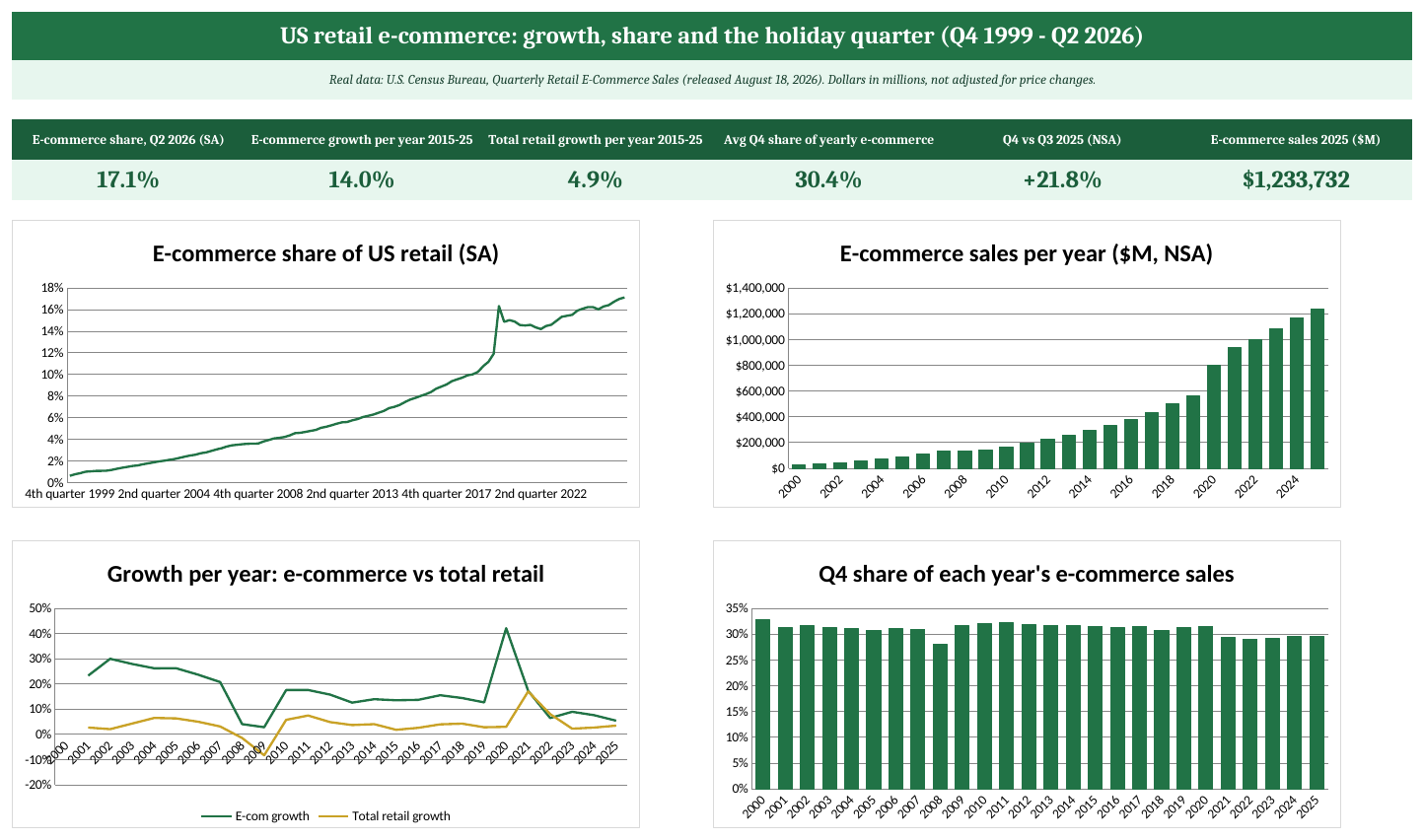
The Dashboard sheet of the practice workbook (real data: U.S. Census Bureau).
Step 5: The recommendation
A good recommendation is short, uses the numbers and says what to do:
- Plan for continued online growth, but not pandemic-era growth. E-commerce grew 14.0% a year over 2015-2025, but only 5.4% in 2025 (before inflation). A planning range of 5-10% a year matches the recent trend better than the ten-year average.
- Staff and stock for Q4. Q4 brings about 30.4% of a year's online sales; in 2025 Q4 e-commerce was 21.8% higher than Q3 ($365.2 billion vs $299.7 billion). Book extra warehouse and support capacity from October.
- Keep shifting budget online, step by step. The online share of US retail rose from 7.1% in 2015 to 16.4% in 2025 (not adjusted) and reached 17.1% in Q2 2026 (adjusted). It moves about one point a year, so a sudden switch is not needed.
What this data cannot tell you
- It is the whole US market, not your category or your company. A furniture store and a grocery store will see different numbers; the Census also publishes monthly retail data by kind of business if you need more detail.
- The dollars include inflation. To see real growth, divide by a price index such as the CPI.
- The newest quarter is preliminary and will be revised. Re-download the file before you present.
Ravindra Bagale's Tip
Always rebuild percentages from the raw dollar columns instead of copying the published percent columns. The published ones are rounded to one decimal, and when you average or chart them the rounding errors add up.
Ravindra Bagale's Tip – मराठी
Published percent columns copy करण्याऐवजी नेहमी raw dollar columns मधून percentage स्वतः काढा. Published आकडे एका decimal पर्यंत rounded असतात, आणि त्यांचा average किंवा chart केला की rounding च्या चुका वाढत जातात.
Ravindra Bagale's Tip – हिंदी
Published percent columns copy करने के बजाय हमेशा raw dollar columns से percentage खुद निकालिए। Published आंकड़े एक decimal तक rounded होते हैं, और उनका average या chart बनाने पर rounding की गलतियाँ बढ़ती जाती हैं।
Practice task
- Open Raw NSA and find the row for the 4th quarter of 2020. Then find the same quarter on the Clean sheet.
- On Clean, add a column that shows the quarter as a real date:
=DATE(B2,(C2-1)*3+1,1). - Build the PivotTable from Step 2 and check that the Q4 share for 2025 matches the By year sheet.
- Change the CAGR formula to cover 2020-2025 and compare it with 2015-2020.
- Download the newest file from the Census page next quarter and update the Raw sheets. Which formulas need a new last row?
Learn it properly
Course lessons:
- 5.13 Extracting Parts of Text
- 3.7 SUBSTITUTE, REPLACE, TRIM, CLEAN and Case Functions
- 7.4 Show Values As
- 13.4 KPI Cards
Related guides: SUMIF and SUMIFS · How to Create a PivotTable
Frequently asked questions
Why are there two versions, adjusted and not adjusted?
Not adjusted numbers are the actual sales in each quarter, with the holiday peak. Seasonally adjusted numbers remove the usual seasonal pattern so you can compare one quarter with the previous one. Add quarters into years with the not adjusted numbers.
Is the share of e-commerce the same as the share of online shopping?
Close, but not exactly. The Census counts a sale as e-commerce when the order is placed online, even if the customer picks it up in a store. It covers retail businesses with paid employees.
Can I use this data in my own report?
Yes. It is a work of the U.S. Government and not protected by copyright in the US. Cite the U.S. Census Bureau as the source and say that the analysis is yours.
Why does my growth number differ slightly from the published percent change?
The file rounds its percent columns to one decimal. Your formula uses the exact dollar values, so small differences are expected.