Case Study: NYC Restaurant Inspections in Excel (Real NYC Open Data)
A restaurant group is opening its next place in New York City and wants to pass its first health inspection. The operations manager asks: "How many restaurants score in the A range at their first inspection, and what do inspectors cite most?" We downloaded every initial cycle inspection from April to June 2026. Only 56.9% of 3,920 inspections scored 0 to 13 points, the A range, and one maintenance violation (code 10F) appeared in 55.5% of inspections.
Download the DOHMH Restaurant Inspection Results from NYC Open Data, filter to one inspection type and period, remove duplicates and rows with a missing borough, then build one row per inspection with a key (CAMIS and date), XLOOKUP for borough, cuisine and score, and COUNTIFS for violations. Compare boroughs and cuisines with COUNTIFS and AVERAGEIFS, rank violation codes with COUNTIF, and chart the results.
Real data on this page
This case study uses real public data from NYC Open Data (Department of Health and Mental Hygiene), not fictional teaching data. It is the one exception to the fictional-data rule on this site. Every number on this page was calculated from the downloaded extract, and the practice workbook contains the same rows and formulas so you can check each one.
Download the practice file (case-study-nyc-restaurant-inspections.xlsx)
Excel file, 1291 KB. It holds the trimmed real data and every formula used below. It has every downloaded violation row for the quarter (minus the removed rows, which are kept on their own sheet), the inspection table built with formulas, the analysis and the dashboard.
Quick answer
- Open the DOHMH New York City Restaurant Inspection Results dataset on NYC Open Data and filter Inspection Type to Cycle Inspection / Initial Inspection and the dates you want.
- Export to CSV, remove exact duplicates and rows with borough 0.
- Add a Key column: CAMIS and inspection date joined, because each violation is a separate row.
- Make one row per inspection and fill it with XLOOKUP (borough, cuisine, score) and COUNTIFS (violations, critical violations).
- Use COUNTIFS and AVERAGEIFS for the A-range share and average score by borough and cuisine, and COUNTIF to rank violation codes.
- Chart the results on a Dashboard sheet and write the recommendation.
The business question
NYC inspectors give points for each violation. Fewer points is better. NYC Health's letter grading page says: 0 to 13 points is an A, 14 to 27 is a B, and 28 or more is a C. A new restaurant wants to know its odds and where to focus its training. So the questions are:
- What share of initial inspections score in the A range (0 to 13)?
- Does it differ by borough or by type of cuisine?
- Which violations come up most often, so staff can be trained for them?
The data: source and licence
Source and licence
Dataset: *DOHMH New York City Restaurant Inspection Results*, published by the NYC Department of Health and Mental Hygiene on NYC Open Data (dataset id 43nn-pn8j), updated daily. We used the extract with record date 5 October 2026.
Where: data.cityofnewyork.us/.../43nn-pn8j. Downloaded 6 October 2026 through the dataset's API with the filter Inspection Type = 'Cycle Inspection / Initial Inspection' and inspection date 1 April to 30 June 2026.
Licence and terms: NYC's Open Data Law (Local Law 11 of 2012) makes City data available without registration, licence requirements or restrictions on use. The NYC Open Data terms of use say the data is provided as is. As the City asks, we name the source, the version (extract date) and our changes, and note that the City of New York cannot vouch for the accuracy or completeness of the data or of this analysis.
Our changes: we kept 14 columns (restaurant name, address, phone and map columns left out, because this lesson compares groups, not named businesses), removed 9 exact duplicate rows and 15 rows whose borough is coded 0, and built the inspection table and analysis. The removed rows are on their own sheet in the practice file.
Grades: the score bands come from NYC Health: Letter Grading for Restaurants.
| Column | Meaning |
|---|---|
| CAMIS | Unique number for each restaurant (per permit) |
| Boro | Borough |
| Inspection date | Date of the inspection |
| Violation code / description | One row per violation cited |
| Critical flag | Critical violations are those most likely to contribute to food-borne illness |
| Score | Total points for the inspection, repeated on every row of that inspection |
| Grade | A, B, C, N (not yet graded), Z or P (grade pending); blank when no grade was issued |
Step 1: Clean the rows
The key thing to understand: one row is one violation, not one inspection. An inspection with five violations has five rows, each repeating the score. Counting rows would count violations.
- Load the CSV with Data > From Text/CSV and click Load To > Table.
- Run Data > Remove Duplicates with all columns ticked.
- Filter Boro for 0 and delete those rows (the borough is missing).
- Add a Key column that names each inspection:
=A2&"-"&TEXT(E2,"yyyymmdd")joins CAMIS and the date.
| Cleaning step | Rows left | Removed |
|---|---|---|
| Violation rows downloaded (initial cycle inspections, Q2 2026) | 13,784 | |
| Remove exact duplicate rows | 13,775 | 9 |
| Remove rows with borough coded 0 (missing) | 13,760 | 15 |
After cleaning there are 3,920 inspections at 3,917 restaurants (three restaurants had two initial inspections in the quarter). 11 inspections had no violations at all.
Step 2: One row per inspection
Copy the Key, CAMIS and date columns to a new sheet, run Remove Duplicates, make it a table called Inspections, and fill the other columns with formulas:
Boro           =XLOOKUP(C2,Violations[Key],Violations[Boro])
Score          =XLOOKUP(C2,Violations[Key],Violations[Score])
Grade          =XLOOKUP(C2,Violations[Key],Violations[Grade])&""
Violations     =COUNTIFS(Violations[Key],C2,Violations[Violation code],"<>")
Critical       =COUNTIFS(Violations[Key],C2,Violations[Critical flag],"Critical")
A-range score  =IF(F2<=13,"Yes","No")
XLOOKUP returns the first matching row, which is fine because the score is the same on every row of an inspection. The &"" turns an empty grade into empty text instead of 0.
Grade is not the same as score
Only an A is posted straight after an initial inspection; other restaurants are re-inspected before they get a letter. So in this data 2,198 inspections show grade A and 1,620 show no grade. To compare all restaurants fairly, we use the score (0 to 13 = A range), not the grade column.
Step 3: Compare boroughs and cuisines
- Insert a PivotTable from Inspections: Boro in Rows, Key in Values (Count), A-range score in Columns, then Show Values As > % of Row Total.
- For a report that stays put, use formulas:
=COUNTIFS(Inspections[Boro],A3,Inspections[A-range score],"Yes")/B3and=AVERAGEIFS(Inspections[Score],Inspections[Boro],A3). - Do the same by Cuisine, keeping only cuisines with at least 100 inspections so that small groups do not mislead.
| Borough | Inspections | A-range share | Avg score | Closures | Critical per inspection |
|---|---|---|---|---|---|
| Bronx | 334 | 55.4% | 19.5 | 7 | 2.04 |
| Brooklyn | 1,024 | 58.7% | 18.0 | 16 | 1.91 |
| Manhattan | 1,542 | 58.6% | 17.8 | 14 | 1.93 |
| Queens | 872 | 52.3% | 20.0 | 12 | 2.15 |
| Staten Island | 148 | 58.1% | 16.5 | 1 | 1.91 |
| All boroughs | 3,920 | 56.9% | 18.5 | 50 | 1.98 |
The median score is 13, exactly the top of the A range, so a typical restaurant is one violation away from missing it. Brooklyn had the highest A-range share (58.7%) and Queens the lowest (52.3%). The gap between boroughs is small next to the gap between cuisines:
| Cuisine (100+ inspections) | Inspections | A-range share | Avg score |
|---|---|---|---|
| Donuts | 112 | 79.5% | 11.4 |
| Coffee/Tea | 316 | 69.6% | 14.1 |
| Mexican | 158 | 62.0% | 17.1 |
| Chicken | 123 | 61.8% | 16.8 |
| American | 678 | 61.4% | 17.1 |
| Pizza | 239 | 54.8% | 17.7 |
| Italian | 154 | 53.9% | 19.3 |
| Japanese | 135 | 52.6% | 20.2 |
| Bakery Products/Desserts | 155 | 51.0% | 20.0 |
| Chinese | 285 | 48.4% | 21.1 |
| Latin American | 167 | 41.9% | 22.1 |
| Caribbean | 128 | 36.7% | 26.4 |
Careful with cuisine comparisons
Cuisines differ in menu, cooking steps and kitchen size. A low share does not mean a cuisine is unsafe; it means those kitchens get more points on average in this quarter.
Step 4: Rank the violations
Count each code with =COUNTIF(Violations[Violation code],H3) and divide by the number of inspections. No inspection had the same code twice, so this is also the share of inspections that got that violation.
| Code | Citations | Share of inspections | Critical? | Description (shortened) |
|---|---|---|---|---|
| 10F | 2,174 | 55.5% | Not Critical | Non-food contact surface or equipment made of unacceptable material, not kept clean, or not properly sealed, raised, spaced or movable ... |
| 02G | 1,144 | 29.2% | Critical | Cold TCS food item held above 41 °F; smoked or processed fish held above 38 °F; intact raw eggs held above 45 °F; or reduced oxygen ... |
| 06D | 1,098 | 28.0% | Critical | Food contact surface not properly washed, rinsed and sanitized after each use and following any activity when contamination may have ... |
| 06C | 1,015 | 25.9% | Critical | Food, supplies, or equipment not protected from potential source of contamination during storage, preparation, transportation, display, ... |
| 08A | 981 | 25.0% | Not Critical | Establishment is not free of harborage or conditions conducive to rodents, insects or other pests. |
| 10B | 938 | 23.9% | Not Critical | Anti-siphonage or back-flow prevention device not provided where required; equipment or floor not properly drained; sewage disposal ... |
| 02B | 816 | 20.8% | Critical | Hot TCS food item not held at or above 140 °F. |
| 04L | 587 | 15.0% | Critical | Evidence of mice or live mice in establishment's food or non-food areas. |
| 10G | 421 | 10.7% | Not Critical | Dishwashing and ware washing: Cleaning and sanitizing of tableware, including dishes, utensils, and equipment deficient. |
| 05D | 323 | 8.2% | Critical | No hand washing facility in or adjacent to toilet room or within 25 feet of a food preparation, food service or ware washing area. Hand ... |
Step 5: Build the dashboard
- On the Dashboard sheet add six KPI cards that link to the Analysis sheet: inspections, A-range share, average score, closures, critical violations per inspection and the top violation's share.
- Insert a column chart of A-range share by borough and one of inspections by score band.
- Insert bar charts of the top 10 violation codes and of A-range share by cuisine.
- Turn off gridlines, align the charts and set landscape, fit to one page.
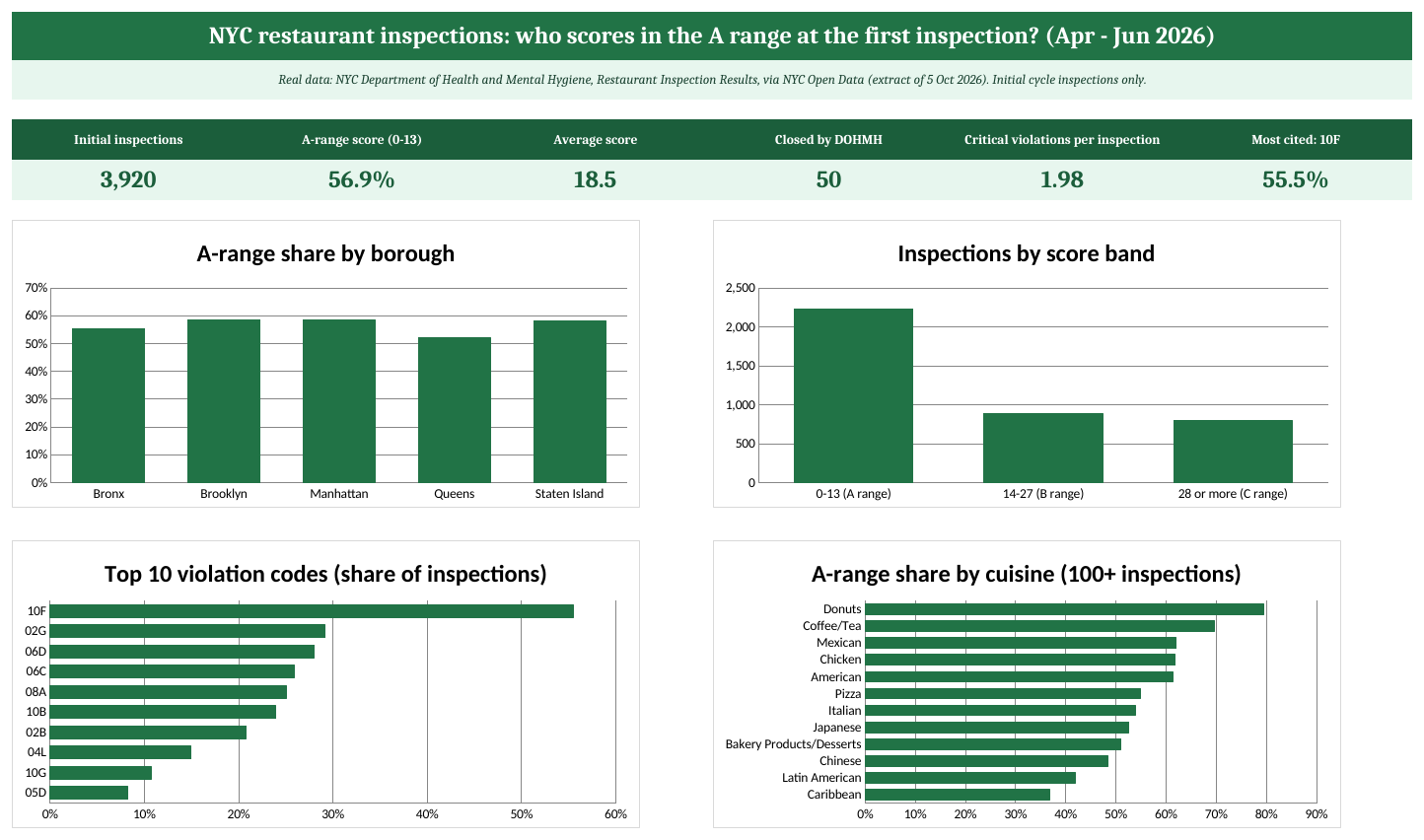
The Dashboard sheet of the practice workbook (real data: NYC DOHMH via NYC Open Data).
Step 6: The recommendation
- Fix the cheap, common items first. Code 10F (non-food surfaces and equipment not clean or not properly sealed or movable) was cited in 55.5% of inspections. A deep clean and an equipment check before opening costs little.
- Make food temperature a daily checklist. Cold food held too warm (02G) appeared in 29.2% of inspections and hot food held too cool (02B) in 20.8%. Both are critical violations. Thermometers and a logged check twice per shift address both.
- Book pest control before the first inspection. Conditions that attract pests (08A) appeared in 25.0% of inspections and evidence of mice (04L) in 15.0%.
- Plan for a re-inspection anyway. Only 56.9% of initial inspections scored in the A range across the city, and 50 of 3,920 ended with the restaurant closed by DOHMH. Keep the team on the checklist until the grade card is posted.
What this data cannot tell you
- It covers restaurants that were active on the extract date. Places that closed after their inspection are not in it.
- Scores can change after a hearing; the dataset says scores are updated based on adjudication results. Re-download before you present.
- Three months is a short window, and a borough or cuisine figure can move from quarter to quarter.
Ravindra Bagale's Tip
When a dataset has one row per event inside a bigger thing (violations inside inspections, lines inside invoices), build a Key column first and make a second table with one row per bigger thing. Most counting mistakes come from skipping this step.
Ravindra Bagale's Tip – मराठी
Dataset मध्ये मोठ्या गोष्टीच्या आतल्या प्रत्येक घटनेसाठी एक row असेल (inspection मधले violations, invoice मधल्या lines), तर आधी Key column बनवा आणि मोठ्या गोष्टीसाठी एक row असलेली दुसरी table तयार करा. मोजणीतल्या बहुतेक चुका हा step वगळल्यामुळे होतात.
Ravindra Bagale's Tip – हिंदी
अगर dataset में बड़ी चीज़ के अंदर की हर घटना के लिए एक row है (inspection के अंदर violations, invoice के अंदर lines), तो पहले Key column बनाइए और बड़ी चीज़ के लिए एक row वाली दूसरी table बनाइए। गिनती की ज़्यादातर गलतियाँ यह step छोड़ने से होती हैं।
Practice task
- On Violations, filter Key for one inspection with several rows and check that the Inspections sheet counts them correctly.
- Add a column to Inspections that shows the score band (A range, B range, C range) with IFS.
- Make a PivotTable of Inspections by Cuisine and Boro. Which cuisine has the lowest average score in Queens?
- Find how many inspections cited code 04L (mice) in each borough with COUNTIFS on the Violations sheet and the Key.
- Download the next quarter from NYC Open Data with the same filter and compare the A-range share.
Learn it properly
Course lessons:
- 5.1 Duplicates
- 4.6 XLOOKUP Basics and if_not_found
- 3.3 COUNT, COUNTA, COUNTBLANK, COUNTIF and COUNTIFS
- 7.4 Show Values As
- 13.5 Charts for the Dashboard
Related guides: COUNTIF and COUNTIFS · XLOOKUP for Beginners · How to Create a PivotTable · Case Study: Find the Best Customers of a Real Online Retailer with RFM in Excel
Frequently asked questions
Can I use NYC Open Data in my own work?
Yes. NYC's Open Data Law makes the data available without registration, licence requirements or restrictions on use. Name the source, the version or download date and your changes, and do not suggest the City endorses your analysis.
Why does the grade column have so many blanks?
After an initial inspection, only restaurants that score 0 to 13 get their A right away. Others are re-inspected first, so their initial inspection row has no letter grade. That is why this case study uses the score.
Why did you leave out restaurant names?
This lesson compares boroughs, cuisines and violation types. Leaving out names and addresses keeps the practice file smaller and the focus on the method. The full dataset on NYC Open Data has them.
What does 'Critical' mean?
DOHMH flags as critical the violations most likely to contribute to food-borne illness, such as food held at the wrong temperature or evidence of mice.