Chapter 19: Kubernetes Services, Ingress and Volumes
19.7 Ingress — a hostname, not a free public domain
Why: the problem
A startup runs five apps: the shop, the admin panel, the API, the blog and the image service. If each gets its own LoadBalancer Service, that is five load balancers and five bills, and five places to manage HTTPS certificates. Real teams at companies like Nykaa put one Ingress controller behind one load balancer and write Ingress rules: shop.example.com goes to the shop Service, example.com/api goes to the API Service, and so on. The Ingress controller (ingress-nginx, Traefik, or the AWS ALB controller) reads those rules and routes HTTP traffic. One important truth: an Ingress gives routing by hostname, not a free public domain. You still buy a domain and point its DNS to the load balancer. In this lesson you will install ingress-nginx on kind, route by host and by path, add TLS with a self-made certificate, and see the 404 and 503 errors every beginner hits.
What we will build
You will run two apps, tea and coffee, behind one ingress-nginx on kind. tea.local and coffee.local route by host; cafe.local/tea and cafe.local/coffee route by path. Then you will add HTTPS with a self-signed certificate stored in a TLS Secret.
What: every term in plain English
- Ingress — A Kubernetes object with HTTP routing rules: host and path to Service.
- Ingress controller — The program that reads Ingress objects and does the routing, like ingress-nginx.
- IngressClass — Says which controller should handle an Ingress.
- Host rule — Route by the name in the URL, like tea.local.
- Path rule — Route by the part after the name, like /tea.
- pathType Prefix — Match the path and anything below it.
- TLS Secret — A Secret that holds a certificate and its private key.
- Default backend — Where traffic goes when no rule matches; ingress-nginx returns 404.
How: step by step
-
Create kind with port 80 and 443
cat kind-ing.yaml && kind create cluster --name lab --config kind-ing.yamlWhat it does: The node is labelled ingress-ready and laptop ports 80 and 443 map to it.
Output
kind: Cluster apiVersion: kind.x-k8s.io/v1alpha4 nodes: - role: control-plane kubeadmConfigPatches: - | kind: InitConfiguration nodeRegistration: kubeletExtraArgs: node-labels: "ingress-ready=true" extraPortMappings: - containerPort: 80 hostPort: 80 - containerPort: 443 hostPort: 443 Set kubectl context to "kind-lab" -
Install ingress-nginx for kind
kubectl apply -f https://kind.sigs.k8s.io/examples/ingress/deploy-ingress-nginx.yamlWhat it does: The kind project's ready manifest for ingress-nginx.
Output
namespace/ingress-nginx created deployment.apps/ingress-nginx-controller created ingressclass.networking.k8s.io/nginx created -
Wait for the controller
kubectl -n ingress-nginx wait --for=condition=ready pod -l app.kubernetes.io/component=controller --timeout=120sWhat it does: Waits until it can route traffic.
Output
pod/ingress-nginx-controller-6b8f5d8b5c-x2k9p condition met -
Make a practice namespace
kubectl create namespace practice
kubectl config set-context --current --namespace=practice
What it does: Keeps all lab objects in one folder that is easy to delete.
Output
namespace/practice created Context "kind-lab" modified. -
Run tea and coffee
for a in tea coffee; do kubectl create deploy $a --image=hashicorp/http-echo:1.0 -- /http-echo -text="$a is ready" -listen=:5678; kubectl expose deploy $a --port=80 --target-port=5678; doneWhat it does: Two tiny apps that print a word, each with a ClusterIP Service.
Output
deployment.apps/tea created service/tea exposed deployment.apps/coffee created service/coffee exposed -
Add names to your hosts file
echo "127.0.0.1 tea.local coffee.local cafe.local" | sudo tee -a /etc/hostsWhat it does: Your laptop now sends these names to kind.
Output
127.0.0.1 tea.local coffee.local cafe.local
Example 1: Route by host name
Stack. ingress-nginx on kind
Goal. Route by host name.
host-ing.yaml
apiVersion: networking.k8s.io/v1
kind: Ingress
metadata:
  name: by-host
spec:
  ingressClassName: nginx
  rules:
  - host: tea.local
    http:
      paths:
      - path: /
        pathType: Prefix
        backend:
          service: {name: tea, port: {number: 80}}
  - host: coffee.local
    http:
      paths:
      - path: /
        pathType: Prefix
        backend:
          service: {name: coffee, port: {number: 80}}
terminal
kubectl apply -f host-ing.yaml
curl -s tea.local
curl -s coffee.local
What each line does
ingressClassName: nginx— Let ingress-nginx handle this Ingress.host: tea.local— Only requests for this name match.path: / Prefix— Every path under the host.backend service tea port 80— Send matching traffic to Service tea.
Green output
ingress.networking.k8s.io/by-host created
tea is ready
coffee is ready
Expected result. One entry point, two apps, chosen by the host name in the request.
Example 2: Route by path on one host
Stack. ingress-nginx annotations
Goal. Route by path on one host.
path-ing.yaml
apiVersion: networking.k8s.io/v1
kind: Ingress
metadata:
  name: by-path
  annotations:
    nginx.ingress.kubernetes.io/rewrite-target: /
spec:
  ingressClassName: nginx
  rules:
  - host: cafe.local
    http:
      paths:
      - path: /tea
        pathType: Prefix
        backend:
          service: {name: tea, port: {number: 80}}
      - path: /coffee
        pathType: Prefix
        backend:
          service: {name: coffee, port: {number: 80}}
terminal
kubectl apply -f path-ing.yaml
curl -s cafe.local/tea
curl -s cafe.local/coffee
curl -s -o /dev/null -w "%{http_code}\n" cafe.local/juice
What each line does
rewrite-target: /— Send / to the app instead of /tea. Many apps only know /.path: /tea— cafe.local/tea and below go to tea.path: /coffee— cafe.local/coffee goes to coffee./juice— No rule matches, so the default backend answers 404.
Green output
tea is ready
coffee is ready
404
Expected result. Path rules let one domain serve many apps, like example.com/api and example.com/shop.
Example 3: HTTPS with a TLS Secret
Stack. OpenSSL 3, ingress-nginx
Goal. HTTPS with a TLS Secret.
terminal
openssl req -x509 -nodes -days 30 -newkey rsa:2048 \
  -keyout tls.key -out tls.crt -subj "/CN=tea.local" -addext "subjectAltName=DNS:tea.local"
kubectl create secret tls tea-tls --cert=tls.crt --key=tls.key
kubectl patch ingress by-host --type=merge -p '{"spec":{"tls":[{"hosts":["tea.local"],"secretName":"tea-tls"}]}}'
curl -sk https://tea.local
curl -s -o /dev/null -w "%{http_code} -> %{redirect_url}\n" http://tea.local
What each line does
openssl req -x509— Makes a self-signed certificate for lab use.subjectAltName=DNS:tea.local— Browsers and curl check this name.create secret tls— Stores the cert and key as a kubernetes.io/tls Secret.spec.tls— Tells the Ingress which hosts use which certificate.curl -k— Accept the self-signed cert in the lab. Real sites use Let's Encrypt via cert-manager.308 redirect— ingress-nginx redirects HTTP to HTTPS when TLS is set.
Green output
secret/tea-tls created
ingress.networking.k8s.io/by-host patched
tea is ready
308 -> https://tea.local/
Expected result. HTTPS works and HTTP is redirected. In production, cert-manager gets free certificates from Let's Encrypt automatically.
Verify: did it work?
-
List Ingresses
kubectl get ingressWhat it does: Shows hosts and the address.
Output
NAME CLASS HOSTS ADDRESS PORTS by-host nginx tea.local,coffee.local localhost 80, 443 by-path nginx cafe.local localhost 80 -
Read controller logs
kubectl -n ingress-nginx logs deploy/ingress-nginx-controller --tail=2What it does: Each request is logged with host, path and status.
Output
172.18.0.1 - - [25/Oct/2026:10:20:01 +0000] "GET / HTTP/1.1" 200 13 "-" "curl/8.5.0" 78 0.002 [practice-tea-80]
When it is red 1
404 Not Found (nginx)
Cause. No rule matched the host or path, or ingressClassName is missing.
Fix, step by step
- Check the host in curl matches the rule exactly.
- Add ingressClassName: nginx.
- kubectl describe ingress for warnings.
When it is red 2
503 Service Temporarily Unavailable
Cause. The rule matched, but the Service has no ready endpoints.
Fix, step by step
- kubectl get endpointslices -l kubernetes.io/service-name=tea.
- Check Pods are Ready and the Service port is right.
When it is red 3
curl: (6) Could not resolve host: tea.local
Cause. Your laptop does not know the name.
Fix, step by step
- Add it to /etc/hosts.
- Or use curl -H "Host: tea.local" localhost.
Cleanup
-
Remove the hosts line
sudo sed -i "/tea.local coffee.local cafe.local/d" /etc/hostsWhat it does: Cleans your hosts file.
Output
(no output means it worked) -
Delete the cert files
rm -f tls.key tls.crtWhat it does: Lab keys should not stay on disk.
Output
(no output means it worked) -
Delete the practice namespace
kubectl delete namespace practiceWhat it does: Deletes every object you made in this lesson in one go.
Output
namespace "practice" deleted -
Delete the lab cluster
kind delete cluster --name labWhat it does: Removes the whole cluster container. On minikube use: minikube delete.
Output
Deleting cluster "lab" ...
Deleted nodes: ["lab-control-plane"]
Ravindra Bagale's Tip
Ingress mhanje building cha reception: naav ani path baghun yogya flat madhe pathavto. Domain mukt milat nahi, to vikat ghyava lagto!
Practice tasks
Easy Add a host
Why: Practise host rules.
What to do: Add juice.local to by-host.
- Create the juice Deployment and Service.
- Add a rule.
Check: curl juice.local works.
Medium Make a 503
Why: Know it by face.
What to do: Scale tea to 0 and curl tea.local.
- kubectl scale deploy tea --replicas=0
Check: You see 503.
Hard cert-manager on a real domain
Why: Real HTTPS.
What to do: On a cloud cluster with a real domain, install cert-manager and use a Let's Encrypt ClusterIssuer.
- Point DNS to the load balancer.
- Add the cert-manager annotation.
Check: The browser shows a valid lock.
Easy Say Ingress in two lines
Why: If you can say it simply, you understand it. Interviewers want the short version first.
What to do: Write two short lines about Ingress for a fresher who knows only Docker basics.
- Write what problem it solves.
- Write the one kubectl command you use for it.
- Read it aloud to a friend.
Check: A fresher understands it without asking a question.
Easy Start a fresh lab cluster
Why: Practice needs a throwaway cluster. If you break it, you delete it and start again.
What to do: Create a kind cluster, or a minikube cluster, and check the node is Ready.
- kind create cluster --name lab
- kubectl get nodes
- kubectl get pods -A
Check: One node shows STATUS Ready and the kube-system Pods are Running.
Medium Break it on purpose
Why: You must know the red message by face. During an outage there is no time to read slowly.
What to do: Cause one error from the "When it is red" part of this lesson and fix it.
- Follow the error section.
- Copy the exact message and the kubectl describe Events into your notes.
- Write the fix in one line.
Check: You fixed it using only the steps, without searching the web.
Medium Write a one-page runbook
Why: At 2 a.m. nobody remembers the right command. A short page saves the on-call person.
What to do: Write a runbook page for this lesson.
- Title, when to use, exact kubectl command, how to check, how to undo.
Check: A teammate can follow it alone.
Medium Repeat it on a cloud cluster
Why: kind is a laptop toy. Real clusters run on EKS, GKE, AKS or k3s on a VM.
What to do: Do the main steps of this lesson again on a small k3s VM or a free-tier managed cluster.
- Install k3s on one Ubuntu 22.04 VM: curl -sfL https://get.k3s.io | sh -
- Copy the kubeconfig.
- Apply the same YAML and compare the output.
Check: Same output on the cloud cluster as on kind.
Hard Explain it like an interview
Why: Interviewers want real stories, not definitions.
What to do: Record a 60 second answer about this lesson.
- Say the problem, the YAML field you used, the kubectl command you ran, and one error you hit.
Check: Your answer has a real command and a real error message.
Hard Draw the flow top to bottom
Why: A drawing shows who talks to whom and in what order.
What to do: Draw this lesson as boxes from top to bottom.
- Start at kubectl apply, go through the API server, controller and scheduler, end at the running container.
Check: Each box matches a real thing you saw in kubectl output.
Homework: try at home
Try at home
At home, add a third app, juice, and route juice.local and cafe.local/juice to it. Then on an EKS lab, swap ingressClassName to alb and see an ALB appear in the EC2 console.
Recap
- An Ingress routes HTTP by host and path to Services.
- An Ingress controller must be installed to make it work.
- One load balancer can serve many apps.
- spec.tls with a TLS Secret adds HTTPS.
- 404 means no rule matched; 503 means no ready endpoints.
FAQ
ingress-nginx or Traefik or ALB?
All work. ALB is common on EKS; ingress-nginx is common everywhere.
Is Gateway API replacing Ingress?
Gateway API is the newer, richer standard. Ingress is still everywhere, so learn both.
How do I get a free certificate?
cert-manager with Let's Encrypt.
Do I need /etc/hosts in production?
No. Real DNS records point to the load balancer.
Can Ingress route TCP like MySQL?
Standard Ingress is HTTP only. Use a LoadBalancer Service or Gateway API for TCP.
Interview questions
-
What is an Ingress?
An API object that defines HTTP routing rules by host and path to Services, implemented by an Ingress controller.
-
Difference between Ingress and LoadBalancer Service?
LoadBalancer is L4 per Service; Ingress is L7 routing that can share one load balancer across many Services.
-
How do you enable HTTPS on Ingress?
Add spec.tls with a TLS Secret, usually created by cert-manager.
-
What does a 503 from ingress-nginx mean?
The backend Service has no ready endpoints.
-
What is IngressClass?
It binds an Ingress to a specific controller.
Quick quiz
Q1. Does an Ingress give you a public domain?
No. You buy a domain and point DNS to the load balancer.
Q2. What reads Ingress rules?
An Ingress controller, like ingress-nginx.
Q3. What error means no rule matched?
404 from nginx.
Q4. What error means the Service has no ready Pods?
503.
Q5. Where is the HTTPS certificate stored?
In a TLS Secret named in spec.tls.
Samajla ka?
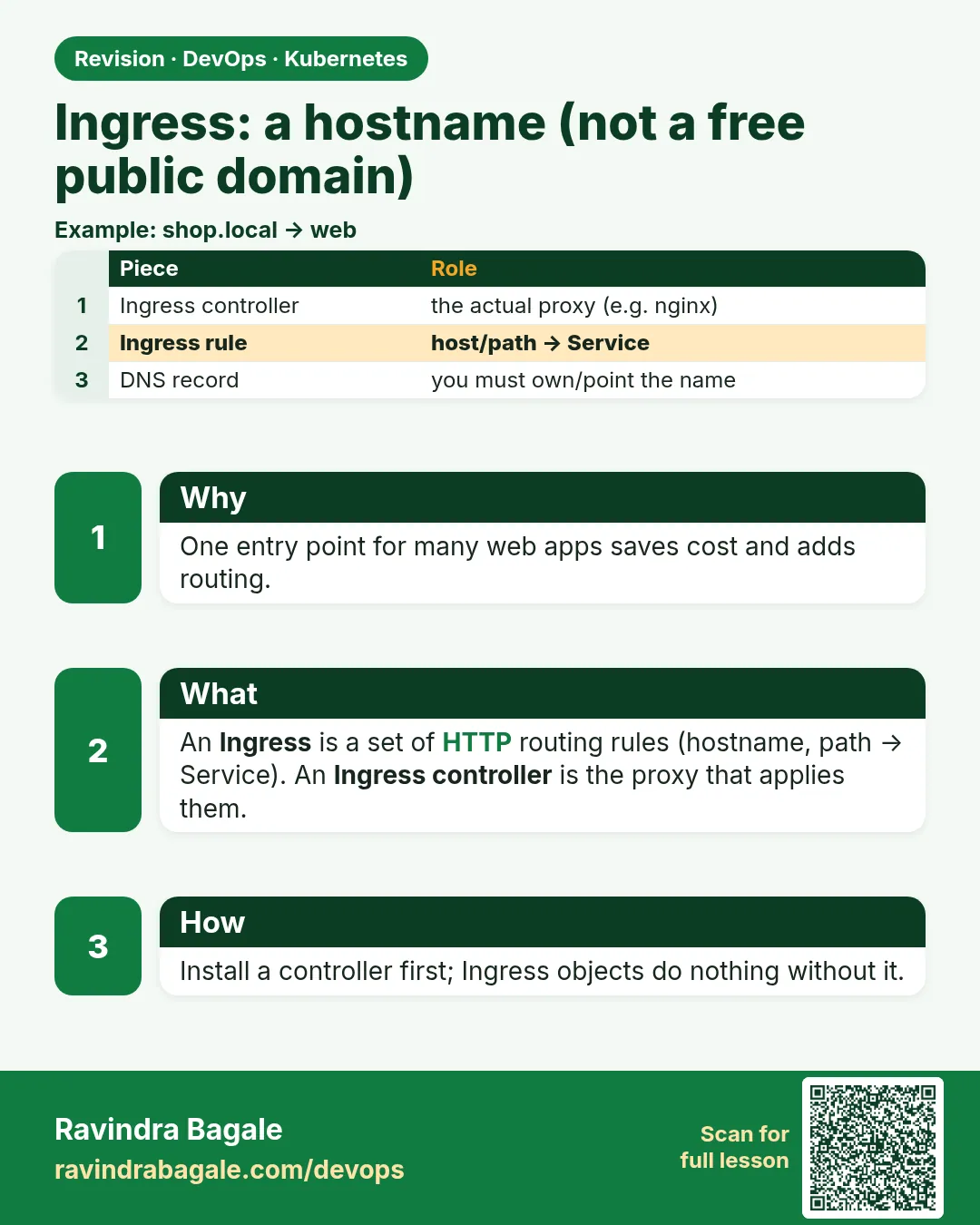 Revision card
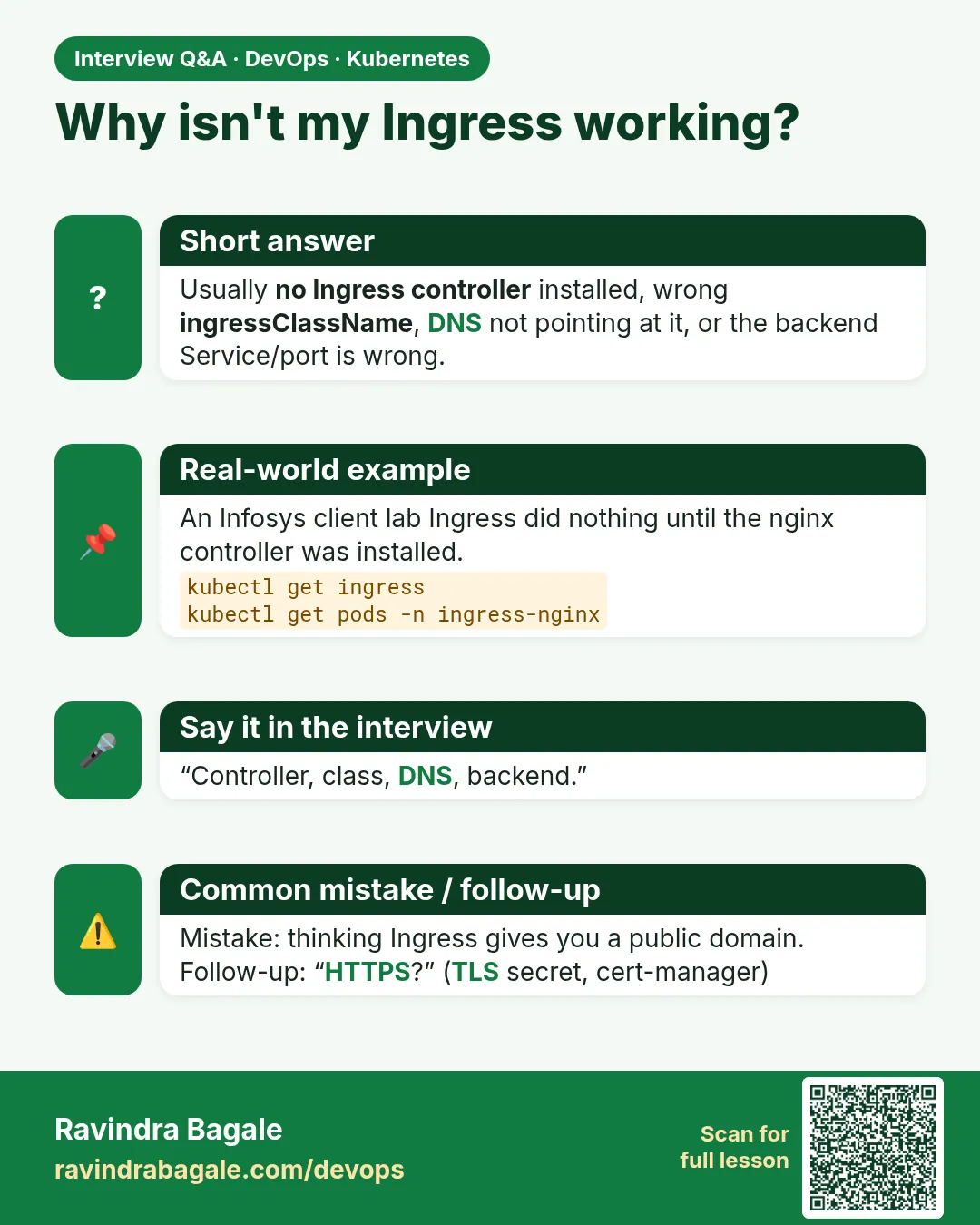 Interview card
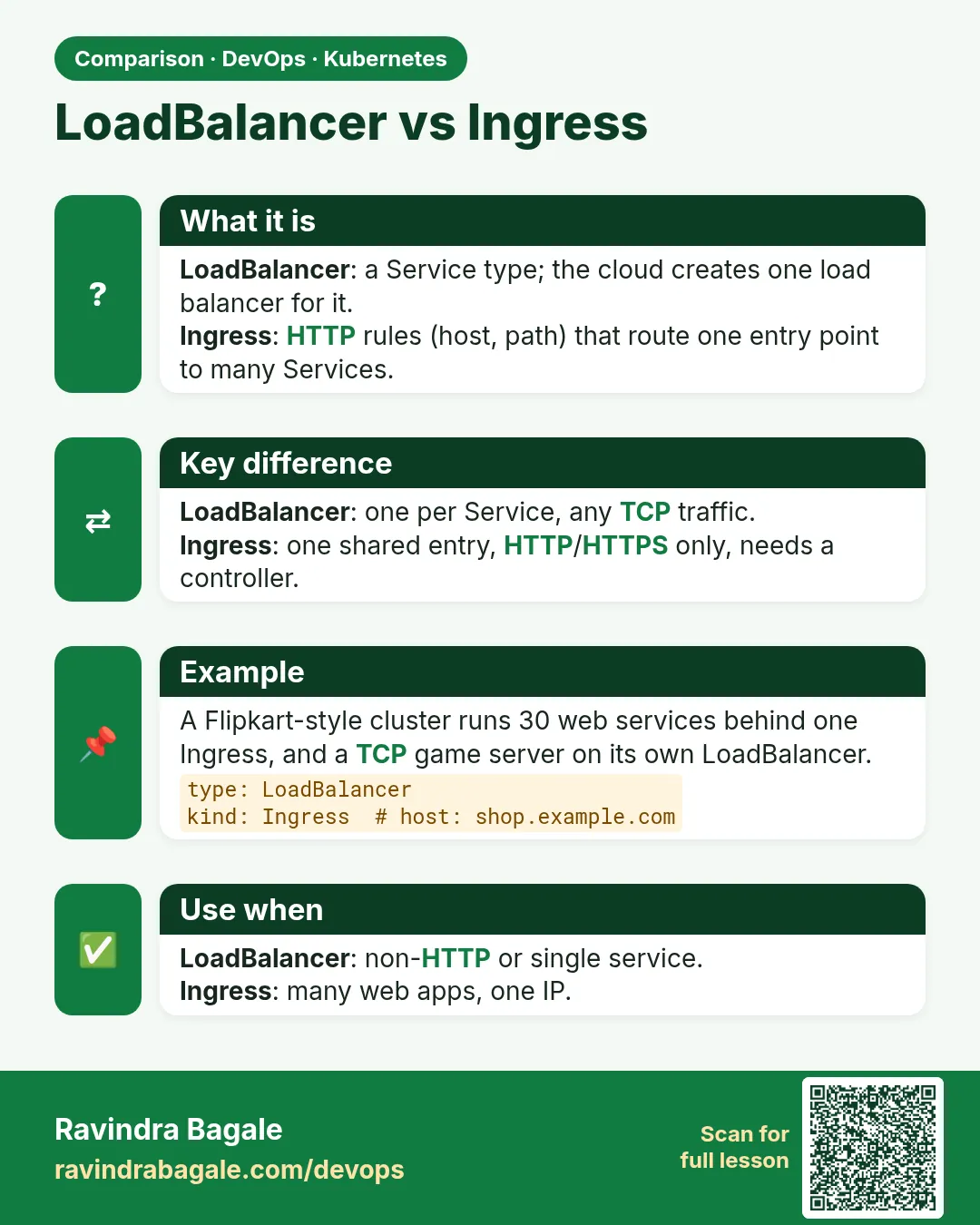 Comparison card