Chapter 19: Kubernetes Services, Ingress and Volumes
19.4 LoadBalancer — when a cloud should publish it
Why: the problem
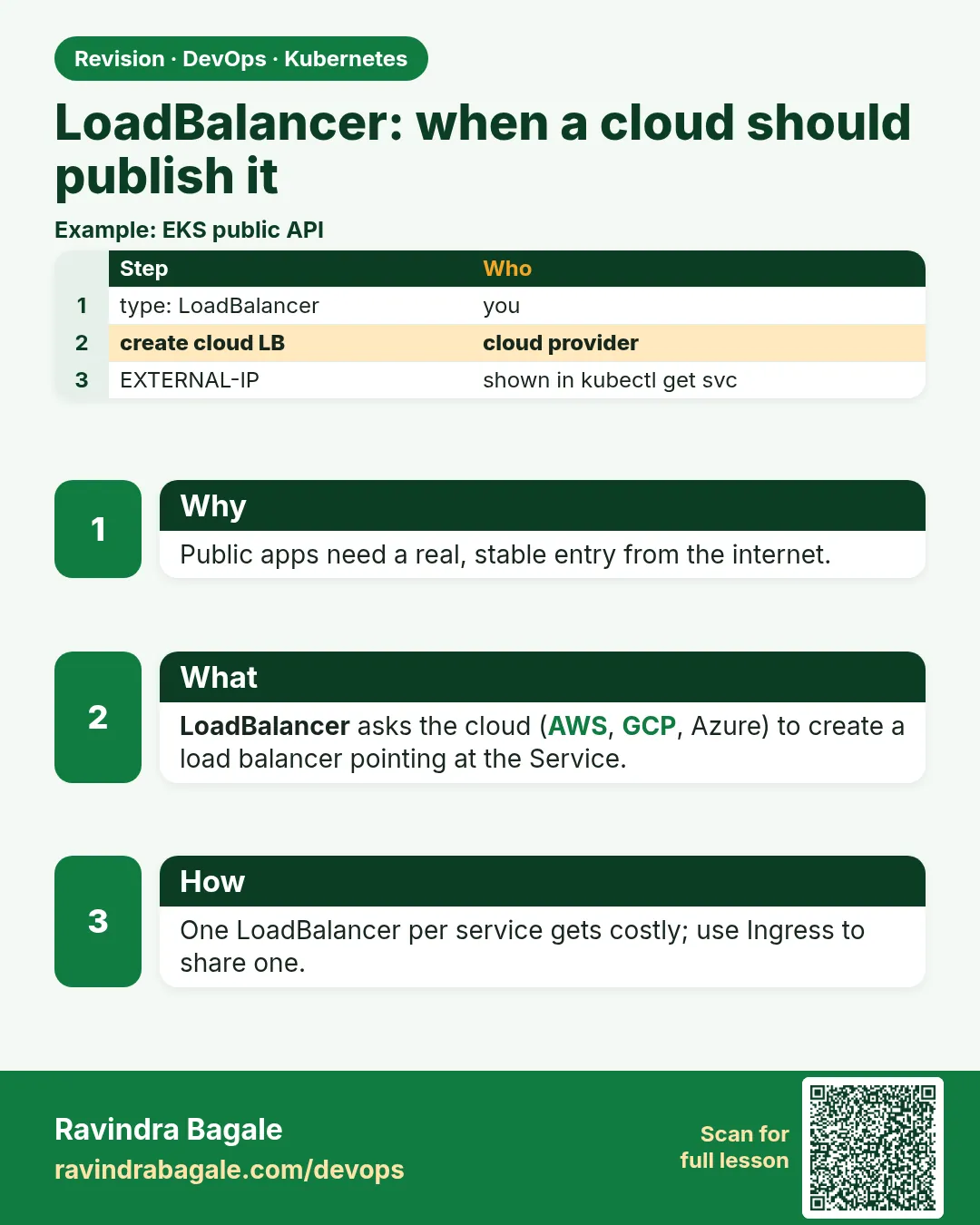
A Hotstar match starts. Millions of phones open the score page. They need one public address that works on port 80 and 443, spreads the load over many nodes, and skips dead ones. A NodePort cannot do this alone. On a cloud like AWS, you set type: LoadBalancer on the Service. The cloud controller sees it and creates a real cloud load balancer, for example an AWS Network Load Balancer, points it at your nodes or Pods, and writes its public DNS name into the Service. You do nothing in the AWS console. Delete the Service and the load balancer goes away too. Each LoadBalancer Service costs money, about 16 to 20 US dollars a month on AWS, so teams often use one Ingress behind one load balancer for many apps. In this lesson you will create a LoadBalancer Service on kind with cloud-provider-kind, then look at the exact YAML and annotations used on EKS.
What we will build
You will run cloud-provider-kind, which gives kind clusters real LoadBalancer IPs on your laptop. You will expose the whoami Pods as type LoadBalancer, get an EXTERNAL-IP, call it, and then read the EKS version that creates an internet-facing AWS NLB.
What: every term in plain English
- LoadBalancer Service — A Service type that asks the cloud for an external load balancer.
- Cloud controller manager — The Kubernetes part that talks to the cloud API and creates load balancers.
- EXTERNAL-IP — The public IP or DNS name of the load balancer, shown in kubectl get svc.
- NLB — AWS Network Load Balancer. Works at TCP level, very fast.
- ALB — AWS Application Load Balancer. Works at HTTP level; used by Ingress.
- Annotation — A key-value note on an object that controllers read for extra settings.
- AWS Load Balancer Controller — An add-on for EKS that creates NLBs and ALBs from Services and Ingresses.
- cloud-provider-kind — A small tool that makes LoadBalancer Services work on kind.
How: step by step
-
Start a lab cluster
kind create cluster --name lab
kubectl get nodes
What it does: Creates a one-node Kubernetes cluster inside Docker. On minikube use: minikube start.
Output
Creating cluster "lab" ... ✓ Ensuring node image (kindest/node:v1.30.0) ✓ Preparing nodes Set kubectl context to "kind-lab" NAME STATUS ROLES AGE VERSION lab-control-plane Ready control-plane 40s v1.30.0 -
Install cloud-provider-kind
go install sigs.k8s.io/cloud-provider-kind@v0.4.0What it does: Installs the tool with Go. Run it in a second terminal and keep it open.
Output
go: downloading sigs.k8s.io/cloud-provider-kind v0.4.0 -
Start it
sudo ~/go/bin/cloud-provider-kindWhat it does: Watches for LoadBalancer Services and gives them an IP.
Output
I1025 10:02:11 controller.go:174] probe HTTP address https://lab-control-plane:6443 I1025 10:02:12 controller.go:84] Creating new cloud provider for cluster lab -
Make a practice namespace
kubectl create namespace practice
kubectl config set-context --current --namespace=practice
What it does: Keeps all lab objects in one folder that is easy to delete.
Output
namespace/practice created Context "kind-lab" modified. -
Run the whoami Deployment
kubectl apply -f who.yaml && kubectl rollout status deploy/whoWhat it does: Same three Pods as lesson 19.1.
Output
deployment "who" successfully rolled out -
Expose as LoadBalancer
kubectl expose deploy who --type=LoadBalancer --port=80 --name=who-lbWhat it does: Asks for an external load balancer.
Output
service/who-lb exposed -
Wait for the external IP
kubectl get svc who-lb -wWhat it does: First pending, then an IP.
Output
NAME     TYPE           CLUSTER-IP    EXTERNAL-IP   PORT(S)
who-lb   LoadBalancer   10.96.7.201   pending       80:31544/TCP
who-lb   LoadBalancer   10.96.7.201   172.18.0.6    80:31544/TCP
Example 1: Call the LoadBalancer IP and see the spread
Stack. kind + cloud-provider-kind
Goal. Call the LoadBalancer IP and see the spread.
terminal
LB=$(kubectl get svc who-lb -o jsonpath='{.status.loadBalancer.ingress[0].ip}')
echo $LB
for i in 1 2 3 4 5 6; do curl -s $LB | grep Hostname; done
What each line does
jsonpath ...ingress[0].ip— Reads the external IP from the Service status.curl -s $LB— Calls port 80 directly, no odd port.the loop— Shows different Pods answering.
Green output
172.18.0.6
Hostname: who-6c8f7d9b5-9xw7m
Hostname: who-6c8f7d9b5-4kq2x
Hostname: who-6c8f7d9b5-tm2zr
Hostname: who-6c8f7d9b5-9xw7m
Hostname: who-6c8f7d9b5-tm2zr
Hostname: who-6c8f7d9b5-4kq2x
Expected result. A clean IP on port 80. On a cloud this would be a public address.
Example 2: The EKS version: an internet-facing NLB with IP targets
Stack. EKS 1.30, AWS Load Balancer Controller v2.8
Goal. The EKS version: an internet-facing NLB with IP targets.
who-nlb.yaml
apiVersion: v1
kind: Service
metadata:
  name: who-nlb
  annotations:
    service.beta.kubernetes.io/aws-load-balancer-type: external
    service.beta.kubernetes.io/aws-load-balancer-nlb-target-type: ip
    service.beta.kubernetes.io/aws-load-balancer-scheme: internet-facing
spec:
  type: LoadBalancer
  selector:
    app: who
  ports:
  - port: 80
    targetPort: 80
terminal (EKS cluster with AWS Load Balancer Controller)
kubectl apply -f who-nlb.yaml
kubectl get svc who-nlb
curl -s http://$(kubectl get svc who-nlb -o jsonpath='{.status.loadBalancer.ingress[0].hostname}') | grep Hostname
What each line does
aws-load-balancer-type: external— Let the AWS Load Balancer Controller handle it (not the old built-in code).nlb-target-type: ip— The NLB sends traffic straight to Pod IPs, skipping NodePorts.scheme: internet-facing— A public NLB. Use internal for a private one.hostname— On AWS you get a DNS name, not an IP.
Green output
service/who-nlb created
NAME      TYPE           EXTERNAL-IP                                                      PORT(S)
who-nlb   LoadBalancer   k8s-practice-whonlb-1a2b3c4d5e-0123456789.elb.ap-south-1.amazonaws.com   80:30912/TCP
Hostname: who-6c8f7d9b5-4kq2x
Expected result. AWS created an NLB for you. In Route 53 you would point a name like score.example.com to this hostname with an alias record.
Example 3: An internal load balancer limited to office IPs
Stack. EKS, private subnets
Goal. An internal load balancer limited to office IPs.
who-internal.yaml
apiVersion: v1
kind: Service
metadata:
  name: who-internal
  annotations:
    service.beta.kubernetes.io/aws-load-balancer-type: external
    service.beta.kubernetes.io/aws-load-balancer-scheme: internal
spec:
  type: LoadBalancer
  loadBalancerSourceRanges:
  - 10.0.0.0/8
  selector:
    app: who
  ports:
  - port: 80
    targetPort: 80
What each line does
scheme: internal— The NLB gets only private IPs inside the VPC.loadBalancerSourceRanges— Only these client ranges may connect.10.0.0.0/8— For example, the company VPN and VPC range.
Green output
$ kubectl get svc who-internal
NAME           TYPE           EXTERNAL-IP                                                          PORT(S)
who-internal   LoadBalancer   k8s-practice-whointer-9f8e7d6c5b-ab12cd34ef.elb.ap-south-1.amazonaws.com   80:31877/TCP
Expected result. Admin tools and internal APIs stay off the internet but still get a load balancer.
Verify: did it work?
-
Check the Service status
kubectl get svc who-lb -o jsonpath="{.status.loadBalancer}"What it does: Shows the address the controller wrote.
Output
{"ingress":[{"ip":"172.18.0.6","ipMode":"Proxy"}]} -
Check events
kubectl describe svc who-lb | tail -3What it does: Shows the controller's work.
Output
Normal  EnsuringLoadBalancer  10s  service-controller  Ensuring load balancer
Normal  EnsuredLoadBalancer   8s   service-controller  Ensured load balancer
When it is red 1
EXTERNAL-IP stays pending forever
Cause. No controller exists to create load balancers (plain kind or minikube).
Fix, step by step
- On kind, run cloud-provider-kind. On minikube, run minikube tunnel.
- On EKS, install the AWS Load Balancer Controller.
- Check kubectl describe svc for events.
When it is red 2
Failed build model due to unable to resolve at least one subnet
Cause. On EKS the subnets are not tagged for load balancers.
Fix, step by step
- Tag public subnets with kubernetes.io/role/elb = 1.
- Tag private subnets with kubernetes.io/role/internal-elb = 1.
- Delete and re-apply the Service.
When it is red 3
curl: (28) Connection timed out
Cause. Security group or loadBalancerSourceRanges blocks your IP.
Fix, step by step
- Check loadBalancerSourceRanges.
- Check the node or Pod security group allows the NLB.
Cleanup
-
Delete the LoadBalancer Services
kubectl delete svc who-lbWhat it does: On a cloud this also deletes the load balancer, which stops the cost.
Output
service "who-lb" deleted -
Delete the practice namespace
kubectl delete namespace practiceWhat it does: Deletes every object you made in this lesson in one go.
Output
namespace "practice" deleted -
Delete the lab cluster
kind delete cluster --name labWhat it does: Removes the whole cluster container. On minikube use: minikube delete.
Output
Deleting cluster "lab" ...
Deleted nodes: ["lab-control-plane"]
Ravindra Bagale's Tip
LoadBalancer la paise lagtat. Lab sampla ki Service delete kara, mag AWS console madhe check kara!
Practice tasks
Easy Watch pending turn to an IP
Why: Know the normal flow.
What to do: Create a LoadBalancer and watch it.
- kubectl get svc -w
Check: You see pending, then an IP.
Medium Use minikube tunnel
Why: Another lab way.
What to do: On minikube, run minikube tunnel and expose a LoadBalancer.
- minikube tunnel
- kubectl get svc
Check: An EXTERNAL-IP appears.
Hard Check the AWS bill line
Why: Cost awareness is a DevOps skill.
What to do: Find the hourly NLB price for ap-south-1 on the AWS pricing page.
- Search Elastic Load Balancing pricing.
Check: You can say the cost per month.
Easy Say LoadBalancer in two lines
Why: If you can say it simply, you understand it. Interviewers want the short version first.
What to do: Write two short lines about LoadBalancer for a fresher who knows only Docker basics.
- Write what problem it solves.
- Write the one kubectl command you use for it.
- Read it aloud to a friend.
Check: A fresher understands it without asking a question.
Easy Start a fresh lab cluster
Why: Practice needs a throwaway cluster. If you break it, you delete it and start again.
What to do: Create a kind cluster, or a minikube cluster, and check the node is Ready.
- kind create cluster --name lab
- kubectl get nodes
- kubectl get pods -A
Check: One node shows STATUS Ready and the kube-system Pods are Running.
Medium Break it on purpose
Why: You must know the red message by face. During an outage there is no time to read slowly.
What to do: Cause one error from the "When it is red" part of this lesson and fix it.
- Follow the error section.
- Copy the exact message and the kubectl describe Events into your notes.
- Write the fix in one line.
Check: You fixed it using only the steps, without searching the web.
Medium Write a one-page runbook
Why: At 2 a.m. nobody remembers the right command. A short page saves the on-call person.
What to do: Write a runbook page for this lesson.
- Title, when to use, exact kubectl command, how to check, how to undo.
Check: A teammate can follow it alone.
Medium Repeat it on a cloud cluster
Why: kind is a laptop toy. Real clusters run on EKS, GKE, AKS or k3s on a VM.
What to do: Do the main steps of this lesson again on a small k3s VM or a free-tier managed cluster.
- Install k3s on one Ubuntu 22.04 VM: curl -sfL https://get.k3s.io | sh -
- Copy the kubeconfig.
- Apply the same YAML and compare the output.
Check: Same output on the cloud cluster as on kind.
Hard Explain it like an interview
Why: Interviewers want real stories, not definitions.
What to do: Record a 60 second answer about this lesson.
- Say the problem, the YAML field you used, the kubectl command you ran, and one error you hit.
Check: Your answer has a real command and a real error message.
Hard Draw the flow top to bottom
Why: A drawing shows who talks to whom and in what order.
What to do: Draw this lesson as boxes from top to bottom.
- Start at kubectl apply, go through the API server, controller and scheduler, end at the running container.
Check: Each box matches a real thing you saw in kubectl output.
Homework: try at home
Try at home
At home, if you have an EKS lab, create who-nlb, put its hostname in a browser, then delete it and check in the EC2 console under Load Balancers that it is gone. On kind, repeat Example 1 with 5 replicas.
Recap
- type LoadBalancer asks the cloud for a real load balancer.
- The address appears in EXTERNAL-IP.
- On kind use cloud-provider-kind; on EKS use the AWS Load Balancer Controller.
- Annotations choose NLB type, target type and scheme.
- Each LoadBalancer costs money; delete it after labs.
FAQ
Do I get a fixed IP on AWS?
You get a DNS name. Point your domain to it with a Route 53 alias.
NLB or ALB?
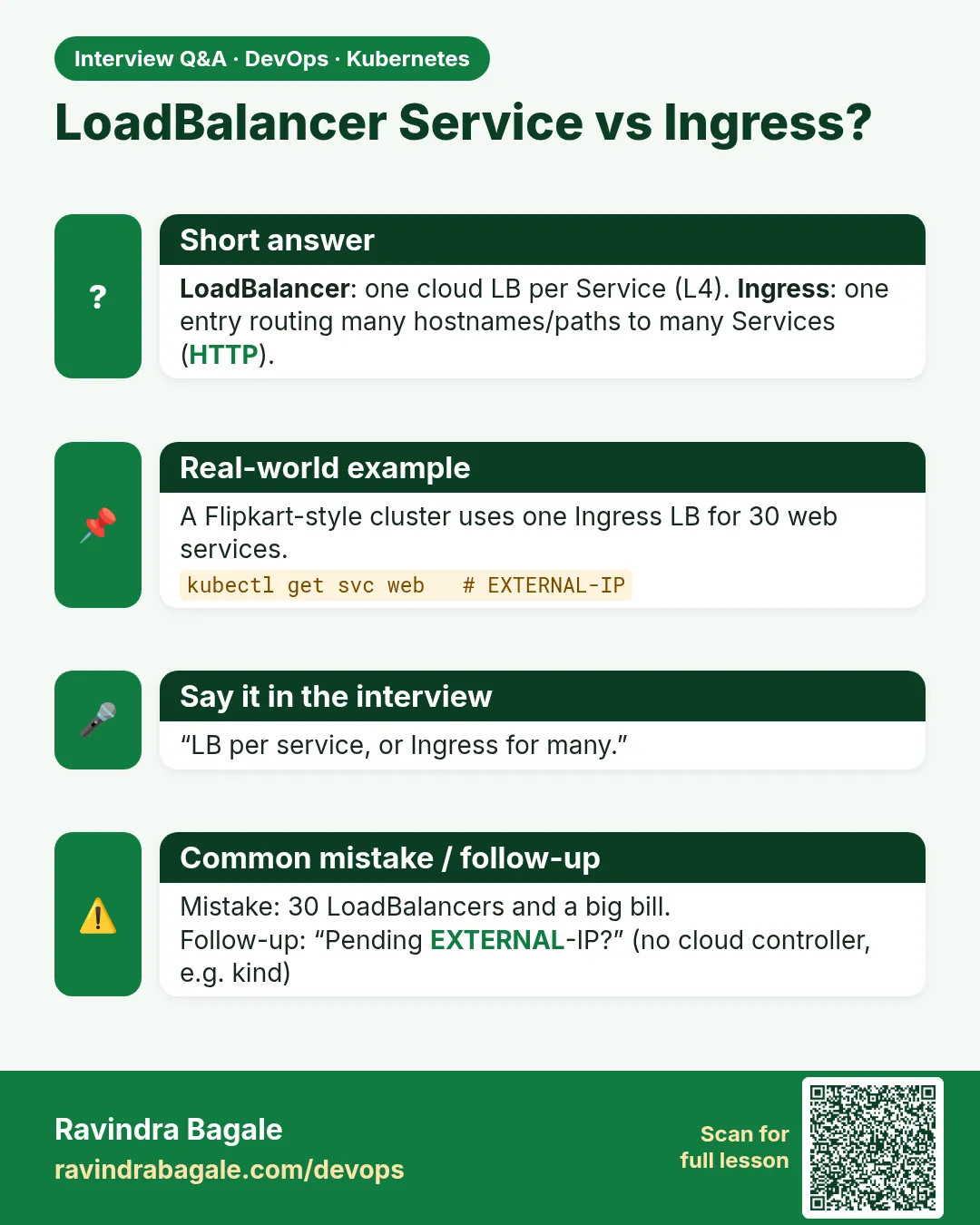
A LoadBalancer Service makes an NLB. For HTTP routing by host or path, use an Ingress with an ALB.
Can I keep the client IP?
Yes, with IP targets or externalTrafficPolicy Local.
How do I add HTTPS?
Add the aws-load-balancer-ssl-cert annotation with an ACM certificate ARN, or use an Ingress.
What about GKE and AKS?
Same type: LoadBalancer. Only the annotations differ.
Interview questions
-
What is a LoadBalancer Service?
A Service type where the cloud controller provisions an external load balancer that forwards to the Service.
-
How does it work on EKS?
The AWS Load Balancer Controller creates an NLB targeting instances or Pod IPs, based on annotations.
-
Why use Ingress instead of many LoadBalancers?
To share one load balancer, add host/path routing and TLS, and cut cost.
-
How do you make an internal load balancer?
Use the internal scheme annotation and private subnets.
-
Why might EXTERNAL-IP stay pending?
No cloud controller, missing subnet tags, or missing IAM permissions.
Quick quiz
Q1. What creates the real load balancer?
The cloud controller (on EKS, the AWS Load Balancer Controller).
Q2. Why does EXTERNAL-IP stay pending on plain kind?
No controller can create a load balancer.
Q3. What does nlb-target-type ip do?
Sends traffic straight to Pod IPs.
Q4. What happens when you delete the Service?
The cloud load balancer is deleted too.
Q5. Why not make every app a LoadBalancer?
Each one costs money; one Ingress can serve many apps.
Samajla ka?
 Revision card
 Interview card