Chapter 29: Scan Pipeline in Jenkins
29.11 One combined pipeline
Why: the problem
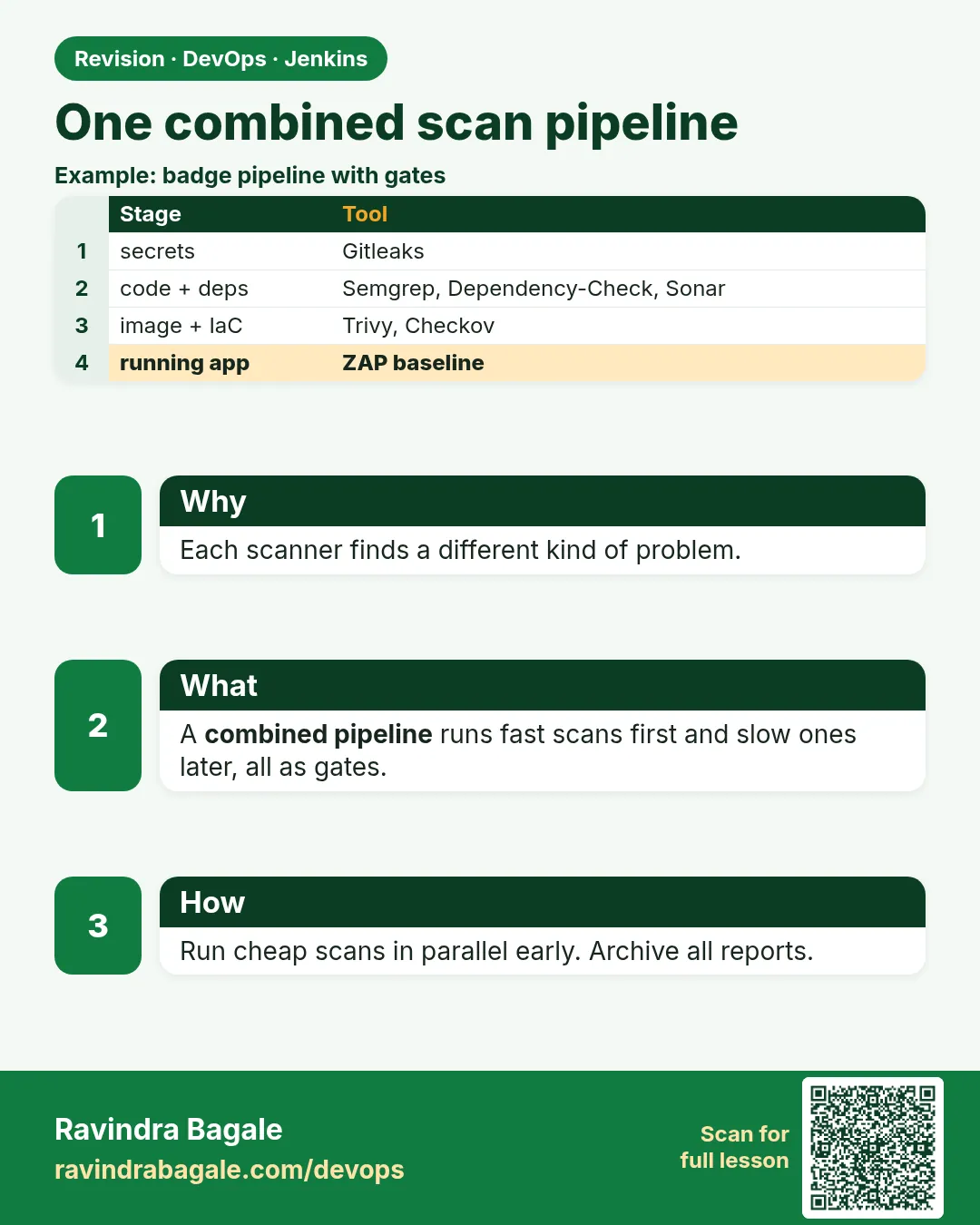
Suppose we are the DevOps engineer for the whole badge product. We now know nine tools. If we run them one after another, the pipeline takes 25 minutes and developers start to hate it. If we run them in the wrong order, we waste time: why build an image if the code already leaked a password? This lesson joins everything into one pipeline with a smart order: cheap and fast checks first (secrets), then tests, then code scans in parallel, then the image, then image scans in parallel, then a short DAST scan, and Live only if everything is green on main. All reports are archived even when the build is red, so a developer can see exactly why.
What we will build
One complete Jenkinsfile for the Node badge API that runs Gitleaks, tests, SonarQube, Semgrep, Dependency-Check and Checkov (in parallel), the quality gate, the image build, Trivy and Syft/Grype (in parallel), ZAP baseline, and Live. Then you will adapt it for Python and Java, and measure the time saved by parallel stages.
What: every term in plain English
- Stage order — Fast and cheap first, expensive later. Fail early, save time.
- parallel — A Jenkins block that runs stages at the same time, on the same or different agents.
- post { always } — Steps that run whether the build is green or red, e.g. archive reports.
- when { branch "main" } — Run a stage only on main. Branches get all scans but no deploy.
- disableConcurrentBuilds() — Only one build of this branch at a time, so shared caches do not clash.
- Evidence — The reports archived with each build: proof for auditors.
- Fail fast — The first red gate stops the pipeline; later stages are skipped.
How: step by step
-
Put the Jenkinsfile in the repo
cp Jenkinsfile.full Jenkinsfile && git add Jenkinsfile && git commit -m "ci: full scan pipeline"What it does: Adds the full pipeline from Example 1.
Output
[main 5d1e0b3] ci: full scan pipeline -
Check the syntax before pushing
curl -s -X POST -u ravi:$JENKINS_TOKEN -F "jenkinsfile=<Jenkinsfile" http://localhost:8080/pipeline-model-converter/validateWhat it does: Jenkins validates declarative syntax without running it.
Output
Jenkinsfile successfully validated. -
Push and run
git pushWhat it does: Multibranch picks it up.
Output
To github.com:ravi/badge-api.git 3f9c2ab..5d1e0b3 main -> main -
Watch the stage view
Open the job > main > latest build (or Blue Ocean)What it does: Shows parallel stages side by side.
Output
Checkout ✔ Secrets ✔ Test ✔ [SonarQube ✔ Semgrep ✔ Dependency-Check ✔ Checkov ✔] Quality gate ✔ Build ✔ [Trivy ✔ SBOM ✔] DAST ✔ Live ✔ -
Check total time
curl -s -u ravi:$JENKINS_TOKEN http://localhost:8080/job/badge-api/job/main/lastBuild/api/json | jq ".duration/1000|floor"What it does: Build time in seconds.
Output
412 -
Break one gate
git switch -c demo-red && echo 'const k = "AKIAZ7EXAMPLE4TESTQ2K";' >> app/config.js && git commit -am "demo" && git push -u origin demo-redWhat it does: A fake key on a branch to show fail-fast.
Output
branch 'demo-red' set up to track 'origin/demo-red'. -
See fail-fast
Open the demo-red buildWhat it does: Gitleaks is red; nothing after it runs, but reports are archived.
Output
Secrets (Gitleaks) ✘
Stage "Test" skipped due to earlier failure(s)
...
Archiving artifacts
Finished: FAILURE
Example 1: Node
Stack. Node.js, all nine tools
Goal. Node.js: the complete pipeline.
Jenkinsfile
pipeline {
  agent { label 'scan' }
  options { timestamps(); timeout(time: 45, unit: 'MINUTES'); disableConcurrentBuilds() }
  environment { IMAGE = "badge-api:${GIT_COMMIT}" }
  stages {
    stage('Checkout') { steps { checkout scm; sh 'git fetch --unshallow || true; mkdir -p reports' } }
    stage('Secrets (Gitleaks)') {
      steps { sh 'gitleaks detect --source . --redact --report-format json --report-path reports/gitleaks.json' }
    }
    stage('Test') { steps { sh 'npm ci && npx jest --coverage' } }
    stage('Code scans') {
      parallel {
        stage('SonarQube') {
          steps { withSonarQubeEnv('lab-sonar') { sh 'sonar-scanner' } }
        }
        stage('Semgrep') {
          steps { sh 'docker run --rm -v "$PWD:/src" -w /src semgrep/semgrep semgrep scan --config p/javascript --error --metrics off --sarif -o reports/semgrep.sarif' }
        }
        stage('Dependency-Check') {
          steps {
            withCredentials([string(credentialsId: 'lab-nvd-key', variable: 'NVD_API_KEY')]) {
              sh '/opt/dependency-check/bin/dependency-check.sh --project badge-api --scan . --exclude "**/node_modules/**" --data /var/cache/odc --noupdate --format XML --format HTML --out reports --failOnCVSS 7'
            }
          }
        }
        stage('Checkov') {
          steps { sh 'checkov -d . --framework terraform,dockerfile,kubernetes --compact -o cli -o junitxml --output-file-path console,reports/checkov.xml' }
        }
      }
    }
    stage('Quality gate') {
      steps { timeout(time: 5, unit: 'MINUTES') { waitForQualityGate abortPipeline: true } }
    }
    stage('Build image') { steps { sh 'docker build -t $IMAGE .' } }
    stage('Image scans') {
      parallel {
        stage('Trivy') { steps { sh 'trivy image --severity HIGH,CRITICAL --ignore-unfixed --exit-code 1 $IMAGE' } }
        stage('SBOM') { steps { sh 'syft $IMAGE -o cyclonedx-json=reports/sbom.cdx.json && grype sbom:reports/sbom.cdx.json --fail-on high' } }
      }
    }
    stage('DAST (ZAP baseline)') {
      steps { sh './ci/zap-baseline.sh $IMAGE' }   // the script from lesson 29.5
    }
    stage('Live (lab)') {
      when { branch 'main' }
      steps { echo "All gates green: deploying $IMAGE to the lab" }
    }
  }
  post {
    always {
      archiveArtifacts artifacts: 'reports/**', allowEmptyArchive: true, fingerprint: true
      junit allowEmptyResults: true, testResults: 'reports/checkov.xml'
      recordIssues enabledForFailure: true, tools: [sarif(pattern: 'reports/semgrep.sarif')]
    }
    cleanup { sh 'docker rmi $IMAGE || true' }
  }
}
What each line does
disableConcurrentBuilds()— Avoids two builds fighting over caches like /var/cache/odc.stage('Secrets (Gitleaks)')— First: cheapest check, and a leak must stop everything.parallel { SonarQube, Semgrep, Dependency-Check, Checkov }— Four independent code scans at once. Total time = the slowest one, not the sum.stage('Quality gate')— After the parallel block, wait for the SonarQube result.stage('Build image')— Only when code is clean do we spend time building.parallel { Trivy, SBOM }— Two image checks at once../ci/zap-baseline.sh— The lesson 29.5 logic in a script, so the Jenkinsfile stays short.when { branch 'main' }— Feature branches are fully scanned but never deployed.post { always { archiveArtifacts ... junit ... recordIssues ... } }— All evidence is kept even on red builds.cleanup { docker rmi }— Removes the image so agent disk does not fill up.
Green output
[Pipeline] { (Code scans)
[Pipeline] parallel
[SonarQube] ANALYSIS SUCCESSFUL
[Semgrep] Ran 82 rules on 4 files: 0 findings.
[Dependency-Check] Analysis Complete (6 seconds)
[Checkov] Passed checks: 112, Failed checks: 0, Skipped checks: 1
Quality gate is 'OK'
[Trivy] Total: 0 (HIGH: 0, CRITICAL: 0)
[SBOM] No vulnerabilities found
ZAP rc=0 (0 pass, 2 warnings only)
All gates green: deploying badge-api:5d1e0b3 to the lab
Finished: SUCCESS
Expected result. One green build with every gate and a full evidence pack.
Example 2: Python: change only the stack-specific lines
Stack. Python, Flask
Goal. Python: change only the stack-specific lines.
Changed stages
stage('Test') {
  steps { sh 'python3 -m venv .venv && . .venv/bin/activate && pip install -r requirements.txt pytest pytest-cov && pytest --cov=. --cov-report=xml' }
}
// Semgrep: --config p/python
// Dependency-Check: add --enableExperimental and scan requirements.txt
// Everything else (Gitleaks, Checkov, Trivy, SBOM, ZAP, Live) stays the same.
What each line does
pytest --cov-report=xml— Coverage for SonarQube.--config p/python— Python rules for Semgrep.--enableExperimental— Turns on the Python analyzer in Dependency-Check.
Green output
[Test] 2 passed in 0.31s
[Semgrep] Ran 61 rules on 3 files: 0 findings.
Finished: SUCCESS
Expected result. About 80 percent of the pipeline is language-neutral. Put it in a shared library (chapter 25) and pass the stack as a parameter.
Example 3: Java: Maven does tests, coverage, Sonar and Dependency-Check
Stack. Java 17, Maven
Goal. Java: Maven does tests, coverage, Sonar and Dependency-Check.
Changed stages
stage('Test') { steps { sh 'mvn -B verify' } }
stage('Code scans') {
  parallel {
    stage('SonarQube') { steps { withSonarQubeEnv('lab-sonar') { sh 'mvn -B sonar:sonar' } } }
    stage('Semgrep')   { steps { sh 'docker run --rm -v "$PWD:/src" -w /src semgrep/semgrep semgrep scan --config p/java --error --metrics off' } }
    stage('Dependency-Check') {
      steps {
        withCredentials([string(credentialsId: 'lab-nvd-key', variable: 'NVD_API_KEY')]) { sh 'mvn -B dependency-check:check' }
      }
    }
    stage('Checkov') { steps { sh 'checkov -d . --framework dockerfile,kubernetes --compact' } }
  }
}
What each line does
mvn -B verify— Tests and JaCoCo coverage.mvn -B sonar:sonar— Scan with the Maven plugin.mvn -B dependency-check:check— Uses failBuildOnCVSS from the pom (lesson 29.4).
Green output
[Dependency-Check] [INFO] BUILD SUCCESS
[SonarQube] [INFO] ANALYSIS SUCCESSFUL
Quality gate is 'OK'
Finished: SUCCESS
Expected result. Same gates, Java tools.
Verify: did it work?
-
List archived reports
curl -s -u ravi:$JENKINS_TOKEN http://localhost:8080/job/badge-api/job/main/lastBuild/api/json | jq -r ".artifacts[].fileName"What it does: Shows the evidence pack.
Output
gitleaks.json semgrep.sarif dependency-check-report.xml dependency-check-report.html checkov.xml sbom.cdx.json zap.html -
Compare serial vs parallel time
Run once with parallel removed, once with it; compare durationWhat it does: Measures the gain.
Output
serial: 731 s parallel: 412 s -
Confirm branches do not deploy
Open the demo-red or any feature branch buildWhat it does: Live (lab) is skipped by when.
Output
Stage "Live (lab)" skipped due to when conditional
When it is red 1
Stage "Live (lab)" skipped due to earlier failure(s)
Finished: FAILURE  (and no reports to read)
Cause. Reports were archived inside a stage that never ran.
Fix, step by step
- Move archiveArtifacts into the top-level post { always }.
- Use allowEmptyArchive: true.
- Rerun the red build and check the Artifacts list.
When it is red 2
[Dependency-Check] Unable to obtain an exclusive lock on the H2 database
Cause. Two parallel builds (other branches) use the same DB folder.
Fix, step by step
- Keep --noupdate in builds and a nightly update job.
- Wrap the stage in lock('odc-db') { }.
- Keep disableConcurrentBuilds().
When it is red 3
Timeout has been exceeded (45 MINUTES)
Cause. One scan hung or the agent is too small for four parallel scans.
Fix, step by step
- Give each stage its own timeout.
- Add a second scan agent, or run heavy scans on different agents with agent { label 'scan' } per stage.
- Check DB caches are used (Trivy, Dependency-Check).
Cleanup
-
Delete the demo branch
git push origin --delete demo-red && git switch main && git branch -D demo-redWhat it does: Removes the red demo.
Output
- [deleted] demo-red -
Prune Docker on the agent
docker image prune -f && docker network prune -fWhat it does: Removes dangling images and unused networks left by scans.
Output
Total reclaimed space: 1.2GB
Ravindra Bagale's Tip
Swasta check adhi, mahag nantar. Report nehmi archive kara, red build la suddha.
Practice tasks
Easy Validate the Jenkinsfile
Why: Catch typos before a 7-minute run.
What to do: Use the validate endpoint.
- Run step 2.
Check: "successfully validated".
Medium Measure parallel gain
Why: Show the value with numbers.
What to do: Run serial and parallel versions.
- Remove parallel once.
- Compare duration.
Check: Two numbers and the saving.
Medium Evidence pack
Why: Auditors and interviewers love proof.
What to do: Download all artifacts of a green build.
- Open Artifacts.
- Zip them.
Check: 7 reports from one build.
Hard Shared library
Why: Many services, one pipeline.
What to do: Move the language-neutral stages into a shared library step scanPipeline(stack: "node").
- Create vars/scanPipeline.groovy.
- Call it from Jenkinsfile.
Check: Two repos use the same steps.
Easy Run the full pipeline by hand once
Why: Running a tool by hand first shows you what Jenkins will see.
What to do: Run the full pipeline on your laptop against the Node badge app, before Jenkins.
- Open a terminal in the badge-api folder.
- Run the the full pipeline command from step-by-step.
- Read the summary line.
Check: You can say how many findings there are and what the exit code was (echo $?).
Medium Make the full pipeline go red on purpose
Why: A gate you have never seen fail is a gate you do not trust.
What to do: Add one bad thing that the full pipeline should catch and run the build.
- Create a branch called break-scan.
- Add the bad change from the "When it is red" section.
- Push and watch the build.
Check: The scan stage is red and the Live (lab) stage is skipped.
Medium Archive the the full pipeline report
Why: Reviewers and auditors need the report file, not only the console.
What to do: Save the report as a build artifact in Jenkins.
- Write the report to reports/ in the scan command.
- Add post { always { archiveArtifacts artifacts: 'reports/**', allowEmptyArchive: true } }.
- Run the build and open the Artifacts link.
Check: The report file is downloadable from the build page.
Hard Explain the full pipeline in 60 seconds
Why: Interviewers ask "what does this stage do and why".
What to do: Record yourself explaining the stage to a fresher.
- Say the problem it solves.
- Say the command and the exit code rule.
- Say what you do when it is red.
Check: A friend can repeat back when the build should go red.
Homework: try at home
Try at home
Build the full pipeline for your badge API, then make a table: gate, tool, what makes it red, time taken. Break each gate once and keep screenshots as your interview evidence pack.
Recap
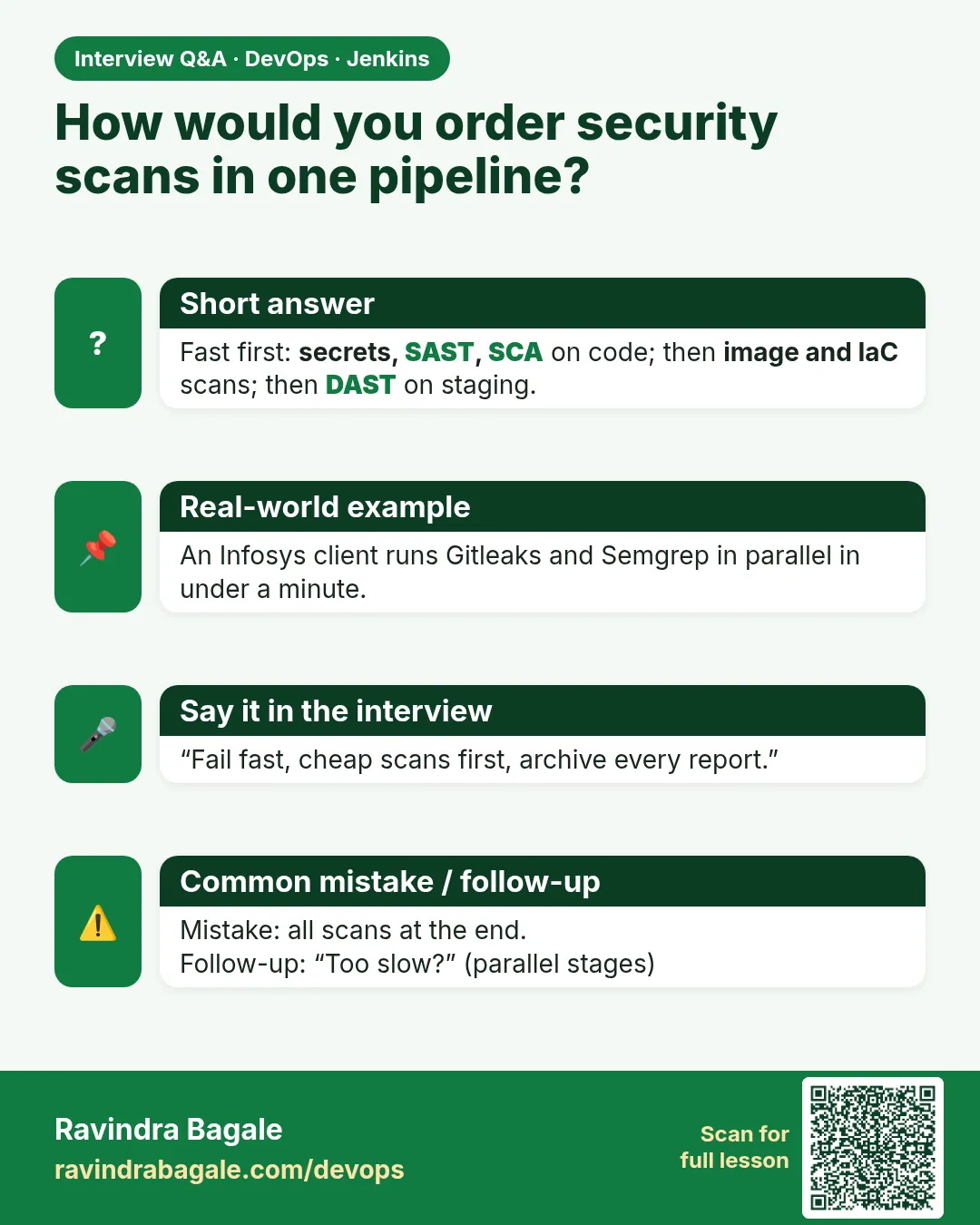
- Order: secrets, tests, code scans (parallel), gate, build, image scans (parallel), DAST, Live.
- Parallel stages cut time to the slowest scan.
- Archive all reports in post { always }.
- Live only on main and only when every gate is green.
- Most of the pipeline is language-neutral; only test and rule packs change.
FAQ
Isn't this too slow for every commit?
With caches and parallel stages it is often 5-8 minutes. Heavy scans can run nightly on main if needed.
Do I need all nine tools?
Start with Gitleaks, a dependency scan, Trivy and SonarQube or Semgrep; add more as you grow.
Where do failures go?
Build page, archived reports, and chat notifications (chapter 32).
Can different stages use different agents?
Yes, set agent per stage.
How to stop people editing out gates?
Shared library, PR review of Jenkinsfile, and branch protection.
Interview questions
-
Design a DevSecOps pipeline in Jenkins.
Secrets scan, tests, SAST (Sonar/Semgrep), SCA (Dependency-Check), IaC (Checkov) in parallel, quality gate, build, image scan (Trivy), SBOM, DAST (ZAP), sign/verify, deploy only on main when green, archive evidence.
-
How do you keep a security pipeline fast?
Parallel stages, cached vulnerability DBs, diff-aware scans, fail fast, right-sized agents.
-
Why archive reports in post always?
So evidence exists for red builds, which are the ones people need to debug.
-
How do you reuse the pipeline across teams?
A Jenkins shared library with a parameterised scan step.
-
What is fail fast and why use it?
Stop at the first red gate to save time and avoid deploying risky builds.
Quick quiz
Q1. Why Gitleaks first?
Cheapest check, and a leak must stop everything.
Q2. Why parallel?
Independent scans run at once; total time is the slowest one.
Q3. Where should archiveArtifacts go?
Top-level post { always }.
Q4. Do feature branches deploy?
No, when { branch "main" } skips Live.
Q5. What happens after the first red gate?
Later stages are skipped (fail fast).
Lab
- Install two scanners on label scan.
- Put those stages in a Jenkinsfile.
- Green build; then add a finding; confirm red and no Live.
- Do not add a Cosign private key.
Practice task
Nine-row table: tool, command/concept, failure shape, may Live run?
Ravindra Bagale's Tip
Scan red mhanje deploy nahi. Gitleaks la --redact. Cosign key ithe nahi. Dhyan rakho!
Thodkyaat sangaycha tar
- Each scan has one command and a failure you can recognise.
- ZAP only at your lab URL. Gitleaks stays redacted.
- Syft = inventory. Cosign = verify before deploy, no keys here.
- Combined pipeline: tests + scans then Live.
Samajla ka?
 Revision card
 Interview card