47.3 Docker architecture: client, daemon, containerd, runc, registry
Chala mitrano! When we type docker run, a container starts. But who does the work in between? Today we visit a restaurant kitchen: waiter, manager, chef and store room. We meet each part by running a command.
चला मित्रांनो! docker run टाइप केलं की container सुरू होतो. पण मध्ये कोण कोण काम करतं? आज एका restaurant चं kitchen बघू: waiter, manager, chef आणि store room. प्रत्येक भागाला एक command चालवून भेटू.
चलो दोस्तों! docker run टाइप करते ही container शुरू होता है. पर बीच में कौन-कौन काम करता है? आज एक restaurant की kitchen देखेंगे: waiter, manager, chef और store room. हर हिस्से से एक command चलाकर मिलेंगे.
1. Start from a restaurant order
You sit in a Zomato partner restaurant and tell the waiter: "one paneer tikka". The waiter does not cook. He takes the order to the manager. The manager tells the head chef. The head chef gives the job to a cook at the stove. If an ingredient is missing, someone fetches it from the store room first.
Docker works the same way. When you type docker run nginx, the word docker is only the waiter. Other programs do the real work, one after another.
In this lesson we meet each worker, see it running with our own eyes, and learn what breaks when one of them is missing. This helps you fix real errors at work, and it is a favourite interview question at companies like Amazon and Accenture.
2. The client: the docker command
Step 1: Docker client
Why: Everything starts with the command you type, so we meet it first.
What: The client is the docker program in your terminal. It does not run containers itself. It only sends your request as a message to the Docker daemon and prints the answer.
Example 1: See the client and server parts
Type this:
docker version
You will see:
Client: Docker Engine - Community
 Version:           27.3.1
Server: Docker Engine - Community
 Engine:
  Version:          27.3.1
 containerd:
  Version:          1.7.22
 runc:
  Version:          1.1.14
What it means: One command shows two sides: Client (the waiter) and Server (the kitchen). The server part also lists containerd and runc, which we meet next.
Example 2: Find where the client program lives
Type this:
which docker
You will see:
/usr/bin/docker
What it means: The client is just one program file. It can even live on a different computer from the engine, which we use in lesson 47.14.
Example 3: Client with no engine
Type this:
sudo systemctl stop docker docker.socket
docker ps
You will see:
Cannot connect to the Docker daemon at unix:///var/run/docker.sock. Is the docker daemon running?
What it means: The waiter is here, but the kitchen is closed. Start it again with sudo systemctl start docker. This is the most common Docker error for beginners.
3. The daemon: dockerd
Step 2: Daemon (dockerd)
Why: Someone must receive the order and plan the work.
What: A daemon is a program that runs in the background all the time, waiting for requests. dockerd is the Docker daemon. It manages images, networks and volumes, and passes container jobs to containerd.
Example 4: Check that the daemon is running
Type this:
systemctl is-active docker
You will see:
active
What it means: systemctl controls background services on Linux. "active" means the manager is in the kitchen.
Example 5: See the daemon process
Type this:
ps -e -o pid,comm | grep -E 'dockerd'
You will see:
1102 dockerd
What it means: The daemon is a normal Linux process with an ID number (PID). Your number will differ.
Example 6: Read the daemon's own log
Type this:
sudo journalctl -u docker --since '10 min ago' | tail -3
You will see:
level=info msg="Loading containers: done."
level=info msg="Docker daemon" version=27.3.1
level=info msg="API listen on /run/docker.sock"
What it means: When something goes wrong, read this log first. The last line tells us where the daemon listens for the client: a socket file, our next step.
Step 3: The socket and the API
Why: The client and daemon are two programs. They need a way to talk.
What: They talk through a special file called a socket, /var/run/docker.sock, using a set of web-style requests called the Docker API. API means a fixed way for one program to ask another for things.
Example 7: Look at the socket file
Type this:
ls -l /var/run/docker.sock
You will see:
srw-rw---- 1 root docker 0 Oct 25 09:10 /var/run/docker.sock
What it means: The first letter s means socket. Only root and the docker group may use it. That is why you add your user to the docker group (lesson 47.5).
Example 8: Talk to the daemon without the docker client
Type this:
curl -s --unix-socket /var/run/docker.sock http://localhost/version | head -c 120
You will see:
{"Platform":{"Name":"Docker Engine - Community"},"Version":"27.3.1","ApiVersion":"1.47"...
What it means: curl sends a request through the socket. We got the same version as docker version. This proves the docker command is just a client of this API.
Example 9: List containers through the API
Type this:
curl -s --unix-socket /var/run/docker.sock http://localhost/containers/json
You will see:
[]
What it means: An empty list, same as an empty docker ps. Tools like Portainer and Jenkins plugins use exactly this API.
Ravindra Bagale's Tip
The Docker socket is Docker's master key. Whoever can reach the socket has root on the server. Never mount the socket into an unknown container. Remember this!
Docker socket म्हणजे Docker ची master चावी. ज्याला socket चा access, त्याला server चा root access. Socket कधीही अनोळखी container मध्ये mount करू नका. लक्षात ठेवा!
Docker socket मतलब Docker की master चाबी. जिसके पास socket का access, उसके पास server का root access. Socket कभी किसी अनजान container में mount मत कीजिए. याद रखिए!
4. containerd and runc: the real workers
Step 4: containerd
Why: The manager does not cook. The head chef keeps every dish on track.
What: containerd is the program that pulls image layers, creates containers and watches them while they run. Kubernetes also uses containerd directly, without dockerd.
Example 10: See containerd running
Type this:
systemctl is-active containerd
ps -e -o pid,comm | grep containerd
You will see:
active
   988 containerd
What it means: containerd is its own background service, separate from dockerd.
Example 11: See Docker's containers through containerd
Type this:
docker run -d --name web nginx:1.27
sudo ctr -n moby containers ls
You will see:
CONTAINER                                                           IMAGE    RUNTIME
6f0c...                                                             -        io.containerd.runc.v2
What it means: ctr is containerd's own small client. Docker keeps its containers in a group called moby. The same container appears here too.
Example 12: Docker still works when dockerd restarts
Type this:
sudo systemctl restart docker
docker ps --format '{{.Names}} {{.Status}}'
You will see:
web Up 40 seconds
What it means: With the setting live-restore turned on in /etc/docker/daemon.json, containers keep running while dockerd restarts. Without it, they restart with the daemon. Big teams at Swiggy turn this on so a daemon upgrade does not drop traffic.
Step 5: runc and the shim
Why: Someone must finally ask the kernel to create the walled process.
What: runc is a small program that asks the Linux kernel to create the container process, then exits. A small helper called containerd-shim stays behind as the parent of the container, so the container lives even if containerd restarts.
Example 13: Find the runc program
Type this:
runc --version
You will see:
runc version 1.1.14
spec: 1.2.0
What it means: runc follows a public standard called OCI (Open Container Initiative), so other tools like Podman use it too.
Example 14: See the shim that owns your container
Type this:
ps -ef | grep containerd-shim | grep -v grep | head -1
You will see:
root 2210 1 0 09:31 ? 00:00:00 /usr/bin/containerd-shim-runc-v2 -namespace moby -id 6f0c...
What it means: One shim per container. Its parent is process 1, not dockerd. That is why the container does not die with dockerd.
Example 15: See the container's real process
Type this:
docker inspect --format '{{.State.Pid}}' web
ps -p $(docker inspect --format '{{.State.Pid}}' web) -o pid,comm
You will see:
2235
  PID COMMAND
 2235 nginx
What it means: The nginx inside the container is process 2235 on the host. In the end, every container is just a process the kernel walls off.
5. The registry: the store room
Step 6: Registry
Why: If the image is not on disk, the daemon must fetch it first.
What: A registry is a server that stores images. Docker Hub is the default public one. Companies use private ones: Amazon ECR at Netflix and Swiggy, Google Artifact Registry at Spotify, Azure Container Registry at many banks.
Example 16: See which registry is the default
Type this:
docker info --format '{{.IndexServerAddress}}'
You will see:
https://index.docker.io/v1/
What it means: When you do not give a registry name, Docker uses Docker Hub.
Example 17: Pull from a named registry
Type this:
docker pull public.ecr.aws/nginx/nginx:1.27
You will see:
1.27: Pulling from nginx/nginx
Status: Downloaded newer image for public.ecr.aws/nginx/nginx:1.27
What it means: The part before the first slash is the registry address. This image came from Amazon's public registry instead of Docker Hub.
Example 18: See where images are stored on disk
Type this:
sudo du -sh /var/lib/docker
You will see:
1.4G /var/lib/docker
What it means: Every pulled image and every container lives under this folder on the host. Never delete files here by hand; use Docker commands such as docker image prune.
6. Watch the whole chain in one go
Step 7: Events: watch each step happen
Why: Now we join all the pieces and watch the chain live.
What: docker events prints every action the daemon takes, as it happens. Run it in one terminal, and run a container in a second terminal.
Example 19: Terminal 1: start watching
Type this:
docker events --format '{{.Type}} {{.Action}} {{.Actor.Attributes.name}}'
You will see:
(waiting...)
What it means: The command waits. Leave it open.
Example 20: Terminal 2: run a container
Type this:
docker run --rm --name demo alpine echo hi
You will see:
hi
What it means: A tiny container runs and is removed.
Example 21: Back in terminal 1: the chain
Type this:
docker events (output)
You will see:
image pull alpine
container create demo
network connect bridge
container start demo
container die demo
container destroy demo
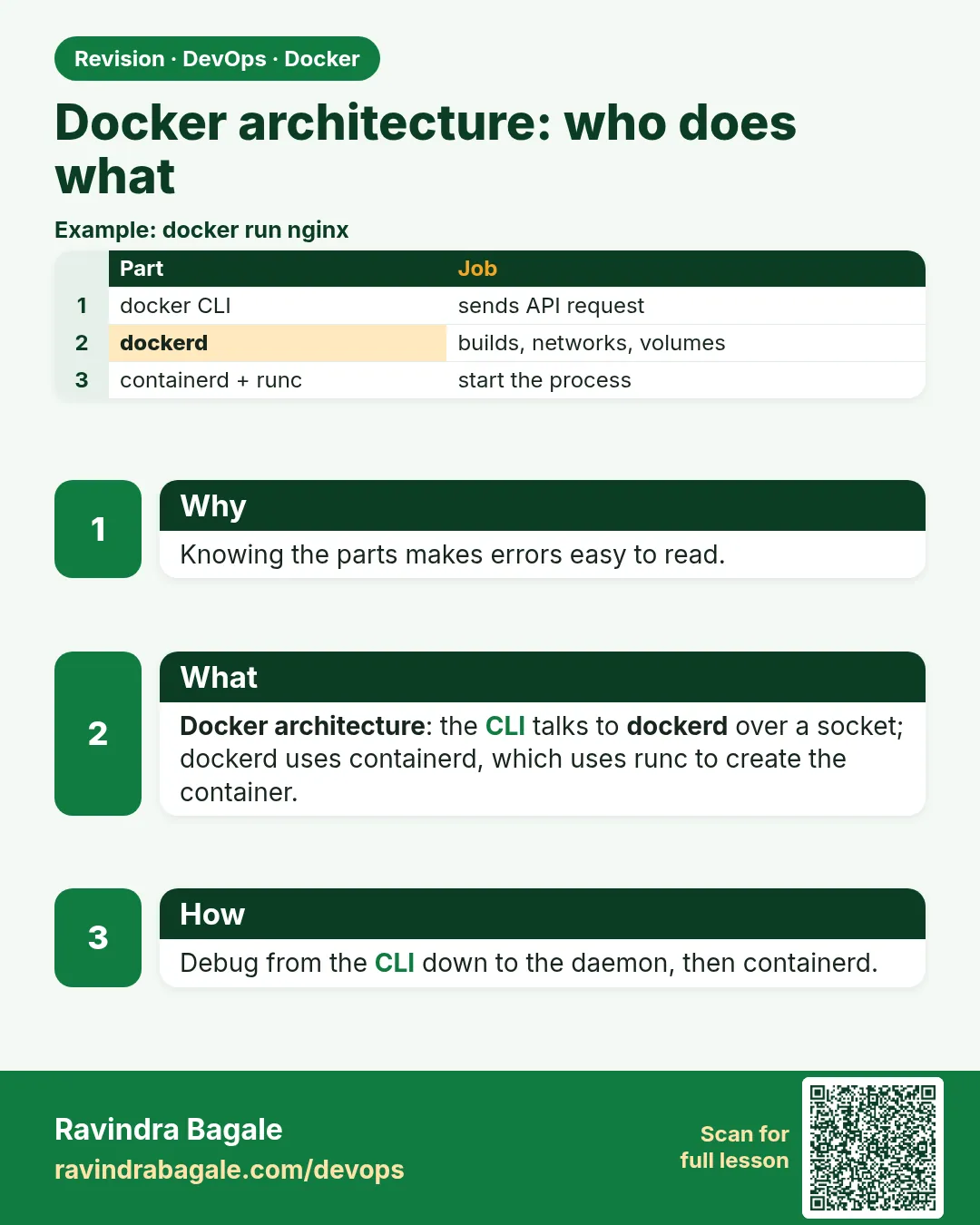
What it means: Pull, create, connect to a network, start, die, destroy. This is the full life of a container, step by step, exactly as in Picture 1. Press Ctrl+C to stop watching.
Step 8: When one worker is missing
Why: At work, you will see errors that point to one broken worker. Knowing the chain tells you where to look.
What: Each error message names the worker that failed. Match the message to the picture, then fix that one worker only.
Example 22: No permission on the socket
Type this:
docker ps
You will see:
permission denied while trying to connect to the Docker daemon socket at unix:///var/run/docker.sock
What it means: The daemon is fine, but your user is not in the docker group. Fix it with sudo usermod -aG docker $USER, then log out and back in. Never fix it by making the socket world-writable.
Example 23: containerd is stopped
Type this:
sudo systemctl stop containerd
docker run --rm alpine echo hi
You will see:
docker: Error response from daemon: failed to create task for container: connection refused: unavailable.
What it means: dockerd got the order but could not reach the head chef. Start it with sudo systemctl start containerd and run the command again.
Example 24: The registry cannot be reached
Type this:
docker pull nginx:1.27
You will see:
Error response from daemon: Get "https://registry-1.docker.io/v2/": dial tcp: lookup registry-1.docker.io: no such host
What it means: The store room is closed or the server has no internet or DNS. Check with curl -I https://registry-1.docker.io/v2/. In a private AWS network, teams at Netflix use a VPC endpoint to reach ECR instead.
Check yourself
Q1. Does the docker command run containers itself?
No. It is a client; it sends requests to dockerd through the socket.
Q2. What is /var/run/docker.sock?
The socket file the client uses to talk to the daemon's API.
Q3. Which program finally asks the kernel to create the process?
runc.
Q4. Why does a container survive a containerd restart?
Its parent is containerd-shim, not containerd.
Q5. Where does Docker pull images from by default?
Docker Hub.
Q6. What is the first thing to check for 'Cannot connect to the Docker daemon'?
Whether the docker service is running: systemctl is-active docker.
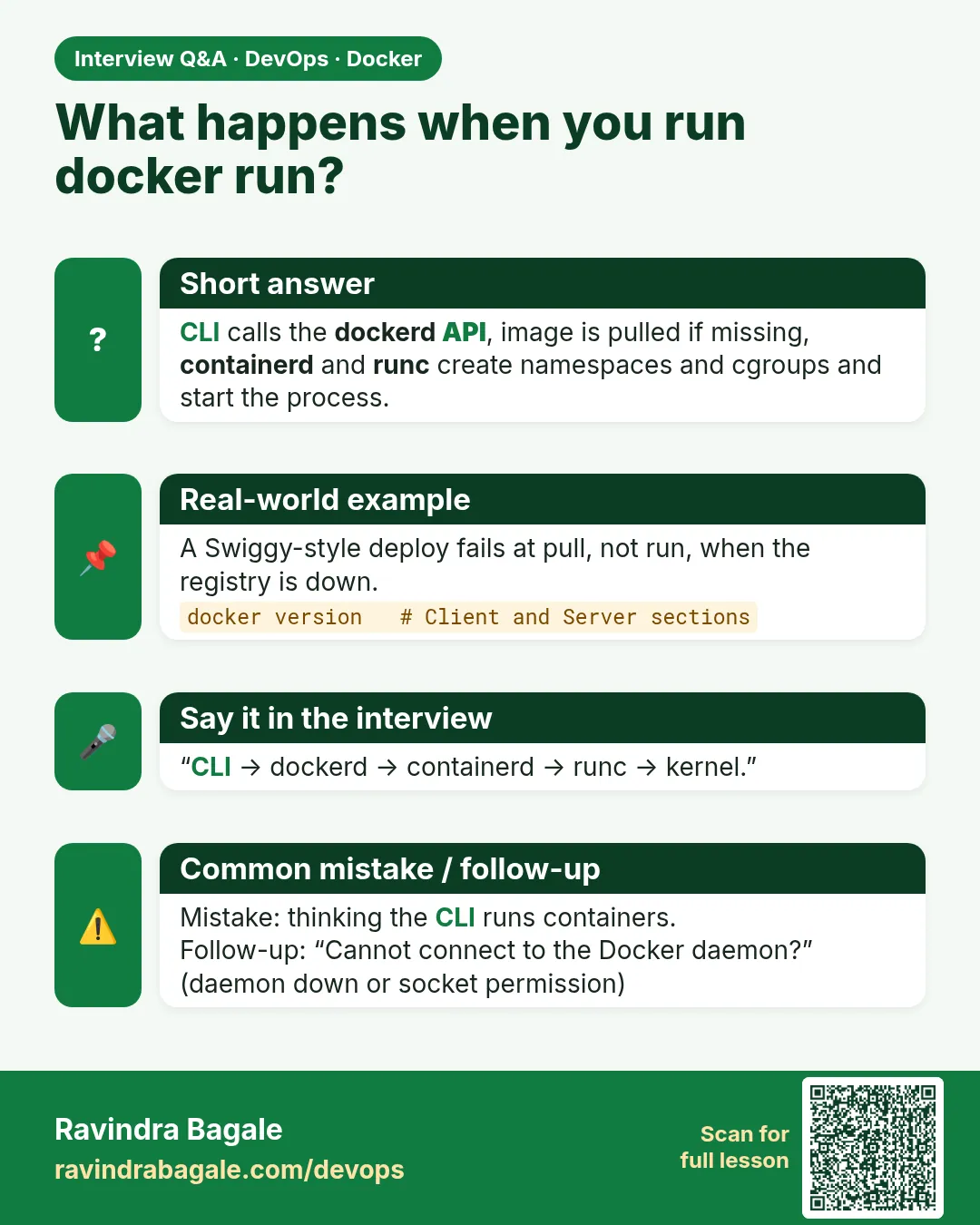
Friends, learn the order: docker client, dockerd, containerd, shim, runc, kernel, and the registry if the image is missing. Keep the restaurant example in mind. Did you understand? Let us try it once more. If not, repeat the docker events example in two terminals. Next: namespaces and cgroups, how the walls are built.
मित्रांनो, क्रम पाठ करा: docker client, dockerd, containerd, shim, runc, kernel, आणि image नसेल तर registry. Restaurant चं उदाहरण लक्षात ठेवा. समजलं का? चला, पुन्हा एकदा करून पाहू. नसेल तर docker events चं उदाहरण दोन terminal मध्ये परत करा. पुढे namespaces आणि cgroups.
दोस्तों, क्रम याद कीजिए: docker client, dockerd, containerd, shim, runc, kernel, और image न हो तो registry. Restaurant वाला उदाहरण याद रखिए. समझ आया? चलिए, एक बार फिर करके देखते हैं। नहीं तो docker events वाला उदाहरण दो terminal में दोबारा कीजिए. आगे namespaces और cgroups.
Lab: try at home
- Run
docker versionand write down the versions of Engine, containerd and runc. - Run
curl -s --unix-socket /var/run/docker.sock http://localhost/versionand compare. - Open two terminals. Run
docker eventsin one anddocker run --rm alpine echo hiin the other. - Start nginx with
docker run -d --name web nginx:1.27and find its host PID withdocker inspect. - Clean up with
docker rm -f web.
Recap
- The docker command is only a client.
- dockerd is the daemon; it listens on /var/run/docker.sock.
- containerd runs containers; runc creates the process and exits; the shim stays as parent.
- Registries store images: Docker Hub by default, ECR and others in companies.
- docker events shows the whole chain live.
 Revision card
 Interview card