52.5 ENV vs ARG
Friends, both ENV and ARG are variables, so people mix them up. The difference is time. ARG lives only while building. ENV lives in the image and in every container. Today we prove it with our own commands.
मित्रांनो, ENV आणि ARG दोन्ही variables आहेत, म्हणून लोक गोंधळतात. फरक वेळेचा आहे. ARG फक्त build करताना जगतो. ENV image मध्ये आणि प्रत्येक container मध्ये राहतो. आज आपल्या commands ने हे सिद्ध करू.
दोस्तों, ENV और ARG दोनों variables हैं, इसलिए लोग उलझ जाते हैं. फ़र्क समय का है. ARG सिर्फ़ build के समय रहता है. ENV image में और हर container में रहता है. आज अपने commands से यह साबित करेंगे.
1. Start from a story
Meera worked on the mobile backend at PhonePe. Her team built one image for test, staging and production.
A new joiner had written ENV DB_HOST=test-db.internal in the Dockerfile. The production deployment forgot to override it, and production pods tried to connect to the test database for twenty minutes.
Another joiner had written ARG NPM_TOKEN and used it in RUN. The token was visible to anyone who ran docker history on the image.
Meera fixed both. Settings that change per environment came in at run time with -e or an env file. Build-time choices like the Node version used ARG. Secrets went through secret mounts. This lesson walks through exactly what she did.
2. ARG
Step 1: Declare and use ARG
Why: Make a build choice without editing the file.
What: ARG NAME=default, then use $NAME in RUN. Change it with --build-arg.
Example 1: Default
Type this:
printf 'FROM alpine:3.20\nARG APP_VER=1.0\nRUN echo building $APP_VER > /ver\nCMD ["cat","/ver"]\n' > Dockerfile
docker build -t a1 . && docker run --rm a1
You will see:
building 1.0
What it means: Default used.
Example 2: Override
Type this:
docker build --build-arg APP_VER=2.5 -t a2 . && docker run --rm a2
You will see:
building 2.5
What it means: No file edit.
Example 3: Unknown arg warning
Type this:
docker build --build-arg NOPE=1 -t a3 .
You will see:
[Warning] One or more build-args [NOPE] were not consumed
What it means: Docker tells you about typos.
Step 2: ARG is gone at run time
Why: People expect build args inside containers.
What: ARG values are not in the container environment.
Example 4: Look for it
Type this:
docker run --rm a2 sh -c 'echo [$APP_VER]'
You will see:
[]
What it means: Empty at run time.
Example 5: Config has none
Type this:
docker image inspect a2 -f '{{json .Config.Env}}'
You will see:
["PATH=/usr/local/sbin:/usr/local/bin:/usr/sbin:/usr/bin:/sbin:/bin"]
What it means: Only PATH.
Example 6: But history shows it
Type this:
docker history a2 --no-trunc --format '{{.CreatedBy}}' | grep APP_VER
You will see:
RUN |1 APP_VER=2.5 /bin/sh -c echo building $APP_VER > /ver
What it means: The value is recorded in history.
Step 3: Never put secrets in ARG
Why: History is readable by anyone with the image.
What: Use RUN --mount=type=secret instead (lesson 52.9).
Example 7: Leaky build
Type this:
printf 'FROM alpine:3.20\nARG TOKEN\nRUN echo using token > /dev/null\n' > Dockerfile
docker build --build-arg TOKEN=example-only-abc123 -t leak .
You will see:
=> [2/2] RUN echo using token
What it means: Looks harmless.
Example 8: Leak found
Type this:
docker history leak --no-trunc | grep -o 'TOKEN=[a-z0-9-]*'
You will see:
TOKEN=example-only-abc123
What it means: Anyone can read it.
Example 9: Lint catches
Type this:
docker build --check .
You will see:
WARNING: SecretsUsedInArgOrEnv - Do not use ARG or ENV instructions for sensitive data (ARG "TOKEN")
What it means: BuildKit warns you.
3. ENV
Step 4: Declare ENV
Why: Some settings belong in every container.
What: ENV KEY=value is stored in the image config and set in every container.
Example 10: Set
Type this:
printf 'FROM python:3.12-slim\nENV PYTHONUNBUFFERED=1 APP_PORT=8000\nCMD ["sh","-c","echo port=$APP_PORT"]\n' > Dockerfile
docker build -t e1 . && docker run --rm e1
You will see:
port=8000
What it means: Visible at run time.
Example 11: In config
Type this:
docker image inspect e1 -f '{{json .Config.Env}}' | tr ',' '\n' | grep APP
You will see:
"APP_PORT=8000"
What it means: Stored in the image.
Example 12: Used in build
Type this:
printf 'FROM alpine:3.20\nENV APP_HOME=/srv/app\nRUN mkdir -p $APP_HOME\nWORKDIR $APP_HOME\nCMD ["pwd"]\n' > Dockerfile
docker build -t e2 . && docker run --rm e2
You will see:
/srv/app
What it means: ENV works in later instructions too.
Step 5: Override ENV at run time
Why: Each environment needs different values.
What: docker run -e KEY=value or --env-file replaces the image value.
Example 13: -e
Type this:
docker run --rm -e APP_PORT=9000 e1
You will see:
port=9000
What it means: Run-time wins.
Example 14: env file
Type this:
printf 'APP_PORT=7000\n' > prod.env && docker run --rm --env-file prod.env e1
You will see:
port=7000
What it means: Many values from one file.
Example 15: Pass from host
Type this:
export APP_PORT=6000 && docker run --rm -e APP_PORT e1
You will see:
port=6000
What it means: -e NAME alone copies the host value.
Step 6: Good ENV values
Why: Not everything belongs in ENV.
What: Good: PATH additions, language flags, default ports. Bad: hostnames per environment, passwords.
Example 16: PATH
Type this:
printf 'FROM python:3.12-slim\nENV PATH=/opt/venv/bin:$PATH\nRUN python -m venv /opt/venv\nCMD ["which","python"]\n' > Dockerfile
docker build -t e3 . && docker run --rm e3
You will see:
/opt/venv/bin/python
What it means: venv is active everywhere.
Example 17: Language flags
Type this:
printf 'FROM python:3.12-slim\nENV PYTHONDONTWRITEBYTECODE=1 PYTHONUNBUFFERED=1\n' > Dockerfile && cat Dockerfile | tail -1
You will see:
ENV PYTHONDONTWRITEBYTECODE=1 PYTHONUNBUFFERED=1
What it means: Logs appear at once, no .pyc files.
Example 18: Node
Type this:
printf 'FROM node:22-slim\nENV NODE_ENV=production\nCMD ["node","-e","console.log(process.env.NODE_ENV)"]\n' > Dockerfile
docker build -t e4 . && docker run --rm e4
You will see:
production
What it means: Libraries switch to production mode.
Step 7: Secrets in ENV leak too
Why: docker inspect shows every ENV.
What: Anyone with docker inspect can read ENV values, in the image or the container.
Example 19: Baked password
Type this:
printf 'FROM alpine:3.20\nENV DB_PASS=example-only\n' > Dockerfile
docker build -t bad . && docker image inspect bad -f '{{json .Config.Env}}'
You will see:
["PATH=...","DB_PASS=example-only"]
What it means: Readable by anyone.
Example 20: Run-time password visible
Type this:
docker run -d --name r -e DB_PASS=example-only alpine:3.20 sleep 60 && docker inspect r -f '{{json .Config.Env}}' | grep -o 'DB_PASS=[a-z-]*'
You will see:
DB_PASS=example-only
What it means: Still visible on the host.
Example 21: Better: file secret
Type this:
printf 'example-only\n' > db_pass.txt && docker run --rm -v $PWD/db_pass.txt:/run/secrets/db_pass:ro alpine:3.20 cat /run/secrets/db_pass
You will see:
example-only
What it means: App reads a file; inspect does not show it.
4. ARG and ENV together
Step 8: ARG feeding ENV
Why: Record the build version inside the container.
What: ENV APP_VER=$APP_VER copies a build-time value into the image.
Example 22: Copy across
Type this:
printf 'FROM alpine:3.20\nARG APP_VER=dev\nENV APP_VER=$APP_VER\nCMD ["sh","-c","echo version $APP_VER"]\n' > Dockerfile
docker build --build-arg APP_VER=3.1.4 -t ae . && docker run --rm ae
You will see:
version 3.1.4
What it means: Build value is now visible.
Example 23: CI value
Type this:
docker build --build-arg APP_VER=$(git rev-parse --short HEAD) -t ae .
You will see:
=> [2/2] ENV APP_VER=9f3c2e1
What it means: Commit id in the image.
Example 24: Health endpoint
Type this:
docker run --rm ae sh -c 'echo {"version":"$APP_VER"}'
You will see:
{"version":"3.1.4"}
What it means: Apps can show their version.
Step 9: Precedence
Why: Which value wins?
What: ENV with the same name beats ARG in RUN. docker run -e beats ENV.
Example 25: Same name
Type this:
printf 'FROM alpine:3.20\nARG MODE=arg\nENV MODE=env\nRUN echo $MODE\n' > Dockerfile
docker build --progress=plain --build-arg MODE=cli . 2>&1 | grep -E '#[0-9]+ 0\.[0-9] '
You will see:
#6 0.1 env
What it means: ENV won during build.
Example 26: Run time
Type this:
docker build -t p . && docker run --rm -e MODE=run p sh -c 'echo $MODE'
You will see:
run
What it means: -e won at run time.
Example 27: Compose
Type this:
printf 'services:\n a:\n image: p\n environment:\n MODE: compose\n command: sh -c "echo $$MODE"\n' > compose.yaml && docker compose run --rm a
You will see:
compose
What it means: Compose environment acts like -e.
Step 10: Default with fallback
Why: Avoid empty values.
What: Use ${VAR:-default} in Dockerfile lines.
Example 28: Fallback
Type this:
printf 'FROM alpine:3.20\nARG REGION\nRUN echo region=${REGION:-ap-south-1}\n' > Dockerfile
docker build --progress=plain . 2>&1 | grep region=
You will see:
#5 0.1 region=ap-south-1
What it means: Default used.
Example 29: Given
Type this:
docker build --progress=plain --build-arg REGION=us-east-1 . 2>&1 | grep region=
You will see:
#5 0.1 region=us-east-1
What it means: Given value used.
Example 30: Required
Type this:
printf 'FROM alpine:3.20\nARG REGION\nRUN test -n "$REGION" || (echo REGION required; exit 1)\n' > Dockerfile
docker build .
You will see:
REGION required
ERROR: ... exit code: 1
What it means: Fail early when missing.
Step 11: Inspect what is set
Why: Check before you ship.
What: List ENV from the image and the running container.
Example 31: Image
Type this:
docker image inspect ae -f '{{range .Config.Env}}{{println .}}{{end}}'
You will see:
PATH=/usr/local/sbin:/usr/local/bin:/usr/sbin:/usr/bin:/sbin:/bin
APP_VER=3.1.4
What it means: Two values.
Example 32: Container
Type this:
docker run --rm -e EXTRA=1 ae env | sort | tail -3
You will see:
APP_VER=3.1.4
EXTRA=1
HOME=/root
What it means: Image plus run-time values.
Example 33: Exec in running
Type this:
docker run -d --name live ae sleep 60 && docker exec live printenv APP_VER
You will see:
3.1.4
What it means: Same inside a running container.
Step 12: ENV and ARG across stages
Why: Multi-stage builds start fresh at each FROM.
What: A new stage does not inherit ENV or ARG from the previous stage. It only inherits what its own base image had. Declare what you need again in each stage, or put shared values in a common base stage and build FROM that stage.
Example 34: Not inherited
Type this:
printf 'FROM alpine:3.20 AS one\nENV COLOR=blue\nFROM alpine:3.20\nCMD ["sh","-c","echo [$COLOR]"]\n' > Dockerfile
docker build -t st1 . && docker run --rm st1
You will see:
[]
What it means: The final stage never saw COLOR, because it started again from plain alpine.
Example 35: Shared base stage
Type this:
printf 'FROM alpine:3.20 AS base\nENV COLOR=blue\nFROM base AS final\nCMD ["sh","-c","echo [$COLOR]"]\n' > Dockerfile
docker build -t st2 . && docker run --rm st2
You will see:
[blue]
What it means: FROM base carries the ENV forward, because base is now the parent image.
Example 36: Global ARG reused
Type this:
printf 'ARG VER=1.2\nFROM alpine:3.20 AS a\nARG VER\nRUN echo a=$VER\nFROM alpine:3.20\nARG VER\nRUN echo b=$VER\n' > Dockerfile
docker build --progress=plain . 2>&1 | grep -E '(a|b)=1'
You will see:
#5 0.1 a=1.2
#7 0.1 b=1.2
What it means: One global ARG, redeclared in each stage that needs it.
5. Common mistakes and how Meera avoids them
Mistake one: environment hostnames in ENV. Production silently uses test values when someone forgets an override. Meera passes them at run time only.
Mistake two: secrets in ARG or ENV. History and inspect show them. Meera uses secret mounts for build and files for run time.
Mistake three: expecting ARG inside the container. It is gone. Meera copies it to ENV when she really needs it.
Mistake four: an ARG used after FROM without redeclaring. Meera writes ARG again after each FROM.
Mistake five: empty values. Meera uses a fallback or fails the build early.
Check yourself
Q1. When does ARG exist?
Only during docker build.
Q2. When does ENV exist?
In the build, the image and every container.
Q3. Which wins at run time, ENV or -e?
-e.
Q4. Why not put a password in ARG?
docker history shows it.
Friends, remember the time rule: ARG for build time, ENV for run time defaults, -e for each environment, secrets never in either. Did you understand? Let us try it once more. Open docker history on one of your images and look for anything that should not be there.
मित्रांनो, वेळेचा नियम लक्षात ठेवा: build time साठी ARG, run time defaults साठी ENV, प्रत्येक environment साठी -e, आणि secrets कधीच दोन्हीत नाही. समजलं का? चला, पुन्हा एकदा करून पाहू. तुमच्या एका image वर docker history उघडा आणि नको असलेलं काही आहे का ते बघा.
दोस्तों, समय का नियम याद रखिए: build time के लिए ARG, run time defaults के लिए ENV, हर environment के लिए -e, और secrets कभी इन दोनों में नहीं. समझ आया? चलिए, एक बार फिर करके देखते हैं। अपनी किसी image पर docker history खोलिए और देखिए कुछ ऐसा तो नहीं जो नहीं होना चाहिए.
Ravindra Bagale's Tip
Run docker build --check on every Dockerfile. It warns about secrets in ARG and ENV before they ever reach a registry.
प्रत्येक Dockerfile वर docker build --check चालवा. ARG आणि ENV मधले secrets registry पर्यंत पोहोचण्याआधीच तो warning देतो.
हर Dockerfile पर docker build --check चलाइए. ARG और ENV में secrets registry तक पहुँचने से पहले ही यह warning देता है.
Lab: try at home
- Build with ARG and override it.
- Prove ARG is empty in the container.
- Find the ARG value in docker history.
- Set ENV and override with -e and --env-file.
- Copy an ARG to ENV and print it.
- Run docker build --check on a leaky file.
Recap
- ARG is build time only.
- ENV is in image and containers.
- -e and --env-file override ENV.
- Neither is safe for secrets.
- ARG can feed ENV.
- Use fallbacks and fail early.
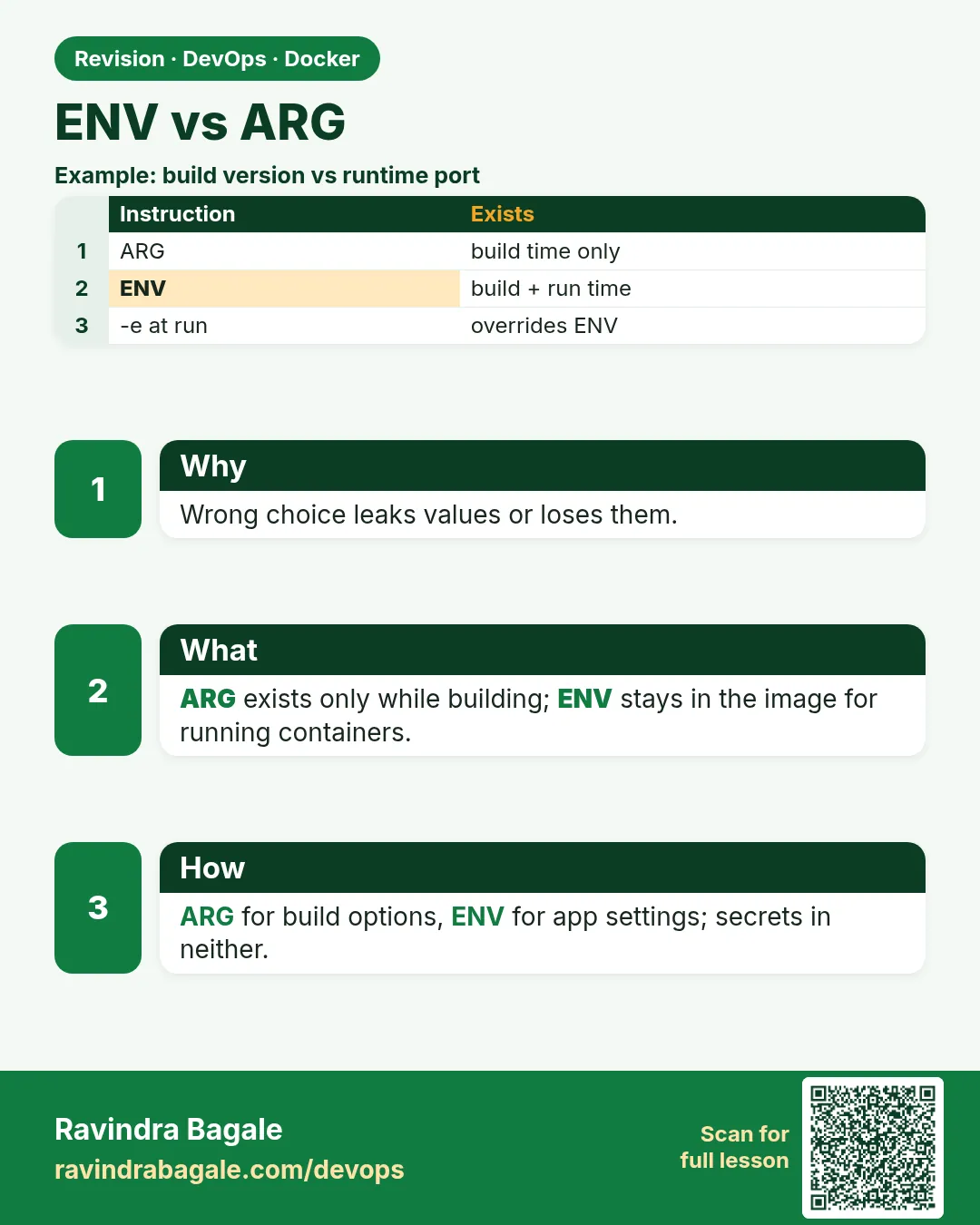 Revision card
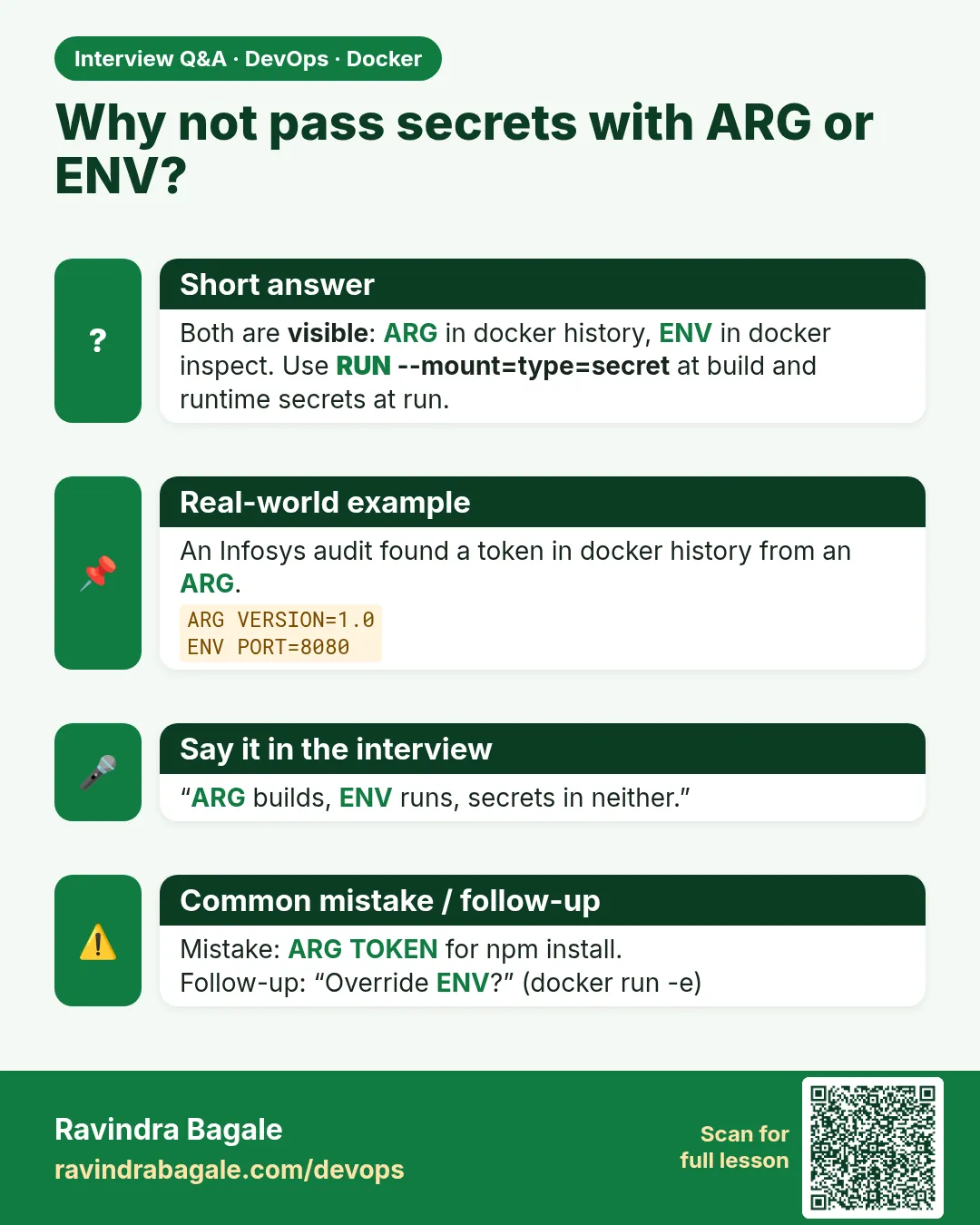 Interview card
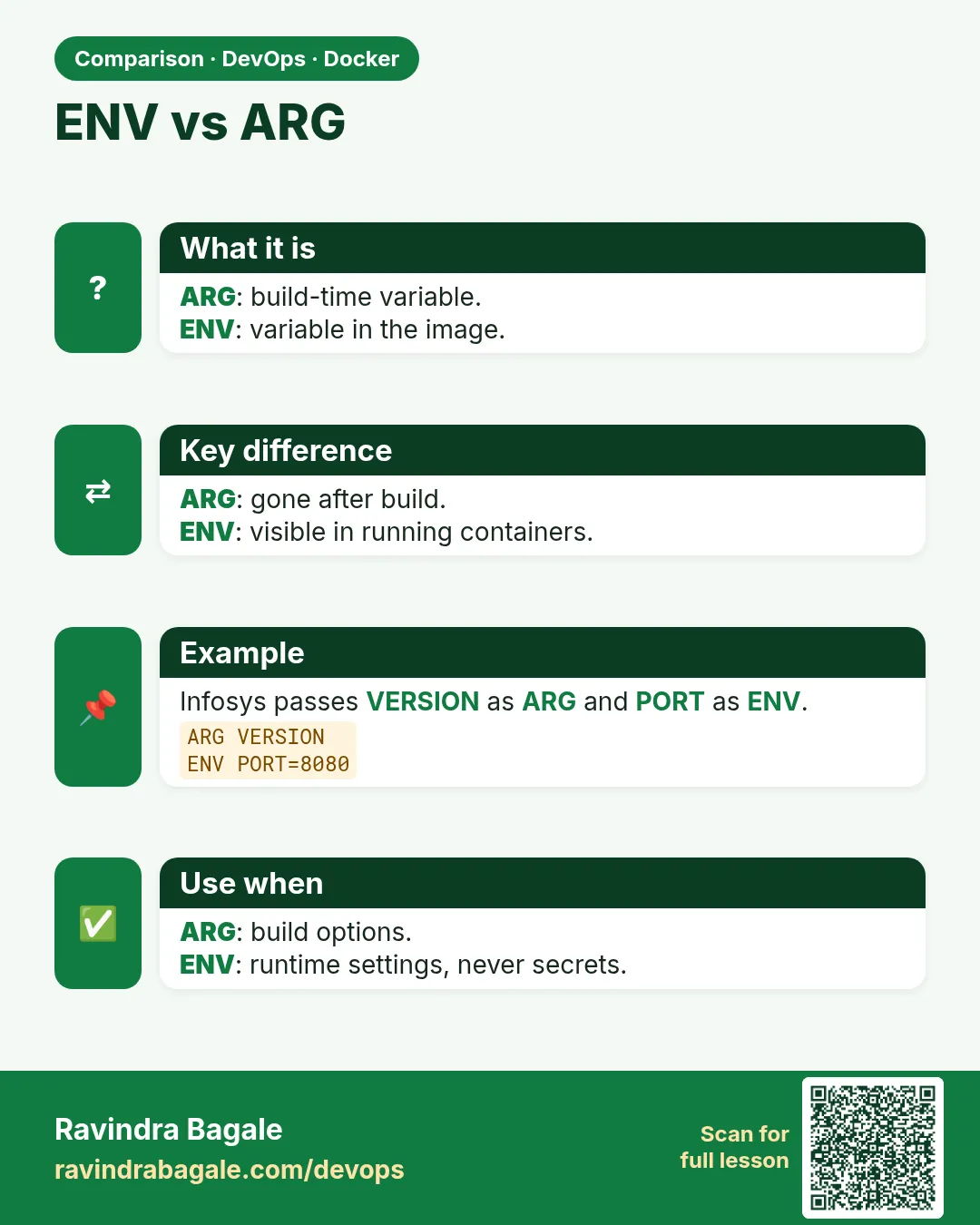 Comparison card