Chapter 92: GitLab CI Deep Dive
92.9 Node and Python test jobs, with test reports
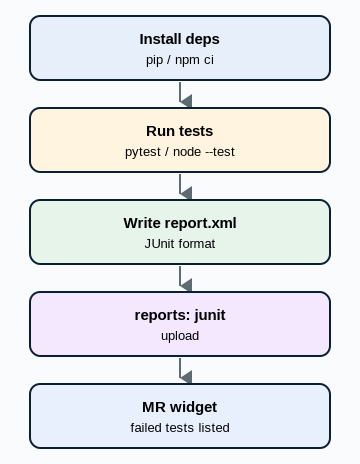
Story (fictional teaching scenario). At a fictional fintech in Kochi, reviewers had to open raw job logs to find which test failed. Hannah from Hamburg added JUnit test reports. Now the merge request page shows "1 failed test: test_add" with the error, right where reviewers look.
Why
A clear list of failed tests on the merge request saves every reviewer a hunt through logs.
What
- JUnit XML — A common test-result file format. Most test tools can write it.
- artifacts:reports:junit — Tells GitLab the file is a test report, so it shows results in the UI.
- when: always — Upload the report even when the tests fail (the time you need it most).
How
- Make your test tool write JUnit XML.
- Save it under
artifacts:reports:junit. - Add
when: alwaysto the artifacts. - Open the merge request and look at the test summary.
Example 1: Python with a report
unit-test-py:
  image: python:3.13-slim
  script:
    - pip install -r requirements.txt
    - python -m pytest -q --junitxml=report.xml
  artifacts:
    when: always
    reports:
      junit: report.xml
Output (tested locally — the job's script was run on a practice computer, not in a GitLab pipeline)
..                                                       [100%]
2 passed in 0.01s
What it means: Both tests passed and report.xml was written. Run locally on the practice app; the first part of the XML began with <testsuite name="pytest" errors="0" failures="0" skipped="0" tests="2".
Example 2: When a test fails
Output (tested locally — the job's script was run on a practice computer, not in a GitLab pipeline)
FAILED tests/test_app.py::test_add - assert 5 == 6
1 failed, 1 passed in 0.01s
What it means: We broke one test on purpose. pytest exits with a non-zero code, so the GitLab job would fail, and with when: always the report would still be uploaded and shown on the merge request.
Example 3: Node test job
unit-test-web:
  image: node:22-slim
  script:
    - npm ci
    - node --test --test-reporter=junit --test-reporter-destination=report.xml
  artifacts:
    when: always
    reports:
      junit: report.xml
What it means: Node's built-in runner can write JUnit too. Check your Node version supports the junit reporter (the practice computer ran plain node --test, shown in lesson 7).
Ravindra Bagale's Tip
Always add when: always to test-report artifacts. Without it, reports vanish exactly when tests fail.
Test-report artifacts ला नेहमी when: always लावा. नाहीतर tests fail झाले की नेमके reports गायब होतात.
Test-report artifacts पर हमेशा when: always लगाओ. वरना tests fail होने पर ही reports गायब हो जाते हैं.
Did you understand? Let us try it once more.