Chapter 92: GitLab CI Deep Dive
92.11 Environments, manual approval, protected environments and resource_group
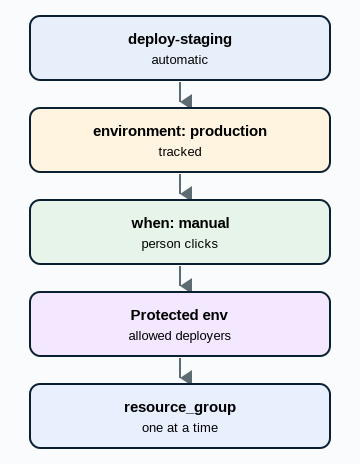
Story (fictional teaching scenario). At a fictional pharmacy chain in Mysuru, two production deploys once ran at the same time and left mixed versions on the servers. Clara from Vienna made three changes. Deploys go to named environments, so GitLab shows what is live where. The production job is manual, so a person clicks Run. And a resource_group lets only one production deploy run at a time; the second one waits.
Why
Production needs a record, a human decision and no races.
What
- environment — A named deploy target, like
stagingorproduction. GitLab lists deployments per environment. - when: manual — The job waits for someone to click Run.
- Protected environment — Only allowed users or groups can deploy to it. Required approvals for deployments are a Premium/Ultimate feature (check your tier in the GitLab docs).
- resource_group — Jobs with the same resource group never run at the same time.
- allow_failure: false — On a manual job, makes the pipeline wait (blocked) until it is run.
How
- Add
environment:to every deploy job. - Make production
when: manualwith a default-branch rule. - Protect the production environment in Settings → CI/CD → Protected environments (Operate settings vary by version).
- Add
resource_group: production.
Example 1: Staging then manual production
deploy-staging:
  stage: deploy
  script: ["echo deploy to staging"]
  environment:
    name: staging
  rules:
    - if: $CI_COMMIT_BRANCH == $CI_DEFAULT_BRANCH

deploy-prod:
  stage: deploy
  needs: ["deploy-staging"]
  script: ["echo deploy to production"]
  environment:
    name: production
  resource_group: production
  rules:
    - if: $CI_COMMIT_BRANCH == $CI_DEFAULT_BRANCH
      when: manual
      allow_failure: false
Line by line: Staging deploys automatically on main. Production needs staging first, is tied to the production environment, can only run one at a time because of resource_group, and waits for a person because of when: manual. allow_failure: false keeps the pipeline blocked until someone decides.
Output (illustrative — pipeline not run)
Pipeline #1088  blocked
  deploy-staging  passed
  deploy-prod     manual  ▶ (waiting for a person)
...
deploy-prod: Waiting for resource: production   (another deploy is running)
What it means: The pipeline paused for a human. A second production deploy queued instead of racing the first.
Ravindra Bagale's Tip
Put resource_group on every production deploy job. It is one line and it prevents the worst kind of mixed-version outage.
प्रत्येक production deploy job वर resource_group लावा. एकच ओळ आहे आणि mixed-version outage सारखा वाईट प्रकार टळतो.
हर production deploy job पर resource_group लगाओ. एक ही लाइन है और mixed-version outage जैसी बुरी चीज़ रुकती है.
Did you understand? Let us try it once more.