Chapter 92: GitLab CI Deep Dive
92.12 include, extends and reusable templates
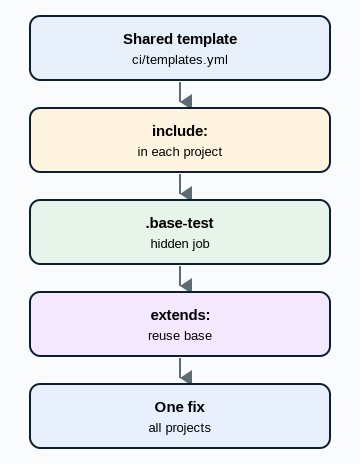
Story (fictional teaching scenario). At a fictional IT services firm in Coimbatore, twenty projects had twenty copies of the same test job. Sven from Gothenburg moved the common parts into one template file in a shared project. Each project now has a short .gitlab-ci.yml that includes the template and extends the hidden base job. A fix in the template reaches all twenty.
Why
Copy-paste CI drifts. Shared templates give one place to review and fix.
What
- include:local — Pull in another YAML file from the same repo.
- include:project — Pull in a file from another GitLab project, pinned with
ref:. - include:template — GitLab's own built-in templates.
- include:component — CI/CD components from the CI/CD Catalog, with inputs (see GitLab docs for current syntax).
- Hidden job — A job name starting with a dot, like
.base-test. It never runs by itself. - extends — Copy settings from a hidden job, then add or override.
- !reference — Reuse one section (like a script list) from another job.
How
- Write a hidden base job with shared settings.
- Put it in a template file.
include:that file.- Make real jobs
extends:the base and add only what differs.
Example 1: Template and caller in one repo
# ci/templates.yml
.base-test:
  image: python:3.13-slim
  before_script:
    - pip install -r requirements.txt
  artifacts:
    when: always
    reports:
      junit: report.xml
# .gitlab-ci.yml
include:
  - local: ci/templates.yml

unit-test:
  extends: .base-test
  script:
    - python -m pytest -q --junitxml=report.xml
Line by line: The template defines a hidden job. The main file includes it, then unit-test extends it and adds only its own script. The merged job has the image, setup, report settings and script.
Output (illustrative — pipeline not run)
CI Lint → Full configuration:
unit-test:
  image: python:3.13-slim
  before_script: [pip install -r requirements.txt]
  script: [python -m pytest -q --junitxml=report.xml]
  artifacts: {when: always, reports: {junit: report.xml}}
What it means: GitLab's pipeline editor can show the fully merged result, so you can check what extends produced.
Example 2: Include from another project, pinned
include:
  - project: "platform/ci-templates"
    ref: "v1.4.0"
    file: "/python/test.yml"
What it means: Every project uses version v1.4.0 of the shared template until it chooses to upgrade. Project path and tag are examples.
Ravindra Bagale's Tip
Pin shared includes to a tag, not a branch. Otherwise one bad template commit breaks every project at once.
Shared includes branch ला नाही, tag ला pin करा. नाहीतर template चा एक चुकीचा commit सगळे projects एकदम तोडतो.
Shared includes को branch पर नहीं, tag पर pin करो. वरना template का एक गलत commit सारे projects एक साथ तोड़ देता है.
Did you understand? Let us try it once more.