Chapter 92: GitLab CI Deep Dive
92.1 Why GitLab CI — pipelines, stages and jobs
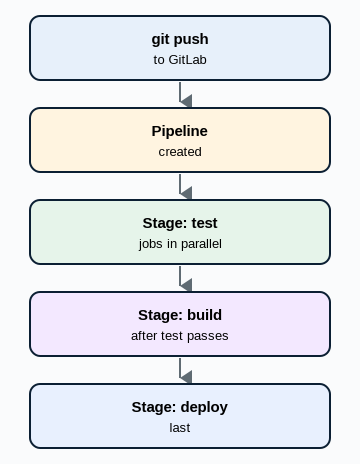
Story (fictional teaching scenario). At a fictional insurance-claims startup in Pune, the code lived on GitLab, but tests ran on Fernando's laptop before each release. One Friday he was on leave and nobody ran them. A broken build went live. Lakshmi from the platform team added one file, .gitlab-ci.yml. Now every push starts a pipeline: first the test stage, then build, then deploy. If a test fails, later stages never start. The laptop is no longer part of the release.
Why
A pipeline runs the same checks for every change, whether or not a person remembers.
What
- Pipeline — One full run of your CI/CD for one commit or merge request.
- Job — One named task with a
script:(the commands to run). The smallest unit. - Stage — A group of jobs. Stages run one after another. Jobs inside one stage run at the same time.
- .gitlab-ci.yml — The file in the root of your repo that defines everything.
- Runner — The machine that actually runs a job (lesson 3).
How
- Add
.gitlab-ci.ymlto the root of the repo. - List
stages:in order. - Add jobs, each with a
stage:and ascript:. - Push, then open Build → Pipelines in GitLab to watch.
Example 1: The smallest pipeline
stages:
  - test

say-hello:
  stage: test
  script:
    - echo "Hello from GitLab CI on $CI_COMMIT_BRANCH"
Line by line: stages: lists the stages; here only test. say-hello: is the job name (any name you like). stage: test puts it in that stage. script: is a list of shell commands. $CI_COMMIT_BRANCH is a predefined variable GitLab fills in.
Output (illustrative — pipeline not run)
$ echo "Hello from GitLab CI on $CI_COMMIT_BRANCH"
Hello from GitLab CI on main
Job succeeded
What it means: The runner printed each command (lines starting with $) and then its output. "Job succeeded" means every command exited with code 0.
Example 2: Three stages
stages: [test, build, deploy]

unit-test:
  stage: test
  script: ["echo running tests"]

lint:
  stage: test
  script: ["echo checking style"]

package:
  stage: build
  script: ["echo building package"]

release:
  stage: deploy
  script: ["echo pretend deploy"]
Output (illustrative — pipeline not run)
Pipeline #1042  passed
  test:   unit-test  passed   lint  passed
  build:  package    passed
  deploy: release    passed
What it means: unit-test and lint ran at the same time because they share a stage. package waited for both. The pipeline number is an example.
Ravindra Bagale's Tip
Name jobs by what they do, like unit-test or build-image. The pipeline page then reads like a checklist.
Jobs ची नावं ते काय करतात त्यावरून ठेवा, जसं unit-test किंवा build-image. मग pipeline page checklist सारखं वाचता येतं.
Jobs के नाम उनके काम से रखो, जैसे unit-test या build-image. फिर pipeline page checklist जैसा पढ़ता है.
Did you understand? Let us try it once more.