Chapter 92: GitLab CI Deep Dive
92.2 The .gitlab-ci.yml file — image, before_script, script and default
Story (fictional teaching scenario). At a fictional furniture e-shop in Jodhpur, Oliver from Bristol wrote the same pip install line in six jobs. When the requirements file moved, he had to fix six places. Ritu showed him default: and before_script:. One shared setup, written once. She also pinned the Docker image each job runs in, so tests ran on the same Python every time.
Why
Most mistakes in CI files are repeated lines that drift apart. A few keywords remove the repetition.
What
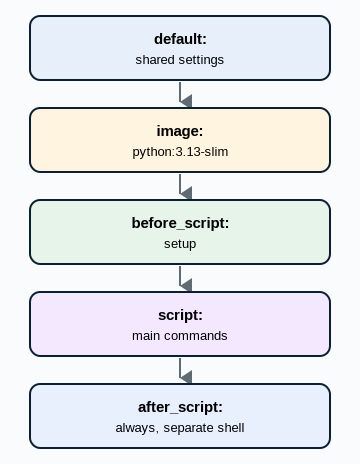
- image — The Docker image the job runs inside (when the runner uses the Docker executor). Example:
python:3.13-slim. - before_script — Commands that run before
scriptin the same shell. - script — The main commands. Required in every normal job.
- after_script — Runs after, even if the job failed, in a separate shell. Variables you exported in
scriptare not there. - default — Settings, like
imageorbefore_script, that every job gets unless it sets its own. - variables — Plain, non-secret values in the file. Quote values so YAML does not change them (for example
"012345").
How
- Put common settings in
default:. - Pin image tags (not
latest) so builds are repeatable. - Keep
script:short; move long logic into a script file in the repo. - Use
after_script:only for clean-up or extra logs.
Example 1: Shared setup
default:
  image: python:3.13-slim
  before_script:
    - python --version
    - pip install -r requirements.txt

variables:
  APP_NAME: "claims-api"

unit-test:
  stage: test
  script:
    - python -m pytest -q
Line by line: Every job uses the python:3.13-slim image and runs the two setup commands. APP_NAME is a plain variable for every job. unit-test only lists its own work. The image tag is an example; pick a tag you have checked on Docker Hub.
Output (tested locally — the job's script was run on a practice computer, not in a GitLab pipeline)
2 passed in 0.01s
What it means: The python -m pytest -q command was run on a practice copy of the lab app (lesson 15) and both tests passed. In GitLab you would see this same line in the job log.
Example 2: Why quotes matter
variables:
  PIN_A: 012345
  PIN_B: "012345"
What it means: GitLab's docs warn that 012345 without quotes is read as an octal number, so PIN_A becomes 5349. PIN_B stays the text 012345. Always quote variable values.
Ravindra Bagale's Tip
Pin image tags like python:3.13-slim. latest can change under you on a quiet Tuesday and break a passing pipeline.
python:3.13-slim सारखे image tags pin करा. latest एखाद्या शांत मंगळवारी बदलतो आणि चालणारी pipeline तोडतो.
python:3.13-slim जैसे image tags pin करो. latest किसी शांत मंगलवार को बदल जाता है और चलती pipeline तोड़ देता है.
Did you understand? Let us try it once more.