Chapter 92: GitLab CI Deep Dive
92.10 Docker builds and the built-in container registry
Story (fictional teaching scenario). At a fictional music-streaming startup in Shillong, Lucas from Montevideo kept a personal registry password in CI settings to push images. When he left, the pushes broke. Rina switched to GitLab's built-in container registry with the CI job token: GitLab gives each job short-lived registry login details automatically, with the permissions of the person who triggered the pipeline.
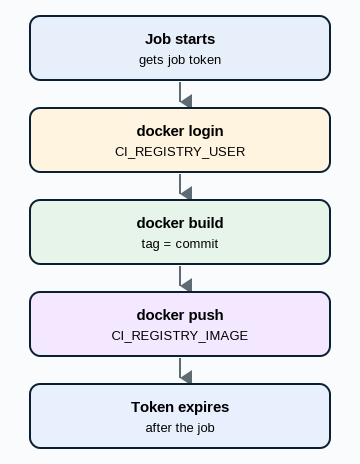
Why
Personal passwords in CI leak and break when people leave. Built-in, short-lived credentials do neither.
What
- Container registry — Each GitLab project can store Docker images.
- CI_REGISTRY — The registry host name.
- CI_REGISTRY_IMAGE — This project's image path.
- CI_REGISTRY_USER / CI_REGISTRY_PASSWORD — Short-lived login details GitLab provides to the job (the password is the job token).
- CI_JOB_TOKEN — A token valid only while the job runs, with limited permissions.
- Docker-in-Docker (dind) — Running a Docker daemon as a service so a job can run
docker build. It needs a runner configured for privileged mode, which is a security trade-off; some teams use daemonless builders instead.
How
- Use a Docker image and the
docker:dindservice (or your team's approved builder). - Log in with the predefined variables, using
--password-stdin. - Tag with
$CI_COMMIT_SHORT_SHA. - Push only from the default branch.
Example 1: Build and push
build-image:
  stage: build
  image: docker:27
  services:
    - docker:27-dind
  rules:
    - if: $CI_COMMIT_BRANCH == $CI_DEFAULT_BRANCH
  script:
    - echo "$CI_REGISTRY_PASSWORD" | docker login "$CI_REGISTRY" -u "$CI_REGISTRY_USER" --password-stdin
    - docker build -t "$CI_REGISTRY_IMAGE:$CI_COMMIT_SHORT_SHA" .
    - docker push "$CI_REGISTRY_IMAGE:$CI_COMMIT_SHORT_SHA"
Line by line: The job runs in a Docker CLI image with a dind service. The rule limits pushes to the default branch. Line 1 of the script logs in by piping the job token on stdin, so it never appears as a command argument. Lines 2 and 3 build and push an image tagged with the short commit id. Image tags are examples; check current tags and your runner's dind setup.
Output (illustrative — pipeline not run)
Login Succeeded
Successfully tagged registry.example.com/shop/music-api:3f9c2a1d
3f9c2a1d: digest: sha256:9ab1... size: 1789
What it means: The image is in the project registry under a tag that maps to exactly one commit. Host and path are placeholders.
Ravindra Bagale's Tip
Use the predefined registry variables and --password-stdin. Do not store a personal registry password in CI settings.
Predefined registry variables आणि --password-stdin वापरा. CI settings मध्ये personal registry password ठेवू नका.
Predefined registry variables और --password-stdin इस्तेमाल करो. CI settings में personal registry password मत रखो.
Did you understand? Let us try it once more.