Chapter 44: Terraform AWS Guides EC2 RDS S3 Security Groups IAM ALB and Auto Scaling
44.7 How to create a launch template and Auto Scaling group
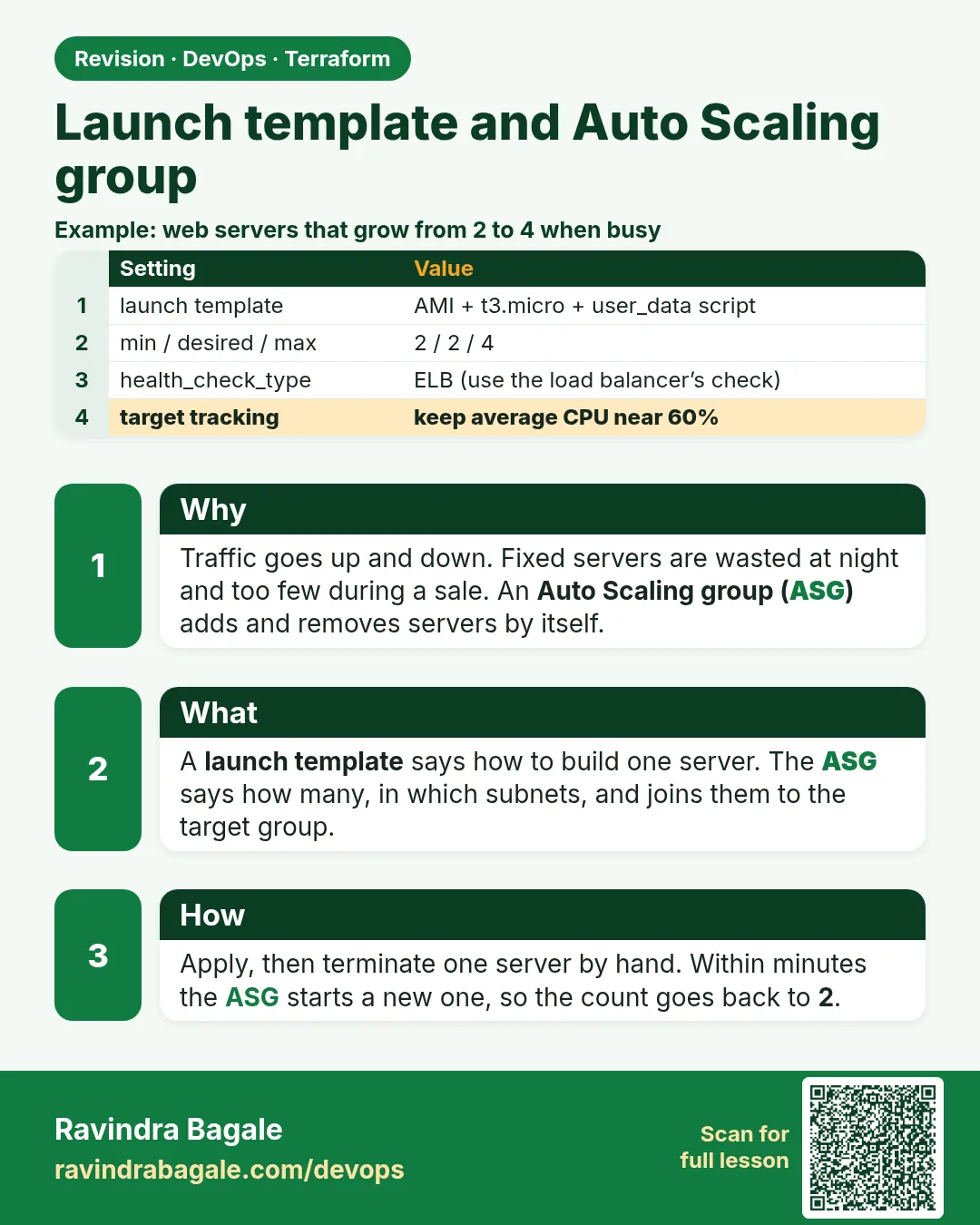
Story. Suppose we are on a Netflix-style team before a big series launch. We cannot guess how many servers we need, and at 3 a.m. nobody wants to add them by hand. An Auto Scaling group keeps a minimum number of servers running, replaces broken ones, and adds more when CPU goes up. A launch template is the recipe each new server is built from.
Steps
- Create the files.
- Run terraform apply.
- Terminate one instance in the console and watch the ASG start a new one.
- Run terraform destroy.
File layout
asg-guide/
├── versions.tf
├── variables.tf
├── main.tf
├── outputs.tf
└── user_data.sh
# ---- versions.tf ----
terraform {
  required_version = ">= 1.6"
  required_providers {
    aws = {
      source  = "hashicorp/aws"
      version = "~> 5.0"
    }
  }
}

provider "aws" {
  region = var.region
}

# ---- variables.tf ----
variable "region" {
  type    = string
  default = "ap-south-1"
}

# ---- main.tf ----
data "aws_ami" "al2023" {
  most_recent = true
  owners      = ["amazon"]
  filter {
    name   = "name"
    values = ["al2023-ami-2023.*-x86_64"]
  }
}

data "aws_vpc" "default" {
  default = true
}

data "aws_subnets" "default" {
  filter {
    name   = "vpc-id"
    values = [data.aws_vpc.default.id]
  }
}

resource "aws_launch_template" "web" {
  name_prefix   = "guide-web-"
  image_id      = data.aws_ami.al2023.id
  instance_type = "t3.micro"

  metadata_options {
    http_tokens = "required"
  }

  user_data = filebase64("${path.module}/user_data.sh")
}

resource "aws_autoscaling_group" "web" {
  name                = "guide-web-asg"
  min_size            = 1
  desired_capacity    = 2
  max_size            = 4
  vpc_zone_identifier = data.aws_subnets.default.ids
  health_check_type   = "EC2"

  launch_template {
    id      = aws_launch_template.web.id
    version = "$Latest"
  }

  tag {
    key                 = "Name"
    value               = "guide-web-asg"
    propagate_at_launch = true
  }
}

resource "aws_autoscaling_policy" "cpu50" {
  name                   = "cpu-50"
  autoscaling_group_name = aws_autoscaling_group.web.name
  policy_type            = "TargetTrackingScaling"
  target_tracking_configuration {
    predefined_metric_specification {
      predefined_metric_type = "ASGAverageCPUUtilization"
    }
    target_value = 50
  }
}

# ---- user_data.sh ----
#!/bin/bash
dnf install -y nginx
echo "ASG server $(hostname)" > /usr/share/nginx/html/index.html
systemctl enable --now nginx

# ---- outputs.tf ----
output "asg_name" {
  value = aws_autoscaling_group.web.name
}
What each line does
required_providers { aws = { version = "~> 5.0" } }— Pins the AWS provider to any 5.x release.provider "aws" { region = var.region }— Every resource is created in the region from variables.tf (Mumbai, ap-south-1, by default).name_prefix = "guide-web-"— Terraform adds a unique suffix, so a replacement template never clashes.image_id / instance_type— The same AMI and size for every server.user_data = filebase64("${path.module}/user_data.sh")— Launch templates need the boot script base64-encoded; filebase64 reads and encodes it in one step.min_size = 1 / desired_capacity = 2 / max_size = 4— Never fewer than 1, start with 2, never more than 4.vpc_zone_identifier = ...ids— Spreads servers across the default subnets, so one zone failure does not take all of them.version = "$Latest"— New servers use the newest template version.propagate_at_launch = true— Every server gets the Name tag.policy_type = "TargetTrackingScaling"— AWS adds or removes servers to hold the target.target_value = 50— Aim for 50% average CPU.
When it is green.
Plan: 3 to add, 0 to change, 0 to destroy.
Apply complete! Resources: 3 added, 0 changed, 0 destroyed.

$ aws autoscaling describe-auto-scaling-groups --auto-scaling-group-names guide-web-asg \
    --query "AutoScalingGroups[0].Instances[].HealthStatus"
["Healthy", "Healthy"]

Plan: 0 to add, 0 to change, 3 to destroy.
Destroy complete! Resources: 3 destroyed.
When it is red.
Error: waiting for Auto Scaling Group (guide-web-asg) capacity satisfied:
1 error occurred: scaling activity: Failed: ... InvalidParameterValue
Fix. Read the scaling activity: aws autoscaling describe-scaling-activities --auto-scaling-group-name guide-web-asg. Usually the instance type is not offered in one subnet zone, or the AMI is wrong. Fix the template and apply again.
What: every term in plain English
- launch template — A saved recipe for servers: AMI, type, security groups and user_data.
- Auto Scaling group (ASG) — Keeps a number of servers running, replaces failed ones and can scale.
- filebase64() — Reads user_data.sh and base64-encodes it, which launch templates require.
- min / desired / max — The smallest, current and largest number of servers.
- vpc_zone_identifier — The subnets the ASG may launch into, ideally in several zones.
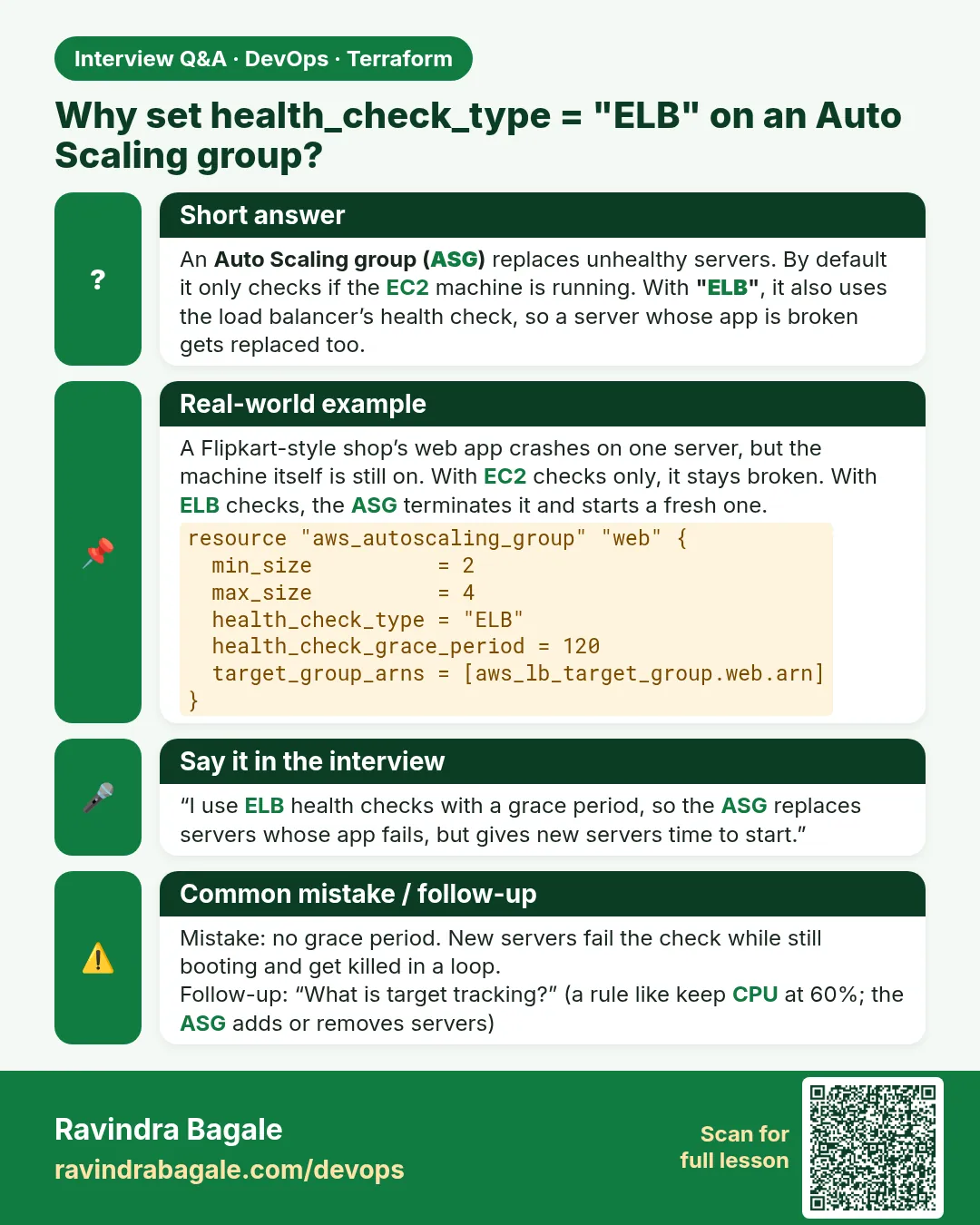
- health_check_type — EC2 checks only the machine; ELB also uses load balancer health checks.
- scaling policy — A rule that changes desired capacity, such as target tracking on CPU.
- instance refresh — Rolling replacement of servers after the launch template changes.
Example 1: Load the boot script with filebase64
Launch templates need base64 user_data. filebase64 reads and encodes user_data.sh in one step, with no heredoc inside HCL.
- Put the script in user_data.sh.
- Use filebase64 in the template.
- Validate.
resource "aws_launch_template" "web" {
  name_prefix   = "guide-web-"
  image_id      = data.aws_ami.al2023.id
  instance_type = "t3.micro"
  metadata_options {
    http_tokens = "required"
  }
  user_data = filebase64("${path.module}/user_data.sh")
}
terraform validate
Output
Success! The configuration is valid.
What it shows: If the script needs variables, use base64encode(templatefile(...)) instead.
Example 2: Create the ASG across all default subnets
Spreading servers over zones means one zone problem does not take the app down. Ola runs every ASG across at least two zones.
- Set min 1, desired 2, max 4.
- Use all default subnets.
- Use latest_version of the template.
terraform apply -auto-approve | tail -n 1
aws autoscaling describe-auto-scaling-groups --auto-scaling-group-names guide-web-asg \
  --query "AutoScalingGroups[0].Instances[].[InstanceId,AvailabilityZone,LifecycleState]" --output text
Output
Apply complete! Resources: 3 added, 0 changed, 0 destroyed.
i-0asg0a1b2c3d4e5f6 ap-south-1a InService
i-0asg0b2c3d4e5f6a7 ap-south-1b InService
What it shows: Two servers in two different zones, both InService.
Example 3: Self-healing: terminate a server
The core promise of an ASG. Kill one server and a new one appears without anybody touching anything.
- Terminate one instance.
- Wait three minutes.
- List instances again.
aws ec2 terminate-instances --instance-ids i-0asg0a1b2c3d4e5f6 > /dev/null
sleep 180
aws autoscaling describe-scaling-activities --auto-scaling-group-name guide-web-asg \
  --max-items 1 --query "Activities[0].Description" --output text
Output
Launching a new EC2 instance: i-0asg0c3d4e5f6a7b8
What it shows: The activity log explains every launch and termination.
Example 4: Scale on CPU with target tracking
During an IPL final, Hotstar traffic jumps. Target tracking adds servers to keep average CPU near the target.
- Add the policy.
- Generate CPU load.
- Watch desired capacity.
resource "aws_autoscaling_policy" "cpu" {
  name                   = "cpu-50"
  autoscaling_group_name = aws_autoscaling_group.web.name
  policy_type            = "TargetTrackingScaling"
  target_tracking_configuration {
    predefined_metric_specification {
      predefined_metric_type = "ASGAverageCPUUtilization"
    }
    target_value = 50
  }
}
aws autoscaling describe-auto-scaling-groups --auto-scaling-group-names guide-web-asg \
  --query "AutoScalingGroups[0].DesiredCapacity"
Output
4
What it shows: Under load the ASG grew to max 4. It never goes beyond max_size.
Example 5: Roll out a new page with instance refresh
Changing user_data.sh creates a new template version; instance refresh replaces servers a few at a time with no downtime.
- Add instance_refresh.
- Edit user_data.sh.
- Apply and watch.
instance_refresh {
  strategy = "Rolling"
  preferences {
    min_healthy_percentage = 50
  }
}
sed -i 's/ASG server/ASG v2 server/' user_data.sh
terraform apply -auto-approve | tail -n 1
aws autoscaling describe-instance-refreshes --auto-scaling-group-name guide-web-asg \
  --query "InstanceRefreshes[0].Status" --output text
Output
Apply complete! Resources: 0 added, 2 changed, 0 destroyed.
InProgress
What it shows: Two changed: the launch template (new version) and the ASG (starts the refresh).
Example 6: Stop Terraform fighting the autoscaler
If the policy scales to 4 and your code says desired 2, every plan tries to shrink it back. ignore_changes stops that.
- Add lifecycle ignore_changes on desired_capacity.
- Plan after scaling.
- See no change.
lifecycle {
  ignore_changes = [desired_capacity]
}
terraform plan | tail -n 1
Output
No changes. Your infrastructure matches the configuration.
What it shows: Terraform still owns min and max; the policy owns the current count.
Command cheat sheet
| Command | What it does | When to use it |
|---|---|---|
aws_launch_template |
Server recipe | Before the ASG |
filebase64(path) |
Base64 script | Static user_data |
aws_autoscaling_group |
Keeps N servers | Every tier |
aws_autoscaling_policy |
Scales on a metric | Load |
instance_refresh |
Rolling update | New template |
ignore_changes = [desired_capacity] |
Lets the policy own count | With scaling |
Verify: did it work?
-
Two InService
aws autoscaling describe-auto-scaling-groups --auto-scaling-group-names guide-web-asg --query "length(AutoScalingGroups[0].Instances)"Output
2 -
Template version
aws ec2 describe-launch-templates --launch-template-names $(terraform output -raw lt_name) --query "LaunchTemplates[0].LatestVersionNumber"Output
1 (2 after a change) -
Activity log
aws autoscaling describe-scaling-activities --auto-scaling-group-name guide-web-asg --max-items 1Output
Launching a new EC2 instance...
When it is red 1
Error: creating Auto Scaling Group: ValidationError: You must use a valid fully-formed launch template.
Cause. The template has an invalid field, often user_data not base64.
Fix, step by step
- Use filebase64 or base64encode.
- Validate again.
When it is red 2
Launching a new EC2 instance. Status Reason: The requested configuration is currently not supported.
Cause. The instance type is not offered in one subnet zone.
Fix, step by step
- Pick another type.
- Or remove that subnet.
When it is red 3
Plan: 0 to add, 1 to change, 0 to destroy. (desired_capacity 4 -> 2)
Cause. Terraform wants to undo autoscaling.
Fix, step by step
- Add ignore_changes on desired_capacity.
- Plan again.
Cleanup
terraform destroy -auto-approve
Ravindra Bagale's Tip
Treat ASG servers as cattle, not pets. Never fix one by hand; change the launch template and let the refresh replace them.
Practice tasks
Easy List ASG servers
Why: See zones.
What to do: List instances and zones.
- describe-auto-scaling-groups.
Check: Two zones.
Easy Terminate one
Why: Self-healing.
What to do: Kill a server and wait.
- terminate-instances.
Check: A new one launches.
Medium Change the page
Why: Refresh.
What to do: Edit user_data.sh and apply.
- instance_refresh block.
Check: New text from all servers.
Hard Attach to an ALB
Why: Combine guides.
What to do: Add target_group_arns from the ALB guide and health_check_type ELB.
- Two guides in one folder.
Check: ALB balances ASG servers.
Easy Say it in two lines
Why: If you can say it simply, you understand it.
What to do: Write two short lines about this lesson for a fresher.
- Write the problem it solves.
- Write the one command or file you use.
- Read it aloud.
Check: A fresher understands it without a question.
Easy Start a safe lab folder
Why: Practice needs a throwaway place.
What to do: Make a new folder with versions.tf and a random_pet resource, so no AWS cost.
- mkdir tf-lab and cd into it.
- Add the hashicorp/random provider and one random_pet.
- Run terraform init and terraform apply.
Check: Apply complete! with 1 added.
Medium Break it on purpose
Why: You must know the red output by face.
What to do: Cause one error from the red part of this lesson and fix it.
- Follow one red section.
- Copy the exact message to your notes.
- Write the fix in one line.
Check: You fixed it without searching the web.
Medium Run it twice
Why: A second run must be quiet.
What to do: Run the same plan two times with no edits.
- Run terraform plan.
- Run it again.
- Explain any change it still shows.
Check: The second plan says No changes, or you can explain each line.
Medium Write a runbook page
Why: At 2 a.m. nobody remembers flags.
What to do: Write a one-page runbook for this lesson.
- Title, when to use, exact commands, how to check, how to undo.
Check: A teammate can follow it alone.
Medium Run it from a pipeline
Why: Real teams run Terraform from CI, not from laptops.
What to do: Run the main command of this lesson inside a GitHub Actions or Jenkins job.
- Add a job with hashicorp/setup-terraform or a Terraform Docker image.
- Give it AWS access through an IAM role, never a key in the file.
- Run init, then the command from this lesson.
Check: The job log shows the same output you saw on your laptop.
Medium Check the cost
Why: Labs left running cost real money.
What to do: Find what this lesson would cost per day if you forgot to destroy it.
- Open the AWS Pricing Calculator.
- Add each resource from your plan.
- Write the daily cost in your notes.
Check: You know the daily cost and you ran terraform destroy.
Hard Draw the flow top to bottom
Why: A drawing shows the order of work.
What to do: Draw this lesson as boxes from top to bottom.
- Start at your code, go through plan and state, end at AWS.
- Mark where each command reads or writes.
Check: Each box matches a real step you ran.
Hard Explain it like an interview
Why: Interviewers want real stories.
What to do: Record a 60 second answer about this lesson.
- Say the problem, the command, and one error you hit.
Check: Your answer has a real command and a real error message.
Homework: try at home
Try at home
Build an ASG of 2 to 6 servers that scales at 40 percent CPU, uses filebase64 for user_data.sh and ignores desired_capacity changes.
Recap
- Launch template is the recipe; ASG is the manager.
- filebase64 loads the script with no heredoc.
- ASGs replace failed servers.
- Target tracking scales on load.
- ignore_changes stops plan fights.
FAQ
Launch template or launch configuration?
Launch template; launch configurations are retired.
Why name_prefix?
Templates need unique names; the prefix adds a suffix.
Does the ASG cost money?
Only the servers it runs.
Can I scale on requests?
Yes, with ALBRequestCountPerTarget.
Interview questions
-
What is the difference between min, desired and max?
Smallest allowed, current target and largest allowed number of servers.
-
How do you update servers in an ASG without downtime?
New template version plus a rolling instance refresh.
-
Why use ignore_changes with autoscaling?
So Terraform does not reset desired capacity changed by policies.
-
EC2 vs ELB health checks?
EC2 checks the machine; ELB checks the application through the load balancer.
Quick quiz
Q1. Function for base64 script?
filebase64
Q2. Max servers here?
4
Q3. CPU target in the example?
50
Q4. Refresh strategy?
Rolling
Q5. Field to ignore?
desired_capacity
Lab
- Pick one guide and create its folder with versions.tf, variables.tf, main.tf and outputs.tf.
- Run terraform init, fmt and validate.
- Run terraform plan and read every line that will be added.
- Run terraform apply and test with curl or the AWS CLI.
- Run terraform destroy and confirm Destroy complete!
- Repeat for the next guide.
Practice task
Combine the IAM guide with the EC2 guide so the instance gets the instance profile, then connect with Session Manager.
Ravindra Bagale's Tip
Keep one folder per guide. Small folders are easy to apply and easy to destroy.
In short
- Use data sources for AMIs and VPCs instead of hard-coded ids.
- RDS needs a DB subnet group across two zones; let RDS manage the password.
- S3 settings are separate resources in provider 5.x.
- Security groups can trust other security groups.
- An ALB needs a listener, a target group and targets.
- An ASG builds servers from a launch template.
Samajla ka?
 Revision card
 Interview card