Chapter 44: Terraform AWS Guides EC2 RDS S3 Security Groups IAM ALB and Auto Scaling
44.4 How to create security groups that reference each other
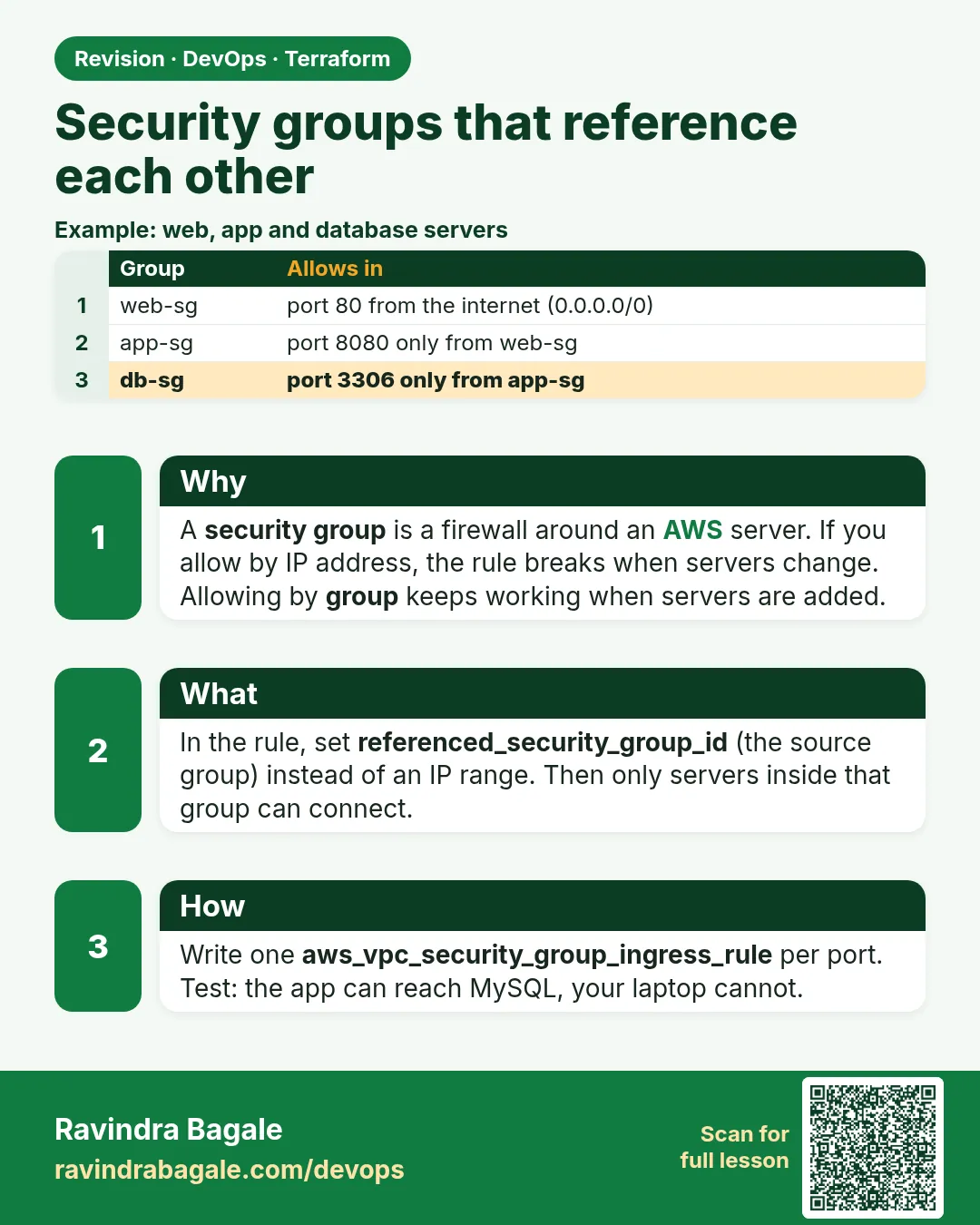
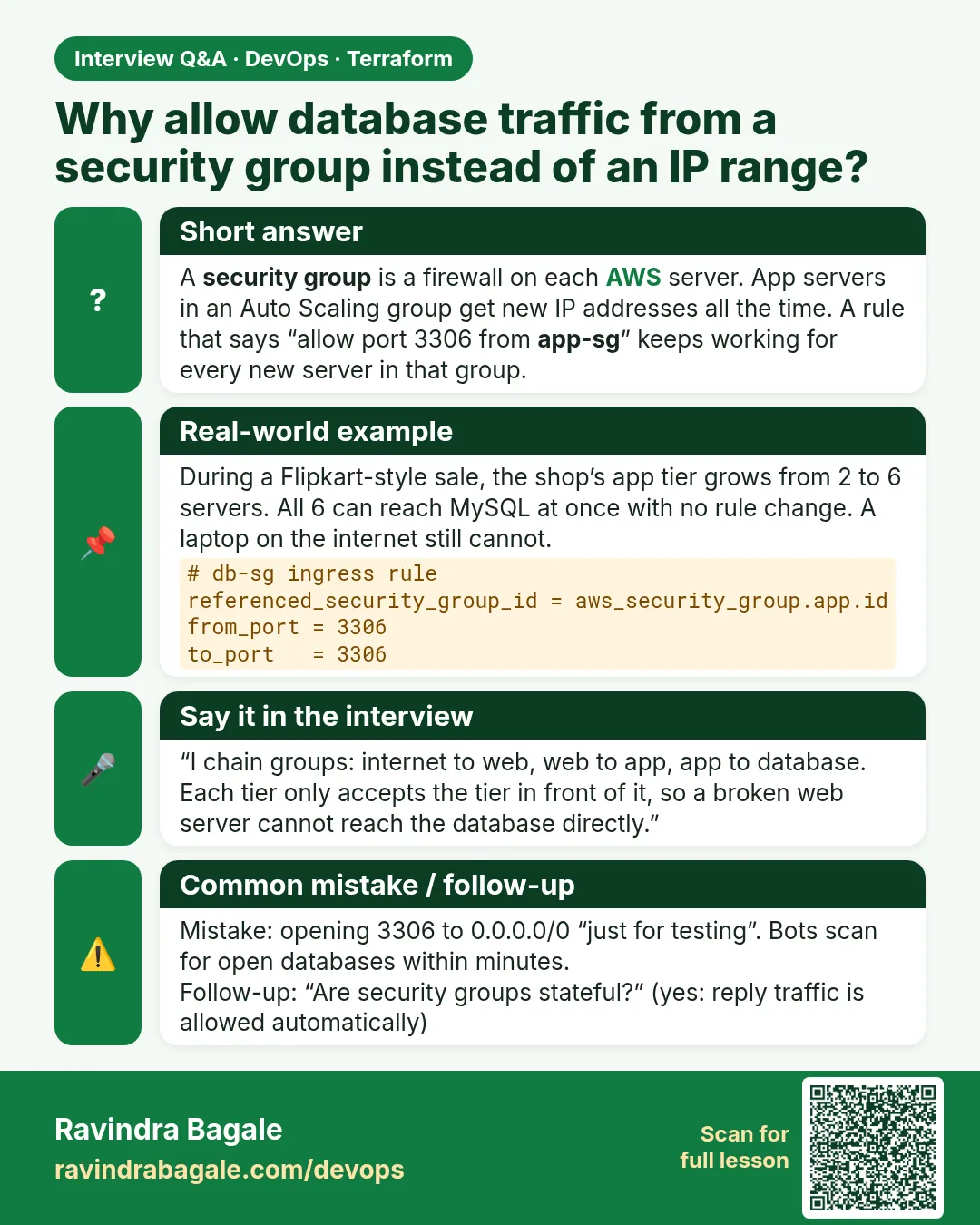
Story. Suppose we are on a Netflix-style team where the app servers must accept traffic only from the load balancer, never directly from the internet. Writing IP ranges breaks every time a load balancer node changes IP. Instead a security group rule can name another security group as the source. This one idea is the base of every 3-tier design in the next chapters.
Steps
- Create the files.
- Run terraform apply.
- Open the app group in the console and see the ALB group named as the source.
- Run terraform destroy.
File layout
sg-guide/
├── versions.tf
├── variables.tf
├── main.tf
└── outputs.tf
# ---- versions.tf ----
terraform {
  required_version = ">= 1.6"
  required_providers {
    aws = {
      source  = "hashicorp/aws"
      version = "~> 5.0"
    }
  }
}

provider "aws" {
  region = var.region
}

# ---- variables.tf ----
variable "region" {
  type    = string
  default = "ap-south-1"
}

# ---- main.tf ----
data "aws_vpc" "default" {
  default = true
}

data "aws_subnets" "default" {
  filter {
    name   = "vpc-id"
    values = [data.aws_vpc.default.id]
  }
}

resource "aws_security_group" "alb" {
  name        = "guide-alb"
  description = "HTTP from the internet"
  vpc_id      = data.aws_vpc.default.id
}

resource "aws_security_group" "app" {
  name        = "guide-app"
  description = "Port 8080 from the ALB only"
  vpc_id      = data.aws_vpc.default.id
}

resource "aws_vpc_security_group_ingress_rule" "alb_http" {
  security_group_id = aws_security_group.alb.id
  cidr_ipv4         = "0.0.0.0/0"
  ip_protocol       = "tcp"
  from_port         = 80
  to_port           = 80
}

resource "aws_vpc_security_group_ingress_rule" "app_from_alb" {
  security_group_id            = aws_security_group.app.id
  referenced_security_group_id = aws_security_group.alb.id
  ip_protocol                  = "tcp"
  from_port                    = 8080
  to_port                      = 8080
}

resource "aws_vpc_security_group_egress_rule" "alb_all" {
  security_group_id = aws_security_group.alb.id
  cidr_ipv4         = "0.0.0.0/0"
  ip_protocol       = "-1"
}

resource "aws_vpc_security_group_egress_rule" "app_all" {
  security_group_id = aws_security_group.app.id
  cidr_ipv4         = "0.0.0.0/0"
  ip_protocol       = "-1"
}

# ---- outputs.tf ----
output "alb_sg_id" {
  value = aws_security_group.alb.id
}

output "app_sg_id" {
  value = aws_security_group.app.id
}
What each line does
required_providers { aws = { version = "~> 5.0" } }— Pins the AWS provider to any 5.x release.provider "aws" { region = var.region }— Every resource is created in the region from variables.tf (Mumbai, ap-south-1, by default).resource "aws_security_group" "alb"— Firewall for the load balancer.resource "aws_security_group" "app"— Firewall for the app servers.cidr_ipv4 = "0.0.0.0/0" (alb_http)— The ALB accepts HTTP from anyone.referenced_security_group_id = aws_security_group.alb.id— The app accepts port 8080 only from members of the ALB group.from_port = 8080 / to_port = 8080— The app port.egress rules ip_protocol = "-1"— Both groups can reach out, for updates and health checks.
When it is green.
Plan: 6 to add, 0 to change, 0 to destroy.
Apply complete! Resources: 6 added, 0 changed, 0 destroyed.
alb_sg_id = "sg-0aaa..."
app_sg_id = "sg-0bbb..."

Plan: 0 to add, 0 to change, 6 to destroy.
Destroy complete! Resources: 6 destroyed.
When it is red.
Error: creating Security Group (guide-alb): InvalidGroup.Duplicate:
The security group 'guide-alb' already exists for VPC 'vpc-...'
Fix. A group with this name already exists, often from a console test. Delete it, import it with an import block, or change the name.
What: every term in plain English
- security group — A stateful firewall on a network interface that only allows listed traffic.
- source by reference — A rule whose source is another security group, not an IP range.
- referenced_security_group_id — The Terraform field that names the source group in a rule.
- cidr_ipv4 — The field for an IP range source, such as 0.0.0.0/0 for the public.
- ingress / egress — Inbound / outbound rules.
- stateful — Replies to allowed requests are allowed automatically.
- rule resource — aws_vpc_security_group_ingress_rule: one rule per resource, easy to change alone.
- cycle — Two groups that reference each other inline can create a dependency loop; separate rule resources avoid it.
Example 1: ALB open to the public, app open only to the ALB
At Zomato only the load balancer faces the internet. App servers accept traffic only from members of the ALB group.
- Create alb and app groups.
- Allow 80 from 0.0.0.0/0 on alb.
- Allow 8080 from the alb group on app.
resource "aws_vpc_security_group_ingress_rule" "alb_http" {
  security_group_id = aws_security_group.alb.id
  cidr_ipv4         = "0.0.0.0/0"
  from_port         = 80
  to_port           = 80
  ip_protocol       = "tcp"
}

resource "aws_vpc_security_group_ingress_rule" "app_from_alb" {
  security_group_id            = aws_security_group.app.id
  referenced_security_group_id = aws_security_group.alb.id
  from_port                    = 8080
  to_port                      = 8080
  ip_protocol                  = "tcp"
}
Output
Plan: 4 to add, 0 to change, 0 to destroy.
What it shows: Two groups and two rules. The app rule never mentions an IP.
Example 2: See the reference in the console output
A reviewer should be able to prove the source is a group. The CLI shows UserIdGroupPairs instead of an IP range.
- Describe the app group.
- Read IpPermissions.
- Find the alb group id.
aws ec2 describe-security-groups --group-ids $(terraform output -raw app_sg_id) \
  --query "SecurityGroups[0].IpPermissions[0].[FromPort,UserIdGroupPairs[0].GroupId,IpRanges]"
Output
[
    8080,
    "sg-0alb1234567890abc",
    []
]
What it shows: IpRanges is empty. Only members of sg-0alb... can connect.
Example 3: Add a third tier: database from app
The same pattern chains as many tiers as you need. HDFC Bank architectures chain web, app, DB this way.
- Create a db group.
- Allow 3306 from app.
- Plan.
resource "aws_security_group" "db" {
  name   = "guide-db"
  vpc_id = data.aws_vpc.default.id
}

resource "aws_vpc_security_group_ingress_rule" "db_from_app" {
  security_group_id            = aws_security_group.db.id
  referenced_security_group_id = aws_security_group.app.id
  from_port                    = 3306
  to_port                      = 3306
  ip_protocol                  = "tcp"
}
Output
  # aws_security_group.db will be created
  # aws_vpc_security_group_ingress_rule.db_from_app will be created
Plan: 2 to add, 0 to change, 0 to destroy.
What it shows: alb to app to db: each link trusts only the tier before it.
Example 4: Avoid a cycle with separate rule resources
Two groups that point at each other inline cause "Cycle" errors. Separate rule resources break the loop because the groups are created first.
- Remove inline ingress blocks.
- Create groups empty.
- Add rules as separate resources.
resource "aws_security_group" "a" {
  name   = "guide-a"
  vpc_id = data.aws_vpc.default.id
}

resource "aws_security_group" "b" {
  name   = "guide-b"
  vpc_id = data.aws_vpc.default.id
}

resource "aws_vpc_security_group_ingress_rule" "a_from_b" {
  security_group_id            = aws_security_group.a.id
  referenced_security_group_id = aws_security_group.b.id
  ip_protocol                  = "tcp"
  from_port                    = 9000
  to_port                      = 9000
}

resource "aws_vpc_security_group_ingress_rule" "b_from_a" {
  security_group_id            = aws_security_group.b.id
  referenced_security_group_id = aws_security_group.a.id
  ip_protocol                  = "tcp"
  from_port                    = 9000
  to_port                      = 9000
}
Output
Success! The configuration is valid.
What it shows: Both groups first, then both rules. No loop.
Example 5: Add the outbound rule Terraform removed
Terraform deletes the default allow-all egress. Without it, servers cannot reach package mirrors, and installs time out.
- Add an egress rule.
- Use ip_protocol -1.
- Plan.
resource "aws_vpc_security_group_egress_rule" "app_out" {
  security_group_id = aws_security_group.app.id
  cidr_ipv4         = "0.0.0.0/0"
  ip_protocol       = "-1"
}
Output
# aws_vpc_security_group_egress_rule.app_out will be created
What it shows: -1 means all protocols and all ports.
Example 6: Test the rule with nc
Rules on paper are not proof. Test from a server in the source group and from one outside it.
- From an ALB-group member, test app:8080.
- From a server without the group, test again.
- Compare.
nc -zv -w 3 10.0.1.25 8080
Output
Connection to 10.0.1.25 8080 port [tcp/http-alt] succeeded!
nc: connect to 10.0.1.25 port 8080 (tcp) timed out
What it shows: The first line is from a group member, the second from an outsider.
Command cheat sheet
| Command | What it does | When to use it |
|---|---|---|
aws_security_group |
Empty group | Each tier |
aws_vpc_security_group_ingress_rule |
One inbound rule | Every link |
referenced_security_group_id |
Group as source | Tier chains |
cidr_ipv4 |
IP range source | Public or admin |
aws_vpc_security_group_egress_rule |
Outbound rule | Allow updates |
nc -zv -w 3 HOST PORT |
Port test | Prove rules |
Verify: did it work?
-
Source is a group
aws ec2 describe-security-groups --group-ids $APP --query "SecurityGroups[0].IpPermissions[0].UserIdGroupPairs[0].GroupId"Output
"sg-0alb..." -
No IP ranges on app
aws ec2 describe-security-groups --group-ids $APP --query "SecurityGroups[0].IpPermissions[0].IpRanges"Output
[] -
Egress exists
terraform state list | grep egressOutput
aws_vpc_security_group_egress_rule.app_out
When it is red 1
Error: Cycle: aws_security_group.a, aws_security_group.b
Cause. Two groups reference each other with inline rules.
Fix, step by step
- Move rules into separate rule resources.
- Plan again.
When it is red 2
Error: InvalidPermission.Duplicate
Cause. Same rule defined inline and as a resource.
Fix, step by step
- Keep only rule resources.
- Remove inline blocks.
When it is red 3
Error: InvalidGroup.NotFound: The security group 'sg-...' does not exist in VPC
Cause. The groups are in different VPCs.
Fix, step by step
- Use the same vpc_id for both.
- Groups can only reference groups in the same VPC (or peered).
Cleanup
terraform destroy -auto-approve
Ravindra Bagale's Tip
Name each rule after its link, like app_from_alb. The plan then reads like a sentence and reviews take seconds.
Practice tasks
Easy Read the rules
Why: CLI.
What to do: Describe the app group.
- IpPermissions.
Check: Source group id.
Easy Add HTTPS
Why: Public rule.
What to do: Allow 443 on the ALB.
- New ingress rule.
Check: 1 to add.
Medium Chain a DB
Why: Third tier.
What to do: Add db_from_app on 3306.
- Copy the pattern.
Check: 2 to add.
Hard Break and fix a cycle
Why: Learn the error.
What to do: Write inline mutual rules, see Cycle, fix it.
- Separate resources.
Check: Valid config.
Easy Say it in two lines
Why: If you can say it simply, you understand it.
What to do: Write two short lines about this lesson for a fresher.
- Write the problem it solves.
- Write the one command or file you use.
- Read it aloud.
Check: A fresher understands it without a question.
Easy Start a safe lab folder
Why: Practice needs a throwaway place.
What to do: Make a new folder with versions.tf and a random_pet resource, so no AWS cost.
- mkdir tf-lab and cd into it.
- Add the hashicorp/random provider and one random_pet.
- Run terraform init and terraform apply.
Check: Apply complete! with 1 added.
Medium Break it on purpose
Why: You must know the red output by face.
What to do: Cause one error from the red part of this lesson and fix it.
- Follow one red section.
- Copy the exact message to your notes.
- Write the fix in one line.
Check: You fixed it without searching the web.
Medium Run it twice
Why: A second run must be quiet.
What to do: Run the same plan two times with no edits.
- Run terraform plan.
- Run it again.
- Explain any change it still shows.
Check: The second plan says No changes, or you can explain each line.
Medium Write a runbook page
Why: At 2 a.m. nobody remembers flags.
What to do: Write a one-page runbook for this lesson.
- Title, when to use, exact commands, how to check, how to undo.
Check: A teammate can follow it alone.
Medium Run it from a pipeline
Why: Real teams run Terraform from CI, not from laptops.
What to do: Run the main command of this lesson inside a GitHub Actions or Jenkins job.
- Add a job with hashicorp/setup-terraform or a Terraform Docker image.
- Give it AWS access through an IAM role, never a key in the file.
- Run init, then the command from this lesson.
Check: The job log shows the same output you saw on your laptop.
Medium Check the cost
Why: Labs left running cost real money.
What to do: Find what this lesson would cost per day if you forgot to destroy it.
- Open the AWS Pricing Calculator.
- Add each resource from your plan.
- Write the daily cost in your notes.
Check: You know the daily cost and you ran terraform destroy.
Hard Draw the flow top to bottom
Why: A drawing shows the order of work.
What to do: Draw this lesson as boxes from top to bottom.
- Start at your code, go through plan and state, end at AWS.
- Mark where each command reads or writes.
Check: Each box matches a real step you ran.
Hard Explain it like an interview
Why: Interviewers want real stories.
What to do: Record a 60 second answer about this lesson.
- Say the problem, the command, and one error you hit.
Check: Your answer has a real command and a real error message.
Homework: try at home
Try at home
Write security groups for a 3-tier HR portal: ALB 443 public, app 9000 from ALB, PostgreSQL 5432 from app.
Recap
- Reference groups, not IPs, between tiers.
- Use one resource per rule.
- Separate rules avoid cycles.
- Add egress yourself.
- Prove each rule with nc.
FAQ
Can a group reference itself?
Yes, to let members talk to each other.
Do references work across VPCs?
Only with peering in the same region.
How many rules per group?
60 inbound by default; quota can be raised.
Is an empty IpRanges good?
Yes for internal tiers.
Interview questions
-
Why reference security groups instead of CIDRs?
The rule follows instances as they scale or change IP.
-
How do you avoid security group cycles?
Create groups empty and add rules as separate resources.
-
Are security groups stateful?
Yes.
-
What does Terraform do to default egress?
Removes it; you must declare egress.
Quick quiz
Q1. Field for group source?
referenced_security_group_id
Q2. Field for IP source?
cidr_ipv4
Q3. All-protocol value?
-1
Q4. App port here?
8080
Q5. Error for mutual inline rules?
Cycle
Samajla ka?
 Revision card
 Interview card