Chapter 44: Terraform AWS Guides EC2 RDS S3 Security Groups IAM ALB and Auto Scaling
44.2 How to launch an RDS MySQL database with Terraform
Story. Suppose we are building the backend for an Infosys client's leave-management app and the team needs a managed MySQL database. Running MySQL on our own EC2 means we patch it, back it up and fail it over ourselves. RDS does those jobs, and Terraform makes the database repeatable. The big rule in this guide: the password is never written in a file. RDS creates it and keeps it in AWS Secrets Manager.
Steps
- Create a folder rds-guide and the four files.
- Run terraform init and terraform validate.
- Run terraform plan and confirm 5 to add.
- Run terraform apply; wait about 6 to 10 minutes.
- Open Secrets Manager in the console and find the rds!db secret.
- Run terraform destroy.
File layout
rds-guide/
├── versions.tf
├── variables.tf
├── main.tf
└── outputs.tf
# ---- versions.tf ----
terraform {
  required_version = ">= 1.6"
  required_providers {
    aws = {
      source  = "hashicorp/aws"
      version = "~> 5.0"
    }
  }
}

provider "aws" {
  region = var.region
}

# ---- variables.tf ----
variable "region" {
  type    = string
  default = "ap-south-1"
}

variable "db_name" {
  type    = string
  default = "appdb"
}

variable "db_username" {
  type    = string
  default = "appadmin"
}

# ---- main.tf ----
data "aws_vpc" "default" {
  default = true
}

data "aws_subnets" "default" {
  filter {
    name   = "vpc-id"
    values = [data.aws_vpc.default.id]
  }
}

resource "aws_db_subnet_group" "db" {
  name       = "guide-rds-subnets"
  subnet_ids = data.aws_subnets.default.ids
}

resource "aws_security_group" "db" {
  name        = "guide-rds-mysql"
  description = "MySQL from inside the VPC only"
  vpc_id      = data.aws_vpc.default.id
}

resource "aws_vpc_security_group_ingress_rule" "mysql" {
  security_group_id = aws_security_group.db.id
  cidr_ipv4         = data.aws_vpc.default.cidr_block
  ip_protocol       = "tcp"
  from_port         = 3306
  to_port           = 3306
}

resource "aws_db_parameter_group" "mysql" {
  name   = "guide-mysql8"
  family = "mysql8.0"

  parameter {
    name  = "require_secure_transport"
    value = "1"
  }
}

resource "aws_db_instance" "app" {
  identifier                  = "guide-mysql"
  engine                      = "mysql"
  engine_version              = "8.0"
  instance_class              = "db.t3.micro"
  allocated_storage           = 20
  storage_type                = "gp3"
  storage_encrypted           = true
  db_name                     = var.db_name
  username                    = var.db_username
  manage_master_user_password = true
  db_subnet_group_name        = aws_db_subnet_group.db.name
  vpc_security_group_ids      = [aws_security_group.db.id]
  parameter_group_name        = aws_db_parameter_group.mysql.name
  publicly_accessible         = false
  backup_retention_period     = 7
  skip_final_snapshot         = true
  deletion_protection         = false
}

# ---- outputs.tf ----
output "db_endpoint" {
  value = aws_db_instance.app.endpoint
}

output "db_secret_arn" {
  value = aws_db_instance.app.master_user_secret[0].secret_arn
}
What each line does
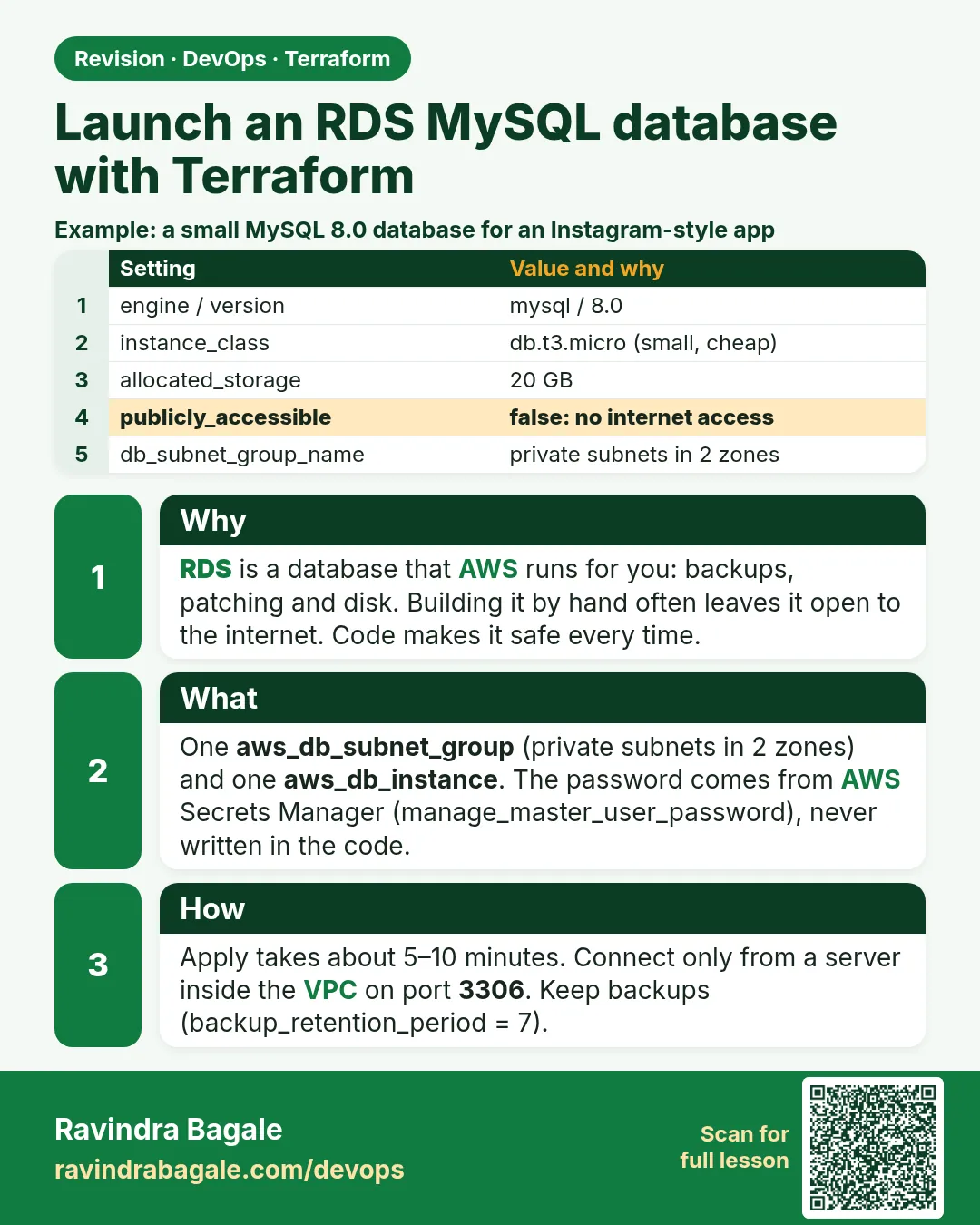
required_providers { aws = { version = "~> 5.0" } }— Pins the AWS provider to any 5.x release.provider "aws" { region = var.region }— Every resource is created in the region from variables.tf (Mumbai, ap-south-1, by default).resource "aws_db_subnet_group" "db"— The list of subnets RDS can place the database in. AWS requires subnets in at least two Availability Zones.subnet_ids = data.aws_subnets.default.ids— Uses every default subnet, which covers several zones.cidr_ipv4 = data.aws_vpc.default.cidr_block— Port 3306 only from addresses inside the VPC, never from the internet.family = "mysql8.0"— The parameter group must match the engine version.require_secure_transport = "1"— Clients must use TLS to connect.engine = "mysql" / engine_version = "8.0"— MySQL 8.0; AWS picks the latest minor version.instance_class = "db.t3.micro"— A small class for learning.storage_encrypted = true— Encrypts the disk and backups.manage_master_user_password = true— RDS generates the password and stores it in Secrets Manager. No password in code or state.publicly_accessible = false— No public IP on the database.backup_retention_period = 7— Keeps seven days of automatic backups.skip_final_snapshot = true— Lets destroy finish without a snapshot. Lab only; set false in production.master_user_secret[0].secret_arn— Output that tells the app where to read the password.
When it is green.
Plan: 5 to add, 0 to change, 0 to destroy.
aws_db_instance.app: Still creating... [5m0s elapsed]
aws_db_instance.app: Creation complete after 6m12s [id=db-ABCDEFG...]
Apply complete! Resources: 5 added, 0 changed, 0 destroyed.
Outputs:
db_endpoint   = "guide-mysql.cxxxxxxx.ap-south-1.rds.amazonaws.com:3306"
db_secret_arn = "arn:aws:secretsmanager:ap-south-1:<account-id>:secret:rds!db-..."

Plan: 0 to add, 0 to change, 5 to destroy.
Destroy complete! Resources: 5 destroyed.
When it is red.
Error: creating RDS DB Instance (guide-mysql): InvalidParameterCombination:
Cannot find version 8.0 for mysql
  -- or --
Error: creating RDS DB Subnet Group: DBSubnetGroupDoesNotCoverEnoughAZs
Fix. For the version error, run aws rds describe-db-engine-versions --engine mysql --query "DBEngineVersions[].EngineVersion" and use a listed version. For the subnet group error, add a subnet from a second Availability Zone. Creating RDS takes 5 to 10 minutes, so a long wait is normal.
What: every term in plain English
- RDS — Managed database service. AWS handles install, patches and backups.
- engine / engine_version — The database type and version, for example mysql 8.0.
- instance_class — The size of the database server, such as db.t3.micro.
- DB subnet group — The subnets RDS can use; must cover at least two zones.
- manage_master_user_password — RDS generates the admin password and stores it in Secrets Manager.
- publicly_accessible — If false, the database gets no public IP.
- skip_final_snapshot — If true, destroy does not take a last backup. Labs only.
- endpoint / address — The DNS name apps use to connect.
Example 1: Create the subnet group from the default VPC
Even a tiny lab database needs a DB subnet group with two zones. Reading subnets from data saves you from copying ids.
- Read default VPC subnets.
- Create aws_db_subnet_group.
- Check zones in the CLI.
resource "aws_db_subnet_group" "db" {
  name       = "guide-db"
  subnet_ids = data.aws_subnets.default.ids
}
aws rds describe-db-subnet-groups --db-subnet-group-name guide-db \
  --query "DBSubnetGroups[0].Subnets[].SubnetAvailabilityZone.Name"
Output
[
    "ap-south-1a",
    "ap-south-1b",
    "ap-south-1c"
]
What it shows: The default VPC has one subnet per zone, so the group covers all three.
Example 2: Let RDS manage the password
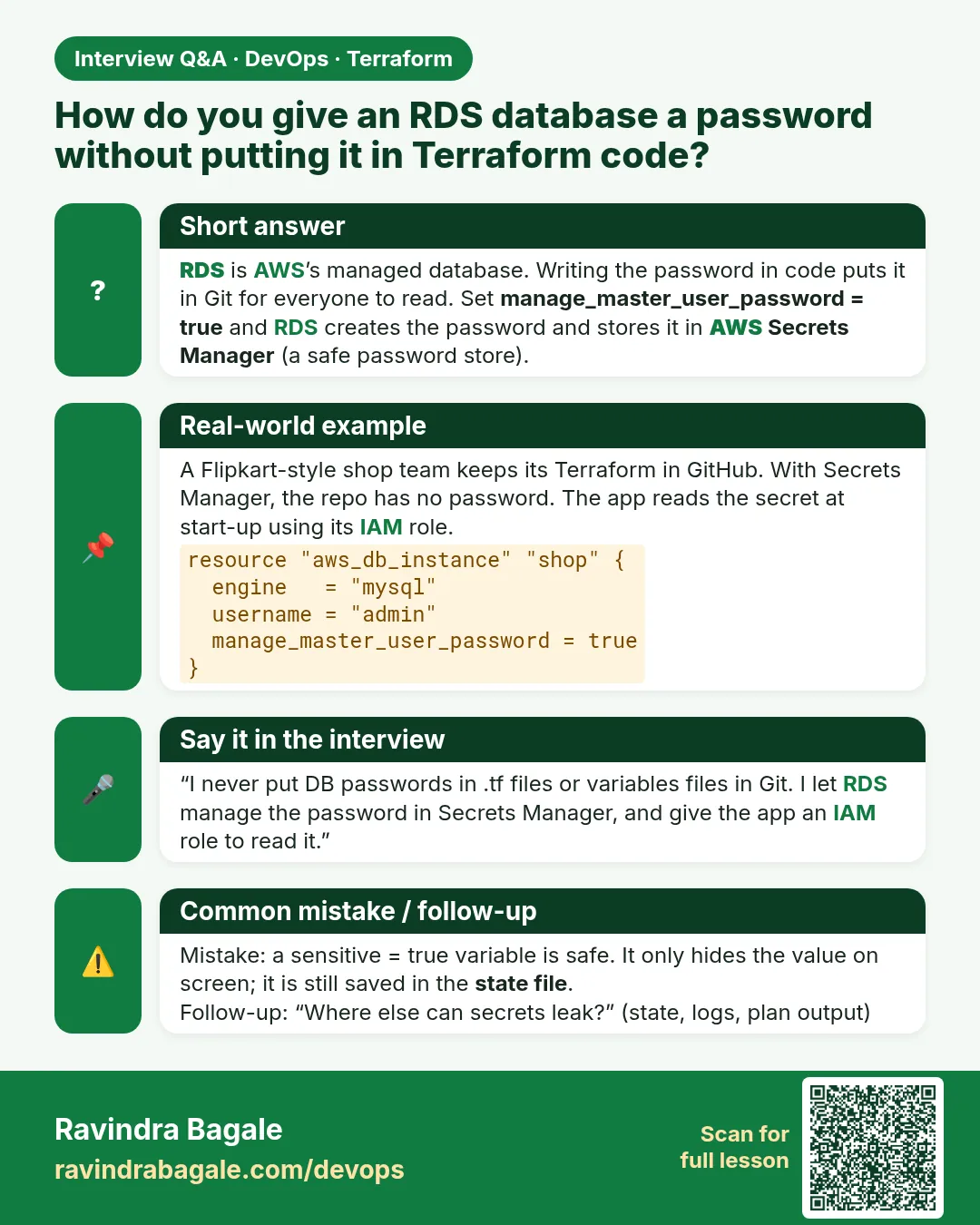
HDFC and ICICI policies forbid passwords in code or tfvars. With manage_master_user_password, the password is created in Secrets Manager and never appears in Terraform.
- Set manage_master_user_password = true.
- Do not set password.
- Output the secret ARN.
resource "aws_db_instance" "mysql" {
  identifier                  = "guide-mysql"
  engine                      = "mysql"
  engine_version              = "8.0"
  instance_class              = "db.t3.micro"
  allocated_storage           = 20
  db_subnet_group_name        = aws_db_subnet_group.db.name
  vpc_security_group_ids      = [aws_security_group.db.id]
  username                    = "admin"
  manage_master_user_password = true
  storage_encrypted           = true
  publicly_accessible         = false
  skip_final_snapshot         = true
}

output "db_secret_arn" {
  value = aws_db_instance.mysql.master_user_secret[0].secret_arn
}
Output
aws_db_instance.mysql: Creation complete after 6m12s [id=db-QRSTUVWXYZ123456]
db_secret_arn = "arn:aws:secretsmanager:ap-south-1:111122223333:secret:rds!db-1a2b3c4d-AbCdEf"
What it shows: The ARN is safe to print. The password inside it is not shown anywhere in the plan or outputs.
Example 3: Read only the secret keys, not the value
Never paste a database password into a terminal you might screen-share. Print the keys to confirm the secret exists.
- Get the secret.
- Print its JSON keys.
- Use the value only inside the app.
aws secretsmanager get-secret-value --secret-id $(terraform output -raw db_secret_arn) \
  --query SecretString --output text | python3 -c "import sys,json; print(sorted(json.load(sys.stdin)))"
Output
['password', 'username']
What it shows: Apps read this secret at runtime with an IAM role.
Example 4: Allow MySQL only from an app group
A database rule open to 0.0.0.0/0 is a breach waiting to happen. Allow 3306 only from the security group of the servers that need it.
- Create app and db groups.
- Allow 3306 from the app group.
- Plan and read the rule.
resource "aws_vpc_security_group_ingress_rule" "mysql_from_app" {
  security_group_id            = aws_security_group.db.id
  referenced_security_group_id = aws_security_group.app.id
  from_port                    = 3306
  to_port                      = 3306
  ip_protocol                  = "tcp"
}
Output
# aws_vpc_security_group_ingress_rule.mysql_from_app will be created
    + from_port   = 3306
    + ip_protocol = "tcp"
What it shows: Only servers carrying the app group can open a connection.
Example 5: Check the database settings after apply
Auditors at Deloitte ask for proof: not public, encrypted, correct engine. One CLI query shows all three.
- Describe the instance.
- Query the three fields.
- Compare with the code.
aws rds describe-db-instances --db-instance-identifier guide-mysql \
  --query "DBInstances[0].[PubliclyAccessible,StorageEncrypted,EngineVersion]"
Output
[
    false,
    true,
    "8.0.39"
]
What it shows: engine_version 8.0 lets AWS pick the latest 8.0 minor release.
Example 6: Resize the database with apply_immediately
Changing instance_class normally waits for the maintenance window. In a lab you can apply it now; in production pick a quiet hour.
- Change the class to db.t3.small.
- Set apply_immediately = true.
- Plan and apply.
terraform plan | grep -E "instance_class|Plan:"
terraform apply -auto-approve | tail -n 1
Output
      ~ instance_class = "db.t3.micro" -> "db.t3.small"
Plan: 0 to add, 1 to change, 0 to destroy.
Apply complete! Resources: 0 added, 1 changed, 0 destroyed.
What it shows: The database restarts during the change, so connections drop for a minute or two.
Command cheat sheet
| Command | What it does | When to use it |
|---|---|---|
aws_db_subnet_group |
Subnets for RDS | Before the DB |
manage_master_user_password = true |
Secret in Secrets Manager | Always |
publicly_accessible = false |
No public IP | Always |
storage_encrypted = true |
KMS encryption | Always |
aws rds describe-db-instances |
DB details | Verify |
aws secretsmanager get-secret-value |
Read a secret | Apps only |
Verify: did it work?
-
DB available
aws rds describe-db-instances --db-instance-identifier guide-mysql --query "DBInstances[0].DBInstanceStatus"Output
"available" -
Not public
aws rds describe-db-instances --db-instance-identifier guide-mysql --query "DBInstances[0].PubliclyAccessible"Output
false -
Secret exists
terraform output -raw db_secret_arnOutput
arn:aws:secretsmanager:...
When it is red 1
Error: creating RDS DB Instance: InvalidParameterCombination: RDS does not support creating a DB instance with the following combination: DBInstanceClass=db.t2.micro, Engine=mysql, EngineVersion=8.0
Cause. The class is too old for this engine version.
Fix, step by step
- Use db.t3.micro or newer.
- Plan again.
When it is red 2
Error: DBSubnetGroupDoesNotCoverEnoughAZs
Cause. The subnet group covers only one zone.
Fix, step by step
- Add a subnet in a second zone.
- Apply again.
When it is red 3
Error: final_snapshot_identifier is required when skip_final_snapshot is false
Cause. Destroy wants a final backup name.
Fix, step by step
- For labs set skip_final_snapshot = true.
- For production give final_snapshot_identifier.
Cleanup
terraform destroy -auto-approve
Ravindra Bagale's Tip
RDS is the slowest resource in most stacks. Start its apply first, then write the rest of your code while it builds.
Practice tasks
Easy Find the endpoint
Why: Outputs.
What to do: Print db_endpoint.
- terraform output.
Check: A rds.amazonaws.com name.
Easy Check encryption
Why: Audit.
What to do: Query StorageEncrypted.
- describe-db-instances.
Check: true.
Medium Add backups
Why: Safety.
What to do: Set backup_retention_period = 7.
- Plan shows ~.
Check: 1 to change.
Hard Switch to PostgreSQL
Why: Engines.
What to do: Change to postgres 16 and port 5432.
- engine, port, rule.
Check: Plan shows replace.
Easy Say it in two lines
Why: If you can say it simply, you understand it.
What to do: Write two short lines about this lesson for a fresher.
- Write the problem it solves.
- Write the one command or file you use.
- Read it aloud.
Check: A fresher understands it without a question.
Easy Start a safe lab folder
Why: Practice needs a throwaway place.
What to do: Make a new folder with versions.tf and a random_pet resource, so no AWS cost.
- mkdir tf-lab and cd into it.
- Add the hashicorp/random provider and one random_pet.
- Run terraform init and terraform apply.
Check: Apply complete! with 1 added.
Medium Break it on purpose
Why: You must know the red output by face.
What to do: Cause one error from the red part of this lesson and fix it.
- Follow one red section.
- Copy the exact message to your notes.
- Write the fix in one line.
Check: You fixed it without searching the web.
Medium Run it twice
Why: A second run must be quiet.
What to do: Run the same plan two times with no edits.
- Run terraform plan.
- Run it again.
- Explain any change it still shows.
Check: The second plan says No changes, or you can explain each line.
Medium Write a runbook page
Why: At 2 a.m. nobody remembers flags.
What to do: Write a one-page runbook for this lesson.
- Title, when to use, exact commands, how to check, how to undo.
Check: A teammate can follow it alone.
Medium Run it from a pipeline
Why: Real teams run Terraform from CI, not from laptops.
What to do: Run the main command of this lesson inside a GitHub Actions or Jenkins job.
- Add a job with hashicorp/setup-terraform or a Terraform Docker image.
- Give it AWS access through an IAM role, never a key in the file.
- Run init, then the command from this lesson.
Check: The job log shows the same output you saw on your laptop.
Medium Check the cost
Why: Labs left running cost real money.
What to do: Find what this lesson would cost per day if you forgot to destroy it.
- Open the AWS Pricing Calculator.
- Add each resource from your plan.
- Write the daily cost in your notes.
Check: You know the daily cost and you ran terraform destroy.
Hard Draw the flow top to bottom
Why: A drawing shows the order of work.
What to do: Draw this lesson as boxes from top to bottom.
- Start at your code, go through plan and state, end at AWS.
- Mark where each command reads or writes.
Check: Each box matches a real step you ran.
Hard Explain it like an interview
Why: Interviewers want real stories.
What to do: Record a 60 second answer about this lesson.
- Say the problem, the command, and one error you hit.
Check: Your answer has a real command and a real error message.
Homework: try at home
Try at home
Write an RDS guide for PostgreSQL 16 with a managed password, encryption, no public access and 7 days of backups.
Recap
- A DB subnet group needs two zones.
- Let RDS manage the password.
- Keep the database private and encrypted.
- Allow 3306 only from an app group.
- skip_final_snapshot is for labs only.
FAQ
Why 6 to 10 minutes?
RDS installs and configures a full database server.
Can I set my own password?
Possible but it lands in state; avoid it.
Where are backups?
In RDS automated backups, kept for backup_retention_period days.
Is db.t3.micro free tier?
Single-AZ db.t3.micro is in the free tier for new accounts.
Interview questions
-
How do you keep RDS passwords out of Terraform?
manage_master_user_password = true.
-
Why does RDS need a subnet group?
To know which subnets and zones it may use.
-
What does skip_final_snapshot do?
Skips the last backup on delete.
-
How do you restrict database access?
A security group rule from the app group only, and publicly_accessible = false.
Quick quiz
Q1. MySQL port?
3306
Q2. Where is the password kept?
Secrets Manager
Q3. Field for no public IP?
publicly_accessible = false
Q4. Smallest class used?
db.t3.micro
Q5. Rule source for app access?
referenced_security_group_id
Samajla ka?
 Revision card
 Interview card