Chapter 44: Terraform AWS Guides EC2 RDS S3 Security Groups IAM ALB and Auto Scaling
44.5 How to create an IAM role and instance profile for EC2
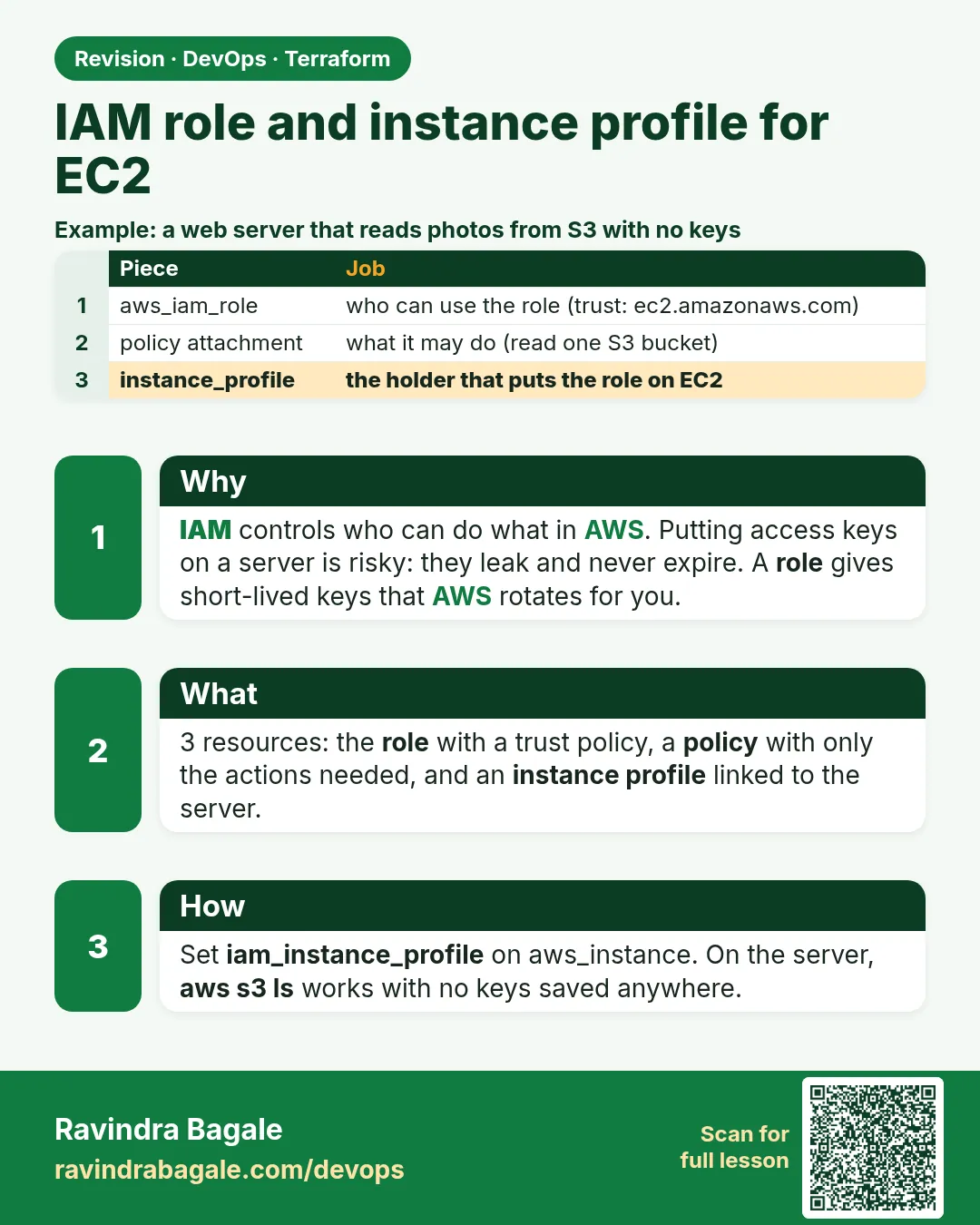
Story. Suppose we are helping an Infosys client team that once found AWS access keys inside a server's config file. An IAM role gives the server short-lived credentials that rotate on their own, so there is nothing to leak. EC2 cannot use a role directly; it uses an instance profile that wraps the role. This guide adds the Session Manager policy so you can log in without SSH keys.
Steps
- Create the files.
- Run terraform apply.
- Attach the profile to the EC2 guide by adding iam_instance_profile to aws_instance.web.
- Open Session Manager and connect.
- Run terraform destroy.
File layout
iam-guide/
├── versions.tf
├── variables.tf
├── main.tf
└── outputs.tf
# ---- versions.tf ----
terraform {
  required_version = ">= 1.6"
  required_providers {
    aws = {
      source  = "hashicorp/aws"
      version = "~> 5.0"
    }
  }
}

provider "aws" {
  region = var.region
}

# ---- variables.tf ----
variable "region" {
  type    = string
  default = "ap-south-1"
}

# ---- main.tf ----
data "aws_iam_policy_document" "ec2_trust" {
  statement {
    actions = ["sts:AssumeRole"]
    principals {
      type        = "Service"
      identifiers = ["ec2.amazonaws.com"]
    }
  }
}

resource "aws_iam_role" "app" {
  name               = "guide-app-role"
  assume_role_policy = data.aws_iam_policy_document.ec2_trust.json
}

resource "aws_iam_role_policy_attachment" "ssm" {
  role       = aws_iam_role.app.name
  policy_arn = "arn:aws:iam::aws:policy/AmazonSSMManagedInstanceCore"
}

resource "aws_iam_instance_profile" "app" {
  name = "guide-app-profile"
  role = aws_iam_role.app.name
}

# ---- outputs.tf ----
output "instance_profile_name" {
  value = aws_iam_instance_profile.app.name
}
What each line does
required_providers { aws = { version = "~> 5.0" } }— Pins the AWS provider to any 5.x release.provider "aws" { region = var.region }— Every resource is created in the region from variables.tf (Mumbai, ap-south-1, by default).data "aws_iam_policy_document" "ec2_trust"— Says who may use the role: the EC2 service.actions = ["sts:AssumeRole"]— The action that hands out temporary credentials.identifiers = ["ec2.amazonaws.com"]— Only EC2 instances can assume it.assume_role_policy = ...json— Attaches the trust policy to the role.policy_arn = ".../AmazonSSMManagedInstanceCore"— Lets Session Manager open a shell, no port 22.resource "aws_iam_instance_profile" "app"— The wrapper you put on an instance with iam_instance_profile = aws_iam_instance_profile.app.name.
When it is green.
Plan: 3 to add, 0 to change, 0 to destroy.
Apply complete! Resources: 3 added, 0 changed, 0 destroyed.
instance_profile_name = "guide-app-profile"

Plan: 0 to add, 0 to change, 3 to destroy.
Destroy complete! Resources: 3 destroyed.
When it is red.
Error: creating IAM Role (guide-app-role): AccessDenied:
User: arn:aws:iam::<account-id>:user/dev is not authorized to perform: iam:CreateRole
Fix. Your user lacks IAM permissions. Ask an admin for a role that allows iam:CreateRole and iam:PassRole, scoped to your project path.
What: every term in plain English
- IAM role — An identity with permissions that AWS services or users can assume. It has no password or keys.
- trust policy — Says who may assume the role, here the EC2 service (ec2.amazonaws.com).
- permission policy — Says what the role may do, for example s3:GetObject on one bucket.
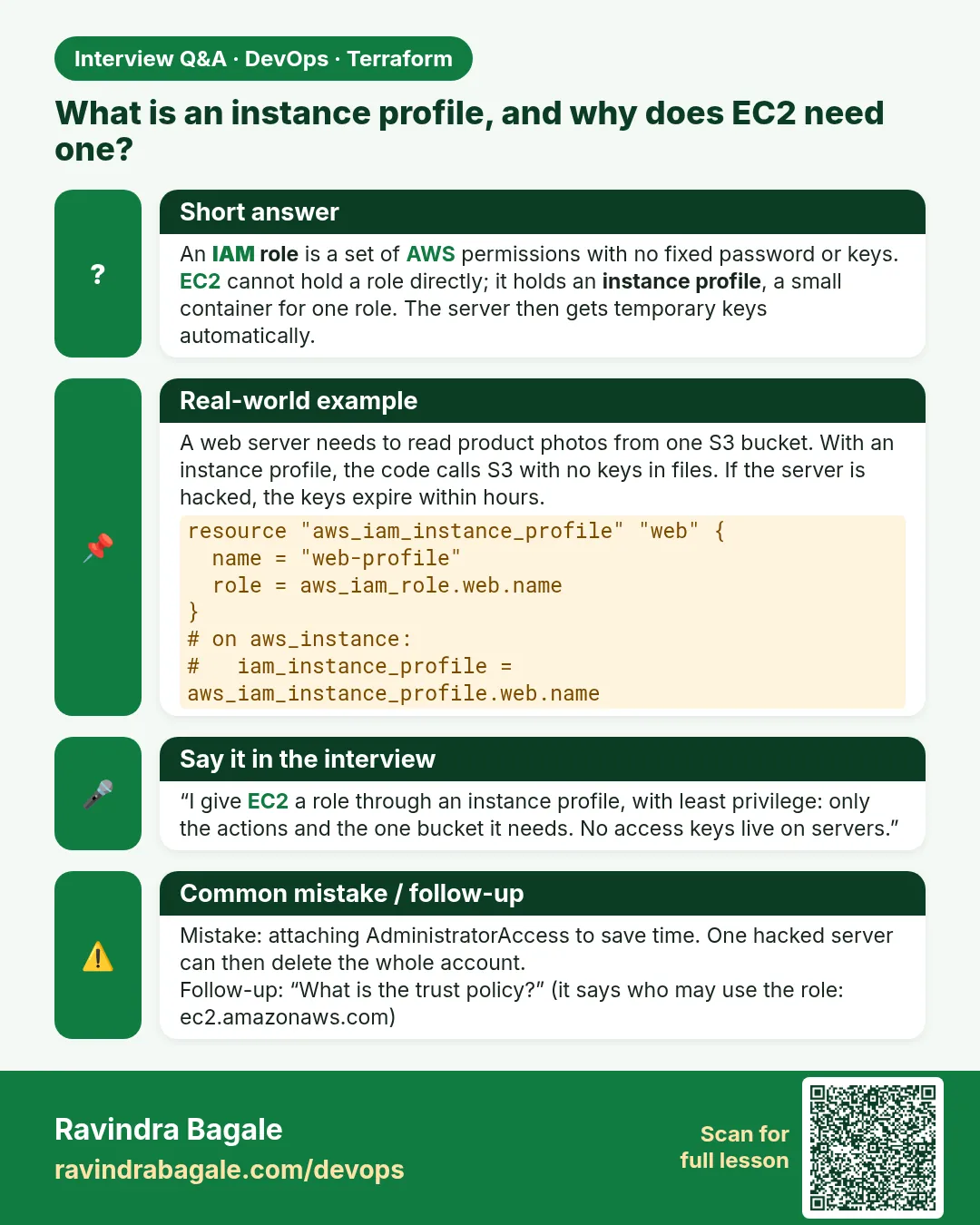
- instance profile — The container that attaches a role to an EC2 instance.
- aws_iam_policy_document — A Terraform data source that writes IAM JSON for you from HCL.
- managed policy — A policy kept by AWS, such as AmazonSSMManagedInstanceCore.
- least privilege — Grant only the actions and resources really needed.
- temporary credentials — Short-lived keys EC2 gets from the role through IMDS. They rotate automatically.
Example 1: Write the trust policy with a data source
Hand-written JSON breaks on a missing comma. aws_iam_policy_document builds valid JSON every time, which is why TCS cloud teams prefer it.
- Create the policy document.
- Use it as assume_role_policy.
- Plan.
data "aws_iam_policy_document" "ec2_trust" {
  statement {
    actions = ["sts:AssumeRole"]
    principals {
      type        = "Service"
      identifiers = ["ec2.amazonaws.com"]
    }
  }
}

resource "aws_iam_role" "app" {
  name               = "guide-ec2-app"
  assume_role_policy = data.aws_iam_policy_document.ec2_trust.json
}
Output
aws_iam_role.app: Creation complete after 1s [id=guide-ec2-app]
What it shows: The .json attribute gives the rendered policy string.
Example 2: Allow read on one bucket only
A role with s3:* on every bucket is a common audit finding at banks. Scope it to one bucket and read-only actions.
- Write a permission document.
- Attach it as an inline role policy.
- Read it back.
data "aws_iam_policy_document" "read_assets" {
  statement {
    actions   = ["s3:GetObject", "s3:ListBucket"]
    resources = ["arn:aws:s3:::guide-assets-9f3a1c7e", "arn:aws:s3:::guide-assets-9f3a1c7e/*"]
  }
}

resource "aws_iam_role_policy" "read_assets" {
  name   = "read-assets"
  role   = aws_iam_role.app.id
  policy = data.aws_iam_policy_document.read_assets.json
}
aws iam get-role-policy --role-name guide-ec2-app --policy-name read-assets --query "PolicyDocument.Statement[0].Action"
Output
[
    "s3:GetObject",
    "s3:ListBucket"
]
What it shows: ListBucket needs the bucket ARN; GetObject needs the /* object ARN. That is why both resources are listed.
Example 3: Attach a managed policy for Session Manager
With AmazonSSMManagedInstanceCore you can open a shell on the server with no SSH key and no port 22, as Atlassian teams do.
- Attach the managed policy.
- Create the instance profile.
- Output the profile name.
resource "aws_iam_role_policy_attachment" "ssm" {
  role       = aws_iam_role.app.name
  policy_arn = "arn:aws:iam::aws:policy/AmazonSSMManagedInstanceCore"
}

resource "aws_iam_instance_profile" "app" {
  name = "guide-ec2-app"
  role = aws_iam_role.app.name
}
Output
instance_profile_name = "guide-ec2-app"
What it shows: EC2 takes the profile, not the role. Without the profile you cannot attach the role.
Example 4: Give the profile to an EC2 instance
Instead of putting access keys in a file on the server, the server gets temporary credentials from the role automatically.
- Add iam_instance_profile to aws_instance.
- Apply.
- Ask the server who it is.
resource "aws_instance" "web" {
  ami                  = data.aws_ami.al2023.id
  instance_type        = "t3.micro"
  iam_instance_profile = aws_iam_instance_profile.app.name
  metadata_options {
    http_tokens = "required"
  }
}
# on the server, via Session Manager
aws sts get-caller-identity --query Arn --output text
Output
arn:aws:sts::111122223333:assumed-role/guide-ec2-app/i-0a1b2c3d4e5f67890
What it shows: assumed-role shows the server is using the role. No keys exist on the disk.
Example 5: Prove least privilege with a denied call
Testing what fails is as important as what works. The role must not be able to delete objects.
- Try reading a file.
- Try deleting it.
- Read the error.
aws s3 cp s3://guide-assets-9f3a1c7e/app.txt -
aws s3 rm s3://guide-assets-9f3a1c7e/app.txt
Output
v2
delete failed: s3://guide-assets-9f3a1c7e/app.txt An error occurred (AccessDenied) when calling the DeleteObject operation
What it shows: Read works, delete is denied. That is the policy doing its job.
Example 6: Simulate a policy before you apply
The IAM policy simulator answers "would this be allowed?" without touching real data. Wipro security teams use it in reviews.
- Get the role ARN.
- Simulate two actions.
- Read the decisions.
aws iam simulate-principal-policy --policy-source-arn $(terraform output -raw role_arn) \
  --action-names s3:GetObject s3:DeleteObject \
  --resource-arns arn:aws:s3:::guide-assets-9f3a1c7e/app.txt \
  --query "EvaluationResults[].[EvalActionName,EvalDecision]" --output text
Output
s3:GetObject    allowed
s3:DeleteObject implicitDeny
What it shows: implicitDeny means no statement allows it. Nothing was changed in S3.
Command cheat sheet
| Command | What it does | When to use it |
|---|---|---|
data "aws_iam_policy_document" |
Builds IAM JSON | Every policy |
aws_iam_role |
Creates a role | Per app |
aws_iam_role_policy |
Inline permissions | App-specific |
aws_iam_role_policy_attachment |
Attach managed policy | SSM, CloudWatch |
aws_iam_instance_profile |
Role holder for EC2 | Before EC2 |
aws iam simulate-principal-policy |
Test permissions | Review |
Verify: did it work?
-
Role exists
aws iam get-role --role-name guide-ec2-app --query Role.RoleNameOutput
"guide-ec2-app" -
Profile has role
aws iam get-instance-profile --instance-profile-name guide-ec2-app --query "InstanceProfile.Roles[0].RoleName"Output
"guide-ec2-app" -
Delete denied
aws iam simulate-principal-policy ... s3:DeleteObjectOutput
implicitDeny
When it is red 1
Error: creating IAM Role: MalformedPolicyDocument: Has prohibited field Resource
Cause. A Resource was put in the trust policy.
Fix, step by step
- Trust policies have no Resource.
- Use the data source.
When it is red 2
Error: creating EC2 Instance: InvalidParameterValue: Value (guide-ec2-app) for parameter iamInstanceProfile.name is invalid
Cause. The profile is not visible yet (IAM is eventually consistent).
Fix, step by step
- Run apply again after a few seconds.
- Reference the profile resource so order is right.
When it is red 3
Error: deleting IAM Role: DeleteConflict: Cannot delete entity, must remove roles from instance profile first
Cause. A profile created outside Terraform still holds the role.
Fix, step by step
- Remove the role from that profile.
- Destroy again.
Cleanup
terraform destroy -auto-approve
Ravindra Bagale's Tip
Never create access keys for a server. Give it a role through an instance profile; the credentials rotate by themselves.
Practice tasks
Easy Read the trust policy
Why: Trust vs permissions.
What to do: Print the trust JSON.
- data source .json in console.
Check: ec2.amazonaws.com principal.
Easy Attach SSM
Why: Managed policy.
What to do: Attach AmazonSSMManagedInstanceCore.
- policy attachment.
Check: Session Manager works.
Medium Scope to a prefix
Why: Least privilege.
What to do: Allow GetObject only on images/*.
- Change the resource ARN.
Check: Other paths denied.
Hard Simulate
Why: Review tool.
What to do: Simulate four actions.
- simulate-principal-policy.
Check: Correct allow and deny.
Easy Say it in two lines
Why: If you can say it simply, you understand it.
What to do: Write two short lines about this lesson for a fresher.
- Write the problem it solves.
- Write the one command or file you use.
- Read it aloud.
Check: A fresher understands it without a question.
Easy Start a safe lab folder
Why: Practice needs a throwaway place.
What to do: Make a new folder with versions.tf and a random_pet resource, so no AWS cost.
- mkdir tf-lab and cd into it.
- Add the hashicorp/random provider and one random_pet.
- Run terraform init and terraform apply.
Check: Apply complete! with 1 added.
Medium Break it on purpose
Why: You must know the red output by face.
What to do: Cause one error from the red part of this lesson and fix it.
- Follow one red section.
- Copy the exact message to your notes.
- Write the fix in one line.
Check: You fixed it without searching the web.
Medium Run it twice
Why: A second run must be quiet.
What to do: Run the same plan two times with no edits.
- Run terraform plan.
- Run it again.
- Explain any change it still shows.
Check: The second plan says No changes, or you can explain each line.
Medium Write a runbook page
Why: At 2 a.m. nobody remembers flags.
What to do: Write a one-page runbook for this lesson.
- Title, when to use, exact commands, how to check, how to undo.
Check: A teammate can follow it alone.
Medium Run it from a pipeline
Why: Real teams run Terraform from CI, not from laptops.
What to do: Run the main command of this lesson inside a GitHub Actions or Jenkins job.
- Add a job with hashicorp/setup-terraform or a Terraform Docker image.
- Give it AWS access through an IAM role, never a key in the file.
- Run init, then the command from this lesson.
Check: The job log shows the same output you saw on your laptop.
Medium Check the cost
Why: Labs left running cost real money.
What to do: Find what this lesson would cost per day if you forgot to destroy it.
- Open the AWS Pricing Calculator.
- Add each resource from your plan.
- Write the daily cost in your notes.
Check: You know the daily cost and you ran terraform destroy.
Hard Draw the flow top to bottom
Why: A drawing shows the order of work.
What to do: Draw this lesson as boxes from top to bottom.
- Start at your code, go through plan and state, end at AWS.
- Mark where each command reads or writes.
Check: Each box matches a real step you ran.
Hard Explain it like an interview
Why: Interviewers want real stories.
What to do: Record a 60 second answer about this lesson.
- Say the problem, the command, and one error you hit.
Check: Your answer has a real command and a real error message.
Homework: try at home
Try at home
Create a role for a log shipper on EC2 that can only write to one CloudWatch log group and read one S3 prefix, and prove it with the simulator.
Recap
- Trust policy: who may assume.
- Permission policy: what it may do.
- EC2 needs an instance profile.
- Use policy documents, not hand JSON.
- Test denies as well as allows.
FAQ
Inline or managed policy?
Inline for app-specific rules; managed for common AWS ones.
Where do the credentials come from?
IMDS gives temporary keys from the role.
Can one profile hold two roles?
No, one role per instance profile.
Is IAM global?
Yes, roles are not tied to a region.
Interview questions
-
What is an instance profile?
A container that attaches an IAM role to EC2.
-
Trust policy vs permission policy?
Trust says who can assume the role; permissions say what it can do.
-
Why avoid access keys on servers?
They are long-lived and can leak; roles give rotating temporary credentials.
-
How do you test an IAM policy safely?
Use the IAM policy simulator.
Quick quiz
Q1. Principal for EC2?
ec2.amazonaws.com
Q2. Action to assume a role?
sts:AssumeRole
Q3. Policy for Session Manager?
AmazonSSMManagedInstanceCore
Q4. Decision when nothing allows?
implicitDeny
Q5. Data source for IAM JSON?
aws_iam_policy_document
Samajla ka?
 Revision card
 Interview card