Chapter 30: Artifacts, Release Patterns and Quality Gates
30.6 Test layers
Why: the problem
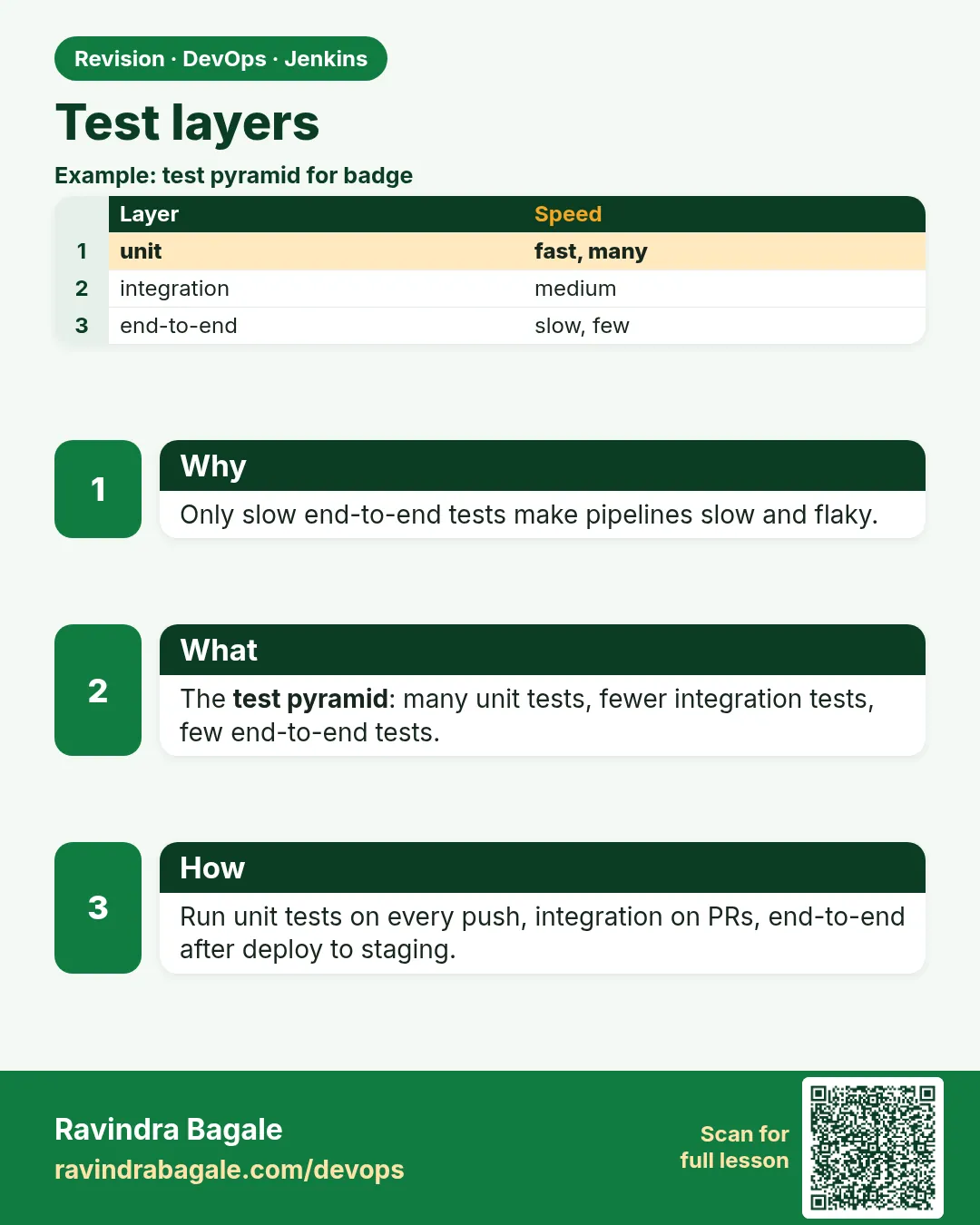
Suppose we are at Myntra and the checkout team pushes 40 changes a day. If every change waits for a 2 hour full test, nobody can ship. If there are no tests, sale day breaks. The answer is test layers. Many small fast tests run first, on every push. Fewer, slower tests run later. Very few full end-to-end tests run before production. This shape is called the test pyramid. In Jenkins each layer is a stage, and a red fast layer stops the slow layers, so you learn about problems in minutes.
What we will build
You will build a Jenkins pipeline with four layers: unit tests, integration tests with a real database in Docker, end-to-end browser tests with Playwright, and a smoke test after deploy. You will do it for a Node.js app, a Java Spring Boot app with Testcontainers, and a Python app with pytest markers.
What: every term in plain English
- Unit test — Tests one small function alone, with no network or database. Runs in milliseconds.
- Integration test — Tests your code with a real outside part, like PostgreSQL or Redis.
- End-to-end (E2E) test — Drives the app like a user, in a real browser, from login to payment.
- Smoke test — A few quick checks after deploy, to prove the release is alive.
- Test pyramid — Many unit tests at the bottom, fewer integration tests, very few E2E tests at the top.
- JUnit XML — A standard test report file. Jenkins reads it with the junit step and shows trends.
- Flaky test — A test that sometimes passes and sometimes fails with no code change.
How: step by step
-
Run unit tests by hand
npm run test:unitWhat it does: Fast. Should finish in seconds.
Output
Tests: 214 passed, 214 total Time: 6.2 s -
Start a test database
docker run -d --name pg-test -e POSTGRES_PASSWORD=test -p 5433:5432 postgres:16-alpineWhat it does: A throwaway database only for tests. test is a lab password, never a real one.
Output
e1b2c3d4f5a6 -
Run integration tests
DATABASE_URL=postgres://postgres:test@localhost:5433/postgres npm run test:intWhat it does: Tests talk to the real PostgreSQL.
Output
Tests: 38 passed, 38 total Time: 41.0 s -
Run E2E tests in a browser
npx playwright test --reporter=junit > e2e.xmlWhat it does: Real Chromium clicks through checkout.
Output
Running 12 tests using 4 workers 12 passed (1.8m) -
Write reports as JUnit XML
npm run test:unit -- --reporters=default --reporters=jest-junitWhat it does: Jenkins reads reports/junit.xml.
Output
Wrote reports/junit.xml -
Publish reports in Jenkins
junit "reports/**/*.xml"What it does: The build page shows a test result trend chart.
Output
Recording test results [Checks API] No suitable checks publisher found. -
Smoke test after deploy
curl -fs https://staging.shop.example.com/health && curl -fs https://staging.shop.example.com/api/cart/pingWhat it does: Two URLs, ten seconds, real proof.
Output
{"status":"ok"}
{"pong":true}
Example 1: Node
Stack. Node.js 20, Jest, PostgreSQL 16, Playwright
Goal. Node.js: four stages in pyramid order, with reports and a fast fail.
Jenkinsfile
pipeline {
  agent { label 'linux-docker' }
  options { timeout(time: 30, unit: 'MINUTES') }
  stages {
    stage('Unit') {
      agent { docker { image 'node:20-alpine'; reuseNode true } }
      steps { sh 'npm ci && npx jest --selectProjects unit --ci --reporters=default --reporters=jest-junit' }
    }
    stage('Integration') {
      steps {
        sh 'docker run -d --name pg-$BUILD_NUMBER -e POSTGRES_PASSWORD=test -p 5433:5432 postgres:16-alpine'
        sh 'until docker exec pg-$BUILD_NUMBER pg_isready -U postgres; do sleep 1; done'
        sh 'DATABASE_URL=postgres://postgres:test@localhost:5433/postgres npx jest --selectProjects int --ci --reporters=jest-junit'
      }
      post { always { sh 'docker rm -f pg-$BUILD_NUMBER' } }
    }
    stage('E2E') {
      agent { docker { image 'mcr.microsoft.com/playwright:v1.48.0-jammy'; reuseNode true } }
      steps { sh 'npx playwright test --reporter=junit > reports/e2e.xml' }
    }
  }
  post {
    always {
      junit 'reports/**/*.xml'
      archiveArtifacts artifacts: 'test-results/**', allowEmptyArchive: true
    }
  }
}
What each line does
timeout(time: 30, unit: 'MINUTES')— A stuck test cannot block the agent forever.reuseNode true— Run the container on the same agent and workspace.--selectProjects unit— Only the unit test project. They run first because they are fastest.pg-$BUILD_NUMBER— A database name per build, so two builds do not clash.until ... pg_isready— Wait until PostgreSQL accepts connections.post { always { sh 'docker rm -f ...' } }— Remove the database even if tests fail.playwright:v1.48.0-jammy— An image with browsers already installed.junit 'reports/**/*.xml'— Publish every report. The build page shows passed, failed and the trend.
Green output
[Pipeline] stage (Unit)
Tests: 214 passed, 214 total   Time: 6.2 s
[Pipeline] stage (Integration)
/var/run/postgresql:5432 - accepting connections
Tests: 38 passed, 38 total     Time: 41.0 s
[Pipeline] stage (E2E)
  12 passed (1.8m)
[Pipeline] junit
Recording test results
Finished: SUCCESS
Expected result. Total about 3 minutes. If a unit test fails, the build stops in 10 seconds and the slow stages never start.
Example 2: Java Spring Boot: unit tests with Surefire, integration tests with Testcontainers and Failsafe
Stack. Java 17, Spring Boot 3, Testcontainers, Maven
Goal. Java Spring Boot: unit tests with Surefire, integration tests with Testcontainers and Failsafe.
src/test/java/com/shop/OrderRepoIT.java
@SpringBootTest
@Testcontainers
class OrderRepoIT {
  @Container
  static PostgreSQLContainer pg = new PostgreSQLContainer("postgres:16-alpine");

  @DynamicPropertySource
  static void props(DynamicPropertyRegistry r) {
    r.add("spring.datasource.url", pg::getJdbcUrl);
    r.add("spring.datasource.username", pg::getUsername);
    r.add("spring.datasource.password", pg::getPassword);
  }

  @Autowired OrderRepository repo;

  @Test
  void savesAndFindsOrder() {
    repo.save(new Order("ORD-1", 499));
    assertEquals(499, repo.findById("ORD-1").get().getAmount());
  }
}
Jenkinsfile (test stages)
stage('Unit') { steps { sh './mvnw -B -ntp test' } }
stage('Integration') { steps { sh './mvnw -B -ntp verify -DskipUnitTests' } }
post { always { junit 'target/surefire-reports/*.xml, target/failsafe-reports/*.xml' } }
What each line does
@Testcontainers— JUnit starts and stops containers for this class.PostgreSQLContainer("postgres:16-alpine")— A real PostgreSQL in Docker, with a random free port.@DynamicPropertySource— Tells Spring the URL, user and password of that container.class name ends with IT— Failsafe runs IT classes in the verify phase. Surefire runs Test classes in test.mvnw test— Unit tests only, fast.surefire-reports and failsafe-reports— Both report folders go to the junit step.
Green output
[INFO] Tests run: 162, Failures: 0, Errors: 0, Skipped: 0   (surefire)
[INFO] Creating container for image: postgres:16-alpine
[INFO] Container postgres:16-alpine started in PT2.4S
[INFO] Tests run: 21, Failures: 0, Errors: 0, Skipped: 0    (failsafe)
[INFO] BUILD SUCCESS
Expected result. Integration tests used a real PostgreSQL without any shared test server.
Example 3: Python: pytest markers choose the layer, and the smoke test runs after deploy
Stack. Python 3.12, pytest, FastAPI
Goal. Python: pytest markers choose the layer, and the smoke test runs after deploy.
pytest.ini
[pytest]
markers =
    unit: fast tests, no network
    integration: needs PostgreSQL or Redis
    smoke: runs against a deployed URL
addopts = -q --junitxml=reports/pytest.xml
tests/test_smoke.py
import os, requests
import pytest

BASE = os.environ.get("BASE_URL", "http://localhost:8000")

@pytest.mark.smoke
def test_health():
    r = requests.get(f"{BASE}/health", timeout=5)
    assert r.status_code == 200
    assert r.json()["status"] == "ok"

@pytest.mark.smoke
def test_menu_has_items():
    r = requests.get(f"{BASE}/api/menu", timeout=5)
    assert len(r.json()["items"]) > 0
Jenkinsfile (stages)
stage('Unit')        { steps { sh 'pytest -m unit' } }
stage('Integration') { steps { sh 'pytest -m integration' } }
stage('Deploy staging') { steps { sh './deploy.sh staging' } }
stage('Smoke')       { steps { sh 'BASE_URL=https://staging.food.example.com pytest -m smoke' } }
What each line does
markers =— Names for test groups, so you can run one layer at a time.--junitxml=reports/pytest.xml— Writes a report Jenkins can read.@pytest.mark.smoke— This test belongs to the smoke layer.timeout=5— A smoke test must be quick. A hanging server fails fast.pytest -m unit— Runs only tests marked unit.BASE_URL=... pytest -m smoke— The same smoke tests run against any environment.
Green output
+ pytest -m unit
188 passed, 47 deselected in 3.91s
+ pytest -m integration
29 passed, 206 deselected in 22.40s
+ BASE_URL=https://staging.food.example.com pytest -m smoke
2 passed, 233 deselected in 0.88s
Expected result. Each layer runs only its tests. The smoke layer proves staging is alive right after deploy.
Verify: did it work?
-
See test results in the API
curl -s -u ravi:$JENKINS_TOKEN "http://localhost:8080/job/checkout/lastBuild/testReport/api/json?tree=passCount,failCount,skipCount"What it does: Numbers you can track.
Output
{"failCount":0,"passCount":264,"skipCount":0} -
Check stage times
Open the build > Pipeline Overview (or Stage View)What it does: Unit should be seconds, E2E minutes. If unit is slow, fix that first.
Output
Unit 0:12 Integration 0:58 E2E 1:52 -
Find the slowest tests
npx jest --selectProjects unit --verbose 2>&1 | sort -t"(" -k2 -n -r | head -3What it does: Slow unit tests are often hidden integration tests.
Output
✓ builds invoice pdf (812 ms)
When it is red 1
ERROR: Step junit failed: No test report files were found. Configuration error?
Cause. The report path is wrong, or the tests crashed before writing reports.
Fix, step by step
- Run ls -R reports in the stage.
- Match the junit pattern to the real path.
- Use allowEmptyResults: true only for stages that may have no tests.
When it is red 2
Could not find a valid Docker environment. Please see logs and check configuration
Cause. Testcontainers cannot reach Docker on the agent.
Fix, step by step
- Run integration tests on an agent with Docker.
- Check docker ps works as the jenkins user.
- In Kubernetes agents, use a DinD sidecar or a Docker host.
When it is red 3
Error: browserType.launch: Executable does not exist at /ms-playwright/chromium-1140/chrome-linux/chrome
Cause. The Playwright version in package.json does not match the image version.
Fix, step by step
- Use the image tag with the same version, like v1.48.0-jammy.
- Or run npx playwright install --with-deps.
When it is red 4
Test passes locally, fails in CI 1 time in 5
Cause. A flaky test, often a timing wait or shared data.
Fix, step by step
- Replace sleep with waiting for a real condition.
- Give each test its own data.
- Quarantine it with a ticket; do not just retry forever.
Cleanup
-
Remove leftover test databases
docker ps -a --filter name=pg- -q | xargs -r docker rm -fWhat it does: Clears containers from crashed builds.
Output
e1b2c3d4f5a6 -
Clear old reports in the workspace
options { skipDefaultCheckout(false) } and add cleanWs() in post alwaysWhat it does: Old XML files can make old failures show again.
Output
[WS-CLEANUP] Deleting project workspace...
Ravindra Bagale's Tip
Unit test aadhi, browser test shevti. Lavkar fail zala tar vel vachto!
Practice tasks
Easy Publish one report
Why: See the trend chart.
What to do: Add the junit step to an existing job.
- junit 'reports/*.xml'
- Run three builds.
Check: The build page shows a test trend chart.
Medium Run E2E only on main
Why: E2E is slow; feature branches need speed.
What to do: Add when { branch "main" } to the E2E stage.
- when { branch 'main' }
Check: Feature branches skip E2E.
Hard Run unit and lint in parallel
Why: Parallel saves minutes on every push.
What to do: Put Unit and Lint inside a parallel block.
- stage("Fast") { parallel { stage("Unit") {...} stage("Lint") {...} } }
Check: Both run at the same time in Stage View.
Easy Say test layers in two lines
Why: If you can say it simply, you understand it. Juniors and interviewers both want the short version first.
What to do: Write two short lines about test layers for a fresher who knows only Linux and Git basics.
- Write the problem it solves.
- Write the one Jenkinsfile step or command you use for it.
- Read it aloud to a friend.
Check: A fresher understands it without asking a question.
Easy Start a fresh lab Jenkins
Why: Practice needs a throwaway Jenkins. If you break it, you delete it and start again.
What to do: Run Jenkins LTS in Docker with a named volume.
- docker volume create jenkins_home
- docker run -d --name jenkins -p 8080:8080 -v jenkins_home:/var/jenkins_home jenkins/jenkins:lts-jdk17
- docker logs jenkins 2>&1 | grep -A2 "initialAdminPassword"
Check: The Jenkins login page opens on localhost:8080.
Medium Do it on the second setup
Why: A release idea must work on a VM, on Docker and on Kubernetes. Only the deploy step should change.
What to do: Repeat this lesson on a different target than the one you used first.
- If you used Docker, use kind or minikube now.
- Change only the deploy commands.
- Keep the same Jenkinsfile stages.
Check: Same result, and the stage names did not change.
Medium Break it on purpose
Why: You must know the red output by face. In a real outage there is no time to read slowly.
What to do: Cause one error from the "When it is red" part of this lesson and fix it.
- Follow the error section.
- Copy the exact message into your notes.
- Write the fix in one line.
Check: You fixed it using only the steps, without searching the web.
Medium Write a release runbook page
Why: At 2 a.m. nobody remembers flags. A short page saves the on-call person.
What to do: Write a one-page runbook for this lesson.
- Title, when to use, exact commands, how to check, how to undo.
Check: A teammate can follow it alone.
Hard Explain it like an interview
Why: Interviewers want real stories, not definitions.
What to do: Record a 60 second answer about this lesson.
- Say the problem, the Jenkinsfile step, and one error you hit.
Check: Your answer has a real command and a real error message.
Hard Draw the flow top to bottom
Why: A drawing shows the order of work and who is waiting on whom.
What to do: Draw this lesson as boxes from top to bottom.
- Start at git push, go through the stages, end at the check in production.
Check: Each box matches a real step you ran.
Homework: try at home
Try at home
At home, take any small app, write 5 unit tests, 2 integration tests with a database in Docker and 1 smoke test. Put them into three Jenkins stages and publish JUnit reports. Then break one unit test and see the slow stages skipped.
Recap
- Test pyramid: many unit, fewer integration, very few E2E.
- Run fast layers first so failures are cheap.
- Use real dependencies in Docker for integration tests.
- Publish JUnit XML so Jenkins shows trends.
- Smoke test every deploy.
FAQ
How many E2E tests should I have?
Only for the most important user paths, like login, search, pay.
Should I mock the database?
In unit tests, yes. In integration tests, use a real one.
Can I retry flaky tests?
One retry is OK while you fix it. Track flaky tests and fix the cause.
Where do contract tests fit?
Between unit and integration. They check two services agree on an API, with tools like Pact.
Does coverage go here?
Yes. Unit tests produce coverage, and the quality gate in the next lesson checks it.
Interview questions
-
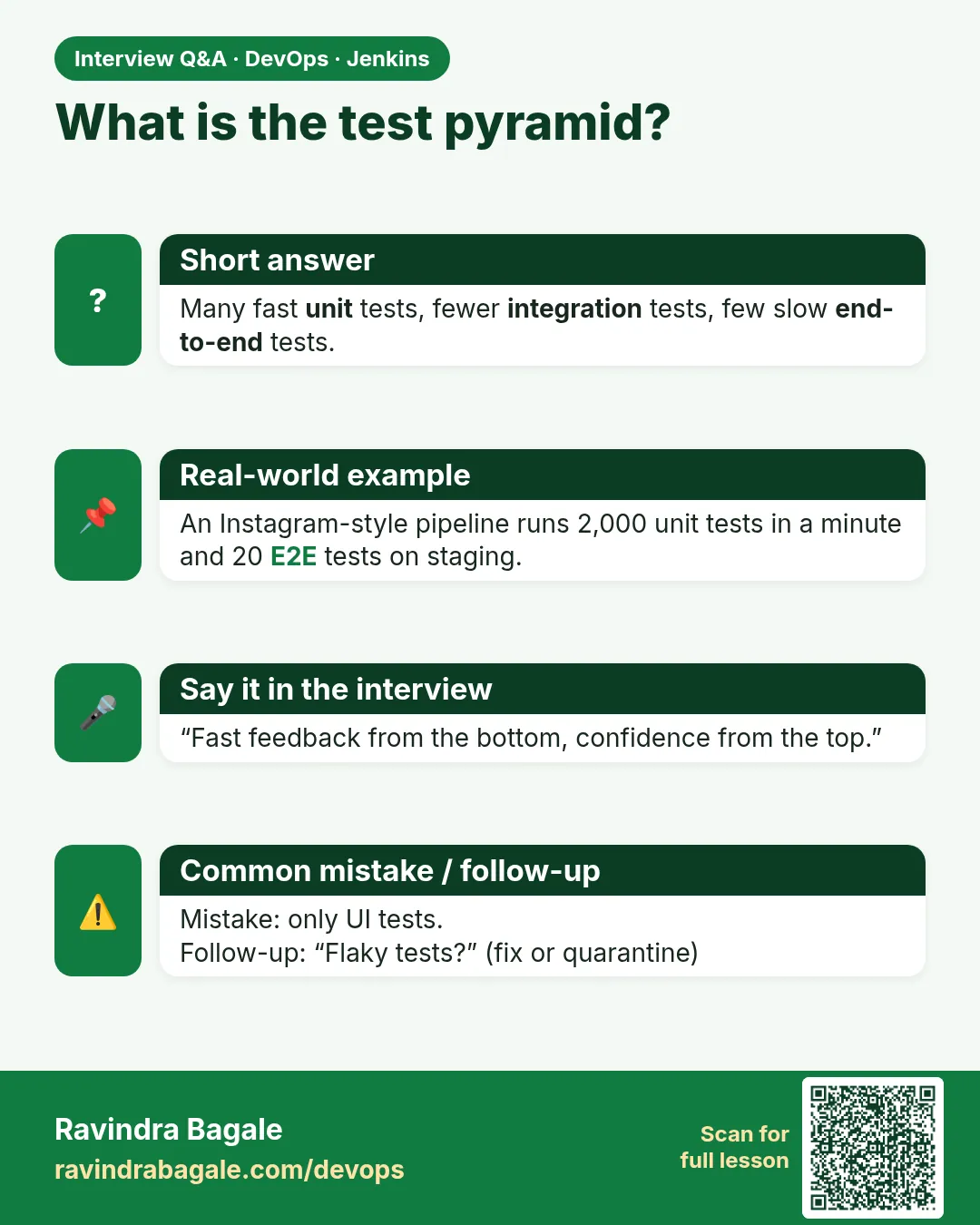
Explain the test pyramid.
Many fast unit tests, fewer integration tests, and very few slow E2E tests, so feedback is quick and cheap.
-
How do you structure tests in a Jenkins pipeline?
Separate stages in pyramid order, fail fast, publish JUnit reports, and run smoke tests after each deploy.
-
How do you run integration tests in CI?
Start real dependencies in Docker or with Testcontainers per build, and clean them in post always.
-
How do you handle flaky tests?
Find the cause like timing or shared data, quarantine with a ticket, and track flake rate.
-
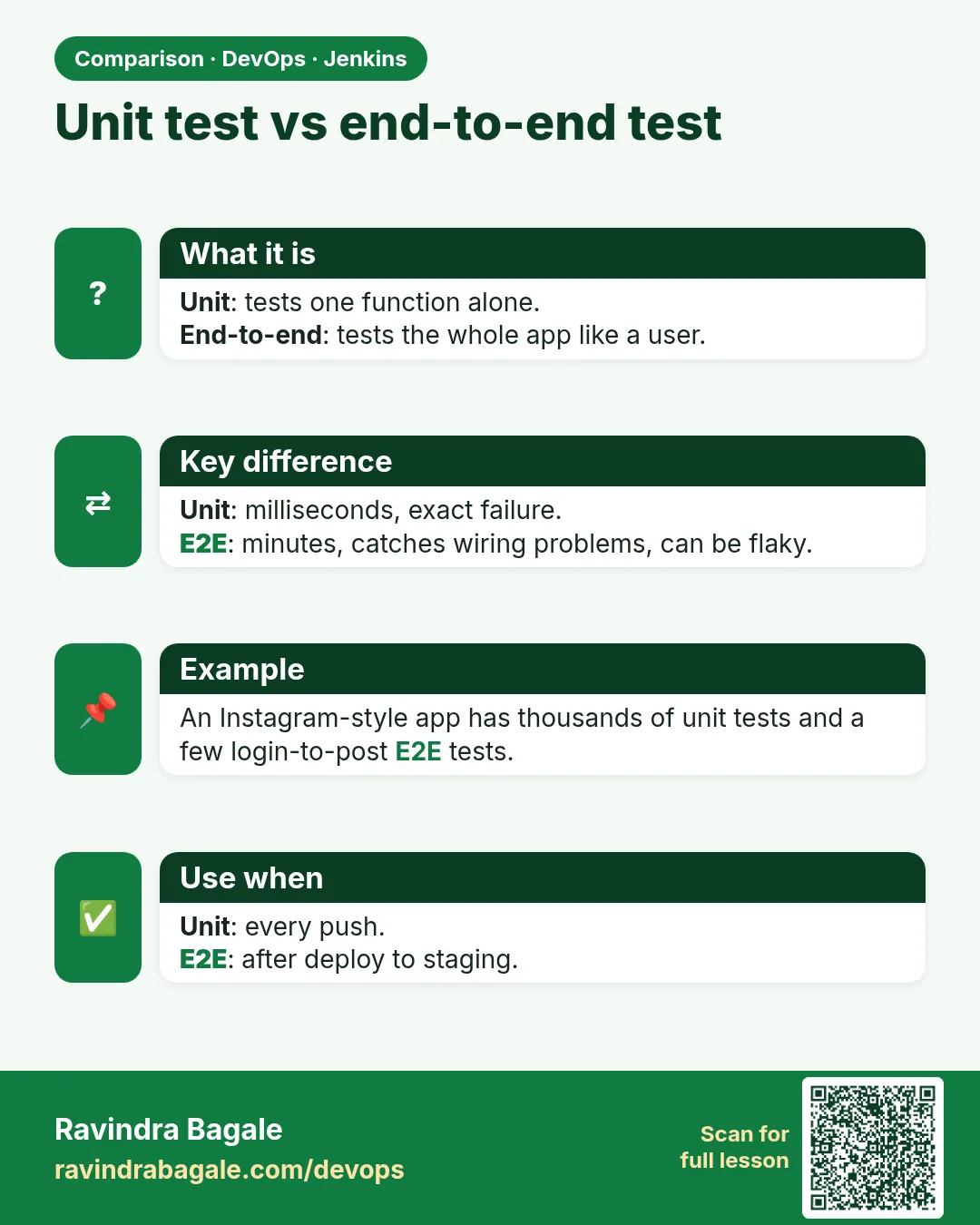
Unit vs integration vs E2E?
Unit tests one piece alone, integration tests pieces together with real services, E2E tests the whole app like a user.
Quick quiz
Q1. Which tests should be the most in number?
Unit tests.
Q2. Why run unit tests first?
They are fastest, so a failure stops the build quickly.
Q3. What does the junit step do?
Reads JUnit XML and shows results and trends.
Q4. What is Testcontainers for?
Starting real databases in Docker for integration tests.
Q5. What does a smoke test prove?
That the deployed release is alive.
Samajla ka?
 Revision card
 Interview card
 Comparison card