Chapter 94: HashiCorp Vault and Secrets Management
94.3 Seal, unseal and recovery boundaries
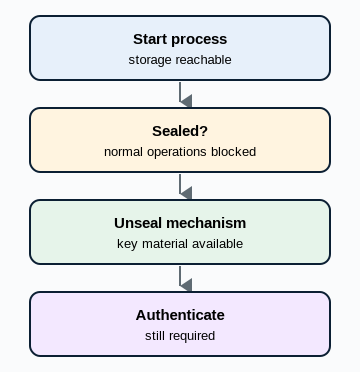
Story (fictional teaching scenario). At a fictional Kolhapur firm, Meera and Ken from Kyoto practise a restart plan on paper. Starting a production process does not always mean it is ready to serve secret reads.
Why
A healthy deployment needs both available storage and access to the key material required to open the barrier.
What
- Sealed means Vault cannot use the key material needed for normal secret operations.
- Unseal makes that key material available; it is not a user login.
- Shamir shares split unseal material among custodians using a threshold.
- Auto-unseal delegates unlocking to a configured trusted key-management mechanism; it adds a dependency.
- Recovery keys in an auto-unseal setup are not a substitute for the missing seal mechanism.
How
-
Define which seal mode is used before documenting recovery.
-
Keep custodians and threshold requirements in an approved runbook.
-
Never publish shares, root tokens or initialization output.
Example 1: Status shape
- Read the command or request.
vault status
- Read the result.
Output (illustrative; NOT executed against Vault)
Initialized: true
Sealed: true
- Line by line: Initialized means a cluster has been set up. Sealed means it is not ready for normal secret reads. Actual CLI status exit codes differ for sealed state; automation must inspect documented status behaviour rather than treat every nonzero exit as a network failure.
Example 2: Unseal is not authentication
- Read the command or request.
Unsealed server + no caller identity
Unsealed server + scoped caller token
- Read the result.
Output (illustrative; NOT executed against Vault)
First caller: no access to protected secret paths.
Second caller: only policy-authorized operations.
- Line by line: Opening the barrier does not grant all clients access. Token authentication and policy still apply. No unseal command or key is executed/exposed here.
Ravindra Bagale's Tip
Do not put recovery material next to the backup it protects.
Recovery material ते ज्या backup ला वाचवतं त्याच्याजवळ ठेवू नका.
Recovery material को उसी backup के पास मत रखो जिसे वह बचाता है.
Did you understand? Let us try it once more.