Chapter 94: HashiCorp Vault and Secrets Management
94.14 Audit, operations and backup safety
Story (fictional teaching scenario). At a fictional Nashik company, Amira from Rabat practises recovery with the operations team before a real outage, without putting shares into the backup ticket.
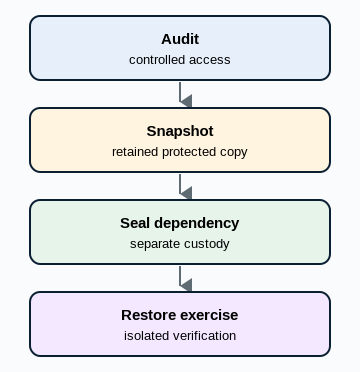
Why
A secrets service becomes critical infrastructure; encrypted storage alone is not a disaster-recovery plan.
What
- Audit device records requests/responses according to Vault audit configuration. Sensitive fields are normally HMAC-protected, but not every field/path is hidden.
- HMAC is a keyed message-authentication hash that helps correlate protected values; it is not the same as deleting sensitive context.
- Snapshot is a point-in-time storage copy where supported, such as Integrated Storage snapshots.
- Restore test proves operators can recover with the required seal mechanism, permissions and configuration.
- Availability includes storage, seal dependencies, networking, clock and audit sink health.
How
-
Treat audit logs as sensitive operational data.
-
Keep audit devices reliable and monitor failures. If all enabled audit devices fail, Vault refuses the corresponding requests; the official guidance recommends at least two devices.
-
Back up storage plus the approved operational configuration and recovery requirements.
-
Test restore into an isolated authorized environment; never delete retained backups for disk pressure.
Example 1: Safe audit interpretation
- Read the command or request.
operation=read path=secret/data/shop
request_id=DEMO_REQUEST outcome=permission_denied
- Read the result.
Output (illustrative; NOT executed against Vault)
An access attempt occurred; the secret value is not shown.
- Line by line: These are teaching fields, not a full real audit record. Paths and metadata can still reveal information. Do not enable raw logging just to see secret values. Multiple audit device and failure behaviour must follow the official operations guidance.
Example 2: Backup checklist, no executable restore
- Read the command or request.
Storage snapshot + protected configuration + documented seal dependency
Separate custody of recovery material
Restore verification + application validation
- Read the result.
Output (illustrative; NOT executed against Vault)
A retained backup is usable only if recovery prerequisites are available and tested.
- Line by line: For auto-unseal, losing the trusted key mechanism can make stored data unusable despite recovery shares. Do not paste unseal shares, tokens or provider keys into a runbook. No snapshot or production operation is executed here.
Ravindra Bagale's Tip
Recovery evidence is a tested procedure, not a folder named backup.
Backup नावाचा folder म्हणजे recoveryचा पुरावा नाही; procedure test हवी.
Backup नाम का folder recovery का सबूत नहीं; procedure test चाहिए.
Did you understand? Let us try it once more.