Chapter 89: Amazon ECS for DevOps
89.7 Autoscaling and circuit breaker rollback
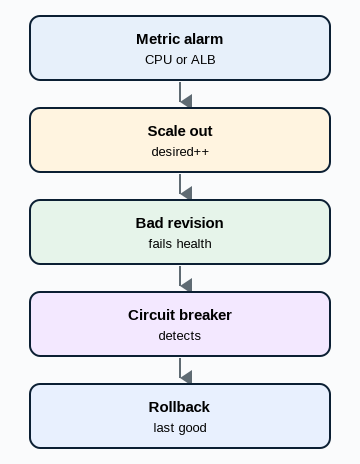
Story. During an IPL-style traffic spike, Neha's menu-api CPU hit a wall. Application Auto Scaling raised the ECS service desired count from 2 to 8. Later a bad build broke /healthz. With deployment circuit breaker and rollback enabled, ECS stopped the failing deployment and returned to the last healthy revision — before Neha finished typing in chat. Scaling and safe rollback are boring on purpose.
Why
Fixed task counts waste money at night and melt at noon. Failed deploys need an automatic stop — not hope.
What
- Application Auto Scaling — Scales ECS service desired count on CloudWatch metrics (CPU, ALBRequestCountPerTarget, and others).
- Min / max capacity — Floors and ceilings so scale cannot go to zero by accident (unless you want that).
- Deployment circuit breaker — ECS watches deployment health; can fail the deploy early.
- Rollback — Optional: return to the previous task definition when the breaker trips.
How
- Enable service auto scaling with sensible min/max.
- Alarm on a metric that matches user pain (often ALB target response or CPU).
- Turn on deployment circuit breaker with rollback for production services.
- Load-test once so you know scale speed and cold-start behaviour on Fargate.
Example 1: Circuit breaker on the service (shape)
"deploymentConfiguration": {
  "deploymentCircuitBreaker": { "enable": true, "rollback": true },
  "maximumPercent": 200,
  "minimumHealthyPercent": 100
}
What it shows: Bad deploys can roll back automatically. minimumHealthyPercent 100 keeps full capacity during rolling updates when you can afford surge.
Example 2: Register scalable target (shape)
aws application-autoscaling register-scalable-target \
  --service-namespace ecs \
  --scalable-dimension ecs:service:DesiredCount \
  --resource-id service/shop-prod/pay-api \
  --min-capacity 2 --max-capacity 10 \
  --region ap-south-1
Output
{
    "ScalableTargetARN": "arn:aws:application-autoscaling:ap-south-1:123456789012:scalable-target/..."
}
What it shows: Desired count may move between 2 and 10 under policies you attach next. Numbers are lab examples.
Ravindra Bagale's Tip
Turn on circuit breaker with rollback for prod before the fancy dashboard. Then add scale policies with a tested max.
Prod वर आधी circuit breaker + rollback. नंतर tested max सह scale policies.
Prod पर पहले circuit breaker + rollback. फिर tested max के साथ scale policies.
Quick quiz
Q1. What does the deployment circuit breaker do?
Stops a failing ECS deployment early and can roll back to the prior revision.
Q2. What does Application Auto Scaling change on ECS?
The service desired task count within min/max based on metrics.
Q3. Why set a max capacity?
So a bad metric or attack cannot scale you into a surprise bill.
Did you understand? Let us try it once more.