Chapter 89: Amazon ECS for DevOps
89.5 IAM — task roles vs execution roles
Story. Carlos in Austin put one fat IAM role on every ECS task. The web container could delete any S3 bucket. A support dump leaked temporary credentials from the task role. Blast radius: huge. Ananya in Bengaluru split roles. The task execution role only pulled from ECR and wrote logs to CloudWatch. The task role only allowed s3:PutObject on shop-uploads/*. Least privilege saved the weekend.
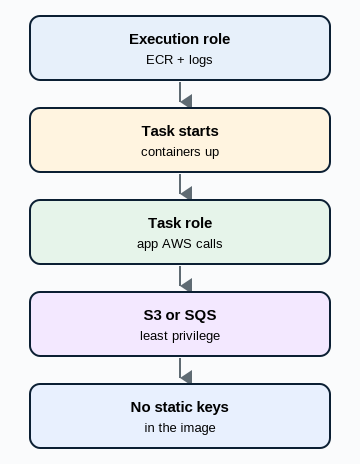
Why
One role that can do everything turns one bug into an account incident. Split "ECS agent needs" from "app needs".
What
- Task execution role — Used by ECS to pull images, fetch secrets/parameters if configured, and push logs. Not for your business S3 writes.
- Task role — Assumed by your application code for AWS API calls (S3, SQS, DynamoDB…).
- Least privilege — Grant only actions and resource ARNs the workload needs.
- No long-lived keys in images — Prefer task roles; never bake access keys into Docker layers.
How
- Create an execution role with managed policies such as the AWS ECS task execution policy (name may vary — check current AWS docs).
- Create a separate task role with a tight inline or customer-managed policy.
- Set both ARNs on the task definition.
- Prove in logs or
aws sts get-caller-identityfrom a debug path that the app identity is the task role.
Example 1: Task definition role fields (shape)
{
  "executionRoleArn": "arn:aws:iam::123456789012:role/ecsTaskExecutionRole",
  "taskRoleArn": "arn:aws:iam::123456789012:role/pay-api-task"
}
What it shows: Two different roles. Swap in your account ids. Do not paste real secret keys into JSON.
Example 2: Tiny task-role policy idea for one prefix
{
  "Effect": "Allow",
  "Action": ["s3:PutObject", "s3:GetObject"],
  "Resource": "arn:aws:s3:::shop-lab-uploads/*"
}
What it shows: Only object read/write on one bucket prefix — not s3:* on *. Bucket name is an example.
Ravindra Bagale's Tip
Execution role ≠ task role. If the app talks to S3, that permission belongs on the task role.
Execution role ≠ task role. App S3 बोले तर permission task role वर.
Execution role ≠ task role. App S3 बोले तो permission task role पर.
Quick quiz
Q1. What is the execution role for?
ECS pulling images, writing logs, and related start-up needs — not your app's business AWS calls.
Q2. What is the task role for?
AWS API calls made by your application code inside the task.
Q3. Why avoid access keys in the image?
They leak easily and are long-lived; task roles give temporary credentials.
Did you understand? Let us try it once more.