Chapter 89: Amazon ECS for DevOps
89.6 CI/CD — build to ECR and update the service
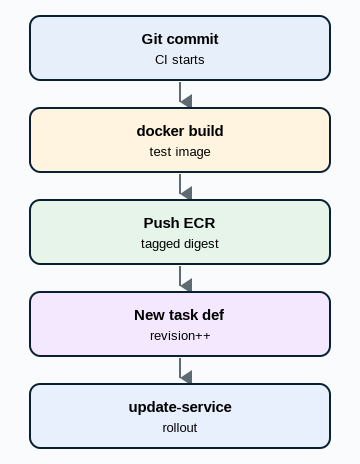
Story. Fatima's Jenkins (chapters 20–32) built pay-api, pushed to Amazon ECR, registered a new task definition revision with the new digest, then called aws ecs update-service --force-new-deployment. Blue tasks drained behind the ALB. No SSH. No docker run on a bastion. The pipeline owned the path from Git commit to healthy targets — the same idea you saw with Docker and Jenkins earlier, pointed at ECS.
Why
Humans clicking Console for every release do not scale and leave no audit trail. CI should push an immutable image and roll the service.
What
- ECR — Elastic Container Registry for Docker images in your account/Region.
- Image tag + digest — Prefer moving a mutable tag like
stagingcarefully; prod often pins digests. - Register task definition — Points the container at the new image.
- Update service — Tells ECS to start a deployment toward that revision.
- OIDC / instance role — CI should assume a role; do not store long-lived AWS keys in Jenkins credentials if you can avoid it.
How
- Build and scan the image in CI.
docker pushto ECR (afterget-login-password/ login helper).- Register a new task definition revision with the new image URI.
aws ecs update-service --cluster … --service … --task-definition family:revision(and wait for stability).
Example 1: Login and push shape
aws ecr get-login-password --region ap-south-1 | docker login --username AWS --password-stdin 123456789012.dkr.ecr.ap-south-1.amazonaws.com
docker tag pay-api:ci 123456789012.dkr.ecr.ap-south-1.amazonaws.com/pay-api:1.5.0
docker push 123456789012.dkr.ecr.ap-south-1.amazonaws.com/pay-api:1.5.0
Output
Login Succeeded
The push refers to repository [123456789012.dkr.ecr.ap-south-1.amazonaws.com/pay-api]
1.5.0: digest: sha256:abcd… size: 1234
What it shows: Auth succeeded and the tag landed in ECR with a digest. Account id is fake for the lesson.
Example 2: Roll the service to a new revision
aws ecs update-service --cluster shop-prod --service pay-api --task-definition pay-api:8 --force-new-deployment --region ap-south-1
Output
{
    "service": {
        "serviceName": "pay-api",
        "taskDefinition": "arn:aws:ecs:ap-south-1:123456789012:task-definition/pay-api:8",
        "desiredCount": 2,
        "deployments": [
            { "status": "PRIMARY", "desiredCount": 2, "runningCount": 0 }
        ]
    }
}
What it shows: A new primary deployment started for revision 8. Watch until runningCount matches desired and old deployment drains.
Ravindra Bagale's Tip
Push by digest-friendly tags, register a new task revision, then update-service. Do not mutate a running task's image by hand.
Image push → नवीन task revision → update-service. चालत्या task ची image हाताने बदलू नका.
Image push → नई task revision → update-service. चलते task की image हाथ से न बदलें.
Quick quiz
Q1. Where do ECS images usually live on AWS?
Amazon ECR in your account and Region.
Q2. What does update-service do in a release?
Starts a deployment so tasks move to the new task definition revision.
Q3. Why avoid long-lived keys in CI?
They leak; prefer role assumption (instance profile or OIDC) with least privilege.
Did you understand? Let us try it once more.