56.4 Image size optimisation checklist
Why: the problem
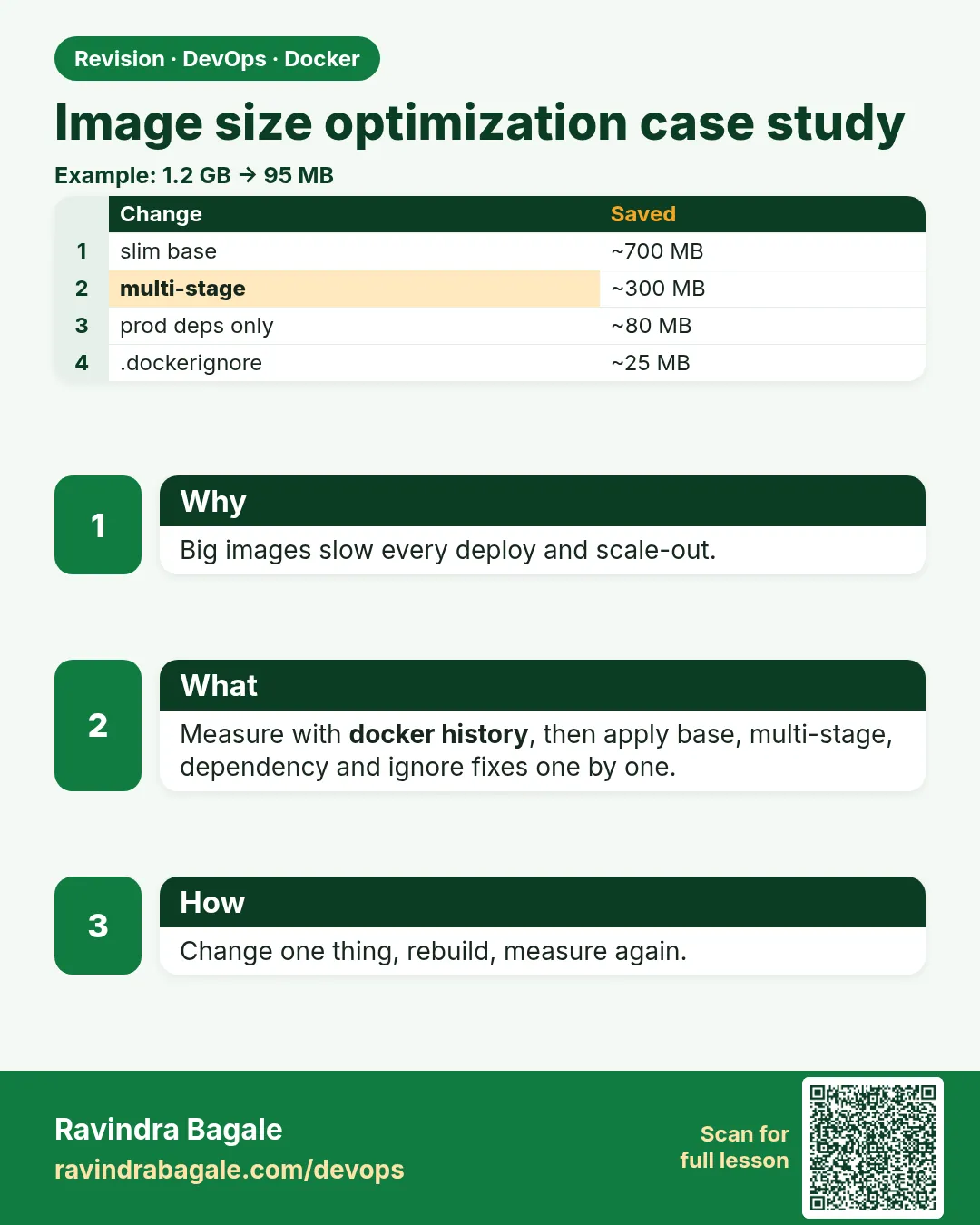
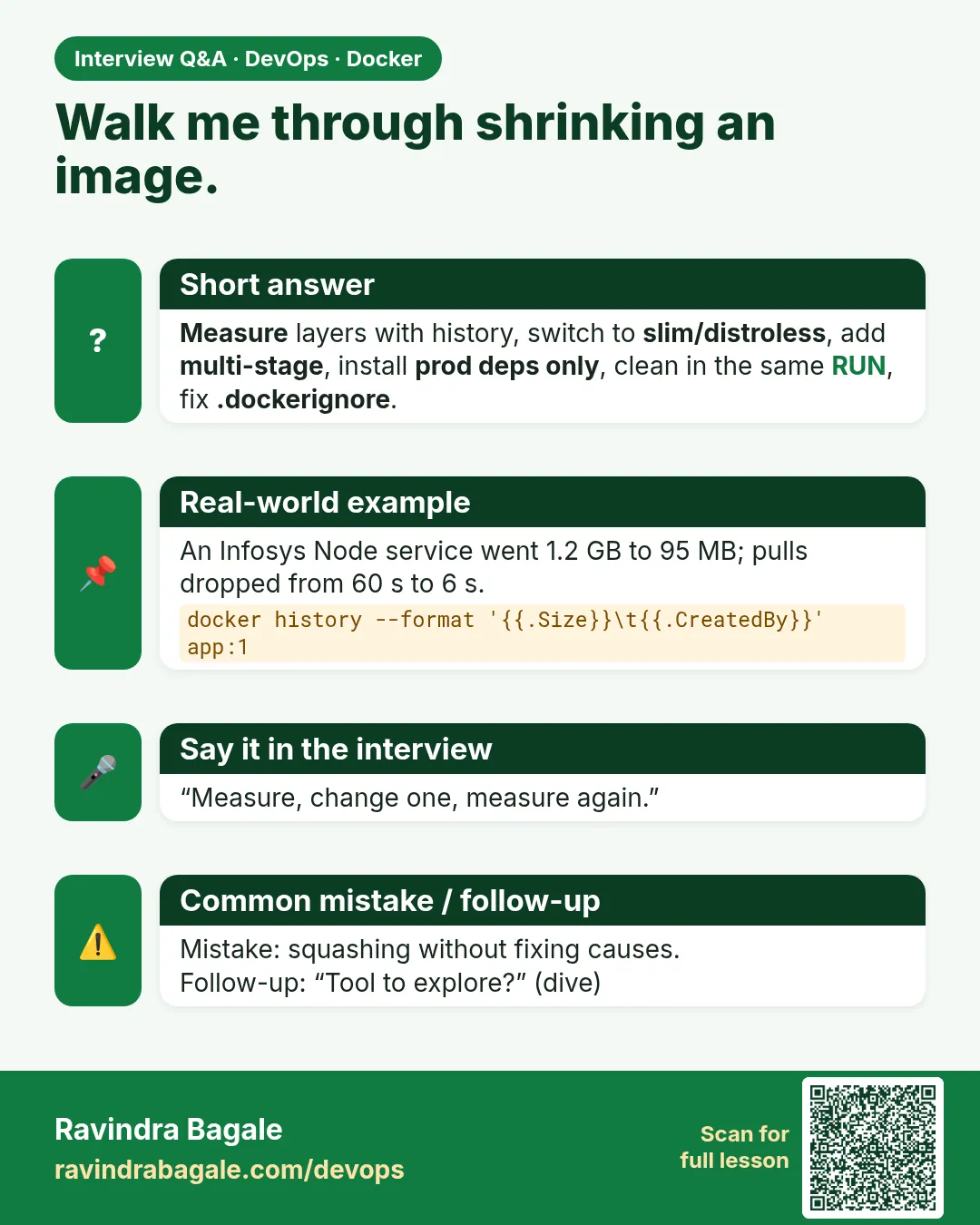
Suppose we are at Ola. Our Python image is 1.2 GB. Every deploy pulls it to 50 servers. Autoscaling waits two minutes for the pull before a new server can take traffic. CI spends more time pushing than testing, and ECR storage costs grow. Big images also carry more packages, which means more CVEs. Most of that size is not our app. It is compilers, caches, docs and a full OS we never use. Shrinking an image is a checklist, not magic: pick a slim base, use .dockerignore, clean in the same layer, build in one stage and copy only results, and inspect with docker history and dive. In this lesson we take a real Flask image from 1.2 GB to under 150 MB, and a Go image to under 10 MB, measuring every step.
What: every term in plain English
- Image size — Sum of all layers. docker images shows it.
- Layer — Result of one Dockerfile instruction. Deleting a file later does not shrink earlier layers.
- slim — Debian base without extra tools. Usually the best default.
- alpine — Very small musl-based base. Can break some Python and Node native packages.
- distroless / scratch — Only the runtime, or nothing at all.
- .dockerignore — Keeps .git, node_modules, data and tests out of the build context.
- Multi-stage — Build in a big image, copy only results into a small one.
- --no-install-recommends — apt flag that skips optional packages.
- dive — A tool that shows each layer and wasted space.
How: step by step
- Measure first. docker images and docker history.
- Add .dockerignore. Smaller context, no junk.
- Switch to slim. Huge win for one line.
- Clean in the same RUN. apt lists, pip and npm caches.
- Multi-stage. Compilers stay in the build stage.
- Copy only what runs. No tests, docs or source for compiled apps.
- Inspect again. dive to find waste.
Example 1: Measure the starting point and see where the size is
Goal. Measure the starting point and see where the size is.
Dockerfile.v0
FROM python:3.12
WORKDIR /app
COPY . .
RUN apt-get update && apt-get install -y build-essential libpq-dev
RUN pip install -r requirements.txt
CMD ["gunicorn", "-b", "0.0.0.0:8000", "app:app"]
Commands
printf 'flask==3.0.3\ngunicorn==23.0.0\npsycopg2==2.9.9\n' > requirements.txt
printf 'from flask import Flask\napp=Flask(__name__)\n@app.get(\"/\")\ndef i(): return \"ok\"\n' > app.py
docker build -f Dockerfile.v0 -t ola:v0 .
docker images ola:v0
docker history --format 'table {{.Size}}\t{{.CreatedBy}}' ola:v0 | head -6
What each line does
python:3.12 (full)— About 1 GB base with compilers and many tools.COPY . . first— Copies .git and everything, and breaks the pip cache on every change.build-essential— Compilers needed only to build psycopg2.Separate RUNs— apt lists and caches stay in layers forever.docker history— Shows which step added the most size.
Green output
REPOSITORY   TAG   SIZE
ola          v0    1.21GB
SIZE      CREATED BY
41.2MB    RUN pip install -r requirements.txt
214MB     RUN apt-get update && apt-get install -y build-essential libpq-dev
68.4MB    COPY . .
1.02GB    (base image layers)
Expected result. 1.21 GB, and the app is a few KB. The base, compilers and the copied .git folder are the waste.
Example 2: Apply the checklist: slim base,
Goal. Apply the checklist: slim base, .dockerignore, multi-stage, clean layers.
.dockerignore
.git
__pycache__
*.pyc
.venv
tests
data
.env
Dockerfile.v2
# syntax=docker/dockerfile:1
FROM python:3.12-slim AS build
RUN apt-get update && apt-get install -y --no-install-recommends build-essential libpq-dev \
    && rm -rf /var/lib/apt/lists/*
WORKDIR /w
COPY requirements.txt .
RUN pip wheel --no-cache-dir --wheel-dir /wheels -r requirements.txt

FROM python:3.12-slim
RUN apt-get update && apt-get install -y --no-install-recommends libpq5 \
    && rm -rf /var/lib/apt/lists/*
ENV PYTHONDONTWRITEBYTECODE=1 PYTHONUNBUFFERED=1
WORKDIR /app
COPY --from=build /wheels /wheels
RUN pip install --no-cache-dir /wheels/* && rm -rf /wheels
COPY app.py .
USER 10001
CMD ["gunicorn", "-b", "0.0.0.0:8000", "app:app"]
Commands
docker build -f Dockerfile.v2 -t ola:v2 .
docker images ola
docker run -d --name ola -p 8000:8000 ola:v2 && sleep 2 && curl -s localhost:8000
What each line does
python:3.12-slim— About 130 MB instead of 1 GB.--no-install-recommends + rm lists in same RUN— No optional packages and no apt cache in the layer.pip wheel in build stage— Compiles psycopg2 where compilers exist.libpq5 only in runtime— The runtime library, not the dev headers or compilers.pip --no-cache-dir— No pip cache saved.COPY app.py only— Only the code that runs.
Green output
REPOSITORY   TAG   SIZE
ola          v2    148MB
ola          v0    1.21GB
ok
Expected result. Same app, 148 MB instead of 1.21 GB: 88% smaller, faster pulls and far fewer CVEs.
Example 3: Go to scratch, and find waste with dive
Goal. Go to scratch, and find waste with dive.
Dockerfile (Go)
FROM golang:1.23 AS build
WORKDIR /src
COPY go.mod ./
RUN go mod download
COPY . .
RUN CGO_ENABLED=0 go build -trimpath -ldflags="-s -w" -o /out/app .

FROM scratch
COPY --from=build /etc/ssl/certs/ca-certificates.crt /etc/ssl/certs/
COPY --from=build /out/app /app
USER 65532:65532
ENTRYPOINT ["/app"]
Commands
docker build -t gosvc:scratch .
docker images gosvc
docker run --rm -it -v /var/run/docker.sock:/var/run/docker.sock wagoodman/dive:v0.12 ola:v0 --ci --lowestEfficiency=0.95
docker run --rm -it -v /var/run/docker.sock:/var/run/docker.sock wagoodman/dive:v0.12 ola:v2 --ci --lowestEfficiency=0.95
What each line does
-ldflags=-s -w— Strip debug info: smaller binary.-trimpath— Removes local paths from the binary.FROM scratch— Empty image. Only what we copy.ca-certificates.crt— Needed for HTTPS calls.USER 65532— Non-root even in scratch.dive --ci— Fails if wasted space is too high. Good for CI.
Green output
REPOSITORY   TAG       SIZE
gosvc        scratch   6.8MB
  efficiency: 91.2 %   wastedBytes: 72 MB   FAIL
  efficiency: 99.6 %   wastedBytes: 410 kB  PASS
Expected result. The Go service is 6.8 MB. dive shows v0 wasted 72 MB and v2 almost nothing.
Every command, step by step (plain docker and Compose)
-
Size of images
docker imagesWhat it does: Lists sizes.
ola v2 148MB -
Layer sizes
docker history ola:v2What it does: Size per instruction.
41MB RUN pip install -
Context size
docker build --progress=plain . 2>&1 | grep 'transferring context'What it does: How much is sent to the builder.
transferring context: 2.1kB -
Real size on disk
docker system df -v | head -20What it does: Shared vs unique size per image.
ola v2 148MB shared 120MB -
Squash check
docker image inspect -f '{{len .RootFS.Layers}}' ola:v2What it does: Number of layers.
9 -
Clean old builds
docker builder prune -f --filter until=72hWhat it does: Removes old build cache.
Total: 2.3GB -
Compare
docker images --format '{{.Repository}}:{{.Tag}} {{.Size}}' | sortWhat it does: Quick list for before and after.
ola:v0 1.21GB
ola:v2 148MB
When it is red 1
ImportError: libpq.so.5: cannot open shared object file
Cause. The runtime stage lacks the shared library the wheel needs.
Fix, step by step
- Install libpq5 in the runtime stage.
- Or use psycopg2-binary for simple cases.
When it is red 2
Error loading shared library ld-linux-x86-64.so.2: No such file (alpine)
Cause. A glibc-built package on musl alpine.
Fix, step by step
- Use slim instead of alpine.
- Or install compatible musl wheels.
When it is red 3
x509: certificate signed by unknown authority (scratch)
Cause. No CA certificates in scratch.
Fix, step by step
- COPY ca-certificates.crt from the build stage.
- Or use distroless static, which includes them.
Practice tasks
Easy Task 1: Measure
Why: Baseline.
What to do: Build v0 and note size.
- Open a terminal with Docker.
- Make a folder with a small app.
- Measure size before and after each change and compare with the solution.
Solution
docker images ola:v0Easy Task 2: History
Why: Find big layers.
What to do: Run docker history.
- Open a terminal with Docker.
- Make a folder with a small app.
- Measure size before and after each change and compare with the solution.
Solution
docker history ola:v0Easy Task 3: Ignore
Why: Context.
What to do: Add .dockerignore and compare context size.
- Open a terminal with Docker.
- Make a folder with a small app.
- Measure size before and after each change and compare with the solution.
Solution
docker build . 2>&1 | grep 'transferring context'Medium Task 4: Slim
Why: One line.
What to do: Switch to python:3.12-slim.
- Open a terminal with Docker.
- Make a folder with a small app.
- Measure size before and after each change and compare with the solution.
Solution
docker build -t ola:v1 .Medium Task 5: Same layer
Why: Clean.
What to do: Install and clean apt in one RUN.
- Open a terminal with Docker.
- Make a folder with a small app.
- Measure size before and after each change and compare with the solution.
Solution
RUN apt-get update && apt-get install -y --no-install-recommends X && rm -rf /var/lib/apt/lists/*Medium Task 6: Multi-stage
Why: Compilers out.
What to do: Build wheels in stage one.
- Open a terminal with Docker.
- Make a folder with a small app.
- Measure size before and after each change and compare with the solution.
Solution
docker build -f Dockerfile.v2 -t ola:v2 .Hard Task 7: Scratch
Why: Go.
What to do: Build the Go app on scratch.
- Open a terminal with Docker.
- Make a folder with a small app.
- Measure size before and after each change and compare with the solution.
Solution
docker build -t gosvc:scratch .Hard Task 8: dive CI
Why: Gate.
What to do: Run dive --ci on v0 and v2.
- Open a terminal with Docker.
- Make a folder with a small app.
- Measure size before and after each change and compare with the solution.
Solution
dive ola:v2 --ciMedium Task 9: Order
Why: Cache.
What to do: Copy requirements.txt before code and test cache.
- Open a terminal with Docker.
- Make a folder with a small app.
- Measure size before and after each change and compare with the solution.
Solution
docker build -t ola:v2 . 2>&1 | grep CACHEDEasy Task 10: Prune
Why: Disk.
What to do: Prune build cache.
- Open a terminal with Docker.
- Make a folder with a small app.
- Measure size before and after each change and compare with the solution.
Solution
docker builder prune -fHomework: try at home
At home, take your biggest image. Write down its size, then apply the checklist one step at a time and record the size after each step. Aim for at least 50% smaller.
Recap
- Measure before and after every change.
- Use .dockerignore always.
- slim base is the best default; alpine with care.
- Install and clean in the same RUN.
- Multi-stage: build tools never reach the final image.
- Inspect with docker history and dive.
FAQ
Q. How do I shrink a Node.js image?
Use node:22-slim, npm ci --omit=dev in the final stage, copy only dist and node_modules, and add node_modules and .git to .dockerignore. Typical result: 900 MB down to about 180 MB.
Q. How do I stop size regressions?
Add a CI step that fails if the image is bigger than a budget, for example 200 MB, or run dive --ci with a lowestEfficiency rule.
Q. Does BuildKit cache mount reduce size?
Yes. RUN --mount=type=cache,target=/root/.cache/pip keeps the pip cache out of the layer while still speeding up rebuilds.
Q. Is alpine always smaller and better?
Smaller, yes. Better, not always: musl breaks some native packages and DNS edge cases.
Q. Does layer count matter?
Size matters more than count, but combining related RUNs helps.
Q. Is docker export/import a good squash?
No, it loses history and metadata. Use multi-stage.
Q. Should I remove the shell?
For high security, distroless or scratch. For most teams slim is a fine balance.
Q. Do smaller images start faster?
Pull is faster; the app start time is the same.
Q. Does --squash exist?
It is experimental. Prefer multi-stage.
Interview questions
-
How do you reduce Docker image size?
Model answer: Slim or distroless base, .dockerignore, multi-stage, clean caches in the same RUN, copy only runtime files, inspect with history and dive.
-
Why doesn't deleting files in a later layer help?
Model answer: Layers are additive; the earlier layer still contains the files.
-
alpine vs slim?
Model answer: alpine is smaller but musl-based; slim is glibc and more compatible.
-
How small can a Go image be?
Model answer: A few MB on scratch or distroless static with CGO disabled.
-
What tool analyses layer efficiency?
Model answer: dive.
-
Why does image size matter?
Model answer: Pull time, autoscaling speed, storage cost and attack surface.
Quick quiz
Q1. Does rm in a later RUN shrink the image?
No, the earlier layer still holds it.
Q2. Best default base?
slim.
Q3. Why multi-stage?
Compilers stay out of the final image.
Q4. Tool to find wasted space?
dive.
Q5. What must a scratch image include for HTTPS?
CA certificates.
Samajla ka?
 Revision card
 Interview card